
VPN, SmartDNS, and proxy are three different tools that solve overlapping but distinct problems. Confusing them (which most guides do) leads to picking the wrong solution and either overspending or under-protecting yourself. This guide clarifies the technical differences, when each tool is the right choice, and the practical scenarios where Filipino developers and remote workers actually need them.
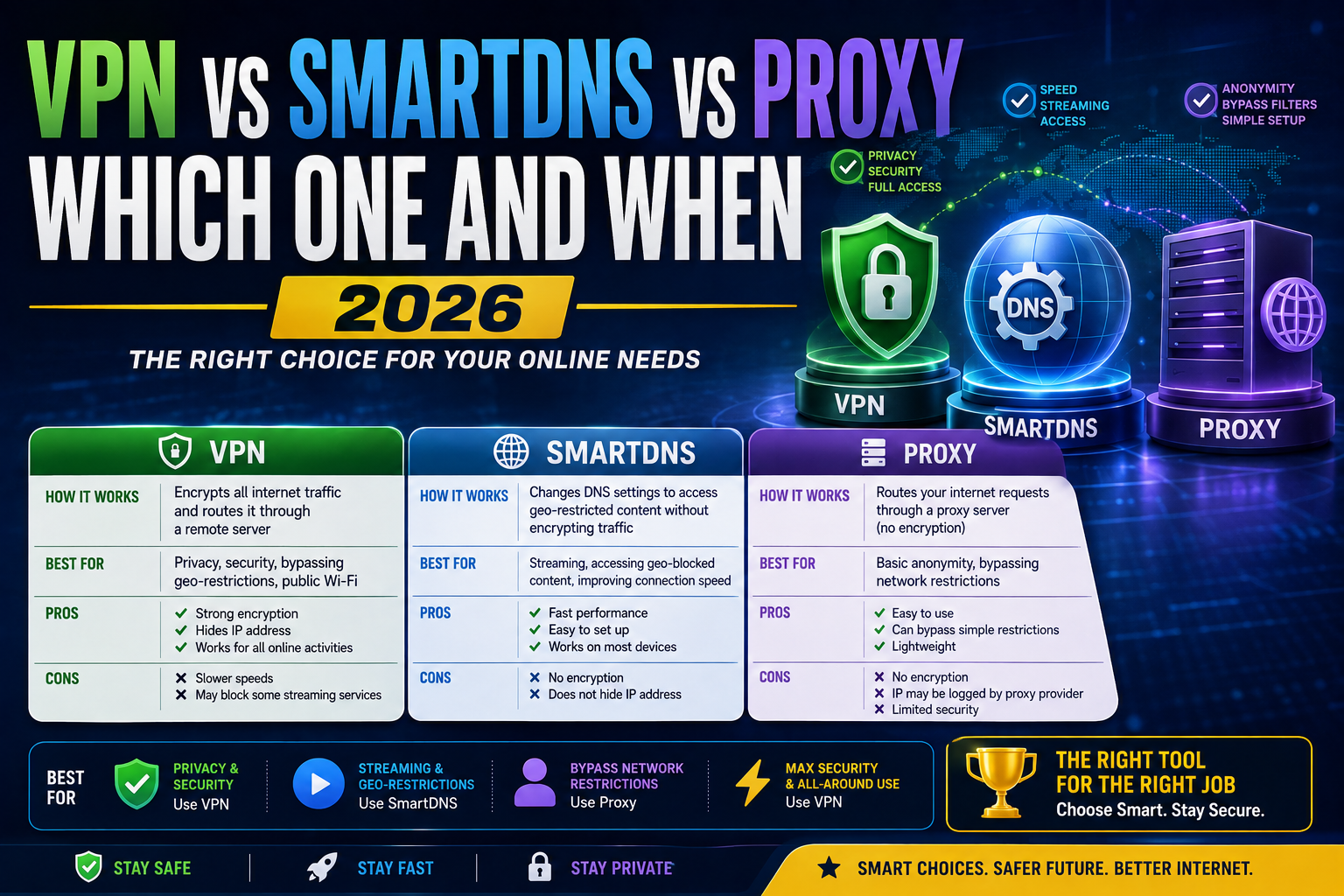
The core technical differences
VPN (Virtual Private Network): Encrypts ALL your internet traffic through a tunnel to a remote server. Your ISP sees encrypted traffic to one destination. Websites see the VPN server’s IP address, not yours. Full-stack privacy.
SmartDNS: Reroutes ONLY specific DNS queries (typically streaming service domains) through a proxy server. Your traffic is NOT encrypted. Your ISP sees the traffic normally. Only the specific service (Netflix US, BBC iPlayer) sees a US or UK IP.
Proxy (HTTP/SOCKS): Routes specific application traffic through a remote server. Encryption depends on protocol used (HTTPS proxies encrypt, HTTP does not). Websites see the proxy server IP. Less complete than VPN but faster.
Quick comparison table
| Feature | VPN | SmartDNS | Proxy |
|---|---|---|---|
| Encrypts traffic | ✅ Yes (all) | ❌ No | 🟡 Depends on type |
| Hides IP address | ✅ Yes (all traffic) | ❌ No | 🟡 For proxied apps only |
| Speed impact | 10-40% slower | Near-zero | Minimal |
| Bypasses geo-restrictions | ✅ Yes | ✅ Yes (streaming) | ✅ Yes (limited) |
| Public Wi-Fi safety | ✅ Yes | ❌ No | 🟡 Only proxied traffic |
| Blocks tracking | 🟡 Partial | ❌ No | 🟡 Partial |
| Typical cost/month | USD 3-13 | USD 4-6 | USD 1-10 |
When to use a VPN
Scenario 1: Public Wi-Fi at coffee shops, hotels, airports.
Public networks are trivially sniffable. Someone on the same Wi-Fi can capture your unencrypted traffic. VPN encryption prevents this. If you regularly work from Starbucks, coworking spaces, or airport lounges, VPN is essential.
Scenario 2: Full privacy from your ISP.
Your Philippine ISP (PLDT, Globe, Converge, Sky) can see every website you visit even over HTTPS (they see the domain names via SNI, just not the content). VPN encrypts DNS + hides the SNI, so your ISP sees only “this user is talking to a VPN server.”
Scenario 3: Accessing region-locked developer services.
Some services (certain AWS regions, specific SaaS trials, US-only beta features) restrict by IP location. VPN lets you appear to be in the required region.
Scenario 4: General geo-unblocking for streaming.
VPN works for most streaming services, but the arms race with Netflix/Hulu/Disney+ is constant. Some VPN IPs get blocked by streaming services. For streaming-only use, SmartDNS is often faster and more reliable.
Best VPN choices for Filipino users:
- NordVPN (USD 3-13/month depending on term length) at largest server network, Manila servers available
- ExpressVPN (USD 6-13/month) at best speed, more expensive
- ProtonVPN (free tier + USD 5-10/month paid) at privacy-focused, Swiss-based
- Surfshark (USD 2-13/month) at unlimited devices per subscription
When to use SmartDNS
Scenario 1: Streaming region-locked content at full speed.
SmartDNS only reroutes streaming service DNS queries. Your Netflix, Hulu, BBC iPlayer, and Disney+ think you are in the target country. Your actual internet speed is preserved because non-streaming traffic still goes direct.
Scenario 2: Smart TVs, gaming consoles, or streaming boxes that do not support VPN.
SmartDNS works at the router level or device DNS setting. Your Apple TV, Roku, Xbox, PlayStation, or Samsung Smart TV can use SmartDNS without any app installation. VPN typically requires app support the device does not have.
Scenario 3: You do NOT need privacy protection.
SmartDNS does not encrypt your traffic. Your ISP still sees everything you do (except the specific streaming service domains). This is fine for pure streaming use case.
Best SmartDNS choices:
- Unlocator (USD 5/month) at supports 200+ streaming services worldwide
- SmartDNSProxy (USD 5/month) at global service coverage
- NordVPN SmartDNS (bundled with NordVPN subscription) at includes SmartDNS for streaming
When to use a proxy
Scenario 1: Web scraping or crawling.
If you build data scraping tools or crawlers, residential proxies let you distribute requests across many IP addresses so target sites do not block you. VPNs work for small-scale scraping but proxies scale better for professional use.
Scenario 2: App-specific IP masking.
Configure a specific browser or application to use a proxy while leaving other apps direct. Useful for testing web apps from different geographic perspectives.
Scenario 3: Ad verification, competitive intelligence, SEO rank tracking.
Marketing teams use proxies to check search rankings and ads as they appear in specific countries. Different SERP for different geos.
Best proxy providers:
- Bright Data (formerly Luminati) at enterprise-grade residential proxies, USD 500+/month
- Oxylabs at similar tier to Bright Data
- Smartproxy at mid-tier at USD 75+/month
- Free public proxies at never use for anything important (slow, unreliable, often malicious)
Recommendation matrix by use case
| Use case | Correct tool |
|---|---|
| Working from Starbucks / coffee shop | VPN |
| Watching Netflix US from Philippines | SmartDNS (faster) or VPN |
| Streaming on smart TV / gaming console | SmartDNS (device compatibility) |
| Privacy from ISP surveillance | VPN |
| Accessing region-locked developer tools | VPN |
| Web scraping / crawling at scale | Proxy (residential) |
| Testing your web app in different geos | Proxy or VPN with location switching |
| SEO rank tracking in specific countries | Proxy or SEO tool with built-in geo |
| Bypassing office/school Wi-Fi restrictions | VPN (encryption bypasses filters) |
| Hiding activity from housemates | VPN |
Common misconceptions
Misconception 1: “VPN makes me anonymous.”
No. VPN hides your IP from websites but the VPN provider knows who you are (billing details, connection logs on some providers). Also, browser fingerprinting (cookies, browser version, screen size) tracks you regardless of IP. Real anonymity requires Tor Browser plus operational security, not VPN alone.
Misconception 2: “SmartDNS is faster than VPN so I should always use SmartDNS.”
Only if you do not need encryption. SmartDNS leaves you fully visible to your ISP and to anyone sniffing public Wi-Fi. Speed is not the only factor.
Misconception 3: “Free VPN is enough for casual use.”
Most free VPNs monetize by selling user data or injecting ads. Some notable historical incidents: Hola VPN sold user bandwidth as botnet exit nodes, Onavo (owned by Facebook) collected user traffic for Facebook’s competitive intelligence. ProtonVPN Free is the exception, genuinely free with acceptable-privacy policy.
Misconception 4: “Proxy and VPN are the same thing.”
Not technically. Proxies operate at application layer (specific app configured to use proxy). VPNs operate at network layer (all traffic from device tunneled). VPN is more complete, proxy is more surgical.
The realistic Filipino developer setup
Most Filipino freelance developers we work with end up with this stack:
- NordVPN subscription (USD 3-5/month on 2-year plan): Used at coffee shops, coworking spaces, hotels. Also for occasional geo-unblocking during work (accessing US-only SaaS trials, testing US client sites from US perspective).
- Ad blocker in browser (uBlock Origin, free): Blocks tracking at the browser level, complements but does not replace VPN.
- Occasionally SmartDNS via NordVPN bundle: For streaming on smart TV when they want US Netflix content.
Total spend: USD 3-5/month for NordVPN, USD 0 for browser ad blocker. Simple, covers 95 percent of real scenarios.
Bottom line
For 90 percent of Filipino developers and remote workers in 2026, a VPN subscription (NordVPN or ProtonVPN) is the correct tool. USD 3-5/month, covers public Wi-Fi safety + privacy from ISP + occasional geo-unblocking.
Add SmartDNS only if you specifically need streaming on devices that do not support VPN apps (smart TVs, gaming consoles).
Use proxies only for professional scraping, ad verification, or SEO rank tracking at scale. Individual users rarely need dedicated proxy services.
Feel free to comment below with your specific use case for targeted advice.
Official documentation
Try VPN or SmartDNS (affiliate)
Some links below are affiliate links. See our affiliate disclosure.
- NordVPN, our top pick for Filipino developers at USD 3-5/month with SmartDNS bundled
- ProtonVPN, best free tier plus strong privacy stance
- ExpressVPN, fastest speeds if budget allows USD 6-13/month
Frequently asked questions
Will a VPN slow down my Filipino internet?
Typically 10-40 percent slower depending on VPN server location and your original connection speed. Fiber users notice less impact than mobile 4G users. VPN protocols also matter: WireGuard (newest) is faster than OpenVPN. For pure streaming, expect 20-30 percent speed reduction. For work tasks (email, coding, video calls), the reduction is usually not noticeable if you pick a nearby server (Singapore for PH users).
Is VPN legal in the Philippines?
Yes, VPN use is legal in the Philippines for personal privacy, accessing geo-restricted services, and general internet security. Illegal activity done through a VPN remains illegal (fraud, piracy, hacking, etc.). VPN is a tool, not a jurisdictional shield.
Can my employer detect I am using a VPN on work laptop?
Yes, easily. Corporate IT can detect VPN traffic patterns (single encrypted tunnel to non-corporate IP) and block or flag it. Most companies allow personal VPN use on personal time, but explicit policies vary. Do not run personal VPN on corporate-issued devices unless your employer’s Acceptable Use Policy allows it. Use your personal device for personal VPN traffic.
Does SmartDNS work with all streaming services?
Most major services (Netflix, Hulu, BBC iPlayer, HBO Max, Disney+, Paramount+) work with SmartDNS but the arms race is constant. Streaming services occasionally block SmartDNS providers, then providers work around, then blocking, and so on. Check your SmartDNS provider’s current supported service list before signing up.
Should I use Tor Browser instead of VPN for maximum privacy?
For maximum anonymity, yes. Tor routes your traffic through 3 encrypted hops making network-level tracking essentially impossible. Downsides: 3-10x slower than VPN, breaks many websites, exit nodes may be malicious for non-HTTPS traffic. For daily developer work, VPN is the right balance. For truly sensitive activities (activism, journalism, whistleblowing), Tor + operational security.
Are free VPNs actually usable?
Only 1-2. ProtonVPN Free is the standout: no data collection beyond what is needed for service, no ads, no bandwidth cap. Speed is throttled and server choice is limited but usable. Avoid Hola, Betternet, Turbo VPN, and other free VPN apps with checkered privacy histories. For paid tier at PHP 200-300/month, ProtonVPN Plus or NordVPN 2-year plan are the best values.

Angel Jude Suarez
Full-Stack Developer at PIES IT Solution
Focuses on Python development, machine learning, and AI integration. Has built production AI systems including OpenAI Whisper integration for medical transcription and GPT-4o-powered diagnosis assistance. Strong background in pandas, scikit-learn, and TensorFlow.
Expertise: Python · PHP · Java · VB.NET · ASP.NET · Machine Learning · AI Integration · OpenCV · Django · CodeIgniter · View all posts by Angel Jude Suarez →