
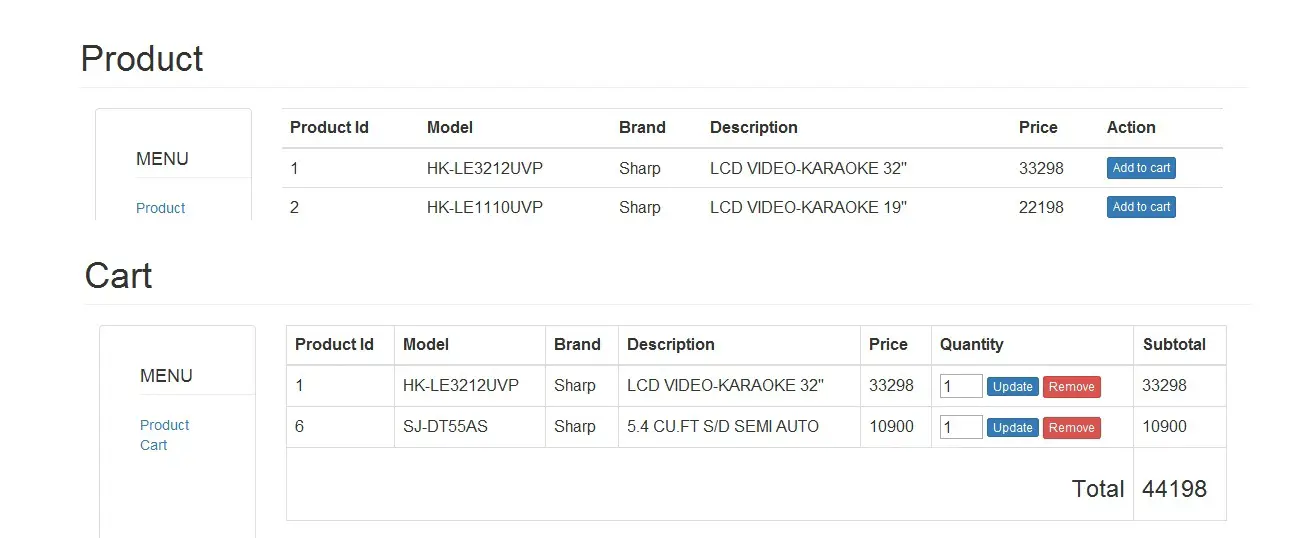
How to Create a Simple Shopping Cart in PHP
Today, I’m going to teach you how to create a simple shopping cart in PHP. The shopping cart PHP script usually available on the website that has a simple PHP eCommerce.
What is the use of Add to Cart Script?
The Shopping Add to Cart Script is useful because it allows you to add multiple order products in a single transaction. You will also see here how powerful the functionality of the session.
What are the features of PHP Shopping Cart Source Code?
This PHP Shopping Cart Source Code contains the following features.
- Product Listing
- Adding of Products
- Product Updating
- PHP Cart Removing of item.
In this PHP code for shopping cart system, it advised that you will use Twitter Bootstrap templates for you to have a beautiful design.
Let’s begin to write PHP Code for Shopping Cart System:
1. Create a MySQL Database and name it “productdb”.
Note: You can click here MySQL Database if you want to learn more about the database.
2. Execute the query for “add to cart database table” in the MySQL database.
CREATE TABLE IF NOT EXISTS `tblproduct` (
`PRODUCTID` int(11) NOT NULL AUTO_INCREMENT,
`MODEL` varchar(30) NOT NULL,
`BRAND` varchar(30) NOT NULL,
`DESCRIPTION` varchar(99) NOT NULL,
`PRICE` double NOT NULL,
PRIMARY KEY (`PRODUCTID`)
) ENGINE=InnoDB DEFAULT CHARSET=latin1 AUTO_INCREMENT=7 ;
3. Populate the add to cart database table by executing the query below.
INSERT INTO `tblproduct` (`PRODUCTID`, `MODEL`, `BRAND`, `DESCRIPTION`, `PRICE`) VALUES
(1, 'HK-LE3212UVP', 'Sharp', 'LCD VIDEO-KARAOKE 32''''', 33298),
(2, 'HK-LE1110UVP', 'Sharp', 'LCD VIDEO-KARAOKE 19''''', 22198),
(3, '21V-FS720S', 'Sharp', 'Pure Flat TV ', 7190),
(4, 'ES-D708', 'Sharp', 'Spin Dryer 7kg ', 4998),
(5, 'ES-D958', 'Sharp', 'Spin Dryer 9.5 KG', 5698),
(6, 'SJ-DT55AS', 'Sharp', '5.4 CU.FT S/D SEMI AUTO ', 10900);
4. Create a connection between the PHP script and MySQL Database. Name it “config.php”
Note: You can follow the tutorial Connect PHP/MYSQL if you want to have another variation in connecting PHP/MySQL.
$server = 'localhost';
$dbuser = 'root';
$dbpass = '';
$dbname = 'productdb';
$con    = mysql_connect($server, $dbuser, $dbpass);
if (isset($con)) {
# code...
$dbSelect = mysql_select_db($dbname);
if (!$dbSelect) {
echo "Problem in selecting database! Please contact administraator";
die(mysql_error());
}
} else {
echo "Problem in database connection! Please contact administraator";
die(mysql_error());
}
5. Create a PHP file called “index.php” for index PHP Cart.
<?php
include "config.php";
?>
<html>
<head>
<title>Product</title>
<!-- CSS plugins -->
<link rel="stylesheet" type="text/css" href="css/bootstrap.min.css">
</head>
<body>
<!-- containner -->
<div class="container">
<!-- row -->
<div class="row">
<h1 class="page-header">Product</h1>
<!-- side bar -->
<div class="sidebar col-md-2">
<!-- panel -->
<div class="panel panel-default " style="min-height:400px;">
<!-- ul -->
<ul >
<li class="list-unstyled" ><h4 class="page-header">MENU</h4></li>
<li class="list-unstyled">
<!-- link product -->
<a href="index.php">
Product
</a>
<!-- end link product -->
</li>
<li class="list-unstyled" >
<!-- link cart -->
<a href="cart.php">
Cart
</a>
<!-- end link cart -->
</li>
</ul>
<!-- end ul -->
</div>
<!-- end panel -->
</div>
<!-- end Sidebar -->

<!-- Content -->
<div class="col-md-10">
<table class="table table-hover">
<tr>
<th>Product Id</th>
<th>Model</th>
<th>Brand</th>
<th>Description</th>
<th>Price</th>
<th>Action</th>
</tr>
<tbody>

<?php
$sqlQuery = "SELECT * FROM `tblproduct`";
$result = mysql_query($sqlQuery) or die(mysql_error());
while ($row = mysql_fetch_array($result)) {
# code...
echo '<tr>
<td>' . $row['PRODUCTID'] . '</td>
<td>' . $row['MODEL'] . '</td>
<td>' . $row['BRAND'] . '</td>
<td>' . $row['DESCRIPTION'] . '</td>
<td>' . $row['PRICE'] . '</td>
<td><a href="process.php?Id=' . $row['PRODUCTID'] . '&Price=' . $row['PRICE'] . '" class="btn btn-xs btn-primary">Add to cart</a></td>
</tr>';
}
?>
</tbody>
</table>
</div>
<!-- end Content -->

</div>
<!-- end row -->
</div>
<!-- end container -->
</body>
</html>
6. Do the following code for the cart list. Name it “cart.php.”
<?php
// start the session to fire the session handler
session_start();
// include the configuration
include "config.php";
// Update the quantity in the cart
if (isset($_POST['Update'])) {
$max = count($_SESSION['janobecart']);
for ($i = 0; $i < $max; $i++) {
$pid = $_SESSION['janobecart'][$i]['PRODUCTID'];
// parse the quantity in interger.
$qty = intval($_REQUEST['qty' . $pid]);
// selecting the items that are already in the cart
$sql = "SELECT * FROM `tblproduct` WHERE `PRODUCTID` =" . $pid;
$result = mysql_query($sql) or die(mysql_error());
while ($row = mysql_fetch_array($result)) {
// checking the quantity of the item.
// It can't be null
if ($qty > 0 && $qty <= 999) {
// calculting the quantity and the price of an item
$price                                  = $row['PRICE'] * $qty;
// updating the items in the cart.
$_SESSION['janobecart'][$i]['QUANTITY'] = $qty;
$_SESSION['janobecart'][$i]['PRICE']    = $price;
}
}
}
}
?>

<!--Design  -->
<html>
<head>
<title>Add to cart</title>
<link rel="stylesheet" type="text/css" href="css/bootstrap.min.css">

</head>
<body>
<!-- form -->
<form class="form-group" method="POST" action="">
<!-- containner -->
<div class="container">
<!-- row -->
<div class="row">
<h1 class="page-header">Cart</h1>
<!-- side bar -->
<div class="sidebar col-md-2">
<!-- panel -->
<div class="panel panel-default " style="min-height:400px;">
<!-- ul -->
<ul >
<li class="list-unstyled" ><h4 class="page-header">MENU</h4></li>
<li class="list-unstyled">
<!-- link product -->
<a href="index.php">
Product
</a>
<!-- end link product -->
</li>
<li class="list-unstyled" >
<!-- link cart -->
<a href="cart.php">
Cart
</a>
<!-- end link cart -->
</li>
</ul>
<!-- end ul -->
</div>
<!-- end panel -->
</div>
<!-- end Sidebar -->

<!-- Content -->
<div class="col-md-10">
<table class="table table-bordered">
<tr>
<th>Product Id</th>
<th>Model</th>
<th>Brand</th>
<th>Description</th>
<th>Price</th>
<th>Quantity</th>
<th>Subtotal</th>
</tr>
<tbody>

<?php
if (isset($_SESSION['janobecart'])) {
$count_cart = count($_SESSION['janobecart']);
for ($i = 0; $i < $count_cart; $i++) {
$proid    = $_SESSION['janobecart'][$i]['PRODUCTID'];
$qty      = $_SESSION['janobecart'][$i]['QUANTITY'];
$subtot   = $_SESSION['janobecart'][$i]['PRICE'];
$sqlQuery = "SELECT * FROM `tblproduct` WHERE PRODUCTID=" . $proid;
$result = mysql_query($sqlQuery) or die(mysql_error());
while ($row = mysql_fetch_array($result)) {
# code...
echo '<tr>
<td>' . $row['PRODUCTID'] . '</td>
<td>' . $row['MODEL'] . '</td>
<td>' . $row['BRAND'] . '</td>
<td>' . $row['DESCRIPTION'] . '</td>
<td>' . $row['PRICE'] . '</td>
<td>
<input type="input" class="input input-xs"  name="qty' . $proid . '" value=' . $qty . '  maxlength="3" size="3"  />
<input type="submit" class="btn btn-xs btn-primary"  name="Update" value="Update" />
<a  href="process.php?RemoveId=' . $proid . '" class="btn  btn-danger btn-xs"   />Remove</a>
</td>
<td>' . $subtot . '</td>
</tr>';
}
// computing the total price of the items in the cart
@$tot += $subtot;
$_SESSION['tot'] = $tot;
}
} else {
}
?>
<tr>
<!-- Displaying the total amount of the items in the cart. -->
<td colspan="6"><h3 align="right">Total</h3></td>
<td>
<h3>
<?php
echo isset($_SESSION['tot']) ? $_SESSION['tot'] : '0.00';
?>
</h3>
</td>
</tr>
</tbody>
</table>
</div>
<!-- end Content -->

</div>
<!-- end row -->
</div>
<!-- end container -->
</form>
<!-- end form -->
</body>
</html>
7. Create a PHP file called “process.php” and add the following code for removing of adding and removing of an item in the cart.
<?php

if (!isset($_SESSION['janobecart'])) {
$_SESSION['janobecart'] = '';
}

if (!empty($_SESSION['janobecart'])) {
// count the session array varible
$max = count($_SESSION['janobecart']);

if (!isset($exist)) {

?>
<script type="text/javascript">
/* <!-- Pop-up Message -->*/
alert('Item is already in the cart.')
/*<!-- End pop-up message -->*/
$_SESSION['janobecart'] = array();
$_SESSION['janobecart'][0]['PRODUCTID'] = $pid;
$_SESSION['janobecart'][0]['PRICE'] = $price;
$_SESSION['janobecart'][0]['QUANTITY'] = 1;
}
?>Note: The code below is a Pop-up Message Using Javascript. This pop-up message is used to display messages about the action of the user, whether successfully executed or not.
<script type="text/javascript">
/*      <!-- Pop-up Message  -->*/
alert('Item has been added in the cart.')
/* <!-- End pop-up message -->*/

unset($_SESSION['tot']);
?>
<script type="text/javascript">
/* <!-- Pop-up Message -->*/
alert('Item has been removed in the cart.')
/* <!-- End pop-up message -->
redirect to main page.*/
window.location='cart.php'
$_SESSION['janobecart'] = array_values($_SESSION['janobecart']);
}
?>Conclusion
In this lesson, we learn how to make add to cart in PHP. Wherein, the output you have done here can be integrated later on to your website. I hope we can hear some feedback from you.
You can download the FULL PHP Code for shopping cart system here.
Get the ready-to-defend package: complete PHP + MySQL source code, full Chapter 1-5 documentation, 6 UML diagrams, ERD, installation guide, user manual, and defense presentation template. Save 3 to 4 weeks of capstone work.
Sold via Gumroad. See our affiliate disclosure.
Frequently Asked Questions
Official documentation
How does this PHP ecommerce or online shopping system work?
Frontend: product catalog with categories, search, cart (session-based), checkout. Backend: order management, payment gateway integration (PayPal/Stripe), shipping, customer accounts, order history.
What PHP and MySQL versions does this project require?
Most projects in this batch run on PHP 7.4 to PHP 8.2 with MySQL 5.7+ or MariaDB 10+. A few older projects need PHP 5.6 (deprecated, use XAMPP 7.x). To run: install XAMPP / WAMP / Laragon, extract project to htdocs, import the included .sql file via phpMyAdmin, edit the connection file (usually config.php or db_connect.php) with your DB credentials, browse to the project URL in your browser.
How do I set up the database for this PHP project?
Open phpMyAdmin (http://localhost/phpmyadmin/ on XAMPP), create a new empty database with the name specified in the project’s config.php. Click the Import tab, choose the included .sql file, click Go. Then edit config.php (or includes/connection.php) with: ‘localhost’, your MySQL username (usually ‘root’), your MySQL password (usually blank for XAMPP), and the database name.
Can I use this PHP project for a BSIT capstone or thesis?
Yes, but extend it. A bare CRUD app is too narrow for full capstone scope. Add: user roles via session checks, reports/dashboards (Chart.js + AJAX), PDF exports (TCPDF library), email notifications (PHPMailer), real domain extension (analytics, audit log, multi-branch support). Pair with Chapter 1-5 documentation matching your panel’s rubric.
Why am I getting ‘connection error’ or ‘undefined function mysqli_connect’?
Three common PHP issues: (1) Connection error: Apache + MySQL services not running in XAMPP control panel, OR database name in config.php does not match what you created in phpMyAdmin. (2) ‘undefined function mysqli_connect’: MySQL extension not enabled, in php.ini uncomment extension=mysqli (then restart Apache). (3) ‘No such file or directory’: MySQL socket path wrong, use 127.0.0.1 instead of localhost in the connection string.
Where can I find more PHP projects with source code?
Browse the PHP Projects hub for the full library (300+ vanilla PHP systems). For modern PHP MVC alternatives see Laravel Projects (74 systems) or CodeIgniter Projects (32 systems). For BSIT-focused capstone idea lists see 150 Best Capstone Project Ideas.
Hello. And Bye.
срочный выкуп авто новосибирск
Hi
I have top news sites ,where you can promote your site,
Let me know interested in these sites:
https://www.topworldnewstoday.com/
https://www.nytimesnewstoday.com
https://www.cnnworldtoday.com
https://www.rtnewstoday.com
https://www.aljazeeranewstoday.com
Regards