
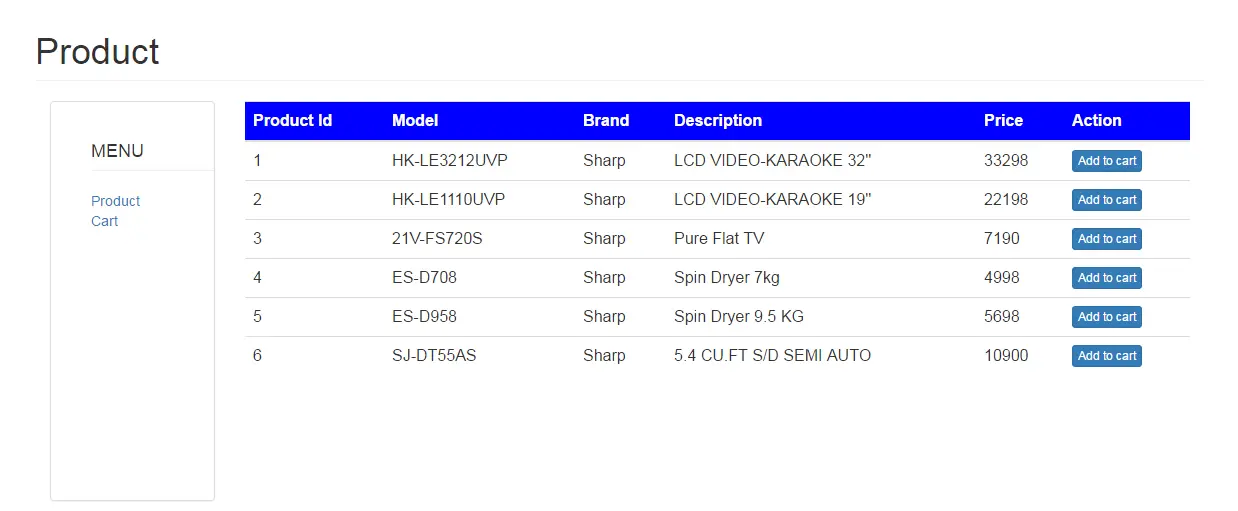
Simple Shopping Cart in PHP with JQuery and Ajax
In this tutorial, I will teach you how to create a shopping cart with jQuery, Ajax, and PHP.
The shopping cart is important when selling a product based on the web because it serves as a basket that you can put many items in it.
As a result, you can order multiple items in one transaction.
Let’s begin:
- Create a database in the MySQL and name it “productdb“.
- Make a query for creating a table in the database that you have created.
CREATE TABLE IF NOT EXISTS `tblproduct` (
`PRODUCTID` int(11) NOT NULL AUTO_INCREMENT,
`MODEL` varchar(30) NOT NULL,
`BRAND` varchar(30) NOT NULL,
`DESCRIPTION` varchar(99) NOT NULL,
`PRICE` double NOT NULL,
PRIMARY KEY (`PRODUCTID`)
) ENGINE=InnoDB DEFAULT CHARSET=latin1 AUTO_INCREMENT=7 ;
- Make a query for inserting data in the table.
INSERT INTO `tblproduct` (`PRODUCTID`, `MODEL`, `BRAND`, `DESCRIPTION`, `PRICE`) VALUES
(1, 'HK-LE3212UVP', 'Sharp', 'LCD VIDEO-KARAOKE 32''''', 33298),
(2, 'HK-LE1110UVP', 'Sharp', 'LCD VIDEO-KARAOKE 19''''', 22198),
(3, '21V-FS720S', 'Sharp', 'Pure Flat TV ', 7190),
(4, 'ES-D708', 'Sharp', 'Spin Dryer 7kg ', 4998),
(5, 'ES-D958', 'Sharp', 'Spin Dryer 9.5 KG', 5698),
(6, 'SJ-DT55AS', 'Sharp', '5.4 CU.FT S/D SEMI AUTO ', 10900);
- Create a connection between MySQL database and PHP script. Name it “config.php“
<?php
$server = 'localhost';
$dbuser = 'root';
$dbpass = '';
$dbname = 'productdb';
$con = mysql_connect($server, $dbuser, $dbpass);
if (isset($con)) {
 # code...
 $dbSelect = mysql_select_db($dbname);
 if (!$dbSelect) {
 echo "Problem in selecting database! Please contact administraator";
 die(mysql_error());
 }
} else {
 echo "Problem in database connection! Please contact administraator";
 die(mysql_error());
}
?>- Create a landing and name it “index.php“. Then, do the following codes for the design and retrieving data in the database to the page.
<?php
include "config.php";
?>
<html>
<head>
 <title>Product</title>
 <!-- CSS plugins -->
 <link rel="stylesheet" type="text/css" href="css/bootstrap.min.css">
</head>
<body>
 <!-- containner -->
 <div class="container">
 <!-- row -->
 <div class="row">
 <h1 class="page-header">Product</h1>
 <!-- side bar -->
 <div class="sidebar col-md-2">
 <!-- panel -->
 <div class="panel panel-default " style="min-height:400px;">
 <!-- ul -->
 <ul >
 <li class="list-unstyled" ><h4 class="page-header">MENU</h4></li>
 <li class="list-unstyled">
 <!-- link product -->
 <a href="index.php">
 Product
 </a>
 <!-- end link product -->
 </li>
 <li class="list-unstyled" >
 <!-- link cart -->
 <a href="cart.php">
 Cart
 </a>
 <!-- end link cart -->
 </li>
 </ul>
 <!-- end ul -->
 </div>
 <!-- end panel -->
 </div>
 <!-- end Sidebar -->

 <!-- Content -->
 <div class="col-md-10">
 <table class="table table-hover">
 <tr style="background-color:blue;color:white">
 <th>Product Id</th>
 <th>Model</th>
 <th>Brand</th>
 <th>Description</th>
 <th>Price</th>
 <th>Action</th>
 </tr>
 <tbody>

 <?php
$sqlQuery = "SELECT * FROM `tblproduct`";
$result = mysql_query($sqlQuery) or die(mysql_error());
while ($row = mysql_fetch_array($result)) {
 # code...
 echo '<tr>
 <td>' . $row['PRODUCTID'] . '</td>
 <td>' . $row['MODEL'] . '</td>
 <td>' . $row['BRAND'] . '</td>
 <td>' . $row['DESCRIPTION'] . '</td>
 <td>' . $row['PRICE'] . '</td>
 <td><a href="process.php?Id=' . $row['PRODUCTID'] . '&Price=' . $row['PRICE'] . '" class="btn btn-xs btn-primary">Add to cart</a></td>
 </tr>';
}
?>
 </tbody>
 </table>
 </div>
 <!-- end Content -->

 </div>
 <!-- end row -->
 </div>
 <!-- end container -->
</body>
</html>- Create another file and name it “process.php“. Then, do the following codes for adding, updating and removing items in the cart.
<?php

if (!isset($_SESSION['janobecart'])) {
 $_SESSION['janobecart'] = '';
}

 if (!empty($_SESSION['janobecart'])) {
 // count the session array varible
 $max = count($_SESSION['janobecart']);

 if (!isset($exist)) {

?>
 <script type="text/javascript">
 /* <!-- Pop-up Message -->*/
 alert('Item is already in the cart.')
 /*<!-- End pop-up message -->*/

 $_SESSION['janobecart'] = array();
 $_SESSION['janobecart'][0]['PRODUCTID'] = $pid;
 $_SESSION['janobecart'][0]['PRICE'] = $price;
 $_SESSION['janobecart'][0]['QUANTITY'] = 1;
 }


 echo '<script type="text/javascript">
 /* <!-- Pop-up Message -->*/
 alert("Item has been added in the cart.")
 /* <!-- End pop-up message -->*/

 unset($_SESSION['tot']);
?>

 <script type="text/javascript">
 /* <!-- Pop-up Message -->*/
 alert('Item has been removed in the cart.')
 /* <!-- End pop-up message -->
 redirect to main page.*/
 window.location='cart.php'

 $_SESSION['janobecart'] = array_values($_SESSION['janobecart']);
}


// Update the quantity in the cart
if (isset($_POST['update'])) {

 // ' echo "<script>alert('yes')</script>";
 $max = count($_SESSION['janobecart']);
 for ($i = 0; $i < $max; $i++) {
 $pid = $_SESSION['janobecart'][$i]['PRODUCTID'];
 // parse the quantity in interger.
 $qty=intval(isset($_GET['qty'.$pid]) ? $_GET['qty'.$_POST['pid']] : "");

 // selecting the items that are already in the cart
 $sql = "SELECT * FROM `tblproduct` WHERE `PRODUCTID` =" . $pid;
 $result = mysql_query($sql) or die(mysql_error());
 while ($row = mysql_fetch_array($result)) {
 // checking the quantity of the item.
 // It can't be null
 if ($qty > 0 && $qty <= 999) {
 // calculting the quantity and the price of an item
 $price = $row['PRICE'] * $qty;
 // updating the items in the cart.
 $_SESSION['janobecart'][$i]['QUANTITY'] = $qty;
 $_SESSION['janobecart'][$i]['PRICE'] = $price;
 }
 }
 }
}

?>- Create another file for the design of the cart. Name it “cart.php”
<?php
// start the session to fire the session handler
session_start();
// include the configuration
include "config.php";

?>

 <!--Design -->
<html>
<head>
 <title>Add to cart</title>

</head>
<body id="content">
 <link rel="stylesheet" type="text/css" href="css/bootstrap.min.css">

<!-- form -->
<form class="form-group" method="POST" action="">
 <!-- containner -->
 <div class="container">
 <!-- row -->
 <div class="row">
 <h1 class="page-header">Cart</h1>
 <!-- side bar -->
 <div class="sidebar col-md-2">
 <!-- panel -->
 <div class="panel panel-default " style="min-height:400px;">
 <!-- ul -->
 <ul >
 <li class="list-unstyled" ><h4 class="page-header">MENU</h4></li>
 <li class="list-unstyled">
 <!-- link product -->
 <a href="index.php">
 Product
 </a>
 <!-- end link product -->
 </li>
 <li class="list-unstyled" >
 <!-- link cart -->
 <a href="cart.php">
 Cart
 </a>
 <!-- end link cart -->
 </li>
 </ul>
 <!-- end ul -->
 </div>
 <!-- end panel -->
 </div>
 <!-- end Sidebar -->

 <!-- Content -->
 <div class="col-md-10" >
 <table class="table table-bordered" >
 <tr style="background-color:blue;color:white">
 <th>Product Id</th>
 <th>Model</th>
 <th>Brand</th>
 <th>Description</th>
 <th>Price</th>
 <th>Quantity</th>
 <th>Subtotal</th>
 </tr>
 <tbody>

 <?php
if (isset($_SESSION['janobecart'])) {
 $count_cart = count($_SESSION['janobecart']);
 for ($i = 0; $i < $count_cart; $i++) {
 $proid = $_SESSION['janobecart'][$i]['PRODUCTID'];
 $qty = $_SESSION['janobecart'][$i]['QUANTITY'];
 $subtot = $_SESSION['janobecart'][$i]['PRICE'];
 $sqlQuery = "SELECT * FROM `tblproduct` WHERE PRODUCTID=" . $proid;
 $result = mysql_query($sqlQuery) or die(mysql_error());
 while ($row = mysql_fetch_array($result)) {
 # code...
 echo '<tr>
 <td>' . $row['PRODUCTID'] . '</td>
 <td>' . $row['MODEL'] . '</td>
 <td>' . $row['BRAND'] . '</td>
 <td>' . $row['DESCRIPTION'] . '</td>
 <td>' . $row['PRICE'] . '</td>
 <td>
 <input type="number" autocomplete="off" class="input input-xs" data-id='. $row['PRICE'] .' id=' . $proid . ' name="qty' . $proid . '" value=' . $qty . ' maxlength="3" size="3" />
 <a href="process.php?RemoveId=' . $proid . '" class="btn btn-danger btn-xs glyphicon glyphicon-trash" /></a>
 </td>
 <td>' . $subtot . '</td>
 </tr>';
 }
 // computing the total price of the items in the cart
 @$tot += $subtot;
 $_SESSION['tot'] = $tot;
 }
} else {
}
?>
 <tr>
 <!-- Displaying the total amount of the items in the cart. -->
 <td colspan="6"><h3 align="right">Total</h3></td>
 <td>
 <h3>
 <?php
echo isset($_SESSION['tot']) ? $_SESSION['tot'] : '0.00';
?>
 </h3>
 </td>
 </tr>
 </tbody>
 </table>
 </div>
 <!-- end Content -->

 </div>
 <!-- end row -->
 </div>
 <!-- end container -->
</form>
<!-- end form -->
</body>
</html>- Finally, create a script for the updating the quantity of an item in the cart.
<script type="text/javascript" src="jquery/jquery.min.js"></script>

<script type="text/javascript">
 $(document).ready(function(){
 $("input").keyup(function(){
 var id = this.id;
 var qty = document.getElementById(id).value;

 $.ajax({
 type:"POST",
 url: "process.php?qty"+id+"=" + qty,
 dataType: "text", //expect html to be returned
 data:{update:"qty", pid:id},
 success: function(data){
 $("#content").load("cart.php");
 $(id).focus();
 }
 });

 });

 // $("input").change(function(){
 // $("#content").load("cart.php");
 // })
 })
</script>
For all students who need a programmer for their thesis system, or anyone who needs source code in any programming language, you can contact us.
Official documentation
Get the ready-to-defend package: complete PHP + MySQL source code, full Chapter 1-5 documentation, 6 UML diagrams, ERD, installation guide, user manual, and defense presentation template. Save 3 to 4 weeks of capstone work.
Sold via Gumroad. See our affiliate disclosure.
Frequently Asked Questions
How does this PHP ecommerce or online shopping system work?
Frontend: product catalog with categories, search, cart (session-based), checkout. Backend: order management, payment gateway integration (PayPal/Stripe), shipping, customer accounts, order history.
What PHP and MySQL versions does this project require?
Most projects in this batch run on PHP 7.4 to PHP 8.2 with MySQL 5.7+ or MariaDB 10+. A few older projects need PHP 5.6 (deprecated, use XAMPP 7.x). To run: install XAMPP / WAMP / Laragon, extract project to htdocs, import the included .sql file via phpMyAdmin, edit the connection file (usually config.php or db_connect.php) with your DB credentials, browse to the project URL in your browser.
How do I set up the database for this PHP project?
Open phpMyAdmin (http://localhost/phpmyadmin/ on XAMPP), create a new empty database with the name specified in the project’s config.php. Click the Import tab, choose the included .sql file, click Go. Then edit config.php (or includes/connection.php) with: ‘localhost’, your MySQL username (usually ‘root’), your MySQL password (usually blank for XAMPP), and the database name.
Can I use this PHP project for a BSIT capstone or thesis?
Yes, but extend it. A bare CRUD app is too narrow for full capstone scope. Add: user roles via session checks, reports/dashboards (Chart.js + AJAX), PDF exports (TCPDF library), email notifications (PHPMailer), real domain extension (analytics, audit log, multi-branch support). Pair with Chapter 1-5 documentation matching your panel’s rubric.
Why am I getting ‘connection error’ or ‘undefined function mysqli_connect’?
Three common PHP issues: (1) Connection error: Apache + MySQL services not running in XAMPP control panel, OR database name in config.php does not match what you created in phpMyAdmin. (2) ‘undefined function mysqli_connect’: MySQL extension not enabled, in php.ini uncomment extension=mysqli (then restart Apache). (3) ‘No such file or directory’: MySQL socket path wrong, use 127.0.0.1 instead of localhost in the connection string.
Where can I find more PHP projects with source code?
Browse the PHP Projects hub for the full library (300+ vanilla PHP systems). For modern PHP MVC alternatives see Laravel Projects (74 systems) or CodeIgniter Projects (32 systems). For BSIT-focused capstone idea lists see 150 Best Capstone Project Ideas.
Hi. Can u show me how to update the quantity?Thank u. 🙂