
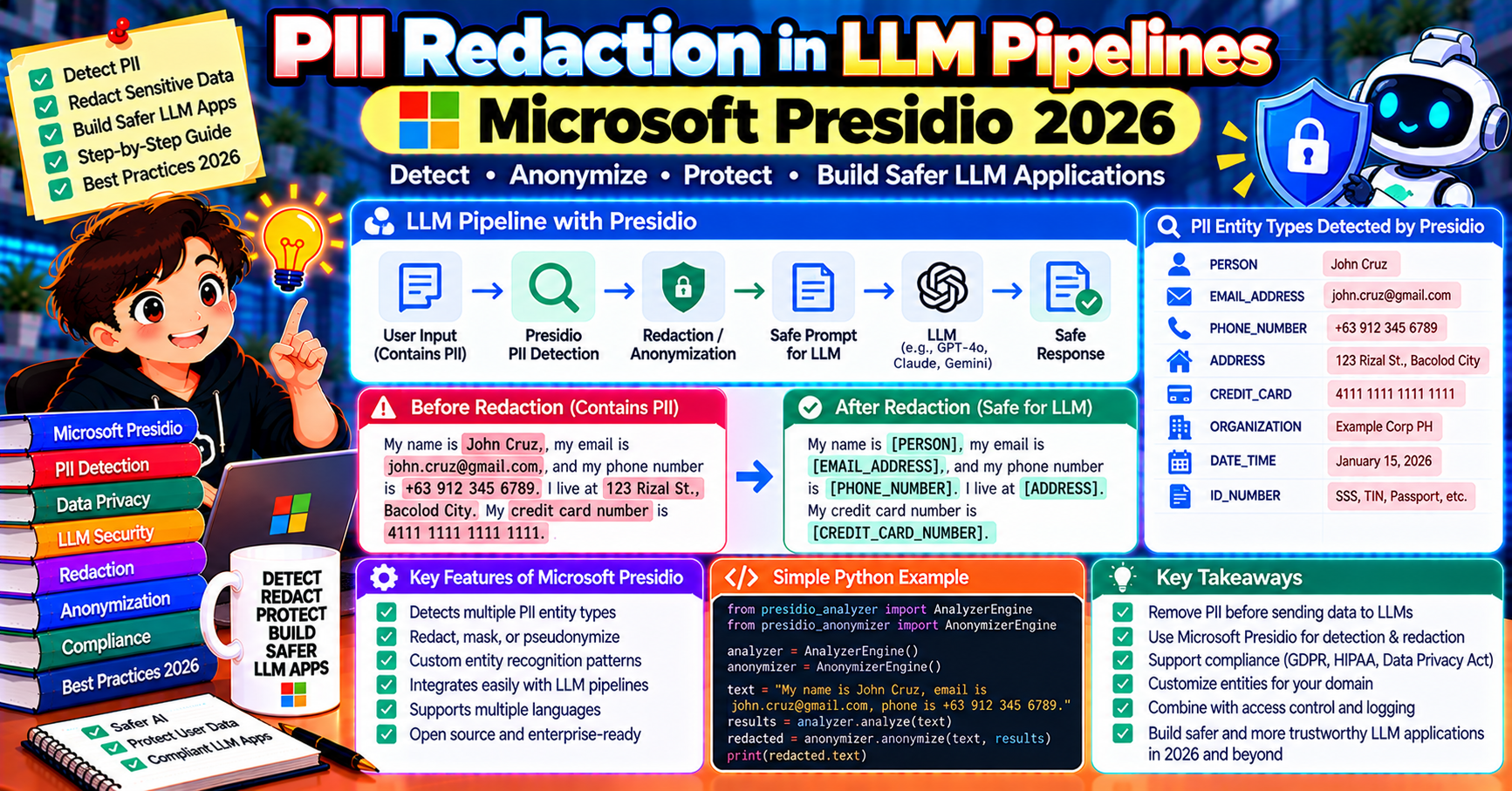
Users paste things they should not. Credit card numbers in support messages. Social security numbers in form-filling requests. API keys in debugging screenshots. If your LLM pipeline sends these raw to a model provider’s API, you have a compliance problem (GDPR, HIPAA, CCPA) and a security problem (what if that provider’s logs leak?). The 2026 standard answer is Microsoft Presidio: an open-source PII detection and redaction library that sits before and after your LLM call. This article walks through installing Presidio, scrubbing inputs, de-anonymizing responses for authorized flows, and handling custom entity types your business cares about.
What Presidio is
Presidio (by Microsoft) is an open-source PII detection and anonymization framework in Python. Two components you will use:
- Presidio Analyzer: detects PII entities in text. Credit card, email, phone number, SSN, IP address, person name, location, 40+ built-in types.
- Presidio Anonymizer: replaces detected entities with redacted versions (masked, hashed, replaced with placeholders, or encrypted-reversible).
Combined, they let you build a pre-LLM scrubber: user text comes in, Presidio redacts PII, redacted text goes to the LLM, response comes back, optionally de-anonymized if the user is authorized to see the original data.
Install and first detection
pip install presidio-analyzer presidio-anonymizer
python -m spacy download en_core_web_lg

from presidio_analyzer import AnalyzerEngine
from presidio_anonymizer import AnonymizerEngine

analyzer = AnalyzerEngine()
anonymizer = AnonymizerEngine()

text = "Hi, my card 4532 1234 5678 9012 was charged on jane@example.com for $200."
results = analyzer.analyze(text=text, language="en")
for r in results:
    print(f"{r.entity_type} ({r.score:.2f}): {text[r.start:r.end]}")
Output:
CREDIT_CARD (1.00): 4532 1234 5678 9012
EMAIL_ADDRESS (1.00): jane@example.com
Each result has entity type, confidence score, and character range. Decide what to do with each based on type.
Anonymize before sending to the LLM
from presidio_anonymizer.entities import OperatorConfig

anonymized = anonymizer.anonymize(
    text=text,
    analyzer_results=results,
    operators={
        "CREDIT_CARD": OperatorConfig("replace", {"new_value": "[CARD]"}),
        "EMAIL_ADDRESS": OperatorConfig("mask", {
            "masking_char": "*",
            "chars_to_mask": 10,
            "from_end": False,
        }),
        "DEFAULT": OperatorConfig("replace", {"new_value": "[REDACTED]"}),
    },
)
print(anonymized.text)
# "Hi, my card [CARD] was charged on **********example.com for $200."
Common operator patterns:
- replace: swap in a placeholder like “[CARD]” or “[PERSON_1]”
- mask: show first N characters, mask the rest with asterisks
- redact: delete entirely
- hash: SHA256 the entity (deterministic replacement)
- encrypt: reversible encryption so you can de-anonymize later with a key
Full pipeline: scrub-call-restore
For some flows, you want to show the user THEIR original PII in the response (e.g., “I see your card ending in 9012 was charged”). Use encrypted anonymization so you can decrypt mentions in the LLM output.
from presidio_anonymizer import DeanonymizeEngine
from presidio_anonymizer.entities import OperatorConfig

CRYPTO_KEY = "WmZq4t7w!z%C&F)J"  # 16/24/32 bytes

# Encrypt PII before sending to LLM
anonymized = anonymizer.anonymize(
    text=user_text,
    analyzer_results=analyzer.analyze(text=user_text, language="en"),
    operators={"DEFAULT": OperatorConfig("encrypt", {"key": CRYPTO_KEY})},
)
llm_input = anonymized.text  # contains encrypted-ciphertext placeholders

# Call LLM
llm_response = openai_call(llm_input)

# Decrypt the ciphertext placeholders in the LLM's response
deanonymizer = DeanonymizeEngine()
restored = deanonymizer.deanonymize(
    text=llm_response,
    entities=anonymized.items,
    operators={"DEFAULT": OperatorConfig("decrypt", {"key": CRYPTO_KEY})},
)
return restored.text  # user sees their original PII in the response
Important: the KEY stays in your infrastructure. The LLM provider only sees ciphertext. Your service decrypts before showing the user, so the user experience is seamless but the LLM provider cannot read the PII even in its logs.
Custom entities: adding your own PII types
Presidio’s built-ins cover common PII but miss domain-specific identifiers (internal customer IDs, order numbers, employee badge numbers). Add a custom recognizer:
from presidio_analyzer import PatternRecognizer, Pattern

internal_customer_id_pattern = Pattern(
    name="internal_customer_id",
    regex=r"CUST-\d{8}",
    score=0.9,
)

recognizer = PatternRecognizer(
    supported_entity="INTERNAL_CUSTOMER_ID",
    patterns=[internal_customer_id_pattern],
)

analyzer.registry.add_recognizer(recognizer)

# Now these get detected
analyzer.analyze("Customer CUST-12345678 asked...", language="en")
For more complex entities (not regex-matchable), build a custom EntityRecognizer subclass that calls an LLM or a dedicated classifier. The pattern is the same: register with the analyzer, done.
Performance in production
- Latency: ~50-200ms per analyze call for typical messages (CPU). Scales linearly with text length. For long documents, chunk and parallelize.
- Memory: Presidio loads a spaCy model (~500 MB for
en_core_web_lg, ~200 MB foren_core_web_sm). Keep one AnalyzerEngine instance per process; initializing is slow. - Throughput: single process handles ~50 requests/second on standard CPU. Horizontal scaling trivial (stateless).
- Accuracy: 90-95% precision on standard entities (credit card, email, phone). Names and locations are context-dependent and recall drops. Tune confidence thresholds for your false-positive tolerance.
Scrubbing responses too (not just inputs)
LLMs can regurgitate PII from their training data (unlikely but documented). Run Presidio on the OUTPUT too, especially for RAG pipelines where the model might paraphrase retrieved content containing PII you did not scrub.
def safe_llm_call(user_text):
    # Pre: scrub input
    scrubbed_input, items = scrub(user_text)
    # Call LLM
    response = call_openai(scrubbed_input)
    # Post: scrub output as well
    scrubbed_output = scrub(response)[0]
    # Restore user's own PII back into the output
    return restore_user_pii(scrubbed_output, items)
Compliance notes
- GDPR Article 32: encryption/pseudonymization of personal data at rest and in transit. Presidio encrypt operator satisfies pseudonymization requirement.
- HIPAA 164.312(a)(2)(iv): encryption of ePHI in transit. For healthcare LLM apps, Presidio-encrypt before sending to the LLM provider aligns with this.
- CCPA 1798.100: right to deletion. Store the mapping of placeholder-to-original separately; deletion is quick (drop the mapping, LLM provider never had the original).
- SOC 2: not directly a Presidio requirement but auditors expect to see PII handling documented. Logging what Presidio flagged, when, and what action was taken is the audit trail.
Common pitfalls
- Over-scrubbing kills LLM quality: if every number is redacted, the model loses semantic clues. Tune per-entity: credit cards and SSNs always redact, names sometimes OK depending on context.
- Confidence thresholds matter: Presidio returns a score per detection. Default threshold is 0.5; many apps raise to 0.7 or 0.85 to cut false positives. Entity names like “Apple” (fruit vs company) have lower confidence and may need threshold tuning.
- Multiple languages: default is English. For multilingual input, load additional spaCy models (
de_core_news_lgfor German etc) and specify language per analyze call. - Context-aware recognition: Presidio’s
context_similarity_factorboosts confidence when PII appears near context words (e.g., “my credit card: 1234”). Enable this for better precision.
Frequently Asked Questions
Does Presidio work for structured data (JSON, forms)?
Yes. Presidio can process JSON and extract PII across all string fields. Use presidio-structured extension for first-class structured-data support with per-field policies.
How does Presidio compare to AWS Comprehend or Google DLP?
Comparable accuracy on common PII types. Presidio is open-source and runs anywhere; Comprehend and DLP are cloud-only. For GDPR data-residency requirements where the data cannot leave your region, Presidio is often the only viable option.
Can I use Presidio with non-text data (images, audio)?
Yes. Presidio has an image anonymizer that redacts PII in images (passport photos, screenshots with visible text). Audio support is via transcription first (Whisper) then Presidio on the transcript.
What about PII in LangChain or LlamaIndex pipelines?
Both have Presidio integrations. In LangChain, use PresidioAnonymizer as a chain step. In LlamaIndex, apply it in the pre-ingestion step on retrieved documents.
How accurate is person-name detection?
Lower than other entities (70-85% recall) because “John” could be a name, a book character, or a common word. For strict privacy, combine with context cues or a stricter threshold. Keep the false positive rate manageable by limiting person-name redaction to specific flows that need it.
Does Presidio handle non-English names and addresses?
Partially. English names have the strongest detection; other languages depend on spaCy’s named-entity recognition in that language. Chinese, Arabic, and non-Latin scripts have weaker coverage. Test on your actual data before deploying globally.
Official documentation

Caren Bautista
Technical Writer at PIES IT Solution
Responsible for crafting clear, well-structured, and beginner-friendly content across the platform. Handles the writing, proofreading, and editorial review of tutorials, guides, and documentation to ensure every article is accurate, readable, and easy to follow.
Expertise: Technical Writing · Content Creation · Documentation · Editorial Writing · JavaScript · TypeScript · Python · Python Errors · HTTP Errors · MS Excel · View all posts by Caren Bautista →