
ER Diagram for Hospital Management System
This Hospital Management System Database Design has an ER Diagram for Hospital Management System project.
This material includes database schema, Data dictionaries, Database Tables and ERD.
The Hospital management system database design is a database design use for managing hospital functions and events.
It enables the admin to register a patient for the hospital, stores their disease details into the database. Any of the staff members, doctor & admin is able to add, view, edit, update or delete data.
The purpose of the Hospital Management System database Design is to make a secure and easy way of storing information of the patient, doctors, inpatient, outpatient, Rooms, and Bill payment.
There are seven(7) common features of Hospital Management System Database Design such as Managing Patients, Doctors, laboratory, Inpatient, Outpatient, Rooms, and Hospital Bills information.
ER Diagram for Hospital Management System
ER Diagram Hospital Management System Database Design Project.
- Manage Patients
This table of ER Diagram Hospital Management System will be used for storing and managing the patient information.
- Manage Doctor
This table will be used for storing and managing the Doctor information and login account.
- Manage Laboratory
This table will be used for storing and managing the Laboratory transaction.
- Manage Inpatient
This table will be used for storing and managing the inpatient information and diagnosis.
- Manage Outpatient
This table will be used for storing and managing the inpatient information and diagnosis.
- Manage Room
This table will be used for storing and managing the room information and assigning of patient in every room.
- Manage Bills
The billing table will be used for managing the statement of accounts per patient and for the collection of bills.
ER Diagram for Hospital Management System with Relationship
This section will show you the ER Diagram for Hospital Management System Project.
In the image below you see the actual relationship of all entity.
Diagram of Hospital Management System
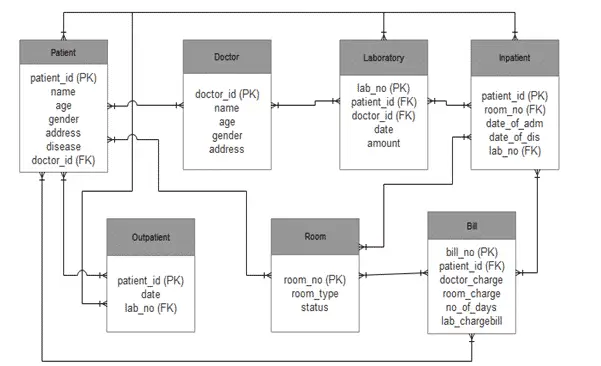
Based on figure 8, the proposed er diagram for hospital management system with relationship shows the entity of the proposed SCA Hospital Management system database, which is presented by tables; the tables are made to meet the required specification of the system and provide much more specific details of each entity within the system.
Table 1: tblPatient
| Field Name | Description | Type | Length |
| patient_id (PK) | Patient ID | varchar | 10 |
| name | Patient Name | varchar | 50 |
| age | Patient Age | int | 3 |
| gender | Patient Gender | varchar | 50 |
| address | Patient Address | varchar | 50 |
| disease | Patient Disease | varchar | 50 |
| doctor_id (FK) | Doctor ID | varchar | 20 |
Table 2: tblDoctor
| Field Name | Description | Type | Length |
| doctor_id (PK) | Doctor ID | varchar | 10 |
| name | Doctor Name | varchar | 30 |
| age | Doctor Age | int | 3 |
| gender | Doctor gender | varchar | 50 |
| address | Doctor Address | varchar | 50 |
Table 3: tblLab
| Field Name | Description | Type | Length |
| lab_no (PK) | Laboratory Number | varchar | 10 |
| patient_id (FK) | Patient ID | varchar | 10 |
| doctor_id (FK) | Doctor ID | varchar | 10 |
| date | Laboratory Date | Date/Time | 10 |
| amount | Amount of Lab | int | 20 |
Table 4: tblInpatient
| Field Name | Description | Type | Length |
| patient_id (PK) | Patient ID | varchar | 10 |
| room_no (FK) | Room Number | varchar | 50 |
| date_of_adm | Date of Admission | Date/Time | 10 |
| date_of_dis | Date of Discharge | Date/Time | 10 |
| lab_no (FK) | Laboratory Number | varchar | 10 |
Table 5: tblOutpatient
| Field Name | Description | Type | Length |
| patient_id (PK) | Patient ID | varchar | 10 |
| date | Date of Outpatient | varchar | 10 |
| lab_no (FK) | Laboratory Number | varchar | 20 |
Table 6: tblRoom
| Field Name | Description | Type | Length |
| room_no (PK) | Room Number | varchar | 50 |
| room_type | Room Type | varchar | 50 |
| status | Status Of Room | varchar | 20 |
Table 7: tblBill
| Field Name | Description | Type | Length |
| bill_no (PK) | Patient ID | int | 11 |
| patient_id (FK) | Patient Name | varchar | 10 |
| doctor_charge | Patient Age | int | 10 |
| room_charge | Patient Gender | int | 10 |
| no_of_days | Patient Address | int | 10 |
| lab_charge | Patient Disease | int | 10 |
| bill | Doctor ID | int | 10 |
If you have any question or suggestion about ER diagram hospital management system project, please feel free to contact us or simply leave a comment below.
Conclusion
This Hospital Management System Database Design is a requirement in the DBMS mini Project.
If you want to develop your own Hospital Management System, you can upgrade this database design to suit your requirements.
Technology stack and requirements
To run this VB.NET project, you need the following on your development machine:
- Visual Studio 2019 or later. The free Community Edition is enough for building, debugging, and running the project.
- .NET Framework 4.7.2 or higher. Most Windows 10 and 11 systems have it preinstalled through Windows Update.
- MySQL Server 8.0 or MSSQL Express 2019. Choose whichever your capstone panel prefers; both work with VB.NET data adapters.
- MySQL Connector/NET or SqlClient library. Add via NuGet Package Manager inside Visual Studio.
- Crystal Reports (optional). Required only if the project generates printable reports; install the runtime redistributable.
Installing the source code
The download link contains a ZIP archive with the full solution. Extract and set up in five steps:
- Extract the archive to a folder outside Program Files (avoids permission issues).
- Open the .sln file in Visual Studio. It loads the full solution with all forms and modules.
- Restore NuGet packages. Right-click the solution then Restore NuGet Packages if prompted.
- Import the database. Locate the .sql file in the archive and import via phpMyAdmin (MySQL) or SQL Server Management Studio.
- Update the connection string in App.config or module code to match your local database name, user, and password.
How to use this project for your BSIT capstone
This VB.NET project maps cleanly to standard BSIT capstone documentation. Suggested chapter alignment:
- Chapter 1 (Introduction). Discuss the problem the system solves in real-world context. Cite Philippine business or academic use cases where a manual process could be replaced.
- Chapter 2 (Review of Related Literature). Compare this system’s features against 5-10 similar published projects. Cite journals like IJERT or IEEE Access for academic-standard sources.
- Chapter 3 (Methodology). Include Use Case Diagram, Data Flow Diagram, Entity Relationship Diagram, and Activity Diagram covering all major workflows in the system.
- Chapter 4 (Results and Discussion). Screenshot each module of the running system with a caption explaining what data it processes and which user role interacts with it.
- Chapter 5 (Conclusion and Recommendations). Identify features that could be added in a Version 2, such as web dashboard, mobile app, or REST API export.
Modules typical of Hospital Management System Database Design
- Patient registration. Personal info, contact person, medical history, allergies, and insurance details.
- Appointment scheduling. Book slots by doctor and date, with SMS or email reminder to the patient.
- Consultation notes. Doctor input for chief complaint, diagnosis, prescription, and follow-up plan.
- Pharmacy / medicine dispensing. Link prescriptions to inventory, deduct dispensed quantity, and print label.
- Billing and payments. Compute charges, apply insurance discounts, and print official receipts.
- Reports. Daily patient census, revenue per doctor, most-prescribed medicine, and patient history logs.
Common enhancements for capstone review
- Electronic health records (EHR). Add complete patient history across visits accessible to any authorized doctor.
- Telemedicine integration. Embed a video-call widget for remote consultations, especially relevant post-2020.
- Lab results integration. Import CBC and chemistry lab results with reference-range highlighting.
- Data privacy compliance. Add audit trail and role-based access to meet Data Privacy Act (RA 10173) requirements.
Official documentation
Frequently Asked Questions
How does this VB.NET hospital management system work?
Standard modules: patient registration, doctor schedule, appointment booking, billing, lab results, pharmacy, ward assignment. Role-based access via login form. VB.NET WinForms + SQL Server. Top BSIT capstone choice in Philippines.
What Visual Studio and SQL Server versions does this VB.NET project require?
Most projects use VB.NET WinForms on .NET Framework 4.5+ with SQL Server 2012 Express or higher. To run: install Visual Studio 2019 / 2022 (Community is free) with the ‘Desktop development with .NET’ workload, install SQL Server Express + SSMS, open the .sln file, build, run.
How do I set up the database for this VB.NET project?
Open SQL Server Management Studio (SSMS) and connect to your SQL Server (e.g. localhost\SQLEXPRESS). Right-click Databases, choose Restore Database OR New Database then import the included .sql script. Update the connection string in App.config (or in code-behind Module) with your server name + credentials. Rebuild and run.
Can I use this VB.NET project for a BSIT capstone or thesis?
Yes, VB.NET is one of the most accepted languages by Philippine BSIT panels. Extend it: add role-based access (admin/staff/customer login redirect), Crystal Reports or RDLC reports, dashboards with Chart control, audit log, multi-branch support. Pair with Chapter 1-5 documentation matching your panel’s rubric.
Why am I getting ‘connection error’ or ‘cannot find SQL Server’?
Three common VB.NET issues: (1) Connection error: SQL Server isn’t running. Open SQL Server Configuration Manager and verify SQL Server (SQLEXPRESS) service is started. (2) Wrong server name in connection string. Try .\SQLEXPRESS, (local)\SQLEXPRESS, or your machine name. (3) Login failed: SQL Server is set to ‘Windows-only’ authentication. Switch to Mixed Mode in SSMS Server Properties, Security.
Where can I find more VB.NET projects with source code?
Browse the VB.NET Projects hub for the full library. For C# WinForms alternatives see C# Projects. For ASP.NET web alternatives see ASP.NET Projects. For BSIT capstone idea lists see 150 Best Capstone Project Ideas.
Related Articles you may Like
- ER Diagram for Sales and Inventory System Database Design
- Ordering System Database Design with ERD
- ER Diagram for Water Refilling Station System Database Design

Adones Evangelista
Programmer & Technical Writer at PIES IT Solution
Adones Evangelista is a programmer and writer at PIES IT Solution, author of over 900 tutorials and error-fix guides at itsourcecode.com. Specializes in JavaScript, Django, Laravel, and Python error debugging covering ValueError, TypeError, AttributeError, ModuleNotFoundError, and RuntimeError, plus C/C++ and PHP capstone projects for BSIT students.
Expertise: JavaScript · Python · Django · Laravel · Error Debugging · C/C++
· View all posts by Adones Evangelista →
Hello Gays,
Hope you are doing well!
I’m taking a course in MS SQL server, and I have a capstone project in Jan-2023, so I need your help to build a database system related to the flow of patients from when they entered the hospital until they go home.
Thank you!
where are the relations b\w these entities.i feel hard to understand the relationship b\w them. There should be amendments. thank you btw this one suits me well.
all the diagrams and information are useful thanks for…..