
Movie Ticketing System Database Design
Movie Ticketing System Database Design is basically aimed to provide complete information of the movie and schedule to the customer, according to which he/she can easily get a ticket instantly and can book a ticket on his/her favorite movies.
Admin can use Movie Ticketing System to insert and delete data such as movie descriptions, movie schedules which will update the related webpage and will be accessible by the customers.
Admin can update the webpage changing according to the data in the database also admin can check the statistics information from the system.
Operate your cinema with better efficiency by automating reservation and ticketing process improve profitability and manage your cinema better by having access to key data in a centralized and systematic view and increase customer satisfaction by giving your customers what they want when it comes to the seat preference.
Based on seat and ticket reservation system allowing booking in a few easy steps. This powerful movie ticketing system can be deployed on any website offering tickets for movies, theater, and other scheduled performances.
Movie Ticketing System Database Design Features:
List of Upcoming
Movies
. Description About the Movie
.
List of cinema hall city
.
Ticket availability
. The Payment gateway for transaction
Entity Relationship Diagram of Movie Ticketing System
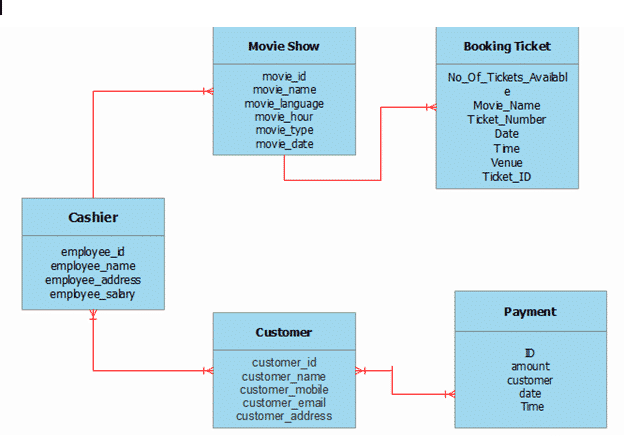
Data Dictionaries for Ticketing System Database Design
Table 1: tblCustomer
| Field Name | Description | Type | Length |
| customer_id (PK) | Customer ID number | Int | 11 |
| customer_name | Customer Full Name | varchar | 30 |
| customer_mobile | Customer Mobile Number | varchar | 11 |
| customer_email | Customer Email Address | varchar | 30 |
| customer_address | Customer Address | Text |
Table 2: tblCashier
| Field Name | Description | Type | Length |
| employee_id (PK) | Employee ID number | Int | 11 |
| emloyee_name | Employee Full Name | varchar | 30 |
| employee_address | Employee Address | Text | |
| employee_salary | Employee Salary | varchar | 50 |
Table 3: tblMovieShow
| Field Name | Description | Type | Length |
| movie_id (PK) | Movie ID number | Int | 11 |
| movie_name | Movie Name or the Title of the movie | varchar | 50 |
| movie_language | Movie in Different Languages | varchar | 50 |
| movie_hour | Movie Duration Time | varchar | 50 |
| movie_type | The type of the Movie | varchar | 50 |
| movie_date | Date of the movie released | varchar | 50 |
Table 4: tblBookingTicket
| Field Name | Description | Type | Length |
| No_Of_Tickets_Available | Number of Tickets Available | Int | 11 |
| Movie_Name | Movie Name or the Title of the movie | varchar | 50 |
| Ticket_Number | The Number of the Ticket | Int | 11 |
| Date | The Date when you book the Ticket | varchar | 50 |
| Time | The Time when you Book the Ticket | varchar | 50 |
| Venue | The Place where you want to watch | varchar | 50 |
| Ticket_ID (PK) | Ticket ID Number | Int | 11 |
Table 5: tblPayment
| Description | Type | Length | |
| ID (PK) | Payment ID number | Int | 11 |
| amount | Cash Amount | Int | 50 |
| customer | Movie in Different Languages | varchar | 50 |
| date | Movie Duration Time | varchar | 50 |
| Time | The type of the Movie | varchar | 50 |
Conclusion
This Ticketing System Database Design is a requirement in the DBMS mini Project. if you want to develop your own Ticketing System Database Design, you can upgrade this database design to suit your requirements.
Related Articles you may Like
- ER Diagram for Sales and Inventory System Database Design
- Ordering System Database Design with ERD
- ER Diagram for Water Refilling Station System Database Design
How to read an ER diagram
An entity-relationship (ER) diagram documents the database schema: entities (tables), attributes (columns), and relationships (foreign keys and cardinality).
- Entity. Rectangle representing a table.
- Attribute. Oval or field for each column.
- Primary key. Underlined attribute name.
- Foreign key. Attribute referencing another entity.
- Relationship. Diamond or line connecting related entities.
Common capstone mistakes to avoid
- Many-to-many without junction table.
- Missing primary key.
- Denormalized redundancy.
- Ambiguous naming.
Where this diagram fits in Chapter 3
- Section 3.3 (Database Design).
- Include the CREATE TABLE SQL script alongside.
- Reference from the class diagram.
- Include a legend to explain the notation for panel members.
Official documentation
Official documentation
Working source code for this system
Download the actual implementation of this system in your preferred language. Each project includes source code, database, and setup instructions for BSIT capstone use.
Frequently asked questions
What is a ER diagram used for in BSIT capstone?
An ER diagram shows the database schema: entities (tables), attributes (columns), and relationships (foreign keys, cardinality). It goes in Chapter 3 alongside the class diagram to communicate the data storage design.
What tool should I use to draw the ER diagram?
Free options: draw.io, Lucidchart free tier, PlantUML, StarUML 30-day trial, Visual Paradigm Community Edition. Paid options: Microsoft Visio, Lucidchart pro, Enterprise Architect. For BSIT capstones, draw.io is the most commonly used free tool.
How detailed does the ER diagram need to be for capstone defense?
Panel members expect the diagram to match the actual system implementation. Include every major class/use case/entity relevant to the system. Omit trivial helper classes. Every diagram element should have a clear justification.
Should I use black-and-white or colored diagrams?
Black-and-white is standard for capstone documentation to match the thesis format. Use color only if it improves clarity. Ensure text is readable at printed size (10pt minimum for labels).
Where does this diagram go in the capstone documentation?
Chapter 3 (System Design and Methodology) typically holds all UML diagrams. Introduce each diagram with a 1-paragraph description explaining what it shows and how to read it.
Frequently asked questions
What is a ER diagram used for in BSIT capstone?
An ER diagram shows the database schema: entities (tables), attributes (columns), and relationships (foreign keys, cardinality). It goes in Chapter 3 alongside the class diagram to communicate the data storage design.
What tool should I use to draw the ER diagram?
Free options: draw.io (browser-based, saves to Google Drive), Lucidchart free tier, PlantUML (text-based, version-controllable), StarUML (30-day trial then reduced feature set), Visual Paradigm Community Edition. Paid options: Microsoft Visio, Lucidchart pro, Enterprise Architect. For BSIT capstones, draw.io is the most commonly used free tool.
How detailed does the ER diagram need to be for capstone defense?
Panel members expect the diagram to match the actual system implementation. Include every major class/use case/entity relevant to the system. Omit trivial helper classes. Every diagram element should have a clear justification. Aim for 1-2 diagrams that fully cover the system, not many partial ones.
Should I use black-and-white or colored diagrams?
Black-and-white is standard for capstone documentation to match the thesis format. Use color only if it improves clarity (e.g., grouping subsystems). Ensure text is readable at printed size (10pt minimum for labels).
Where does this diagram go in the capstone documentation?
Chapter 3 (System Design and Methodology) typically holds all UML diagrams. Introduce each diagram with a 1-paragraph description explaining what it shows and how to read it. Reference specific elements in the surrounding text so panel members can follow the design rationale.

Adones Evangelista
Programmer & Technical Writer at PIES IT Solution
Adones Evangelista is a programmer and writer at PIES IT Solution, author of over 900 tutorials and error-fix guides at itsourcecode.com. Specializes in JavaScript, Django, Laravel, and Python error debugging covering ValueError, TypeError, AttributeError, ModuleNotFoundError, and RuntimeError, plus C/C++ and PHP capstone projects for BSIT students.
Expertise: JavaScript · Python · Django · Laravel · Error Debugging · C/C++
· View all posts by Adones Evangelista →