
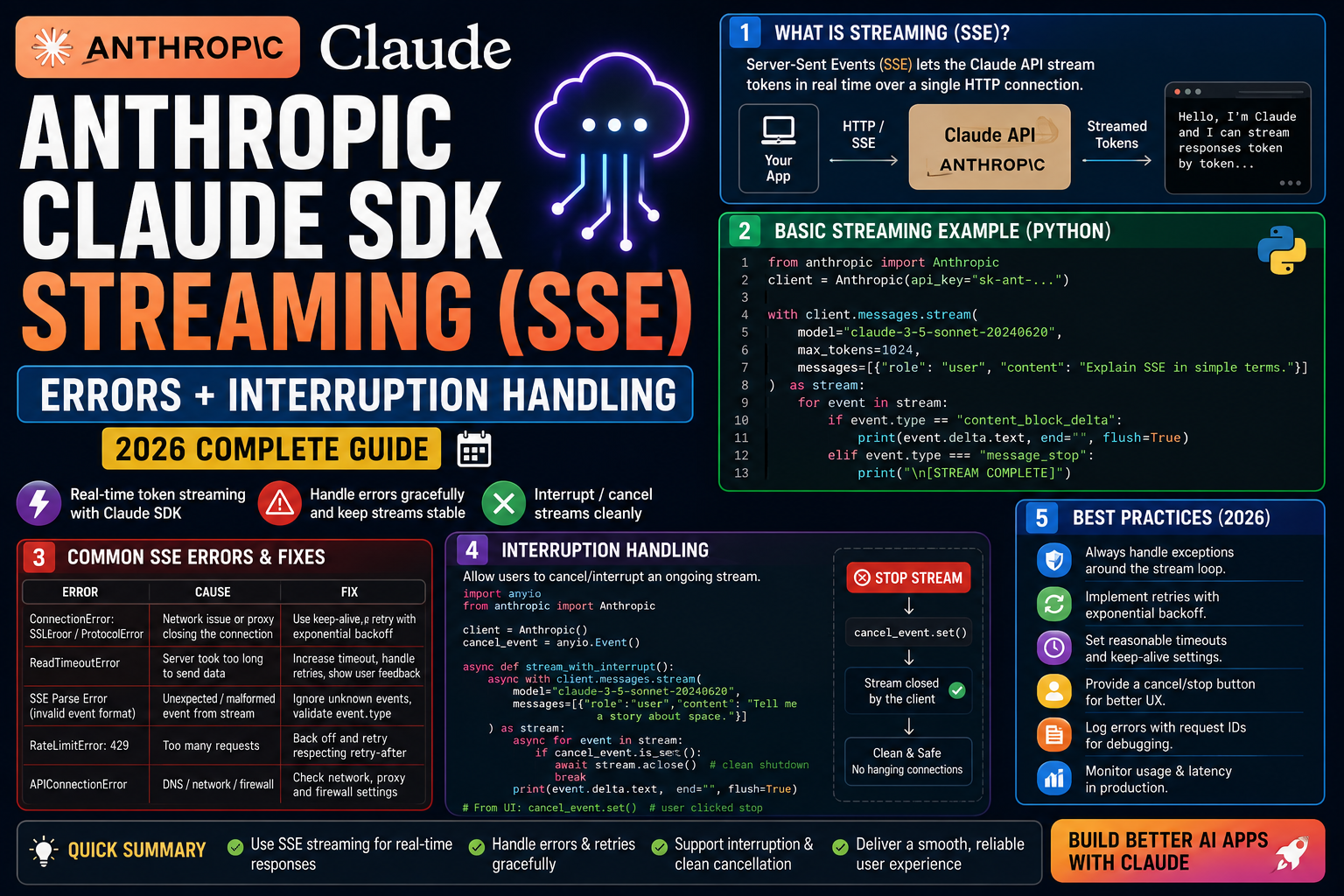
Anthropic’s Claude SDK supports server-sent events (SSE) streaming so you can render tokens as they arrive. Common streaming errors: unclosed connections leaking sockets, partial JSON that fails to parse, and dropped events during interruption. Here is the production pattern that handles all three, with real Python code.
Common streaming errors
- UnclosedConnectionError: you did not close the streaming context. Sockets leak, eventually exhausting connection pool.
- JSONDecodeError on partial chunk: you tried to parse a single SSE chunk as complete JSON. Chunks are text deltas, not full JSON objects.
- Dropped tokens on interruption: user closed the browser mid-stream but your Python code kept writing to a dead connection.
- APITimeoutError mid-stream: long generations exceed default httpx timeout even though the stream is progressing.
The fix: context-managed stream with proper event dispatch
import anthropic

client = anthropic.Anthropic()

def stream_chat(prompt: str):
    # WRONG: manual stream, no cleanup
    # stream = client.messages.stream(...)
    # for event in stream: yield event.text

    # CORRECT: context manager auto-closes on exception or exit
    with client.messages.stream(
        model="claude-opus-4-8",
        max_tokens=4096,
        messages=[{"role": "user", "content": prompt}],
    ) as stream:
        for text in stream.text_stream:
            yield text
        # Access final message after stream ends
        final = stream.get_final_message()
        print(f"Total tokens: {final.usage.output_tokens}")

# Usage
for chunk in stream_chat("Write a haiku"):
    print(chunk, end="", flush=True)
FastAPI streaming endpoint with interruption handling
from fastapi import FastAPI, Request
from fastapi.responses import StreamingResponse
import anthropic

app = FastAPI()
client = anthropic.Anthropic()

async def token_stream(prompt: str, request: Request):
    async with client.messages.stream(
        model="claude-opus-4-8",
        max_tokens=4096,
        messages=[{"role": "user", "content": prompt}],
    ) as stream:
        async for text in stream.text_stream:
            # Detect client disconnect
            if await request.is_disconnected():
                print("Client disconnected. Aborting stream.")
                return
            yield text

@app.post("/chat/stream")
async def chat_stream(req: dict, request: Request):
    return StreamingResponse(
        token_stream(req["prompt"], request),
        media_type="text/event-stream",
    )
Long generation timeout fix
import httpx
import anthropic

# WRONG: default 10-minute timeout can trip on very long generations
# client = anthropic.Anthropic()

# CORRECT: extend timeout to 30 min for long streams
custom_http = httpx.Client(
    timeout=httpx.Timeout(
        connect=10.0,
        read=1800.0,     # 30 minutes for streaming reads
        write=30.0,
        pool=10.0,
    ),
)
client = anthropic.Anthropic(http_client=custom_http)

with client.messages.stream(
    model="claude-opus-4-8",
    max_tokens=8192,
    messages=[{"role": "user", "content": "Write a long essay"}],
) as stream:
    for text in stream.text_stream:
        print(text, end="", flush=True)
Debugging checklist
- Always use
withcontext manager onclient.messages.stream(...). Manual iteration leaks connections. - For async apps, use
anthropic.AsyncAnthropicandasync with. Sync clients in async code deadlock. - Add
await request.is_disconnected()checks so aborted requests do not burn tokens after the user leaves. - Log
stream.get_final_message().usageto track token consumption per stream. Streaming does not reduce token cost.
Common mistakes with SSE streaming
- Parsing individual chunks as JSON. Chunks are text deltas or event envelopes. Only
get_final_message()returns a full message. - Forgetting the context manager. Bare
for chunk in client.messages.stream(...)leaks connections on exception. - Streaming to a slow client without buffering. Downstream slow readers block the LLM producer. Use a bounded queue as backpressure.
- Not testing disconnection. Test with
curl --max-time 3mid-stream to verify your handler cleans up.
Debugging checklist for the Anthropic SDK error
Before diving into fixes, run through this diagnostic checklist. Nine times out of ten the answer surfaces here.
- Read the full traceback, not just the error message. The stack trace shows exactly which line and which call chain triggered the error. The last line names the immediate cause; earlier lines show how you got there.
- Add print or debug statements just before the failing line. Print the variable, its type, and its value. Nine out of ten error surprises come from the value being different from what you assumed.
- Check Python version compatibility. Errors sometimes result from APIs that changed between versions. Run your interpreter version check and compare against the library documentation for that version.
- Isolate the failing call in a minimal reproducer. Copy the failing line into a small standalone script with hardcoded inputs. If it fails there too, the bug is in your code. If not, something in your surrounding context is contributing.
- Search the exact error message. Include the class name and the specific text in your search. Chances are someone else hit the same issue and the fix is documented on Stack Overflow or the library’s GitHub issues.
Common causes for the Anthropic SDK error
Most instances of this error trace back to one of these root causes:
- Uninitialized or missing input. A variable was not populated before use, or the input source (file, API response, database row) did not contain the expected key or value.
- Type mismatch. The code expected a specific type (dict, list, string) but received something different. Python’s dynamic typing means this often surfaces at runtime, not at compile time.
- Version drift. The library API changed and your code assumes the old signature. Check the library’s changelog for breaking changes since the version you last used.
- Race condition or ordering issue. Async or concurrent code sometimes tries to access data before it is ready. Add awaits, locks, or explicit ordering to fix.
- Copy-paste from stale tutorial. Older tutorials may use APIs that no longer exist. Always check the official docs for the current version.
Testing and prevention
Preventing this class of error from recurring is more valuable than fixing it once. Build these habits into your workflow:
- Write tests that trigger the error path. If your test suite hits the error scenario, catch and assert it. A well-written test prevents the same bug from returning.
- Validate inputs at API boundaries. When data enters your code from external sources (HTTP requests, file uploads, database queries), validate structure and types immediately.
- Use type hints and static analysis. Tools like mypy for Python or TypeScript for JavaScript catch many type mismatches before you run the code.
- Log important state. Structured logging with context helps you debug production issues faster. Include enough context to reconstruct what happened.
- Read the library changelog. Before upgrading a dependency, skim the changelog for breaking changes. Two minutes of reading saves an hour of debugging.
When to ask for help
Some errors are worth solving yourself for the learning. Others are worth asking about early. Ask for help when: the error blocks a customer-facing feature, you have spent an hour without progress, the error involves security or data integrity, or you are unsure whether your fix will introduce new bugs. Post to Stack Overflow with a minimal reproducer, or ask a senior developer on your team. Time boxes are your friend.
Official documentation
Quick step-by-step summary (click to expand)
- Identify the error type. Common errors: ConnectionError mid-stream, PermissionDenied, or partial JSON. Print full exception traceback first.
- Wrap streaming in try/except. Catch anthropic.APIConnectionError and anthropic.APITimeoutError specifically. Log the partial response before the error.
- Add reconnect logic. On timeout or connection error, retry with exponential backoff (1s, 2s, 4s). Cap at 3 retries.
- Buffer partial chunks. Accumulate chunks in a buffer. On reconnect, discard duplicate content from the previous partial.
- Handle client disconnect. If your web client disconnects mid-stream, cancel the Anthropic stream cleanly using response.close() to avoid orphan resources.
Frequently Asked Questions
Does streaming reduce token cost?
No. Streaming affects only latency and UX. Total input + output tokens billed are identical to non-streaming.
Can I stop mid-stream to save tokens?
Not fully. Once the request is submitted, tokens are being generated. Closing the stream stops the client from receiving them but Anthropic still bills for output already produced.
Should I use SSE or WebSockets?
SSE for one-way streaming (LLM to client). WebSocket if you need bidirectional (client interruptions during generation). Most chatbots work fine with SSE.
How do I know the stream is fully done?
The text_stream iterator finishes cleanly. Call stream.get_final_message() afterward to access the full Message with usage stats and stop reason.
Does thinking mode work with streaming?
Yes. Extended thinking streams separate thinking-block events. Iterate text_stream for tokens or handle raw events to get thinking + text separately.

Adrian Mercurio
Full-Stack Developer at PIES IT Solution
Specializes in building complete capstone projects with full documentation. Strong background in PHP/MySQL development and database design. Has personally built and tested over 30 capstone-ready projects with ER diagrams, DFDs, and chapter-by-chapter thesis documentation.
Expertise: PHP · Laravel · Database Design · Capstone Projects · C# · C · View all posts by Adrian Mercurio →