
A 500 Internal Server Error from Anthropic’s Claude API means the problem is on their end, not in your code. These errors are almost always transient, and the standard fix is to retry automatically with exponential backoff.
Here is the production-grade pattern using the SDK’s typed exceptions plus tenacity, and how to know when a retry is safe versus when you should give up.
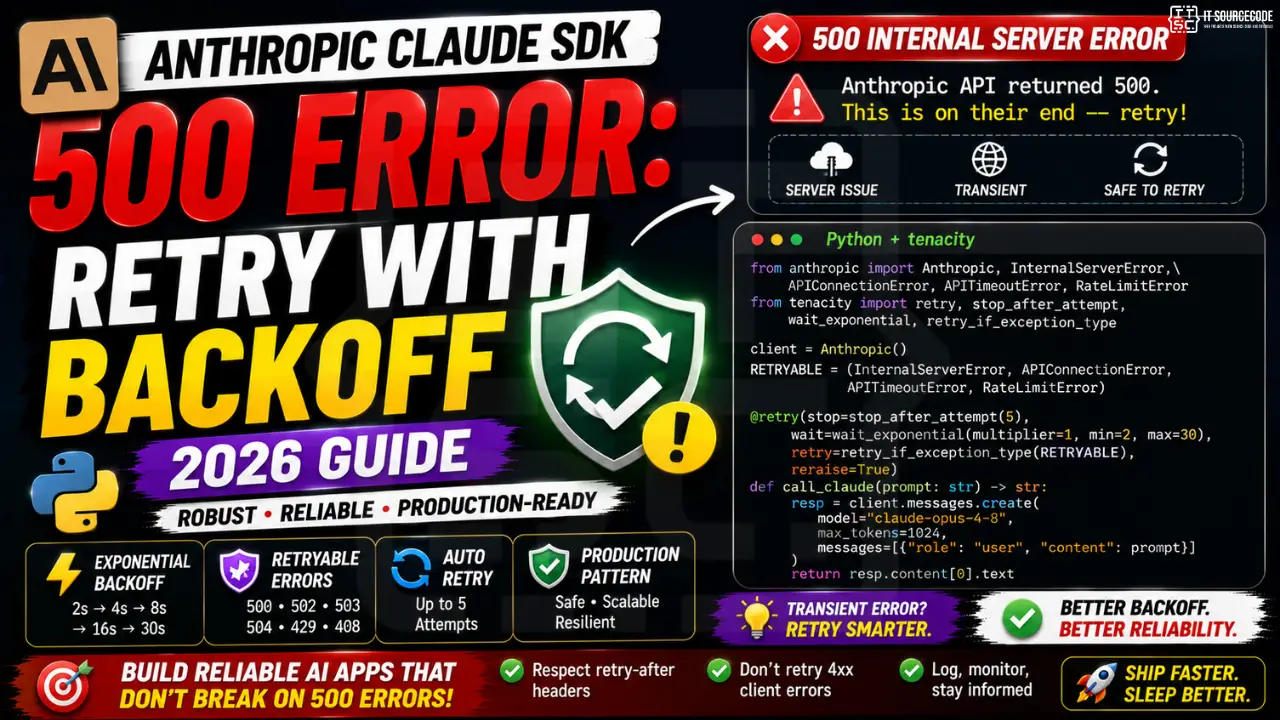
When to retry a 500 error
- 500, 502, 503, 504 from Anthropic: retry with backoff. These are transient server issues.
- 429 (rate limit): retry with backoff and respect the
retry-afterheader. - 408 (timeout): retry.
- 400 (bad request), 401 (auth), 403 (forbidden), 404, 422: do not retry. Fix the request.
The fix: tenacity + typed SDK exceptions
import anthropic
from anthropic import (
    InternalServerError,
    APIConnectionError,
    APITimeoutError,
    RateLimitError,
)
from tenacity import (
    retry,
    stop_after_attempt,
    wait_exponential,
    retry_if_exception_type,
)

client = anthropic.Anthropic()

RETRYABLE = (
    InternalServerError,   # 5xx
    APIConnectionError,    # network hiccup
    APITimeoutError,       # 408
    RateLimitError,        # 429
)

@retry(
    stop=stop_after_attempt(5),
    wait=wait_exponential(multiplier=1, min=2, max=30),
    retry=retry_if_exception_type(RETRYABLE),
    reraise=True,
)
def call_claude(prompt: str) -> str:
    resp = client.messages.create(
        model="claude-opus-4-8",
        max_tokens=1024,
        messages=[{"role": "user", "content": prompt}]
    )
    return resp.content[0].text

# Usage: retries transient errors 4 more times, then re-raises
try:
    reply = call_claude("Summarize the water cycle")
    print(reply)
except InternalServerError as e:
    print(f"Anthropic still failing after retries: {e}")
except RateLimitError as e:
    print(f"Rate limit persists: {e}")
Backoff timing that works in production
The wait_exponential(multiplier=1, min=2, max=30) pattern produces this retry schedule: 2s, 4s, 8s, 16s, capped at 30s. Total worst-case wait for 5 attempts is roughly 60 seconds, which most 500-class outages recover from.
Do not use wait_fixed(1). Hammering Anthropic’s API with 1-second retries during a partial outage makes the situation worse for everyone including you. Exponential backoff gives their infrastructure room to recover.
Handling the retry-after header on 429
from tenacity import wait_exponential, RetryCallState

def rate_limit_aware_wait(state: RetryCallState):
    """Honor Anthropic's retry-after header when present, else exponential."""
    exc = state.outcome.exception()
    if isinstance(exc, anthropic.RateLimitError):
        retry_after = exc.response.headers.get("retry-after")
        if retry_after:
            return int(retry_after)
    return wait_exponential(multiplier=1, min=2, max=30)(state)

@retry(
    stop=stop_after_attempt(5),
    wait=rate_limit_aware_wait,
    retry=retry_if_exception_type(RETRYABLE),
    reraise=True,
)
def call_claude_rate_aware(prompt: str) -> str:
    resp = client.messages.create(
        model="claude-opus-4-8",
        max_tokens=1024,
        messages=[{"role": "user", "content": prompt}]
    )
    return resp.content[0].text
Debugging checklist
- Check Anthropic’s status page (
status.anthropic.com) before assuming your code is broken. - Log the full exception chain, not just the message. The SDK exception object exposes
.response.status_code,.response.headers, and the raw request ID. - Instrument retry attempts. If retries always succeed on attempt 2 or 3, your baseline error rate is fine. If retries frequently exhaust, escalate to Anthropic support with request IDs.
- Cap total retry wait time. Do not let a background job retry for 10 minutes silently. Wrap the retry decorator in a per-call timeout.
Common mistakes with 500 handling
- Catching
Exceptionand retrying blindly. This retries 400 auth errors too, which is wasted work. Catch typed SDK exceptions. - Using fixed 1-second retry. Amplifies outages. Always use exponential backoff.
- No max attempts. Infinite retry loops during a real outage burn budget for no benefit. Cap at 5 attempts.
- Silent retry. Log every retry. If your monitoring shows retry rate above 5%, something is wrong upstream.
Debugging checklist for the Anthropic SDK error
Before diving into fixes, run through this diagnostic checklist. Nine times out of ten the answer surfaces here.
- Read the full traceback, not just the error message. The stack trace shows exactly which line and which call chain triggered the error. The last line names the immediate cause; earlier lines show how you got there.
- Add print or debug statements just before the failing line. Print the variable, its type, and its value. Nine out of ten error surprises come from the value being different from what you assumed.
- Check Python version compatibility. Errors sometimes result from APIs that changed between versions. Run your interpreter version check and compare against the library documentation for that version.
- Isolate the failing call in a minimal reproducer. Copy the failing line into a small standalone script with hardcoded inputs. If it fails there too, the bug is in your code. If not, something in your surrounding context is contributing.
- Search the exact error message. Include the class name and the specific text in your search. Chances are someone else hit the same issue and the fix is documented on Stack Overflow or the library’s GitHub issues.
Common causes for the Anthropic SDK error
Most instances of this error trace back to one of these root causes:
- Uninitialized or missing input. A variable was not populated before use, or the input source (file, API response, database row) did not contain the expected key or value.
- Type mismatch. The code expected a specific type (dict, list, string) but received something different. Python’s dynamic typing means this often surfaces at runtime, not at compile time.
- Version drift. The library API changed and your code assumes the old signature. Check the library’s changelog for breaking changes since the version you last used.
- Race condition or ordering issue. Async or concurrent code sometimes tries to access data before it is ready. Add awaits, locks, or explicit ordering to fix.
- Copy-paste from stale tutorial. Older tutorials may use APIs that no longer exist. Always check the official docs for the current version.
Testing and prevention
Preventing this class of error from recurring is more valuable than fixing it once. Build these habits into your workflow:
- Write tests that trigger the error path. If your test suite hits the error scenario, catch and assert it. A well-written test prevents the same bug from returning.
- Validate inputs at API boundaries. When data enters your code from external sources (HTTP requests, file uploads, database queries), validate structure and types immediately.
- Use type hints and static analysis. Tools like mypy for Python or TypeScript for JavaScript catch many type mismatches before you run the code.
- Log important state. Structured logging with context helps you debug production issues faster. Include enough context to reconstruct what happened.
- Read the library changelog. Before upgrading a dependency, skim the changelog for breaking changes. Two minutes of reading saves an hour of debugging.
When to ask for help
Some errors are worth solving yourself for the learning. Others are worth asking about early. Ask for help when: the error blocks a customer-facing feature, you have spent an hour without progress, the error involves security or data integrity, or you are unsure whether your fix will introduce new bugs. Post to Stack Overflow with a minimal reproducer, or ask a senior developer on your team. Time boxes are your friend.
Official documentation
Quick step-by-step summary (click to expand)
- Identify the error type. Check if the 500 is InternalServerError or APIStatusError. Both are transient and worth retrying.
- Wrap the SDK call in try-except. Catch anthropic.InternalServerError and anthropic.APIStatusError specifically.
- Implement exponential backoff. Wait 1s, then 2s, then 4s between retries. Cap at 3-5 attempts.
- Log the retry attempts. Print or log each retry with the attempt number so production issues are traceable.
- Raise on final failure. After max retries, re-raise the original exception so upstream code can handle the ultimate failure.
Frequently Asked Questions
Does the Anthropic SDK retry automatically?
The SDK includes basic built-in retry logic for some transient errors but does not cover every scenario. For production apps, layer tenacity on top so you can customize backoff, log attempts, and honor retry-after headers.
How many retries is safe?
5 attempts with exponential backoff covers most transient outages. Beyond that you are usually facing a longer outage that retry cannot help with.
Should I retry 400 errors?
No. 400 means your request is malformed. Fix the request. Retrying wastes API budget and pollutes your logs.
What if all retries fail?
Re-raise the exception and surface it to the user or your job queue. For user-facing paths show a soft error. For background jobs, requeue with a longer delay.
Can I use asyncio with this pattern?
Yes. Swap tenacity’s retry decorator for the async variant and use anthropic.AsyncAnthropic() client. The exception types and retry logic stay identical.

Adrian Mercurio
Full-Stack Developer at PIES IT Solution
Specializes in building complete capstone projects with full documentation. Strong background in PHP/MySQL development and database design. Has personally built and tested over 30 capstone-ready projects with ER diagrams, DFDs, and chapter-by-chapter thesis documentation.
Expertise: PHP · Laravel · Database Design · Capstone Projects · C# · C · View all posts by Adrian Mercurio →