

Have you ever come across the puzzling timestamp format “yyyy mm ddt00 00 00.000 z” and wondered what it signifies?
Well, wonder no more! This intriguing format holds the key to representing dates and times in a distinct way.
Let’s break it down: the year, month, and day are self-explanatory, but what about that “t” and the zeros following it? And why does it end with a mysterious “z“?
In this article we will demystify this format, making it not only comprehensible but also usable for your projects.
Whether you’re a coder, a curious mind, or both, let’s dive in and shed light on the fascinating world of timestamps!
What is yyyy mm ddt00 00 00.000 z?
The format “yyyy mm ddt00 00 00.000 z” appears to represent a timestamp in a specific format, where:
- “yyyy” represents the year (e.g., 2023)
- “mm” represents the month (e.g., 08 for August)
- “dd” represents the day of the month (e.g., 16)
- “t” is a literal character, possibly indicating the separation between the date and time components
- “00 00 00.000” likely represents the time in hours, minutes, seconds, and milliseconds (all zeros in this case, indicating midnight)
- “z” usually stands for “Zulu” or “Zulu Time,” which is another term for Coordinated Universal Time (UTC)
Therefore, “yyyy mm ddt00 00 00.000 z” would represent a timestamp at midnight (00:00:00.000) on a specific date in UTC (Zulu Time).
For instance, “2023 08 16t00 00 00.000 z” would represent August 16, 2023, at midnight in UTC.
How to use yyyy mm ddt00 00 00.000 z?
Since the format(“yyyy mm ddt00 00 00.000 z“) has a slight variation from the standard ISO 8601 format.
In this format, the day and month components have only a single digit, and the literal “t00 00 00.000 z” appears instead of the time components.
If this is a custom format you’re working with, you might need to perform some manual string manipulation to achieve the desired output.
Here are the approaches to achieving this.
Method 1: Use string Concatenation
function formatDate(date) {
  const year = date.getFullYear();
  const month = date.getMonth() + 1;
  const day = date.getDate();

  const formattedDate = year + " " + month + " " + day + "t00 00 00.000 z";
  return formattedDate;
}

const currentDate = new Date();
const formattedDate = formatDate(currentDate);
console.log(formattedDate);
Method 2: Use Template Literals
function formatDate(date) {
  const year = date.getFullYear();
  const month = date.getMonth() + 1;
  const day = date.getDate();

  const formattedDate = `${year} ${month} ${day}t00 00 00.000 z`;
  return formattedDate;
}

const currentDate = new Date();
const formattedDate = formatDate(currentDate);
console.log(formattedDate);
Keep in mind these approaches are intended to manually construct the string according to the custom format requirements since it varies from the standard ISO 8601 format.
Nevertheless, it prevents you from using the built-in method toISOString() to achieve this specific format.
Using toISOString() Method
Here is the example program that demonstrates how to use yyyy mm ddt00 00 00.000 z using default function toISOString().
const now = new Date();
const formattedDate = now.toISOString();
console.log(formattedDate);
Result:
2023-08-16T01:46:56.188ZThis code creates a new Date object representing the current date and time, then uses the toISOString() method to convert it to a string in the yyyy-mm-ddT00:00:00.000Z format. The resulting string is then logged to the console.
Frequently Asked Questions
If you have a date string in JavaScript that includes a ‘Z’ character (indicating a UTC timestamp), and you want to remove the ‘Z’ and work with the local time instead, you can do the following:
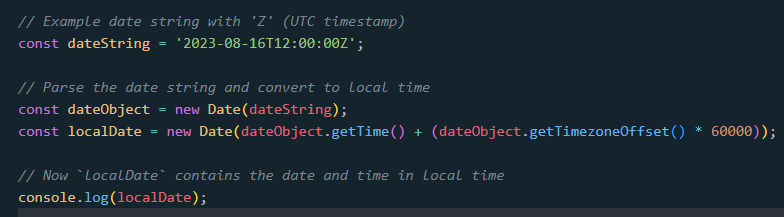
In this example, we:
Parse the input date string using new Date(dateString) to create a Date object.
Calculate the local time by adding the time zone offset (in minutes) multiplied by 60,000 milliseconds to the UTC timestamp.
The resulting localDate object will represent the date and time in the local time zone.
In JavaScript, the “Z” at the end of a time string represents the UTC time zone.
Additionally, UTC stands for Coordinated Universal Time and is often referred to as “Zulu Time” in aviation and military contexts. It is a standardized time reference that does not account for daylight saving time or any local time zone adjustments.
To get the current date and time in ISO 8601 format in JavaScript, you can use the toISOString() method of the Date object. Here’s how you can do it:

The toISOString() method returns a string representing the date and time in the ISO 8601 format, including the time zone information.
The resulting string will look something like this: “2023-08-16T12:34:56.789Z“, where T separates the date and time components, and Z indicates the UTC time zone.
I think we already covered everything we need to know about this article trying to convey.
Nevertheless, you can also check these articles to enhance your JavaScript date manipulation skills.
Conclusion
To sum up, this article explains the “yyyy mm ddt00 00 00.000 z” timestamp format, used for representing dates and times. It breaks down the format’s components and usage:
- “yyyy”: year
- “mm”: month
- “dd”: day
- “t”: separator
- “00 00 00.000”: midnight time
- “z”: UTC time
Methods to use the format are demonstrated, either manually with string manipulation or by leveraging JavaScript’s toISOString() method. The article also addresses common questions about JavaScript date manipulation and suggests related articles for further learning.
Official documentation
Frequently Asked Questions
Is JavaScript still worth learning in 2026?
What is the difference between var, let, and const?
Which JavaScript version should I target in 2026?
What is the best free editor for JavaScript?
How do I run JavaScript locally vs in the browser?
What can I build with JavaScript for my BSIT capstone?

Glay Eliver
Programmer & Technical Writer at PIES IT Solution
Glay Eliver is a programmer and writer at PIES IT Solution, author of over 600 tutorials at itsourcecode.com. Specializes in JavaScript tutorials, Microsoft Office how-tos (Excel, Word, PowerPoint), and Python error debugging covering ImportError, TypeError, AttributeError, ModuleNotFoundError, and JavaScript ReferenceError. Authored several of the site’s highest-traffic Excel and MS Office reference articles.
Expertise: JavaScript · MS Excel · MS Word · MS PowerPoint · Python · Python ImportError · Python TypeError · Python AttributeError · ModuleNotFoundError · JavaScript ReferenceError · Pygame
· View all posts by Glay Eliver →