

This tutorial about How To Code A Calendar In Python is a simple project that is easy to understand and manipulate the code given.
This simple tutorial will teach you on How To Print Calendar using console based.
In Making A Calendar In Python defines an inbuilt module Calendar which handles operations related to calendar.
Calendar Module allows output calendars like the program and provides additional useful functions related to the calendar.
Project Information’s
| Project Name: | Calendar in Python |
| Language/s Used: | Python Console Based |
| Python version (Recommended): | 2.x or 3.x |
| Database: | None |
| Type: | Python Console Program |
| Developer: | IT SOURCECODE |
| Updates: | 0 |
Also, This Calendar Program In Python Functions and classes defined in Calendar module use an idealized calendar, the current Gregorian calendar extended indefinitely in both directions.
By default, these calendars have Monday as the first day of the week, and Sunday as the last (the European convention).
In this Calendar In Python Code also include includes a downloadable Simple Project With Source Code for free, just find the downloadable and click to start downloading.
Calendar In Python Classes
Calendar class creates a Calendar object. A Calendar object provides several methods that can be used for preparing the calendar data for formatting.
This class doesn’t do any formatting itself. This is the job of subclasses. Calendar class allows the calculations for various task based on date, month, and year. Calendar class provides the following methods:
- iterweekdays() – Returns an iterator for the week day numbers that will be used for one week.
- itermonthdates() – Returns an iterator for the month (1-12) in the year.
- itermonthdays() – Returns an iterator of a specified month and a year.
- itermonthdays2() – Method is used to get an iterator for the month in the year similar to itermonthdates(). Days returned will be tuples consisting of a day of the month number and a week day number.
- itermonthdays3() – Returns an iterator for the month in the year similar to itermonthdates(), but not restricted by the datetime.date range. Days returned will be tuples consisting of a year, a month and a day of the month numbers.
- itermonthdays4() – Returns an iterator for the month in the year similar to itermonthdates(), but not restricted by the datetime.date range. Days returned will be tuples consisting of a year, a month, a day of the month, and a day of the week numbers.
- monthdatescalendar() – Used to get a list of the weeks in the month of the year as full weeks.
- monthdays2calendar() – Used to get a list of the weeks in the month of the year as full weeks.
- monthdayscalendar – Used to get a list of the weeks in the month of the year as full weeks.
- yeardatescalendar() – Used to get a list of the weeks in the month of the year as full weeks.
- yeardays2calendar() – Used to get the data for specified year. Entries in the week lists are tuples of day numbers and weekday numbers.
- yeardayscalendar() – Used to get the data for specified year. Entries in the week lists are day numbers.
By the way if you are new to python programming and you don’t know what would be the the Python IDE to use, I have here a list of Best Python IDE for Windows, Linux, Mac OS that will suit for you. I also have here How to Download and Install Latest Version of Python on Windows.
To start executing this tutorial to Display Calendar In Python, make sure that you have installed Python 3.9 and PyCharm in your computer.
How To Code A Calendar in Python?
Here’s the steps to print or create a calendar in python.
1. Install Library
Code:
import calendarExplanation:
The code given above is the required library to be install in the system to display calendar.
2. Print The Calendar
Code:
print("The calender of year 2021 is : ")
print(calendar.calendar(2021, 2, 1, 6))
Explanation:
The code given above is to print the 2021 year calendar.
3. Complete Source Code
# importing calendar module
# for calendar operations
import calendar

# using calender to print calendar of year
# prints calendar of 2021
print("The calender of year 2021 is : ")
print(calendar.calendar(2021, 2, 1, 6))
Output
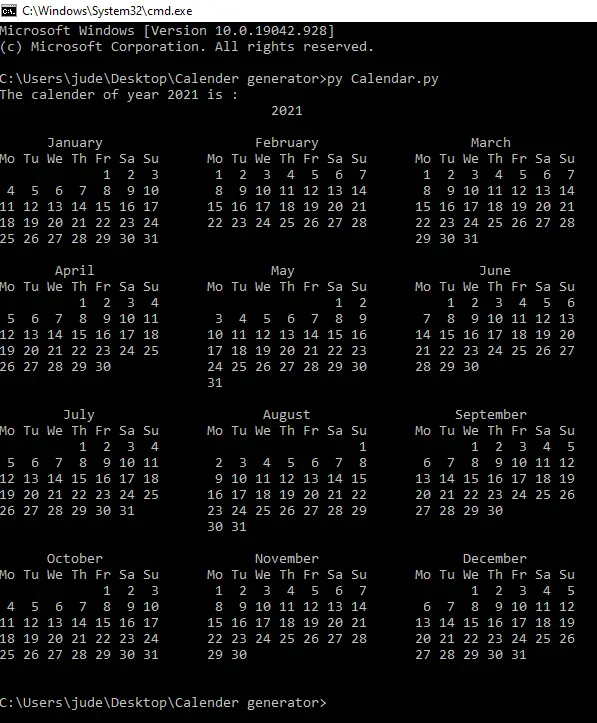
Display Calendar In Python With Source Code : Steps on how to run the project
Time needed: 5 minutes
These are the steps on How To Print Calendar In Python
- Step 1: Download the given source code below.
First, download the given source code below and unzip the source code.

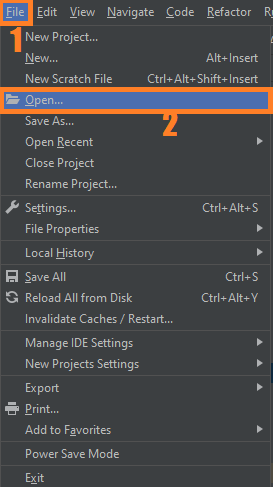
- Step 2: Import the project to your PyCharm IDE.
Next, import the source code you’ve download to your PyCharm IDE.

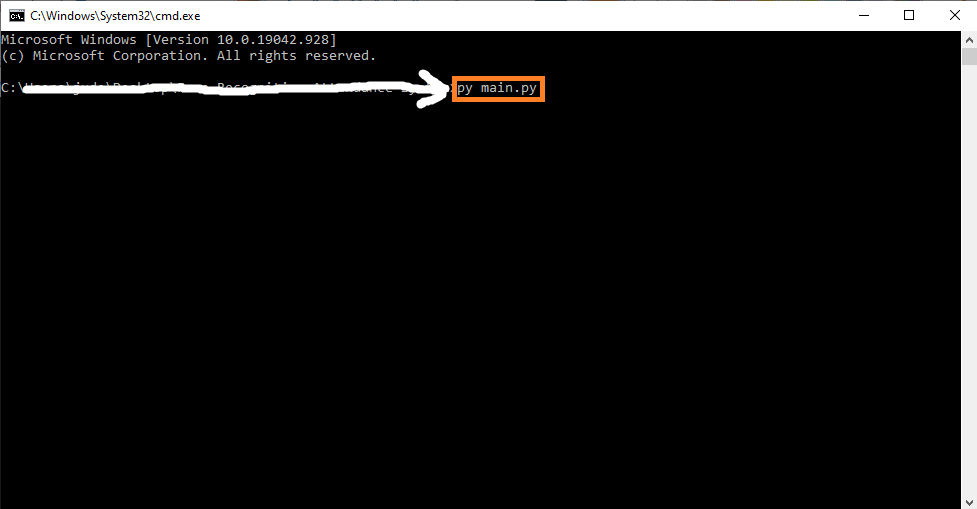
- Step 3: Run the project.
last, run the project with the command “py main.py”

Download Source Code below
Summary
Calendar In Python Functions and classes defined in Calendar module use an idealized calendar, the current Gregorian calendar extended indefinitely in both directions.
By default, these calendars have Monday as the first day of the week, and Sunday as the last (the European convention).
Related Articles
- Code For Game in Python: Python Game Projects With Source Code
- Best Python Projects With Source Code 2020 FREE DOWNLOAD
- How to Make a Point of Sale In Python With Source Code 2021
- Python Code For Food Ordering System | FREE DOWNLOAD | 2020
- Inventory Management System Project in Python With Source Code
Inquiries
If you have any questions or suggestions about on How To Code A Calendar In Python, please feel free to leave a comment below.
Official documentation
Frequently Asked Questions
What does this Python tutorial cover?
Focused Python language or library tutorial showing a single concept with working code. Use as building block when assembling a larger system.
What Python version and libraries does this project require?
Most projects in this batch use Python 3.10, 3.11, or 3.12 (avoid 3.13 until library wheels catch up). Standard libs: tkinter (built-in), sqlite3 (built-in). External: pip install pillow opencv-python pygame mysql-connector-python reportlab requests beautifulsoup4. Check the requirements.txt file (if included) for exact versions.
How do I set up the database for this Python project?
For SQLite (most common, no setup needed): the .db file auto-creates on first run. For MySQL: install MySQL Server + MySQL Workbench, create an empty database, import the included .sql file, edit the connection string in db.py (or db_connect.py) with your host, user, password, database name.
Can I use this Python project for a BSIT capstone or thesis?
Yes. Python is rising fast in Philippine BSIT panels. Extend it: add user roles via auth module, dashboards (matplotlib charts), PDF reports (reportlab), email notifications (smtplib), real domain extension (analytics, audit log, multi-branch support). Pair with Chapter 1-5 documentation matching your panel’s rubric.
Why am I getting ‘ModuleNotFoundError’ or ‘No module named X’?
Three common Python issues: (1) Module not installed: pip install
Where can I find more Python projects with source code?
Browse the Python Projects hub for the full library. For computer vision specifically see OpenCV Projects (46 vision systems). For ML / AI capstones see Machine Learning Projects. For BSIT capstone idea lists see 150 Best Capstone Project Ideas.

Angel Jude Suarez
Full-Stack Developer at PIES IT Solution
Focuses on Python development, machine learning, and AI integration. Has built production AI systems including OpenAI Whisper integration for medical transcription and GPT-4o-powered diagnosis assistance. Strong background in pandas, scikit-learn, and TensorFlow.
Expertise: Python · PHP · Java · VB.NET · ASP.NET · Machine Learning · AI Integration · OpenCV · Django · CodeIgniter · View all posts by Angel Jude Suarez →