
The Point Of Sale System Project in CodeIgniter focuses on dealing with stock goods in terms of total incoming and outgoing items, among other things.
The system also shows all of the accessible information on suppliers, items, and their units, types, and other characteristics.
In addition, the system allows you to manage product kinds by simply typing their names into the system.
About The Project
A POS System Project In CodeIgniter, Admin and Employee Panel are the two sections of the project.
In this web application’s overview, the administrator has access to everything and can quickly manage it.
The supplier’s record can be managed by the admin.
When it comes to keeping track of inbound goods transactions, supplier records are crucial.
In addition, the administrator must keep track of things linked to goods, such as their units and categories.
The user must input a name, select a unit, and set a price to manage items. By default, the quantity value of goods remains 0 after entering goods data; which admin should later maintain from arriving products.
Project Information
| Project Name: | Point of Sale System In CodeIgniter With Source Code |
| Language/s Used: | PHP with CodeIgniter Web Framework |
| PHP version (Recommended): | 5.6.3, 7.4.12 |
| Database: | MySQL |
| Type: | Website, Web Application |
| Developer: | IT SOURCECODE |
| Updates: | 0 |
What is CodeIgniter?
CodeIgniter is an Application Development Framework – a toolset – for PHP web site developers. Its purpose is to let you construct projects much faster than if you were programming code from start by providing a rich set of libraries for common activities, as well as a simple interface and logical structure to access these libraries.
By reducing the amount of code required for a given operation, CodeIgniter allows you to focus more creatively on your project.
Point Of Sale System In CodeIgniter: Features
- Admin Panel
- Employee Panel
- Supplier Management
- Units and Types Setup
- Stock Goods Management
- Maintain Incoming Goods (Purchase)
- Manages Outgoing Goods (Sales)
- Discounts
- Generate Invoices
- Fetch and Download Reports
- User Settings
- User Management
- Activate/Deactivate Users
- Graphical Representation
- Total Earnings Till Date
- Minimum Goods Stock Overview
- Top Recent Purchase Transaction Overview
- Top Recent Sales Transaction Overview
This CodeIgniter Project With Source Code also includes a downloadable CodeIgniter Source Code for free, just find the downloadable source code below and click to start downloading.
I have here a suggested list of CodeIgniter Projects with Source Code Free Download and I’m sure this can help you to improve your skills in CodeIgniter under PHP programming and web development as a whole.
To start executing a Point Of Sale System Project In CodeIgniter With Source Code, makes sure that you have any platform in creating a JavaScript, CSS, bootstrap, and HTML installed in your computer, in my case I will use Sublime Text.
Steps On How To Run The Point Of Sale System Project In CodeIgniter With Source Code
Time needed: 5 minutes
These are the steps on how to run Point Of Sale System Project In CodeIgniter With Source Code
- Download Source Code
First, find the downloadable source code below and click to start downloading the source code file.

- Extract File
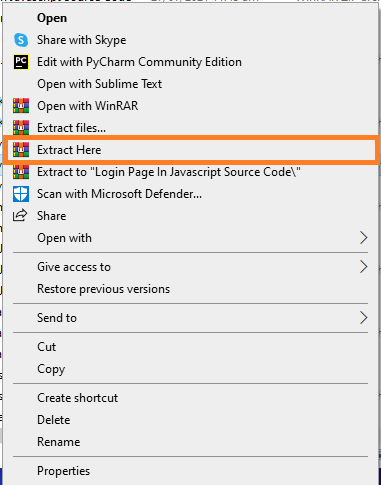
Next, after finished to download the file, go to file location and right click the file and click extract.

- Copy Project Folder
Next, copy the project folder and paste it to C:\xampp\htdocs.

- Open Xampp
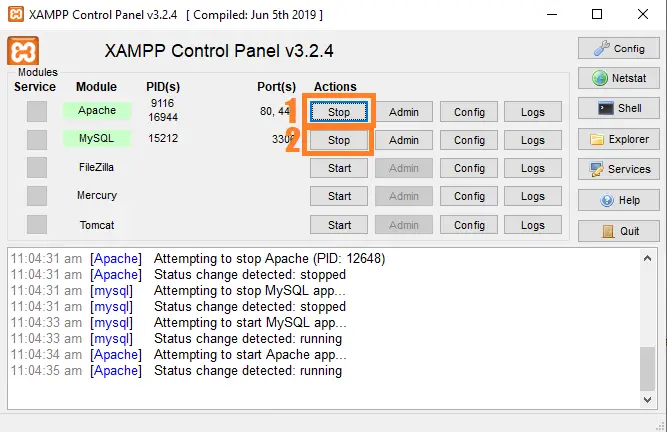
Next, open xampp and start the apache and mysql

- Create Database
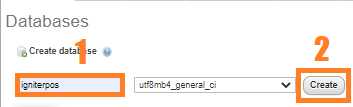
Next, click any browser and type to the URL localhost/phpmyadmin and create database.

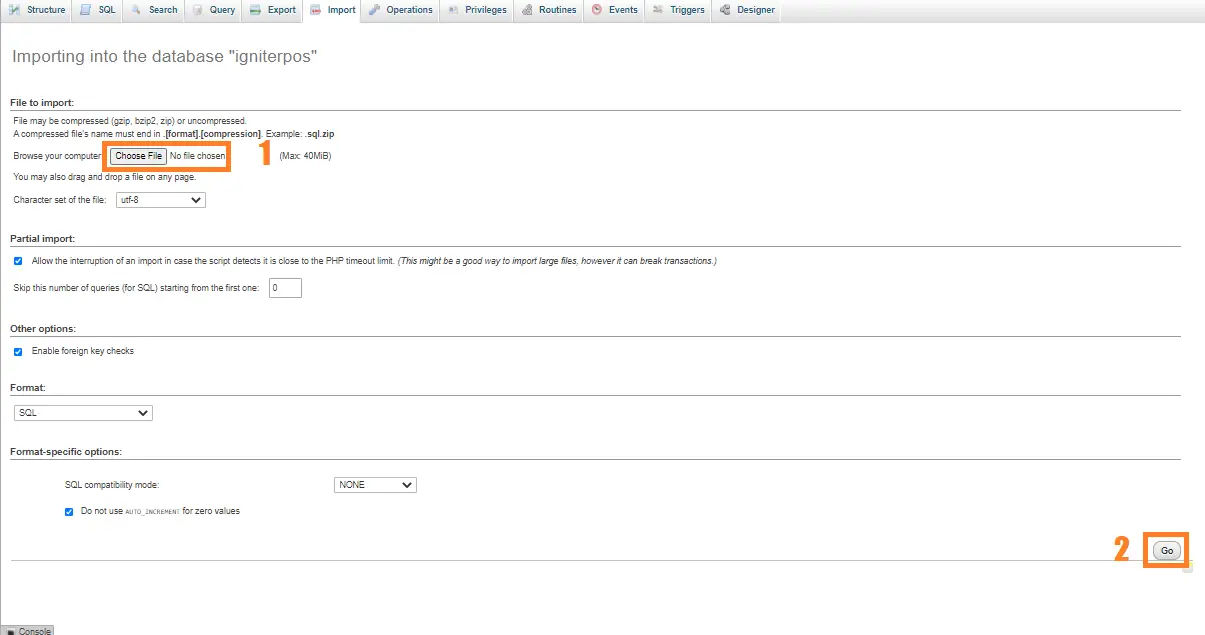
- Import Database
Next, click the created database and click import to the right tab and click choose file and import the sql file inside the download folder.

- Execute Project
Final, type to the URL localhost/pos-codeigniter




Project Output

Download Source Code below
Anyway, if you want to level up your programming knowledge, especially PHP, try this new article I’ve made for you Best PHP Projects With Source Code Free Download.
Summary
As a result, this System is a basic project for all beginning and intermediate CodeIgniter users who want to broaden their understanding of PHP web applications.
Finally, the entire PHP project with open source code is an absolute project and a valuable way for users to understand and explore more about it.
I hope this project Point of Sale System using PHP MySQL will help you with what you are looking for and hope that you will learn something with this project that is useful for your future projects.
Official documentation
Frequently Asked Questions
How does this CodeIgniter Point of Sale (POS) system work?
Cashier UI for adding items to cart, scanning barcodes or searching by name, applying discounts, accepting cash/card/digital wallet, printing receipts (via window.print or TCPDF). Real-time inventory deduction. Daily Z-report. Often paired with inventory module.
What CodeIgniter and PHP versions does this project require?
Most projects in this batch use CodeIgniter 3 (CI3 – the dominant version on tutorial sites) which runs on PHP 5.6 to PHP 8.1. A few newer projects use CodeIgniter 4 which requires PHP 7.4+. Check the system/CodeIgniter.php file or composer.json for exact version. To run: extract to your htdocs (XAMPP/WAMP/Laragon), update application/config/database.php with your MySQL credentials, import the included .sql file via phpMyAdmin, browse to the project folder URL.
How do I set up the database for this CodeIgniter project?
Open phpMyAdmin (or MySQL client), create a new empty database (typical names: ci_school, ci_pos, etc.). Import the included .sql file via the Import tab. Edit application/config/database.php: set ‘hostname’ to localhost, ‘database’ to the new DB name, ‘username’ and ‘password’ to your local MySQL credentials. If using CodeIgniter 4: edit .env with database.default.* settings.
Can I use this CodeIgniter project for a BSIT capstone or thesis?
Yes, but extend it. A bare CRUD app is too narrow for full capstone scope. Add: user roles via session checks, reports/dashboards (Chart.js + AJAX), PDF exports (TCPDF library), email notifications (CodeIgniter Email library), real domain extension (analytics, audit log, multi-branch support). Pair with Chapter 1-5 documentation matching your panel’s rubric.
Why am I getting ‘An Error Was Encountered’ or ‘404 Page Not Found’ errors?
Three common CodeIgniter issues: (1) Wrong base_url in application/config/config.php, set $config[‘base_url’] to your actual project URL (e.g. http://localhost/myproject/). (2) Apache mod_rewrite not enabled, run sudo a2enmod rewrite (Linux) or check XAMPP/WAMP config. (3) Missing .htaccess in project root with proper RewriteRule. For DB errors: verify credentials in application/config/database.php match your MySQL setup.
Where can I find more CodeIgniter projects with source code?
Browse the CodeIgniter Projects hub for the full library. For broader PHP capstones see PHP Projects (300+ vanilla PHP + MySQL systems). For modern PHP MVC alternatives see Laravel Projects (74 systems). For BSIT-focused capstone idea lists see 150 Best Capstone Project Ideas.
Related PHP Projects
- Laravel Point Of Sale Source Code
- Nsca Multipurpose Cooperative Point Of Sales System
- Online Voting System Project In CodeIgniter With Source Code
- Student Management System Project In CodeIgniter With Source Code
- Courier Management System Project In CodeIgniter With Source Code
- Restaurant Management System Project In CodeIgniter With Source Code
Inquiries
If you have any questions or suggestions about Point Of Sale System Project In CodeIgniter With Source Code, please feel free to leave a comment below.

Angel Jude Suarez
Full-Stack Developer at PIES IT Solution
Focuses on Python development, machine learning, and AI integration. Has built production AI systems including OpenAI Whisper integration for medical transcription and GPT-4o-powered diagnosis assistance. Strong background in pandas, scikit-learn, and TensorFlow.
Expertise: Python · PHP · Java · VB.NET · ASP.NET · Machine Learning · AI Integration · OpenCV · Django · CodeIgniter · View all posts by Angel Jude Suarez →
password?
Hello sir
Please send the zip password plz.
Hello po, ano po zip password?
Zip file password: itsourcecode or itsourcecode.com
Please Password. itsourcecode or itsourcecode.com don’t work.
The zip file password: itsourcecode