
The Restaurant Management System Project in CodeIgniter is a type of point-of-sale (POS) software made for restaurants, bars, food trucks, and other businesses in the food service industry.
In contrast to a point-of-sale (POS) system, an RMS takes care of all the back-end needs, such as managing inventory and staff.
About the Project
This Restaurant Management System In CodeIgniter is primarily concerned with the restaurant’s many vital records and data
The system also shows all available information, such as users, items, categories, invoices, orders, and so on.
Furthermore, the system enables for the management of the system’s data.
The Admin Panel and Employee Panel are the two parts of this project Restaurant Management System In CodeIgniter.
In this web application’s overview, the administrator can see all of the available records and manage them quickly.
The administrator has the authority to control user groups such as cashier, manager, and others, each with their own set of regulations.
Project Information
| Project Name: | Restaurant Management System in CodeIgniter Source Code |
| Language/s Used: | PHP with CodeIgniter Web Framework |
| PHP version (Recommended): | 5.6.3, 7.4.12 |
| Database: | MySQL |
| Type: | Website, Web Application |
| Developer: | IT SOURCECODE |
| Updates: | 0 |
What is CodeIgniter?
CodeIgniter is an Application Development Framework – a toolset – for PHP web site developers.
Its purpose is to let you construct projects much faster than if you were programming code from start by providing a rich set of libraries for common activities, as well as a simple interface and logical structure to access these libraries.
By reducing the amount of code required for a given operation, CodeIgniter allows you to focus more creatively on your project.
After creating the groups, the administrator must enter the name of the store (restaurant).
When it’s finished, the admin can begin adding users to the system by selecting store names and groups.
Restaurant Management System CodeIgniter
The Restaurant Management System Using CodeIgniter is overseen by an administrator, who has ability to manage food categories, restaurant tables, and goods.
He or she should just enter a name and select whether the food category or table is active or inactive when creating food categories and tables.
The user must enter a name, price, and description for food products, as well as pick available stores and food categories.
After completing all of the restaurant’s record information, the administrator can ultimately control sales by selecting an available table, product names, and food quantities.
With this information, the system calculates the total net amount, including service tax and VAT, and shows it automatically.
The admin can then control the sales record by changing the status of the bill from outstanding to paid.
Features
- Admin Panel
- Employee Panel
- User Management
- User Groups Management
- Set User’s Access
- Store Management
- Restaurant’s Table Management
- Product and Categories Management
- Manage Food Orders
- View Total Earnings, Paid and Unpaid Bills
- View Monthly Reports
- Generate Invoice
- Manage Company Information
- View and Update Profile
- Search Functionalities
This CodeIgniter Project With Source Code also includes a downloadable CodeIgniter Source Code for free, just find the downloadable source code below and click to start downloading.
I have here a suggested list of CodeIgniter Projects With Source Code Free Download free to download and I’m sure this can help you to improve your skills in CodeIgniter under PHP programming and web development as a whole.
To start executing a Restaurant Management System Project In CodeIgniter With Source Code, makes sure that you have any platform in creating a JavaScript, CSS, bootstrap, and HTML installed in your computer, in my case I will use Sublime Text.
How to Run the Restaurant Management System Project In CodeIgniter With Source Code
Time needed: 5 minutes
These are the steps on how to run Restaurant Management System Project In CodeIgniter With Source Code.
- Download Source Code
First, find the downloadable source code below and click to start downloading the source code file.

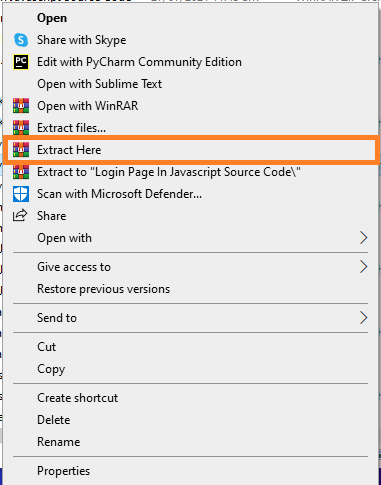
- Extract File
Next, after finished to download the file, go to file location and right click the file and click extract.

- Copy Project Folder
Next, copy the project folder and paste it to C:\xampp\htdocs.

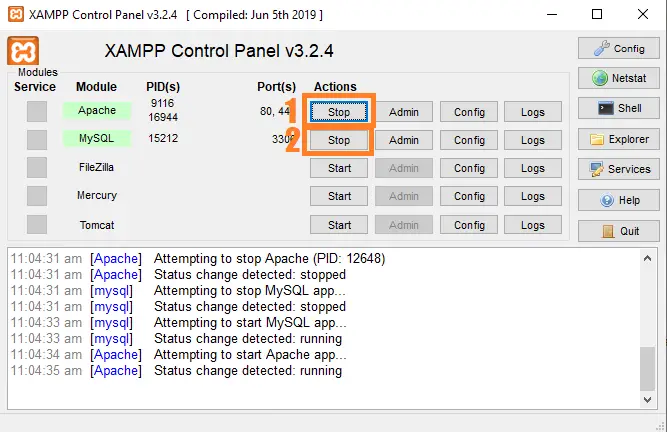
- Open Xampp
Next, open xampp and start the apache and mysql.

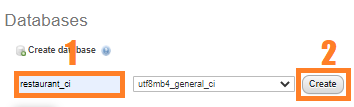
- Create Database
Next, click any browser and type to the URL localhost/phpmyadmin and create database.

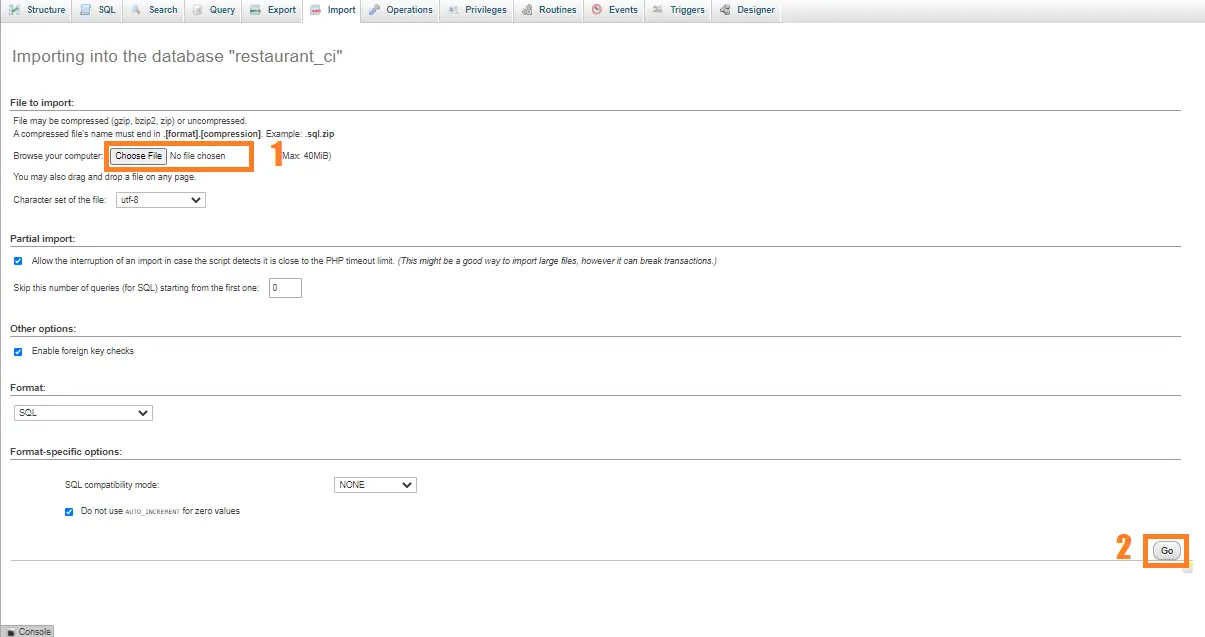
- Import Database
Next, click the created database and click import to the right tab and click choose file and import the sql file inside the download folder.

- Execute Project
final, type to the URL localhost/restaurantci.




Project Output

Download Source Code below
Anyway, if you want to level up your programming knowledge, especially PHP, try this new article I’ve made for you Best PHP Projects With Source Code Free Download.
Summary
As a result, this Restaurant Management System is a basic CodeIgniter project for all beginning and intermediate CodeIgniter users who want to broaden their understanding of PHP web applications.
Finally, the entire PHP project with open source code is an absolute project and a valuable way for users to understand and explore more about it.
Official documentation
Frequently Asked Questions
How does this CodeIgniter restaurant management system work?
Module split: menu inventory, customer orders, billing, kitchen queue, and reports. CodeIgniter MVC structure: Menu_model + Order_model + Customer_model. Real-time kitchen display via simple AJAX polling. Daily/weekly revenue reports via a Reports controller.
What CodeIgniter and PHP versions does this project require?
Most projects in this batch use CodeIgniter 3 (CI3 – the dominant version on tutorial sites) which runs on PHP 5.6 to PHP 8.1. A few newer projects use CodeIgniter 4 which requires PHP 7.4+. Check the system/CodeIgniter.php file or composer.json for exact version. To run: extract to your htdocs (XAMPP/WAMP/Laragon), update application/config/database.php with your MySQL credentials, import the included .sql file via phpMyAdmin, browse to the project folder URL.
How do I set up the database for this CodeIgniter project?
Open phpMyAdmin (or MySQL client), create a new empty database (typical names: ci_school, ci_pos, etc.). Import the included .sql file via the Import tab. Edit application/config/database.php: set ‘hostname’ to localhost, ‘database’ to the new DB name, ‘username’ and ‘password’ to your local MySQL credentials. If using CodeIgniter 4: edit .env with database.default.* settings.
Can I use this CodeIgniter project for a BSIT capstone or thesis?
Yes, but extend it. A bare CRUD app is too narrow for full capstone scope. Add: user roles via session checks, reports/dashboards (Chart.js + AJAX), PDF exports (TCPDF library), email notifications (CodeIgniter Email library), real domain extension (analytics, audit log, multi-branch support). Pair with Chapter 1-5 documentation matching your panel’s rubric.
Why am I getting ‘An Error Was Encountered’ or ‘404 Page Not Found’ errors?
Three common CodeIgniter issues: (1) Wrong base_url in application/config/config.php, set $config[‘base_url’] to your actual project URL (e.g. http://localhost/myproject/). (2) Apache mod_rewrite not enabled, run sudo a2enmod rewrite (Linux) or check XAMPP/WAMP config. (3) Missing .htaccess in project root with proper RewriteRule. For DB errors: verify credentials in application/config/database.php match your MySQL setup.
Where can I find more CodeIgniter projects with source code?
Browse the CodeIgniter Projects hub for the full library. For broader PHP capstones see PHP Projects (300+ vanilla PHP + MySQL systems). For modern PHP MVC alternatives see Laravel Projects (74 systems). For BSIT-focused capstone idea lists see 150 Best Capstone Project Ideas.
Related PHP Projects
- Online Restaurant Management System Project In PHP With Source Code
- Laravel Restaurant Management System With Source Code
- Pharmacy Management System Project In CodeIgniter With Source Code
- Bookstore Management System Project In CodeIgniter With Source Code
- Employee Management System Project In CodeIgniter With Source Code
- User Management System In CodeIgniter With Source Code
Inquiries
If you have any questions or suggestions about Restaurant Management System Project In CodeIgniter With Source Code, please feel free to leave a comment below.

Angel Jude Suarez
Full-Stack Developer at PIES IT Solution
Focuses on Python development, machine learning, and AI integration. Has built production AI systems including OpenAI Whisper integration for medical transcription and GPT-4o-powered diagnosis assistance. Strong background in pandas, scikit-learn, and TensorFlow.
Expertise: Python · PHP · Java · VB.NET · ASP.NET · Machine Learning · AI Integration · OpenCV · Django · CodeIgniter · View all posts by Angel Jude Suarez →
Hi,
What is the password to unzip de project?
Zip file password: itsourcecode or itsourcecode.com
What is the admin login username and pass??
Hi, i tried it on my localhost but after login it will redirect to folder /auth/login and inside the zip file theres no foldee of auth/login thank you