
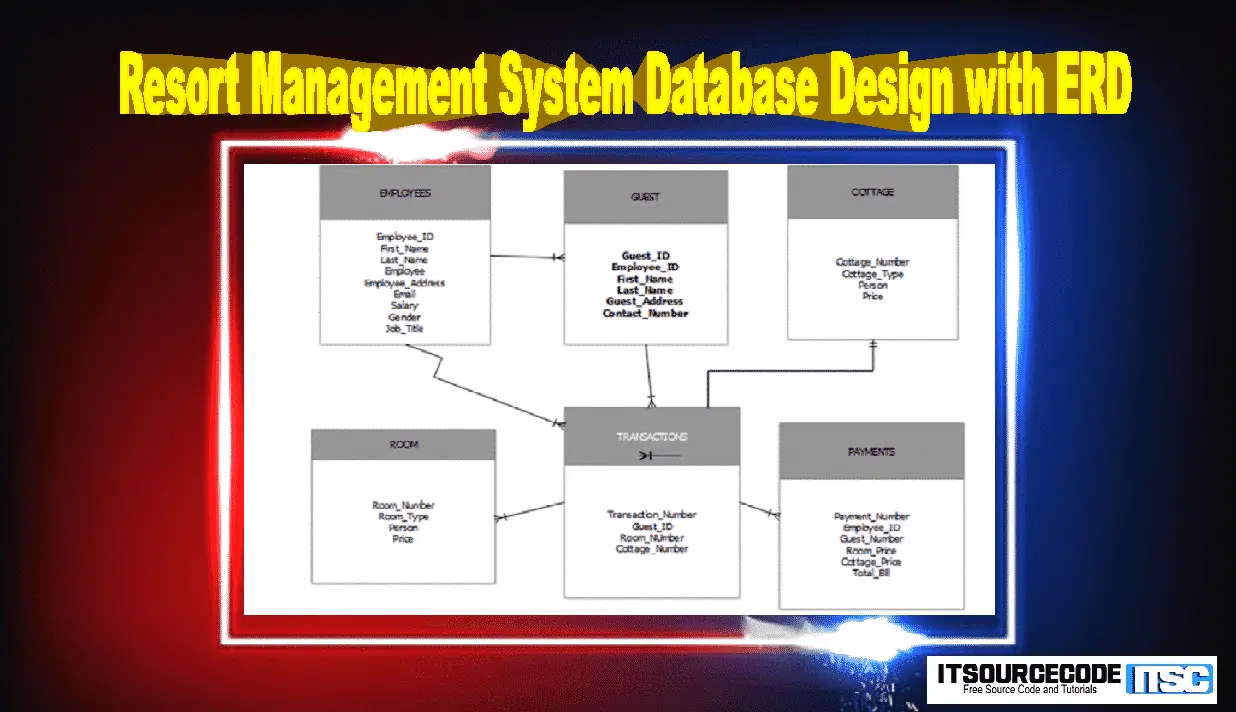
Resort Management System Database Design with ERD
This Resort Management System Database Design with ERD or ERD and Tables for Resort Management System provides you with accurate reservation tracking, excellent web presence, powerful report generation, comprehensive integrated accounting and more(Database Design for Resort Management System Project).
It is a place with pleasant environment to comfort, healthful relaxation and rest, offering food, sleeping accommodation and recreational facilities to the public for a fee.
A modern hotel unit must adapt to these new standards, or risk falling behind its competitors.
A resort nowadays needs to be connected to several online sales channels, while at the same time, maintaining a strong online presence of its own.
The use of a modern RMS (Resort Management System) can assist towards that end, by providing the necessary work structure, much needed automation and connectivity(ERD and Tables for Resort Management System).
Resort Management System is an act of controlling and making decision about or business, departments etc..
It means lot of efforts to be exerted, mind breaking thoughts and more bank accounts to be sift. It brings with it failures and chances of discouragement.
On the other hand, Resort Management System if done with dedication and passion will make one a ‘king’ because people nowadays are fond of taking vacations, living a stress free life(Database Design for Resort Management System Project)…
Resort Management System Database Design with ERD Features:
Resort Management System Features
- Manage Guest
- Monitor Transaction
- Generate Report
- Manage Employee
- Manage Room
Entity Relationship Diagram of Resort Management System
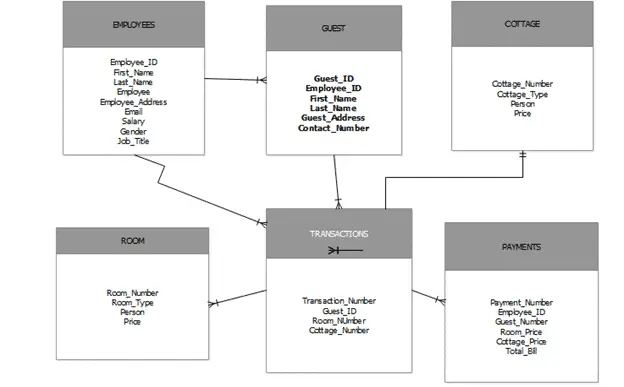
Resort Management System Database Design with ERD :
Data Dictionaries
Table 1 tblemployees
|
Field Name | Description | Type | Lenght |
| Employee_Id | Employee Id Number | int | 50 |
| First_Name | First name of Employee | Varchar | 50 |
| Last_Name | Last Name of Employee | Varchar | 50 |
| Employee_Address | Employee Address | Text | 50 |
| Email Address of Employee | Varchar | 50 | |
| Salary | Salary of Employee | Int | 50 |
| Gender | Employee Gender | Varchar | 50 |
| Job_Title | Job title of employee | Varchar | 50 |
Table 2: tblguest
|
Field Name | Description | Type | Length |
| Guest_ID |
Guest ID number | Int | 50 |
| First_Name |
First name of guest | Varchar | 50 |
| Last_Name |
Lastname of Guest | Varchar | 50 |
| Guest_Address |
Address of Guest | Text | 50 |
| Contact_Number |
Contact number of guest | varchar | 50 |
Table
3: tblcottage
|
Field Name | Description | Type | Length |
| Cottage_Number |
Number of cottage | Int | 50 |
| Cottage_Type |
Type of cottage | Varchar | 50 |
| Person |
Number of Person | Int | 50 |
| Price |
Price of cottage | Int | 50 |
Table
4: tblroom
|
Field Name | Description | Type | Length |
| Room_Number |
Number of Room | Int | 50 |
| Room_Type |
Type of Room | Varchar | 50 |
| Person |
Number of Person | Int | 50 |
| Price |
Price of Room | Int | 50 |
Table
5: tblpayments
|
Field Name | Description | Type | Length |
| Payment_Number |
Number of Payment | Int | 50 |
| Guest_Number |
Number of Guest | Int | 50 |
| Room_Price |
Room Price | Int | 50 |
| Cottage_Price |
Cottage Price | Int | 50 |
| Total_Bill |
Total of bill | Int | 50 |
Table
6: tbltransactions
|
Field Name | Description | Type | Length |
| Transaction_Number |
Number of Transaction | Int | 50 |
| Transaction_date |
Date of Transaction | Date | 50 |
| Guest_ID |
Guest ID number | Int | 50 |
| Room_Number |
Number of Room | Int | 50 |
| Cottage_Number |
Number of Cottage | Int | 50 |
Table
Key
|
Table Name |
Field Name |
Key Type | Length |
| Employee | Employee_Id | PK | 50 |
| Guest | Guest_Id | PK | 50 |
| Room | Room_Id | PK | 50 |
| Cottage | Cottage_Id | PK | 50 |
| Payments | Payments_Id | FK | 50 |
For another free material on database design.
- ER Diagram for Sales and Inventory System Database Design
- Ordering System Database Design with ERD
- ER Diagram for Water Refilling Station System Database
- Database Design for Grocery Management System
- Database Design for Auto parts Income Monitoring System
- Supply Management System Database Design with ERD
How to read an ER diagram
An entity-relationship (ER) diagram documents the database schema: entities (tables), attributes (columns), and relationships (foreign keys and cardinality).
- Entity. Rectangle representing a table.
- Attribute. Oval or field for each column.
- Primary key. Underlined attribute name.
- Foreign key. Attribute referencing another entity.
- Relationship. Diamond or line connecting related entities.
Common capstone mistakes to avoid
- Many-to-many without junction table.
- Missing primary key.
- Denormalized redundancy.
- Ambiguous naming.
Where this diagram fits in Chapter 3
- Section 3.3 (Database Design).
- Include the CREATE TABLE SQL script alongside.
- Reference from the class diagram.
- Include a legend to explain the notation for panel members.
Official documentation
Official documentation
Working source code for this system
Download the actual implementation of this system in your preferred language. Each project includes source code, database, and setup instructions for BSIT capstone use.
- PHP: Online Hotel Management System Project In PHP
- VB.NET: Monbela Hotel Management System Project Using VB.Net and MS Access Version 2.0.0
- Java: Hotel Management System Project in Java With Source Code
- Python: Django Hotel Management System With Source Code
- Django: Django Hotel Management System With Source Code
- Laravel: Hotel Management System Project in Laravel With Source Code
Frequently asked questions
What is a ER diagram used for in BSIT capstone?
An ER diagram shows the database schema: entities (tables), attributes (columns), and relationships (foreign keys, cardinality). It goes in Chapter 3 alongside the class diagram to communicate the data storage design.
What tool should I use to draw the ER diagram?
Free options: draw.io, Lucidchart free tier, PlantUML, StarUML 30-day trial, Visual Paradigm Community Edition. Paid options: Microsoft Visio, Lucidchart pro, Enterprise Architect. For BSIT capstones, draw.io is the most commonly used free tool.
How detailed does the ER diagram need to be for capstone defense?
Panel members expect the diagram to match the actual system implementation. Include every major class/use case/entity relevant to the system. Omit trivial helper classes. Every diagram element should have a clear justification.
Should I use black-and-white or colored diagrams?
Black-and-white is standard for capstone documentation to match the thesis format. Use color only if it improves clarity. Ensure text is readable at printed size (10pt minimum for labels).
Where does this diagram go in the capstone documentation?
Chapter 3 (System Design and Methodology) typically holds all UML diagrams. Introduce each diagram with a 1-paragraph description explaining what it shows and how to read it.
Frequently asked questions
What is a ER diagram used for in BSIT capstone?
An ER diagram shows the database schema: entities (tables), attributes (columns), and relationships (foreign keys, cardinality). It goes in Chapter 3 alongside the class diagram to communicate the data storage design.
What tool should I use to draw the ER diagram?
Free options: draw.io (browser-based, saves to Google Drive), Lucidchart free tier, PlantUML (text-based, version-controllable), StarUML (30-day trial then reduced feature set), Visual Paradigm Community Edition. Paid options: Microsoft Visio, Lucidchart pro, Enterprise Architect. For BSIT capstones, draw.io is the most commonly used free tool.
How detailed does the ER diagram need to be for capstone defense?
Panel members expect the diagram to match the actual system implementation. Include every major class/use case/entity relevant to the system. Omit trivial helper classes. Every diagram element should have a clear justification. Aim for 1-2 diagrams that fully cover the system, not many partial ones.
Should I use black-and-white or colored diagrams?
Black-and-white is standard for capstone documentation to match the thesis format. Use color only if it improves clarity (e.g., grouping subsystems). Ensure text is readable at printed size (10pt minimum for labels).
Where does this diagram go in the capstone documentation?
Chapter 3 (System Design and Methodology) typically holds all UML diagrams. Introduce each diagram with a 1-paragraph description explaining what it shows and how to read it. Reference specific elements in the surrounding text so panel members can follow the design rationale.

Adones Evangelista
Programmer & Technical Writer at PIES IT Solution
Adones Evangelista is a programmer and writer at PIES IT Solution, author of over 900 tutorials and error-fix guides at itsourcecode.com. Specializes in JavaScript, Django, Laravel, and Python error debugging covering ValueError, TypeError, AttributeError, ModuleNotFoundError, and RuntimeError, plus C/C++ and PHP capstone projects for BSIT students.
Expertise: JavaScript · Python · Django · Laravel · Error Debugging · C/C++
· View all posts by Adones Evangelista →