
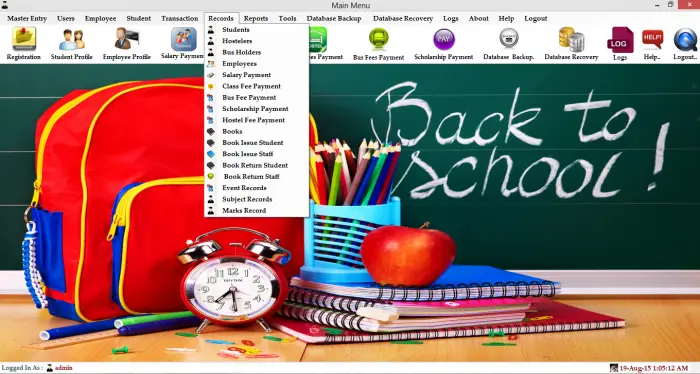
It is an advanced School Management System Project with a front end written in C#.net 4.0 and a back end written in SQL Server 2008.
This software is used to keep track of information about students. It is used by office staff, librarians, account officers, administrators, and other school staff to communicate and get work done.
Software for school management helps the school keep all the information about the different parts of the school in one place. The software system gives users a log-in name and password so they can get to the files.
The system is set up so that the information that goes into it is automatically organized. This software was made with the basic needs of a particular school in mind.
This software organizes, stores, and retrieves real-time information in a secure database with a Login-authenticated system. This software has several modules, such as “class management,” “account management,” “event management,” “transportation management,” “library management,” and “hostel management.”
This School Management System has a large database system that can be used for schools’ daily work. The database can be backed up and recovered.
Requirement : Visual Studio 2010 (Sql Server 2008) and SAP’s Crystal Report for Visual Studio 2010
Its have multiple views for three different-different users :
Manual Users Control : All the users will be control by admin …admin can give all rights to other users manually.
1.Admin can perform all transactions.
2.Librarian (Book Issue and Book Return)
3.Accounts officer can perform transactions.
Main Features are:
1:Master Entries :
Class Entry
Section Entry
Student Entry
Book Entry
Book Suppliers Entry
Fee Entry
Transportation Entry
Department Entry
Hostel Entry
Fee Category
Hostellers Entry
Bus Holders Entry
Events Entry
Scholarships Entry
Registration
Employee Entry
Subject Entry
Marks Entry
Exams Entry
2:Accounts Module
Salary Payment
Class Fees Payment
Bus Fee Payment
Scholarship Payment
Hostel Fees Payment
3 :Transportation Module
Bus Holders
Bus Fee Payment
Reports
4 :Hostel Module
Hostellers
Hostel Fee Payment
Reports
5: Library Module
Book Entry
Book Issue
Book Return(Automatically fine will be added after due date)
6: Examination Module
Subject Entry
Exams Entry
Marks Entry
Scorecard Reports
Scorecard Records
7:Events Management
8: Reports (Using Crystal Report)
Bus Holders Report
Hostellers Report
Class Fees Payment Report
Scholarship Payment Report
Hostel Fees Payment Report
Bus Fees Payment Report
Salary Report
Student Marks Report
9:Advance Record Searching :
Student Records
Employee Records
Transportation Records
Hostellers Records
Books Records
Books Issue Records
Book Return Records
Class Fee Payment Records
Salary Payment Records
Scholarship Payment Records
Hostel Fee Payment Records
Marks Records
Event Records etc.
10:Other Features :
SMS Feature
Email Feature
Advance User Rights Management System
Logs maintain facility (Admin Can View the all changes or transaction of system )
Database Backup option(Admin can create database backup)
Database Recovery option(Admin can Recover database)
Change Password
Password Recovery
Advance Records Searching
Advance Reports
Login Information:
For Admin:
User Type – Admin
User Name – admin
Password – 12345
For Librarian:
User Type – Librarian
User Name – Librarian
Password – 12345
For Account Officer:
User Type – Account Officer
User Name – Account Officer
Password – 12345
Contact me at FB : https://www.facebook.com/vaibhav.patidar.524
My WhatsApp Number :+917225958058
My Contact Number:+917225958058
Email:-Vaibhavpatidar36@gmail.com
Contact number :
+917225958058
Frequently Asked Questions
How does this C# school management system work?
Modules: student enrollment, teacher/staff management, class scheduling, attendance, grade entry, report card generation, fee collection, library. Role-based access via login form. Built with C# WinForms + SQL Server. Foundation BSIT capstone.
What .NET and SQL Server versions does this project require?
Most projects in this batch use C# WinForms on .NET Framework 4.5+ (the dominant stack for tutorial sites) with SQL Server 2012 Express or higher. A few newer projects use .NET 6/7/8. To run: install Visual Studio 2019 / 2022 (Community edition is free), install SQL Server Express + SSMS, open the .sln file, build, run.
How do I set up the database for this C# project?
Open SQL Server Management Studio (SSMS) and connect to your SQL Server instance (e.g. localhost\SQLEXPRESS). Right-click Databases > Restore Database OR > New Database then import the included .sql script. Update the connection string in App.config (or in code-behind) with your server name + credentials. Rebuild and run.
Can I use this C# project for a BSIT capstone or thesis?
Yes, but extend it. A bare CRUD form is too narrow for full capstone scope. Add: role-based access (admin/staff/customer login redirect), Crystal Reports or RDLC reports, dashboard with Chart controls, audit log, multi-branch support. Pair with Chapter 1-5 documentation matching your panel’s rubric.
Why am I getting ‘connection error’ or ‘object reference not set’?
Three common C# issues: (1) Connection error: SQL Server isn’t running OR connection string in App.config has wrong server name. Open SQL Server Configuration Manager + verify SQL Server (SQLEXPRESS) service is running. (2) NullReferenceException: a control reference or DB column returned NULL, add a check or use ?? operator. (3) Build error ‘The type or namespace could not be found’: missing assembly reference, add via Project > Add Reference.
Where can I find more C# projects with source code?
Browse the C# Projects hub for the full library. For other .NET stacks see VB.NET Projects (300+ Windows Forms systems). For ASP.NET WebForms see ASP.NET Projects. For BSIT capstone idea lists see 150 Best Capstone Project Ideas.
Related topic(s) that you may like:
- School Management System Project In C++ With Source Code
- School Management System in Laravel With Source Code
- School Management System Project In Python With Source Code
- Student Management System In PHP With Source Code
- School Management System In CodeIgniter With Source Code
- Use Case Diagram for School Management System
- School Management System Class Diagram
If you have any questions or suggestions in School Management System in C# with Source Code, please feel free to leave a comment below.
“Please LIke and Share It “
it lacks download option Sir
Please send me source code with database at kashif.alsorayai@gmail.com
please send me code with data base and the completed .exe program
Great content. The points mentioned in between the article are very informative and are good to read. Thanks for sharing a useful content. I got all the stuff I was searching for. Great Work!
How to get The souurce code with database ?
Please send me source code with database at tarek_mabed@hotmail.com
Can you send me source code with database at batboutradhwane@gmail.com
needed for pfe project and i need to change language
Please give me source code. I think it isfantastic.
Code source s’il vous plaît comment en avoir mon adresse email : emmanuelkombetho@gmail.com
Send me the source code and the database please!
To get the source code just contact the number or fb page of the author of the articles
Send me the source code and the database please!
You can download the source code inside the articles click the download button
i would like to download it sir thanks
There is a download button there. Click it and it will download the source code