
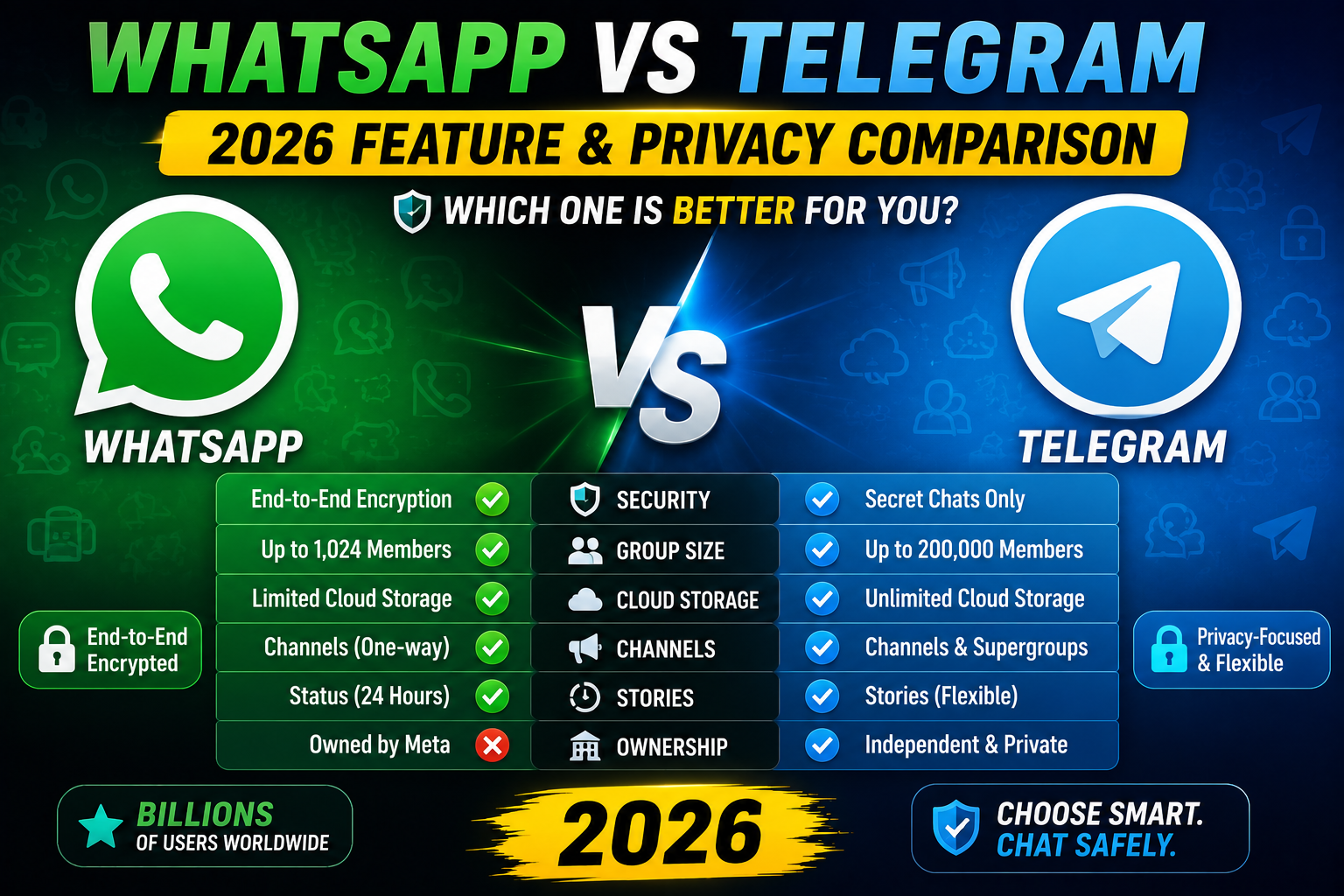
WhatsApp vs Telegram: two of the world’s biggest messaging apps with very different philosophies. WhatsApp emphasizes simplicity and universal encryption. Telegram emphasizes power features, huge groups, and channels. This 2026 comparison helps you decide which to use, or when to use both.
Quick verdict
- Pick WhatsApp if: your family/friends already use it, you want encryption by default, and you value simplicity.
- Pick Telegram if: you want power features, huge groups (200,000+), public channels for content distribution, or bot integrations.
- Use both if: you have distinct audiences (family on WhatsApp, communities on Telegram).
User base and reach
| Metric | Telegram | |
|---|---|---|
| Monthly active users | 2.5 billion+ | 900 million+ |
| Popular in | India, Philippines, Brazil, Europe | Russia, Iran, Nigeria, Ukraine, Uzbekistan |
| Ownership | Meta (Facebook) | Independent (Durov brothers) |
Encryption comparison
- WhatsApp: end-to-end encryption ON by default for all messages. Signal Protocol.
- Telegram: cloud chats encrypted only between client and Telegram servers (not fully E2E). “Secret Chats” are true E2E but manual opt-in.
WhatsApp is more secure by default. Telegram gives more choices but requires you to actively enable Secret Chats.
Group size and channels
| Feature | Telegram | |
|---|---|---|
| Max group members | 1,024 | 200,000 |
| Public channels | Similar (Communities) | Unlimited subscribers |
| Broadcast lists | 256 max recipients | Unlimited via channels |
Telegram wins for public content distribution and large communities.
File sharing
| File type | WhatsApp limit | Telegram limit |
|---|---|---|
| Photos | 16 MB | Full quality |
| Videos | 16 MB | 2 GB (4 GB Premium) |
| Documents | 100 MB | 2 GB (4 GB Premium) |
| Voice notes | 100 MB | 2 GB |
Telegram wins for large file sharing.
Feature comparison
| Feature | Telegram | |
|---|---|---|
| End-to-end encryption | Default on all | Only Secret Chats |
| Cloud sync | Backup only | Full cloud sync |
| Multi-device | 4 linked devices | Unlimited |
| Video call max | 32 people | 1,000 people |
| Disappearing messages | 24 hrs / 7 days / 90 days | Secret Chats only |
| Bots | Business Platform only | Rich bot ecosystem |
| Themes | Light/Dark | Extensive customization |
Business features
- WhatsApp Business: catalog, quick replies, business profile, WhatsApp Business API (paid) for large businesses.
- Telegram: bots for customer service, channels for announcements, groups for community, unlimited members.
Privacy comparison
- Both allow hiding phone number publicly.
- WhatsApp: shares your phone number with contacts; Meta-owned raises data concerns.
- Telegram: username system means you can chat without sharing phone number.
- Telegram’s cloud storage means Telegram can technically read cloud chats (not Secret Chats).
- WhatsApp’s E2E is more private for regular messaging.
Best for personal use
- WhatsApp: your friends/family likely already use it.
- Telegram: better for large group chats with communities.
- Winner: WhatsApp for personal messaging with existing network.
Best for content creators
- Telegram Channels: massive reach potential, easy monetization.
- WhatsApp Channels: growing but not as mature.
- Winner: Telegram for building an audience.
Best for privacy
- WhatsApp: E2E by default, but Meta-owned data policies.
- Telegram: username-based (no phone leak), but only Secret Chats are E2E.
- Winner: WhatsApp for regular chat encryption; Signal for maximum privacy.
Best for large communities
- Telegram: 200,000 members per group, unlimited channels.
- WhatsApp: 1,024 group members max.
- Winner: Telegram for community building.
Common WhatsApp mistakes to avoid
- Not backing up chats before switching phones. Chat history disappears if you skip the backup step. Always back up to Google Drive (Android) or iCloud (iPhone) before the switch.
- Sharing large videos without compression. Original quality uses your phone data quota and takes longer to send. WhatsApp’s default compression is usually fine.
- Trusting “last seen” as availability. People turn it off. Do not judge responsiveness by last seen visibility.
- Forgetting about disappearing messages. Sensitive info shared in a chat with disappearing messages goes away. Do not use for shared reference material.
- Publishing personal number for business. Use WhatsApp Business for business contacts. Keeps personal separate.
Power-user tips for WhatsApp
- Use WhatsApp Web on desktop. Type faster on a real keyboard. Sync happens instantly.
- Star important messages. Long-press > Star. Access the Starred section from the Chats menu to jump back later.
- Reply privately in group chats. Long-press a message > Reply Privately. Removes the person from group awareness of your reply.
- Enable Two-Step Verification. Prevents SIM-swap account theft. Settings > Account > Two-step verification.
- Mute noisy groups. Chat info > Mute notifications > Always. Message you when directly @-mentioned only.
WhatsApp vs Telegram vs Signal
WhatsApp is the largest user base worldwide. Best if everyone you know already uses it. End-to-end encryption by default.
Telegram offers larger group sizes (200,000 members), file sharing up to 2 GB, and bot API. Not encrypted by default (secret chats are).
Signal is the privacy champion. Best encryption, minimal metadata, non-profit funded. Smaller user base means fewer contacts already on it.
Most Philippines and Southeast Asia users lean WhatsApp for personal, Telegram for larger groups and file sharing. Signal picks up as privacy consciousness grows.
Best practices summary
- Enable 2-factor authentication. Blocks SIM-swap attacks that hijack WhatsApp accounts.
- Regular backups. Weekly automatic backup to Drive or iCloud. You will thank yourself when you lose the phone.
- Use Voice Messages sparingly. Text respects the recipient’s time. Voice for tone-heavy conversations only.
- Mute non-essential groups. Family groups do not need to buzz every 10 seconds.
- Separate personal and business. WhatsApp Business or dedicated phone for work contacts.
WhatsApp Business vs personal WhatsApp
WhatsApp offers two apps: WhatsApp Messenger for personal use and WhatsApp Business for small businesses. Both are free but serve different purposes.
- Business profile. Display business name, address, hours, and website. Personal WhatsApp lacks these fields.
- Automated messages. Set up greeting messages, away messages, and quick replies. Personal WhatsApp requires manual typing every time.
- Product catalog. Showcase up to 500 products directly in the chat. Great for small stores.
- Labels for organization. Tag customers as “New”, “Paid”, “Follow up”. Personal WhatsApp only has starred messages.
- Broadcast lists. Send announcements to up to 256 contacts at once. Both apps support this but Business has better tracking.
WhatsApp Web and desktop workflow
Once you connect WhatsApp Web to your phone, you can type on your desktop keyboard which is dramatically faster than mobile typing. A few tips:
- Keep phone connected to internet. WhatsApp Web relays through your phone. Phone offline = Web disconnects.
- Use keyboard shortcuts. Ctrl+N new chat, Ctrl+Shift+M mute, Ctrl+F search. Full list in Menu > Keyboard shortcuts.
- Log out from Web when done on shared computer. Menu > Log out. Prevents others from reading your chats.
- Download the desktop app. Faster than the web version, works even when browser is closed.
- Emoji shortcuts. Type
:smile:or:heart:for quick emoji. Works in both mobile and desktop.
Privacy best practices for WhatsApp
- Review privacy settings. Settings > Privacy. Control who sees your Last Seen, Profile Photo, About, and Status.
- Turn on Read Receipts thoughtfully. Disabling them hides your read status from others but also hides theirs from you.
- Use Disappearing Messages for sensitive info. Auto-delete after 24 hours, 7 days, or 90 days.
- Enable Two-Step Verification. Settings > Account > Two-step verification. Prevents SIM-swap account takeover.
- Verify group invites. Settings > Privacy > Groups > “My Contacts” prevents strangers from adding you to random groups.
Official documentation
Recommended messaging + community resources
The links below are affiliate links. We may earn a commission at no extra cost to you when you buy or sign up. See our affiliate disclosure.
Frequently Asked Questions
Is Telegram more secure than WhatsApp?
Only for Secret Chats (E2E). Regular cloud chats on Telegram are less secure than WhatsApp. WhatsApp’s default E2E is more private for typical use.
Can I use both WhatsApp and Telegram?
Yes. Both apps coexist. Many people use WhatsApp for family/friends and Telegram for communities/subscriptions.
Do both apps use my phone number?
Yes. Both require phone verification. But Telegram lets you hide your phone number publicly by using a username instead.
Which is better for large groups?
Telegram. 200,000 members per group vs WhatsApp’s 1,024. Telegram Channels can have unlimited subscribers.
Can I import my WhatsApp chats to Telegram?
Yes. Telegram has an import feature: on WhatsApp, export chat > share to Telegram > select chat. Chat history imports.

Caren Bautista
Technical Writer at PIES IT Solution
Responsible for crafting clear, well-structured, and beginner-friendly content across the platform.
Expertise: Technical Writing · Content Creation · Documentation · Editorial Writing · JavaScript · TypeScript · View all posts by Caren Bautista →