
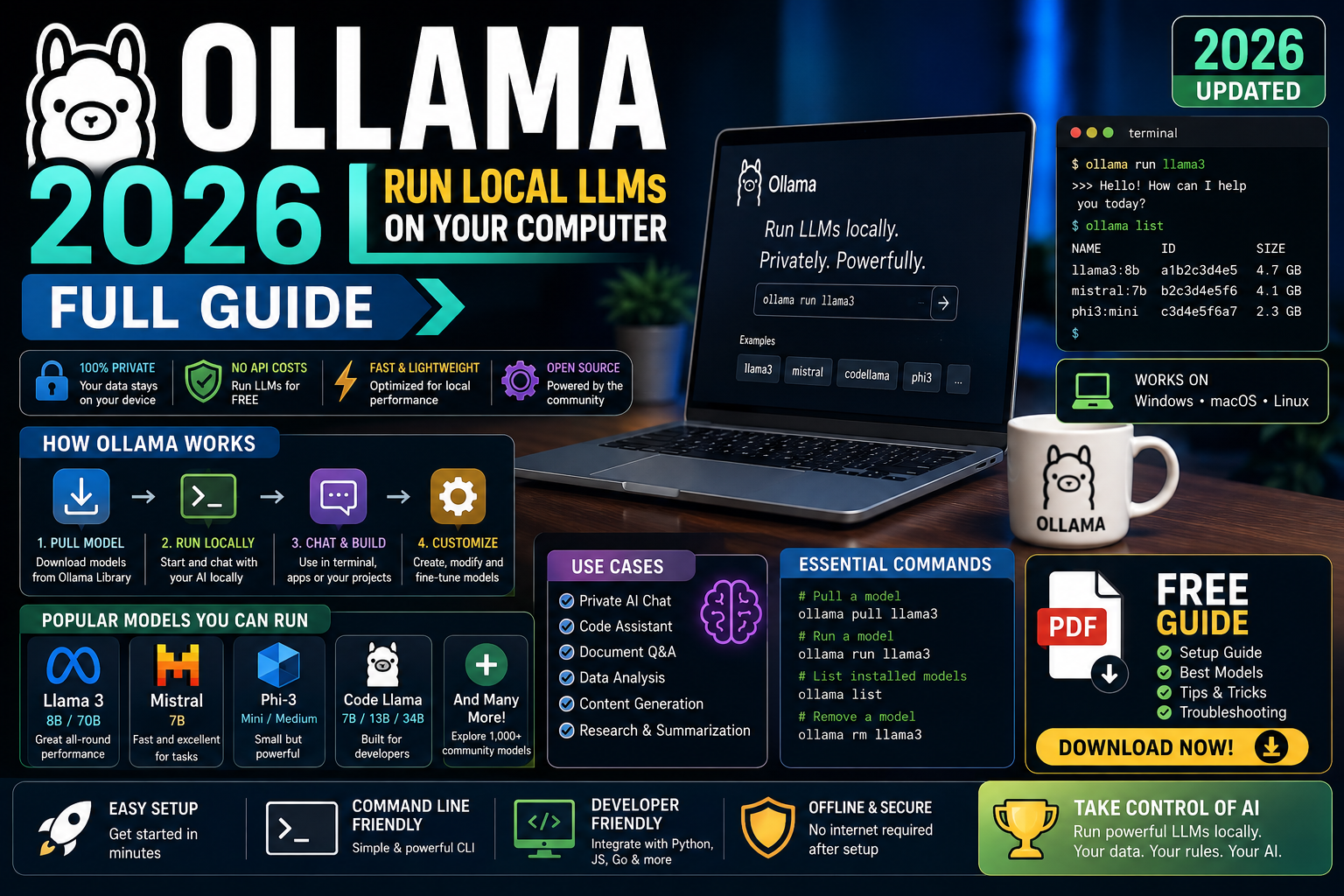
Ollama is the fastest way to run open-source LLMs on your own laptop or server in 2026. No API key, no per-token bill, no data leaving your machine. This is the full walkthrough for developers who want to run Llama 3, Mistral, or Qwen locally, integrate with Python, and know exactly what hardware they need.
Quick answer for 2026
Install Ollama from ollama.com/download, run ollama pull llama3.2, then ollama run llama3.2. A modern laptop with 16GB RAM can run 7B-8B parameter models comfortably. For larger models (30B and up) you need a discrete GPU with 24GB+ VRAM or a Kamatera GPU instance.
What Ollama actually is in 2026
Ollama is an open-source tool that packages LLM inference into a single-command install. It handles model downloads, quantization, GPU acceleration, and exposes a local REST API on port 11434 that mimics the OpenAI Chat Completions format. You get “OpenAI-compatible LLM inference on localhost” in about 2 minutes.
What Ollama gives you in 2026:
- One command to download and run any of 100+ open-source models
- Automatic GPU detection and use (NVIDIA CUDA, Apple Metal, AMD ROCm)
- 4-bit quantization by default so models fit in half the VRAM
- REST API on localhost:11434 that most SDKs can hit
- Modelfile format for building your own custom models on top of base weights
- Zero telemetry, zero cloud dependency, zero per-token cost
Why run local LLMs instead of using an API
Cloud APIs (GPT-5, Claude, Gemini) are excellent, but local LLMs win in several situations:
- Data privacy: healthcare, legal, or financial data that cannot leave your infrastructure
- Cost at scale: once you exceed a few million tokens per day, self-hosted inference beats API pricing on total cost of ownership
- Offline work: travel, edge deployments, air-gapped environments
- Development speed: no rate limits, no billing surprises during iteration
- Learning: you understand LLMs better when you run them yourself
For most 2026 apps you will still use cloud APIs in production because the top proprietary models remain quality leaders. But local LLMs cover a growing share of internal tools, prototypes, and privacy-sensitive workflows.
Install Ollama on Mac, Windows, or Linux
macOS: download the installer from ollama.com/download, drag to Applications, launch. Ollama runs as a menu-bar app and starts a background server on 127.0.0.1:11434.
Windows: download the installer, run it, sign the UAC prompt. Ollama installs as a Windows service that auto-starts on login.
Linux: one command:
curl -fsSL https://ollama.com/install.sh | sh
Verify installation on any platform:
ollama --version
Run your first local model
Two commands. First, download a model:
ollama pull llama3.2
This downloads Llama 3.2 3B (roughly 2 GB). Then start an interactive chat:
ollama run llama3.2

>>> Write a Python function that reverses a string.
def reverse_string(s):
    return s[::-1]

# Example usage
print(reverse_string("hello"))  # olleh
Type /bye to exit. First-token latency on an M-series Mac or a modern NVIDIA laptop is typically 100 to 300 ms. Generation speed on Apple Silicon runs at 30-60 tokens per second for 3B-8B models.
Best Ollama models for developers in 2026
The current 2026 shortlist worth knowing:
- llama3.2:3b (2 GB): fast, decent, ideal for tests on any modern laptop
- llama3.1:8b (4.7 GB): the everyday workhorse, good reasoning quality
- qwen2.5-coder:7b (4.7 GB): best local coding model, beats Llama 8B on code tasks
- mistral-nemo:12b (7 GB): strongest general-purpose model in the 12B range
- llama3.1:70b (40 GB): approaches GPT-4 quality but needs 48GB+ VRAM
- gemma3:27b (17 GB): Google’s open model, strong at instruction following
- deepseek-r1:14b (9 GB): open reasoning model with visible thinking traces
Pull any of them with ollama pull <name>. List everything you have installed with ollama list. Remove models you no longer use with ollama rm <name>.
Integrate Ollama with Python
Ollama exposes an OpenAI-compatible API on http://localhost:11434/v1. You can use the official openai Python SDK by pointing it at Ollama:
from openai import OpenAI

client = OpenAI(
    base_url="http://localhost:11434/v1",
    api_key="ollama",  # any non-empty string works
)

response = client.chat.completions.create(
    model="llama3.2",
    messages=[
        {"role": "system", "content": "You are a helpful Python tutor."},
        {"role": "user", "content": "Explain list comprehensions in 3 sentences."},
    ],
)

print(response.choices[0].message.content)
Or use the dedicated Ollama Python SDK for a more native experience:
pip install ollama
import ollama

response = ollama.chat(
    model="llama3.2",
    messages=[{"role": "user", "content": "Say hello in Filipino."}],
)

print(response["message"]["content"])
Both patterns support streaming, tool calling, and structured outputs. Because the API is OpenAI-compatible, most existing frameworks (LangChain, LlamaIndex, PydanticAI) work with Ollama by swapping the base URL.
Ollama hardware requirements
Rule of thumb: you need roughly the model file size in RAM or VRAM to run it, plus a bit of headroom.
- 3B model (2 GB): any laptop with 8GB RAM, or 4GB VRAM GPU
- 7B-8B model (4-5 GB): 16GB RAM laptop, or 8GB VRAM GPU (RTX 3060, M1/M2 Mac)
- 12B-14B model (7-9 GB): 16GB VRAM GPU (RTX 4080), or 32GB RAM Mac
- 27B-32B model (17-20 GB): 24GB VRAM GPU (RTX 4090, RTX 5090)
- 70B model (40 GB): 48GB+ VRAM (A100 40GB minimum, A100 80GB comfortable)
Apple Silicon Macs punch above their weight because unified memory lets the GPU access all system RAM. A 32GB M3 Max runs 27B models smoothly, and a 64GB M3 Ultra runs 70B models. On the PC side, get a used RTX 3090 (24GB VRAM) as the cheapest way to run 27B-32B models at home.
Common Ollama mistakes to avoid
- Pulling models that do not fit your RAM. Ollama will run them by paging to disk, but generation speed drops to 1-2 tokens per second. Match model size to your hardware.
- Comparing local model quality to GPT-5 or Claude. Even the best 70B open models trail the top closed APIs. Set expectations by model size, not by comparing to the largest cloud models.
- Skipping GPU drivers on Linux or Windows. Ollama silently falls back to CPU if it cannot find CUDA or ROCm. Install proper GPU drivers first and check
ollama psto confirm GPU acceleration is active. - Running Ollama as root on servers. Model files land under a system directory. Create a dedicated ollama user with a persistent home directory instead.
- Exposing the API publicly without authentication. Ollama’s REST endpoint has no auth by default. If you need remote access, put it behind a reverse proxy with basic auth or a VPN.
- Assuming small models handle every task. Small models struggle with math, long context, and multi-step reasoning. Use them for extraction, classification, and short chat, not everything.
Official documentation
Where to run larger models than your laptop can handle
The links below are affiliate links. We may earn a commission at no extra cost to you if you purchase through them. See our affiliate disclosure for details.
- Kamatera GPU cloud for renting A10G, A100, or H100 GPU instances by the hour
- OnSpace AI for hosted AI inference when self-hosting is not the fit
- Rheinwerk Publishing for LLM engineering and applied AI books
Frequently asked questions
Is Ollama free?
Yes, completely free and open source under the MIT license. All models in the Ollama library are also free to download and run. Your only cost is the electricity to run your hardware, or the hourly rate if you rent a GPU on Kamatera or similar cloud services.
Can I run Ollama without a GPU?
Yes. Ollama runs on CPU alone, but generation speed drops to 3-8 tokens per second for a 7B model on a modern desktop CPU. That is fine for learning and background tasks but too slow for interactive chat. Any laptop from the last 3 years with 16GB RAM can run 7B models on CPU.
Which Ollama model is best for coding help?
Qwen 2.5 Coder 7B for a balance of speed and quality on a typical laptop. Qwen 2.5 Coder 32B if you have a 24GB+ GPU. Both outperform Llama 3.1 8B on coding-specific benchmarks in 2026, and both are close to GPT-4-class quality on Python, JavaScript, and Go.
Is Ollama good enough for a BSIT capstone project?
Yes. Ollama-powered capstones are strong because you demonstrate real ML engineering (running inference, not just calling an API) and the entire system works offline for panel demos. Filipino BSIT panels increasingly appreciate the data-privacy angle: patient records, LGU data, or sensitive Q&A never leave your laptop. Recommended: Llama 3.1 8B or Qwen 2.5 Coder 7B on a mid-range gaming laptop.
Can I use Ollama with LangChain, LlamaIndex, or LiteLLM?
Yes. All three have native Ollama support in 2026. LangChain uses ChatOllama, LlamaIndex uses Ollama LLM class, and LiteLLM automatically routes any model name prefixed with ollama/. Switching between local (Ollama) and cloud (OpenAI, Claude) in your app becomes a one-line config change.
Ollama vs LM Studio vs vLLM: which should I pick?
Ollama for developer CLI plus API workflows. LM Studio for desktop GUI users who prefer clicking over typing commands. vLLM for high-throughput production serving of a single model to many concurrent users. Most solo devs start with Ollama, add LM Studio when they want a UI, and graduate to vLLM only when serving real production traffic at scale.
For a private team knowledge base to pair with your local Ollama install, Notion works well as the document source when you can accept some cloud sync. For learning the LLM engineering patterns that make local models useful in production, courses on Coursera and DataCamp cover fine-tuning, RAG, and eval workflows end to end.
Bottom line for 2026 developers
Ollama makes local LLMs practical for every developer in 2026. Two commands and you have a working chat model on your laptop. Point any OpenAI-compatible SDK at localhost:11434 and your existing code works. Rent a Kamatera GPU when you outgrow your laptop, or stay local when data privacy demands it.
Cloud APIs still win on quality at the top end. Ollama wins on cost, privacy, offline capability, and development speed. Most developers in 2026 use both: Ollama for prototypes, private data, and internal tools, plus a cloud API for user-facing production features that need the strongest models. Try both. Ship whichever fits the specific problem you are solving.

Adrian Mercurio
Full-Stack Developer at PIES IT Solution
Specializes in building complete capstone projects with full documentation. Strong background in PHP/MySQL development and database design. Has personally built and tested over 30 capstone-ready projects with ER diagrams, DFDs, and chapter-by-chapter thesis documentation.
Expertise: PHP · Laravel · Database Design · Capstone Projects · C# · Python · AI Projects · View all posts by Adrian Mercurio →