
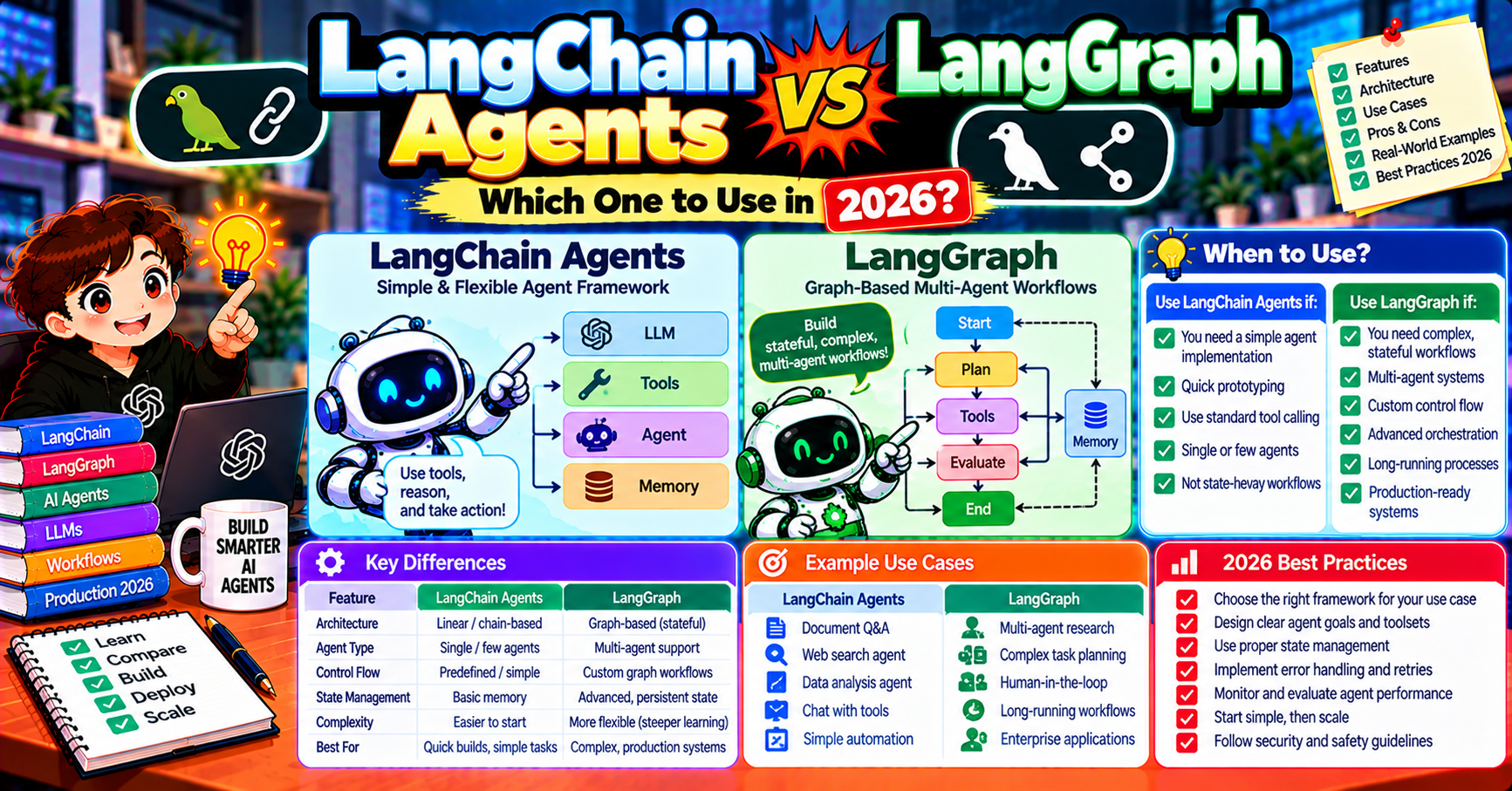
LangChain shipped two generations of agent primitives: the original AgentExecutor (now called “LangChain Agents”) and the state-machine framework LangGraph. In 2026, LangChain itself officially recommends LangGraph for all new agent work. But the AgentExecutor pattern is still in production at many companies and still appears in current tutorials, which confuses people picking a stack. This article clarifies when to use which, how they relate, and the migration path from LangChain Agents to LangGraph for teams already on the older primitive.
The confusion in one sentence
“LangChain Agents” refers to the old AgentExecutor-based API (create_react_agent, create_tool_calling_agent, etc.). LangGraph is a separate package by the same team that replaces this older API with a state-machine model. Both live in the LangChain ecosystem but LangGraph is the one you should use for new work.
LangChain Agents (AgentExecutor): what it was
Pre-2024, the standard pattern for an agent in LangChain was:
from langchain.agents import create_tool_calling_agent, AgentExecutor
from langchain_openai import ChatOpenAI

llm = ChatOpenAI(model="gpt-4o")
tools = [search_tool, calculator_tool]
prompt = get_default_react_prompt()

agent = create_tool_calling_agent(llm, tools, prompt)
agent_executor = AgentExecutor(agent=agent, tools=tools, verbose=True)

result = agent_executor.invoke({"input": "What is 15% of yesterday's AAPL closing price?"})
AgentExecutor wrapped the ReAct loop (reason, act, observe, repeat) in an opaque abstraction. You passed in an LLM, a list of tools, and a prompt; the executor handled everything.
Problems that drove LangChain to replace this:
- No visibility into the loop (hard to debug why an agent took a certain action)
- No way to inject human-in-the-loop between steps
- No native checkpointing (resume after crash was DIY)
- Hard to compose (an AgentExecutor containing another AgentExecutor was awkward)
- Streaming support was limited
- Error recovery was framework-level, not customizable
LangGraph: the modern replacement
LangGraph models the same ReAct loop (and much more) as an explicit state machine. You see every node, every edge, every state transition.
from langgraph.prebuilt import create_react_agent
from langchain_openai import ChatOpenAI

llm = ChatOpenAI(model="gpt-4o")
tools = [search_tool, calculator_tool]

agent = create_react_agent(llm, tools)
result = agent.invoke({"messages": [("user", "What is 15% of yesterday's AAPL closing price?")]})
Same number of lines but under the hood create_react_agent is a compiled LangGraph state machine with explicit nodes you can inspect, modify, extend. The simple case looks like LangChain Agents; the complex case lets you drop into the graph primitives directly.
Feature comparison
| Feature | LangChain Agents (AgentExecutor) | LangGraph |
|---|---|---|
| Core abstraction | Opaque executor loop | Explicit state machine |
| Debuggability | Low (requires LangSmith to understand loop) | High (inspect state at each node) |
| Checkpointing / resume | DIY | Built-in (PostgresSaver, etc.) |
| Human-in-the-loop | Hard | interrupt_before, interrupt_after |
| Multi-agent coordination | Awkward (nest executors) | Subgraphs, teams, supervisor patterns |
| Streaming | Limited (per-token only) | Node-level + token-level events |
| Error recovery | Framework-level retries | Custom conditional edges |
| Parallel execution | No | Fan-out / fan-in built-in |
| LangChain Inc recommendation | Maintenance only (2024+) | Primary (2024+) |
When to still use LangChain Agents in 2026
Honestly, almost never for new code. The only legitimate reasons:
- You are editing an existing codebase that uses AgentExecutor and the migration is not worth the effort yet
- You are following a tutorial written before 2024 and need to understand what it is doing
- You have a dependency that specifically requires an AgentExecutor interface
For every new agent in 2026, start with LangGraph.
Migration path: LangChain Agents to LangGraph
Three realistic migration paths depending on how much you want to invest:
Path 1: Drop-in replacement with create_react_agent
Simplest. Replace your AgentExecutor with LangGraph’s prebuilt create_react_agent. Same interface, state-machine engine underneath:
# BEFORE: LangChain Agents
from langchain.agents import create_tool_calling_agent, AgentExecutor
agent = create_tool_calling_agent(llm, tools, prompt)
executor = AgentExecutor(agent=agent, tools=tools)
result = executor.invoke({"input": question})

# AFTER: LangGraph drop-in
from langgraph.prebuilt import create_react_agent
agent = create_react_agent(llm, tools)
result = agent.invoke({"messages": [("user", question)]})
Change your call site to pass messages instead of input. That is roughly the whole migration for simple cases. Behavior is equivalent for most workloads.
Path 2: Add checkpointing to the drop-in
If you want crash recovery, pass a checkpointer:
from langgraph.checkpoint.postgres import PostgresSaver

agent = create_react_agent(llm, tools, checkpointer=PostgresSaver.from_conn_string(DB_URL))
config = {"configurable": {"thread_id": user_id}}
agent.invoke({"messages": [("user", question)]}, config=config)
Now the agent state persists; resume with the same thread_id after a crash. No equivalent on the old AgentExecutor; this alone justifies the migration for many teams.
Path 3: Custom graph with explicit nodes
If your workflow has steps the ReAct loop does not capture (planning, review gates, parallel execution, hierarchy), rewrite as an explicit LangGraph graph. Not a migration, a redesign, but worth it for complex systems:
from langgraph.graph import StateGraph, END

graph = StateGraph(MyState)
graph.add_node("plan", planner_fn)
graph.add_node("tool_call", tool_fn)
graph.add_node("human_review", human_review_fn)
graph.add_node("respond", response_fn)
# ... edges with conditional routing
app = graph.compile(checkpointer=checkpointer, interrupt_before=["human_review"])
At this point you are not migrating; you are redesigning. Appropriate when the old AgentExecutor is actively limiting your agent’s capability.
What LangChain itself (the library) is for in 2026
LangChain the library still exists and is still useful. It provides:
- LLM provider abstractions (ChatOpenAI, ChatAnthropic, ChatOllama, etc.)
- Tool interfaces (BaseTool, StructuredTool decorators)
- Message types (HumanMessage, AIMessage, ToolMessage)
- Prompt templates and output parsers
- Memory abstractions
- Vector store abstractions for RAG
LangGraph uses all of these under the hood. The library + LangGraph combination is what the LangChain team recommends for building agents in 2026.
What about LangChain Expression Language (LCEL)?
LCEL (| operator chaining) is still useful for composing simple runnables (prompt pipe to LLM pipe to parser). Use it inside your LangGraph nodes when you need a quick chain. LCEL is NOT a replacement for LangGraph; it is a lower-level composition primitive.
Common migration gotchas
- Prompt format changes: AgentExecutor used a ReAct-style prompt with scratchpad placeholders. LangGraph’s create_react_agent uses standard chat messages. Your custom prompts may need light edits.
- Memory classes: ConversationBufferMemory and friends are deprecated. Use LangGraph’s checkpointer for conversation state instead.
- Callbacks: AgentExecutor used callback handlers; LangGraph has different mechanisms (astream_events, LangSmith tracing). Rewrite callback logic as node-level logging.
- Error handling: AgentExecutor caught tool errors silently; LangGraph by default raises them. Add try/except in your nodes to preserve old behavior.
Step-by-step migration playbook
For teams actively migrating from AgentExecutor to LangGraph, here is the sequence that minimizes disruption:
Week 1: inventory your agents. List every AgentExecutor usage in your codebase. Note the tools each uses, the prompt variants, and any custom callback logic. This is the baseline for the migration scope.
Week 2: migrate the simplest agent first. Pick the agent with fewest tools, simplest prompt, no custom callbacks. Replace with create_react_agent. Deploy to a staging environment. Verify behavior matches the production AgentExecutor on 20-30 test cases. Fix any discrepancies.
Week 3: add checkpointing to the first agent. Even if the business case does not demand it, add the PostgresSaver (or MemorySaver for dev). This forces you to think about state persistence and session IDs. Catches design issues before more agents migrate.
Week 4-6: migrate remaining simple agents. One per sprint. Each migration should take 1-2 days of engineering time. Keep AgentExecutor usage in production side-by-side with LangGraph for rollback safety.
Week 7+: tackle complex agents. The last 10-20% of agents have custom callbacks, specialized tools, or non-standard loop logic. These need explicit LangGraph graphs (not just create_react_agent). Rewrite as proper state machines; expect 1-2 weeks per complex agent.
Common migration mistakes
- Over-engineering the first migration. Teams try to redesign everything on the first agent (fancy state, interrupts, parallelism). Keep migration 1 boring; use create_react_agent 1:1. Save redesigns for the complex agents in week 7+.
- Not writing regression tests. Without 20-30 test cases per agent, you cannot verify that the LangGraph version behaves equivalently. Write tests before migrating, not after.
- Big-bang migration. Teams try to migrate all agents in one week. Rushed migrations miss edge cases. One agent per sprint is the realistic pace.
- Forgetting to update observability. AgentExecutor callbacks logged to your old monitoring stack; LangGraph uses LangSmith. Update dashboards + alerts in week 1-2 so you can see migration-period issues in real time.
Frequently Asked Questions
Official documentation
Is AgentExecutor deprecated?
Officially: it is in “legacy” status as of early 2024. Still works, still shipped with LangChain, still receives bug fixes. But LangChain Inc explicitly recommends LangGraph for all new agents and does not add features to AgentExecutor.
Do I need to migrate immediately?
No. Working AgentExecutor code continues to work. Migrate when you need a feature LangGraph provides (checkpointing, interrupts, parallel execution, multi-agent) or when you are already touching the agent code for other reasons.
Does LangGraph require LangChain?
No, LangGraph is standalone. But most teams use them together because LangChain’s LLM abstractions and tool interfaces are convenient inside LangGraph nodes. Pure LangGraph without LangChain is possible but you reimplement a lot of plumbing.
Which is better for production?
LangGraph, decisively. Checkpointing, interrupts, parallel execution, and multi-agent patterns are all production-must-haves that AgentExecutor cannot cleanly do. LangGraph is also where ongoing engineering investment happens.
Can I run them side by side during migration?
Yes. New agents in LangGraph, old agents in AgentExecutor. Both import cleanly in the same project; no conflicts. Migrate gradually.
What about LangGraph Platform?
LangChain’s commercial hosting for LangGraph agents. Deploy a graph as a hosted service with scaling, persistence, and a UI handled for you. Free tier for development; paid tiers for production. Alternative: self-host your compiled graph in any Python runtime.

Angel Jude Suarez
Full-Stack Developer at PIES IT Solution
Focuses on Python development, machine learning, and AI integration. Has built production AI systems including OpenAI Whisper integration for medical transcription and GPT-4o-powered diagnosis assistance. Strong background in pandas, scikit-learn, and TensorFlow.
Expertise: Python · PHP · Java · VB.NET · ASP.NET · Machine Learning · AI Integration · OpenCV · Django · CodeIgniter · View all posts by Angel Jude Suarez →