
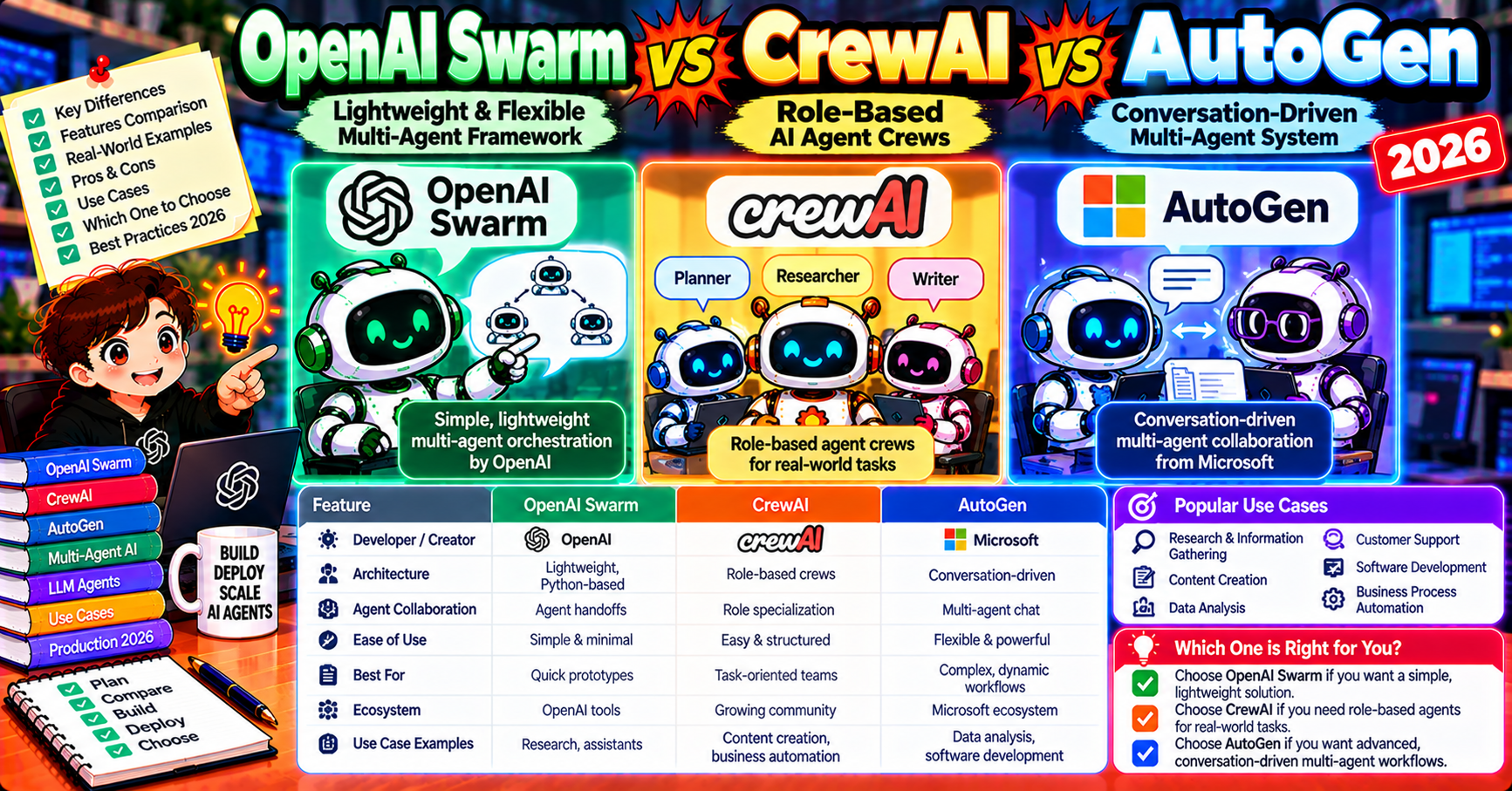
OpenAI’s Swarm framework (shipped experimental in late 2024, matured through 2026) added a fourth serious option to the multi-agent Python ecosystem. Where CrewAI uses roles, AutoGen uses conversations, and LangGraph uses state machines, Swarm uses lightweight routing. This article compares all three on the specific tradeoffs: when Swarm’s minimalism wins, when CrewAI’s role structure wins, and when AutoGen’s conversation metaphor wins. If you are picking between them for a new project, read this first.
What OpenAI Swarm is
Swarm is a lightweight framework from OpenAI for building agents that hand off control between each other. Core primitives:
- Agent: a lightweight class with name, instructions (system prompt), model, and functions (tools)
- Function handoff: a tool can return another Agent instance; Swarm interprets this as “transfer the conversation to this new agent”
- Context variables: a dict of state passed between agents during handoffs
No orchestrator. No manager. No graph. Agents decide when to hand off based on their instructions, and Swarm executes the handoff.
from swarm import Swarm, Agent

def transfer_to_billing():
    return billing_agent

def transfer_to_technical():
    return technical_agent

triage = Agent(
    name="Triage",
    instructions="Determine if the question is billing or technical. "
                 "Call transfer_to_billing() or transfer_to_technical() accordingly.",
    functions=[transfer_to_billing, transfer_to_technical],
)

billing_agent = Agent(name="Billing", instructions="Help with billing questions.")
technical_agent = Agent(name="Technical", instructions="Help with technical questions.")

client = Swarm()
response = client.run(agent=triage, messages=[{"role": "user", "content": "My card was charged twice."}])
print(response.messages[-1]["content"])
Triage receives the question, decides it’s billing, calls transfer_to_billing, Swarm hands control to billing_agent which answers the user. Clean, minimal, exactly as advertised.
Where Swarm fits uniquely
Swarm’s sweet spot: routing patterns. One agent that receives all input, decides which specialist should handle it, hands off. The specialist handles the task and either answers or hands off again.
Classic use cases:
- Customer support triage (billing / technical / sales routing)
- Document processing pipelines (OCR / translation / summarization handoffs)
- Multi-domain Q&A systems where specialists know their topic better than a generalist
- Any workflow structured as “receive, route, specialist handles, maybe route again”
Setup comparison on same task
Task: 3-agent customer support with triage + billing + technical.
Swarm (minimal):
from swarm import Swarm, Agent

def to_billing(): return billing
def to_tech(): return tech

triage = Agent(name="Triage", instructions="Route to billing or tech.", functions=[to_billing, to_tech])
billing = Agent(name="Billing", instructions="Handle billing.")
tech = Agent(name="Tech", instructions="Handle technical.")

Swarm().run(agent=triage, messages=[{"role": "user", "content": message}])
CrewAI (role-centric):
from crewai import Agent, Task, Crew, Process

triage = Agent(role="Triage Specialist", goal="Route question", backstory="...")
billing = Agent(role="Billing Specialist", goal="Resolve billing", backstory="...")
tech = Agent(role="Technical Specialist", goal="Resolve technical", backstory="...")

crew = Crew(
    agents=[triage, billing, tech],
    tasks=[Task(description="Handle customer question", agent=triage, ...)],
    process=Process.hierarchical,
    manager_llm=ChatOpenAI(model="gpt-4o"),
)
crew.kickoff(inputs={"question": message})
AutoGen (conversation):
from autogen_agentchat.agents import AssistantAgent
from autogen_agentchat.teams import SelectorGroupChat

triage = AssistantAgent(name="triage", system_message="Route to billing or tech.", model_client=client)
billing = AssistantAgent(name="billing", system_message="Handle billing.", model_client=client)
tech = AssistantAgent(name="tech", system_message="Handle technical.", model_client=client)

team = SelectorGroupChat([triage, billing, tech], model_client=client, selector_prompt="...")
team.run_stream(task=message)
Swarm is the shortest; CrewAI has more scaffolding (role, goal, backstory) but reads naturally; AutoGen is in between.
Head-to-head on real tradeoffs
| Tradeoff | Swarm | CrewAI | AutoGen |
|---|---|---|---|
| Setup verbosity | Minimal | Medium | Medium |
| Routing (handoff) patterns | Native (its reason to exist) | Hierarchical process mode | SelectorGroupChat |
| Sequential pipelines | Awkward (handoffs don’t flow back) | Native (Process.sequential) | RoundRobinGroupChat |
| Debate/critique | No | DIY | Native via GroupChat |
| Non-OpenAI model support | OpenAI-only (official) | All major providers | All major providers |
| State persistence | Context variables, DIY backend | Memory module | Manual |
| Observability | Minimal (DIY) | AgentOps integration | AgentOps integration |
| Production maturity | Experimental (OpenAI’s stance) | Production-ready v0.80+ | Production-ready v0.4+ |
| Enterprise support | None (community only) | CrewAI Enterprise | Microsoft-backed |
The “experimental” caveat on Swarm
OpenAI officially labels Swarm as “experimental, educational, not production-ready.” In practice teams DO ship it to production, but you accept:
- No OpenAI commercial support if issues arise
- Possibility of API-shape changes without SemVer guarantees
- No enterprise features (checkpointing, interrupts, formal observability)
- Smaller community than CrewAI or AutoGen
For high-stakes production, this matters. For prototypes and internal tools, less so.
When Swarm wins
- Pure routing workflows (triage + specialists)
- Minimal dependencies matter (one import, 300 lines of code total)
- You are already on OpenAI SDK (zero friction integration)
- Teaching or demo purposes (easier to explain to non-engineers)
- Prototype in a hackathon or weekend project
When CrewAI wins over Swarm
- You need sequential pipelines (task chains)
- Non-engineer stakeholders need to review agent config (CrewAI YAML)
- Memory across runs matters (CrewAI’s Memory module)
- Enterprise support with a vendor contract is required
- You use non-OpenAI providers primarily
When AutoGen wins over Swarm
- You need debate/critique patterns (group chat metaphor)
- Code execution agents (AutoGen’s ComputerTerminal via Magentic-One)
- Azure OpenAI shop (Microsoft-backed integration)
- Enterprise support via Microsoft channels
- Web-browsing agents (Magentic-One is purpose-built)
Combining Swarm with other frameworks
Swarm’s lightweight approach plays nicely as a component in bigger systems. One real pattern: use Swarm as the routing layer that decides which “crew” or “graph” to invoke, and use CrewAI or LangGraph for each specialized sub-workflow. Swarm handles the top-level dispatch; the heavier framework handles the actual work.
def transfer_to_research_crew():
    """Hands off to a full CrewAI research crew for complex research tasks."""
    def wrapped_crew():
        crew = Crew(agents=[...], tasks=[...])
        return crew.kickoff()
    return wrapped_crew

triage = Agent(name="Triage", functions=[transfer_to_research_crew, transfer_to_simple_qa])
This gives you Swarm’s simple routing + CrewAI’s richer execution. Keeps complexity local.
Decision shortcut
- Routing-only workflow + OpenAI: Swarm
- Sequential pipeline + role abstraction: CrewAI
- Debate/critique + Azure: AutoGen
- Enterprise production + multiple patterns: LangGraph (not covered head-to-head here, but it covers all three patterns)
- Prototype in a weekend: Swarm (fewest moving parts)
Picking a framework: the 5-minute test
Five questions that resolve most framework-choice decisions:
- Does your workflow look like routing + specialists? If yes and you are on OpenAI, Swarm. If yes but you need multi-provider or production features, CrewAI hierarchical or LangGraph with conditional edges.
- Does your workflow look like a step-by-step pipeline? CrewAI sequential wins. LangGraph covers it too but with more setup.
- Do agents need to debate or critique each other? AutoGen’s group chat is the natural fit. Hard to simulate cleanly in the others.
- Do you need crash recovery and resume? LangGraph wins decisively (built-in checkpointing). The others require DIY.
- Does a non-engineer need to review agent config? CrewAI’s YAML config scales to non-engineer collaboration. The others are code-only.
If your answers point to multiple frameworks, pick based on your team’s existing stack: already on LangChain? LangGraph. Already on Azure? AutoGen. Starting fresh with a weekend hackathon? Swarm.
What the ecosystem looks like heading into 2027
Three trends to watch:
- LangGraph consolidates as the production default because its primitives cover the most patterns and the LangChain Inc ecosystem is well-funded.
- CrewAI maintains the “fastest to prototype” niche through its role abstraction and YAML config. Expect CrewAI Enterprise features to grow.
- AutoGen stays niche but strong in Microsoft shops. Magentic-One keeps attracting developers interested in web-browsing agents.
- Swarm either graduates to production-grade or gets subsumed by OpenAI’s Assistants API evolution. Watch OpenAI DevDay announcements for direction.
Frequently Asked Questions
Official documentation
Does Swarm work with Claude or local models?
Officially no (it is OpenAI-only). Unofficial forks on GitHub add Anthropic + Ollama support but you lose OpenAI’s maintenance. For non-OpenAI primary, use CrewAI or AutoGen which have official multi-provider support.
Will OpenAI promote Swarm from experimental to GA?
Unclear. As of 2026 OpenAI positions it as educational, with the Assistants API as their production-grade alternative. Watch OpenAI DevDay announcements for direction changes. For now, treat Swarm as a lightweight tool for routing + prototypes, not an enterprise framework.
Is Swarm faster than CrewAI or AutoGen?
Marginally. Swarm’s minimal overhead saves ~50-100ms per step versus the heavier frameworks. On an agent making 5-10 LLM calls per task, the saved time is dwarfed by LLM latency. Pick based on workflow fit, not raw speed.
Can I use Swarm’s handoff pattern inside LangGraph?
Yes conceptually. LangGraph conditional edges can model handoffs. Explicit implementation is more verbose than Swarm’s but gives you LangGraph’s checkpointing, interrupts, and observability. For production routing workflows, LangGraph with conditional edges is Swarm’s conceptual descendant.
What about OpenAI’s Assistants API vs Swarm?
Assistants API is OpenAI’s hosted agent product (threads, tools, file search, code interpreter). Swarm is a client-side framework. Different problems: Assistants API is “give OpenAI a task, they run it on their infrastructure.” Swarm is “I run everything client-side with lightweight routing.” Pick Assistants API for OpenAI-only server-side execution; pick Swarm for client-side orchestration.
Is Swarm actively maintained?
Minimal activity. OpenAI shipped it as a reference implementation and does not seem to invest heavily in it. Community forks exist for extensions. If you depend on Swarm for production, consider forking or ensuring you can replace it with a conditional-edge LangGraph implementation when needed.

Adones Evangelista
Programmer & Technical Writer at PIES IT Solution
Adones Evangelista is a programmer and writer at PIES IT Solution, author of over 900 tutorials and error-fix guides at itsourcecode.com. Specializes in JavaScript, Django, Laravel, and Python error debugging covering ValueError, TypeError, AttributeError, ModuleNotFoundError, and RuntimeError, plus C/C++ and PHP capstone projects for BSIT students.
Expertise: JavaScript · Python · Django · Laravel · Error Debugging · C/C++ · View all posts by Adones Evangelista →