
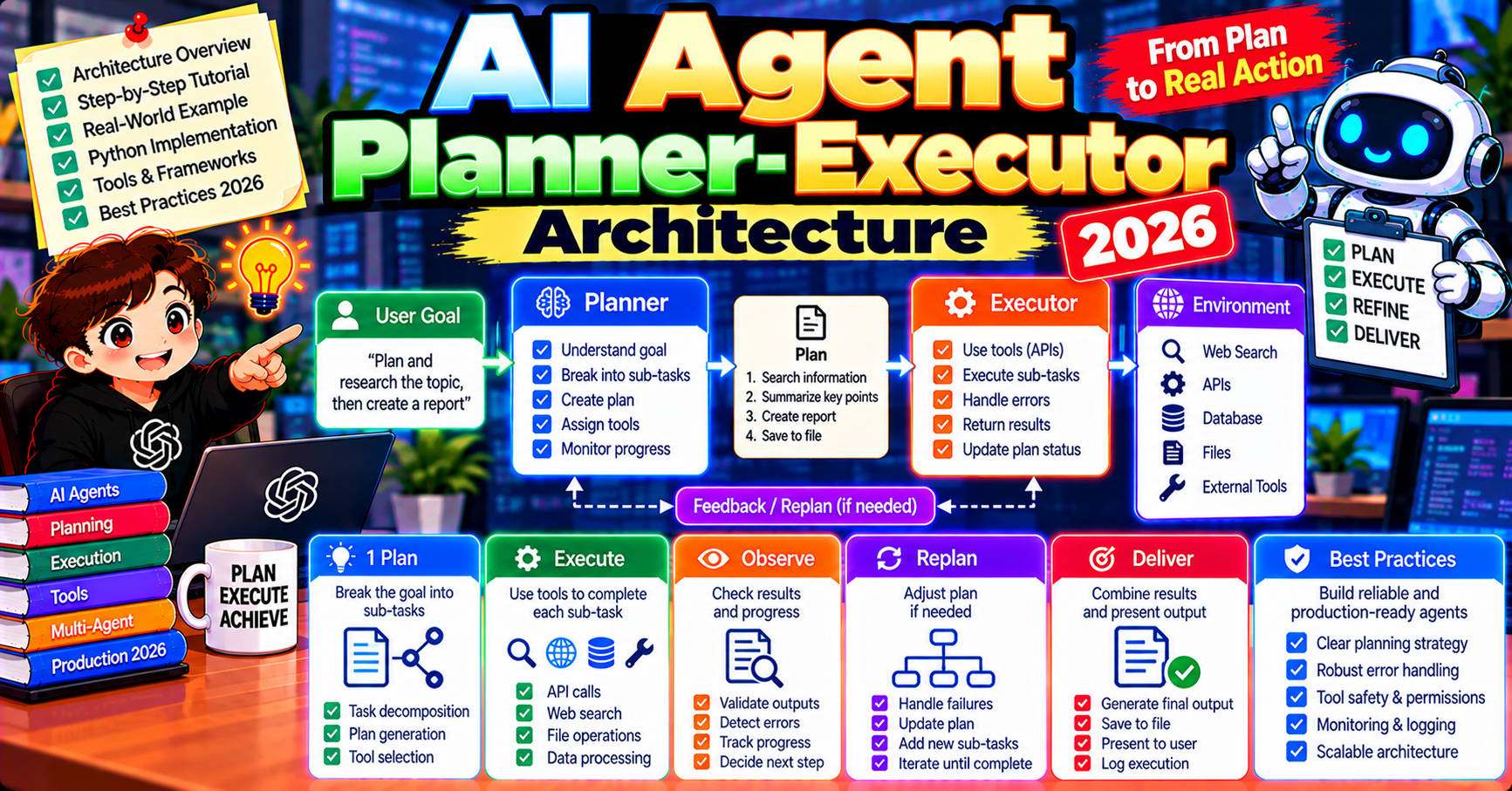
The planner-executor architecture is one of the most-cited patterns in AI agent design, and in 2026 it is the dominant pattern for complex multi-step tasks across production systems. Separating planning (figure out the steps) from execution (do the steps) lets you use different models for different jobs, replan on failure, and build systems where humans can review the plan before expensive execution kicks in. This article walks through the architecture end to end: what it is, why it works, how to implement it with raw Claude or Python, and the production patterns that scale it.
What the planner-executor pattern is
Two specialized agents working together:
- Planner: receives the user’s goal, breaks it into a sequence of concrete subtasks, specifies success criteria for each. Does not execute anything.
- Executor: receives one subtask at a time, uses tools to accomplish it, returns the result (or an error) to the planner.
Loop: Planner outputs plan to Executor runs step 1 to Planner reads result + decides next step to Executor runs step 2 to and so on until the goal is achieved or the planner gives up.
Why separate planning from execution
Four reasons production teams reach for this pattern:
- Model-size separation: planning benefits from the biggest reasoning model (GPT-5, Claude Opus 5.5) but is called infrequently (once per task). Execution benefits from fast + cheap models (Claude Haiku 5.5, GPT-4o-mini) and runs frequently (once per step). Mixing cuts cost 60-80% vs using the big model for everything.
- Human review gate: a plan is reviewable before expensive execution. For high-stakes tasks (data migrations, financial transactions, complex deployments), surface the plan to a human, get approval, then execute.
- Replan on failure: when an executor step fails, the planner can decide whether to retry, skip, use a different tool, or escalate. Monolithic agents often spiral into unhelpful loops on failures.
- Observability: the plan is a concrete artifact you can log, audit, and reference. Monolithic agents produce opaque behavior that is hard to explain to stakeholders.
Minimal planner-executor in raw Python
from anthropic import Anthropic
import json

client = Anthropic()

def plan(goal, context=""):
    """Big model, called once. Returns a list of structured steps."""
    response = client.messages.create(
        model="claude-opus-5-5",
        max_tokens=2048,
        system="You are a planner. Break the user's goal into 3-7 concrete steps. "
               "Each step has: id, description, tool (optional), success_criteria. "
               "Respond with JSON only.",
        messages=[{"role": "user", "content": f"Goal: {goal}\nContext: {context}"}],
    )
    return json.loads(response.content[0].text)

def execute(step, tools):
    """Small model, called per step. Uses tools to accomplish the step."""
    response = client.messages.create(
        model="claude-sonnet-5-5",
        max_tokens=1024,
        tools=tools,
        messages=[{"role": "user", "content": f"Accomplish this step: {step['description']}\nSuccess criteria: {step['success_criteria']}"}],
    )
    return response.content

def planner_executor_loop(goal, tools, max_replans=2):
    plan_v1 = plan(goal)
    results = []

    for step in plan_v1["steps"]:
        result = execute(step, tools)
        results.append({"step": step, "result": result})
        # Check if step failed
        if "error" in str(result).lower() and max_replans > 0:
            # Replan from current state
            context = f"Progress: {json.dumps(results, default=str)}"
            new_plan = plan(goal, context=context)
            max_replans -= 1
            # Switch to new plan's remaining steps (implementation detail)
            # ... re-enter loop with new plan

    return results
Rough but illustrative. Production implementations add structured plan schemas, formal step dependencies, checkpointing, and observability.
Implementation in LangGraph (cleaner for production)
from langgraph.graph import StateGraph, END
from typing import TypedDict, Annotated
import operator

class State(TypedDict):
    goal: str
    plan: list[dict]
    results: Annotated[list, operator.add]
    current_step: int
    status: str  # "planning", "executing", "replanning", "done"

def planner_node(state):
    new_plan = call_planner_llm(state["goal"], state["results"])
    return {"plan": new_plan, "current_step": 0, "status": "executing"}

def executor_node(state):
    step = state["plan"][state["current_step"]]
    result = call_executor_llm(step)
    return {
        "results": [{"step": step, "result": result}],
        "current_step": state["current_step"] + 1,
    }

def route(state):
    if state["current_step"] >= len(state["plan"]):
        return "done"
    last_result = state["results"][-1]["result"] if state["results"] else None
    if last_result and "error" in str(last_result).lower():
        return "replan"
    return "execute"

graph = StateGraph(State)
graph.add_node("plan", planner_node)
graph.add_node("execute", executor_node)
graph.add_edge("plan", "execute")
graph.add_conditional_edges("execute", route, {"execute": "execute", "replan": "plan", "done": END})
graph.set_entry_point("plan")

app = graph.compile(checkpointer=postgres_checkpointer)
LangGraph’s state machine makes the pattern explicit. The conditional edge from executor routes to replan on error, continue to execute, or end on completion. Checkpointer persists state so you can resume after crashes.
Human-in-the-loop plan approval
Add interrupt_before to pause the graph between planning and execution. Present the plan to a human, get approval, resume:
app = graph.compile(
    checkpointer=postgres_checkpointer,
    interrupt_before=["execute"],  # pause before first execution
)

# First run: generates plan, pauses before executing
state = app.invoke({"goal": "Migrate the users table from Postgres 13 to 16"}, config=config)

# Human reviews state["plan"] in your UI
# If approved, resume:
app.invoke(None, config=config)

# If plan needs edit, update state manually and resume:
# app.update_state(config, {"plan": edited_plan})
# app.invoke(None, config=config)
Essential for destructive operations. The plan becomes the artifact that goes through change-management review.
Replanning strategies
When execution fails, the planner has four strategies to pick from:
- Retry with same inputs: for transient errors (API timeout, rate limit). Simple but requires detecting transient vs permanent errors.
- Try alternative tool: if get_weather_v1 fails, try get_weather_v2. Requires the planner to know fallback tools exist.
- Skip and continue: for non-critical steps. Skipping requires the plan to tolerate missing data in downstream steps.
- Replan from scratch: regenerate a new plan based on what has succeeded so far. Expensive (another planner LLM call) but handles novel failure modes.
In production, implement all four and let the planner pick based on the failure type.
When planner-executor fits
- Multi-step tasks where the steps are not knowable upfront (dynamic workflows)
- High-stakes operations where human review of the plan matters (data migrations, deployments, transactions)
- Cost-sensitive workloads where splitting planning (expensive model) from execution (cheap model) saves money
- Debugging-critical use cases where you need an auditable plan artifact
- Workflows where replanning after partial failure is common
When NOT to use planner-executor
- Simple single-step tasks (overkill; one LLM call does the job)
- Workflows where the steps ARE knowable upfront (just hard-code the sequence)
- Latency-critical real-time interactions (planning adds 2-5 seconds per task)
- Tasks where the plan is cheaper than the execution and plan quality does not improve outcomes (just execute directly)
Cost comparison with monolithic agent
For a 10-step task:
- Monolithic agent on Claude Opus 5.5: 10 steps * $0.08/step = $0.80
- Planner (Opus 5.5) + Executor (Sonnet 5.5): 1 plan * $0.15 + 10 steps * $0.02 = $0.35
- Planner (Opus 5.5) + Executor (Haiku 5.5): $0.15 + 10 * $0.005 = $0.20
Separating planner from executor cuts cost 55-75% on multi-step tasks without quality loss on execution (because planning quality is where it matters most, and Opus is still handling planning).
Common pitfalls
- Planner over-specifies: plan is too detailed, prescribes implementation. Executor loses autonomy. Fix: planner specifies WHAT, not HOW.
- Planner under-specifies: steps are vague (“research pricing”), executor doesn’t know what to do. Fix: each step needs concrete success criteria.
- Replan loops: executor keeps failing, planner keeps replanning, system spins. Cap replans at 2-3; escalate to human after.
- Plan drift: executor diverges from the plan silently. Fix: executor should either accomplish the step or return “could not accomplish, suggest X” and never just do something off-plan.
- No plan versioning: replanning overwrites the original plan, losing audit trail. Store plan history as separate state field.
Frequently Asked Questions
Official documentation
Is planner-executor the same as ReAct?
Related but different. ReAct interleaves reasoning + acting at each step within a single agent (one LLM does both planning + execution per turn). Planner-executor separates them into two specialized agents. ReAct is simpler; planner-executor scales better for complex tasks and gives you the review-gate / cost-separation benefits.
Should the plan be natural language or structured JSON?
Structured JSON for production (easier to parse, validate, version). Natural language for prototyping (easier to read and tune the planner’s style). You can combine: structured step list with natural-language descriptions per step.
Can the executor call the planner mid-step?
Yes but risky. The planner is supposed to produce the plan; the executor is supposed to execute. If execution reveals the plan is wrong, the executor returns a failure signal and the orchestrator calls the planner again. Direct executor-to-planner calls blur the separation and make debugging harder.
How do I handle a plan with parallel steps?
Mark steps that can run concurrently via a dependency field in each step (depends_on: [step_1, step_2]). The orchestrator respects dependencies and runs independent steps in parallel. Common in tasks like “download these 10 files AND then combine them.”
What happens if the planner’s output isn’t valid JSON?
Use structured outputs with strict schemas (OpenAI, Anthropic both support this). The LLM is forced to emit a schema-compliant plan. For planners not using strict mode, add a validation + retry loop (if JSON parse fails, re-ask with “please respond with valid JSON only”).
Can the planner refine the plan during execution?
Yes with care. One pattern: after each step completes, the planner reviews the result and optionally updates the remaining steps. More flexible than fixed-plan execution but more expensive (planner call per step). Reserve for genuinely dynamic workflows where plan refinement adds value.

Joken E. Villanueva
Founder & Lead Developer at PIES IT Solution
Founder of PIES Information Technology Solutions, a software company building production-grade applications for institutions across the Philippines. Over 8 years of hands-on full-stack development experience, currently leading the development of ClinicAI, an AI-powered clinic management platform.
Expertise: PHP · MySQL · JavaScript · AI Integration · SaaS Architecture · VB.NET · Database Design · Capstone Documentation · Java · View all posts by Joken E. Villanueva →