
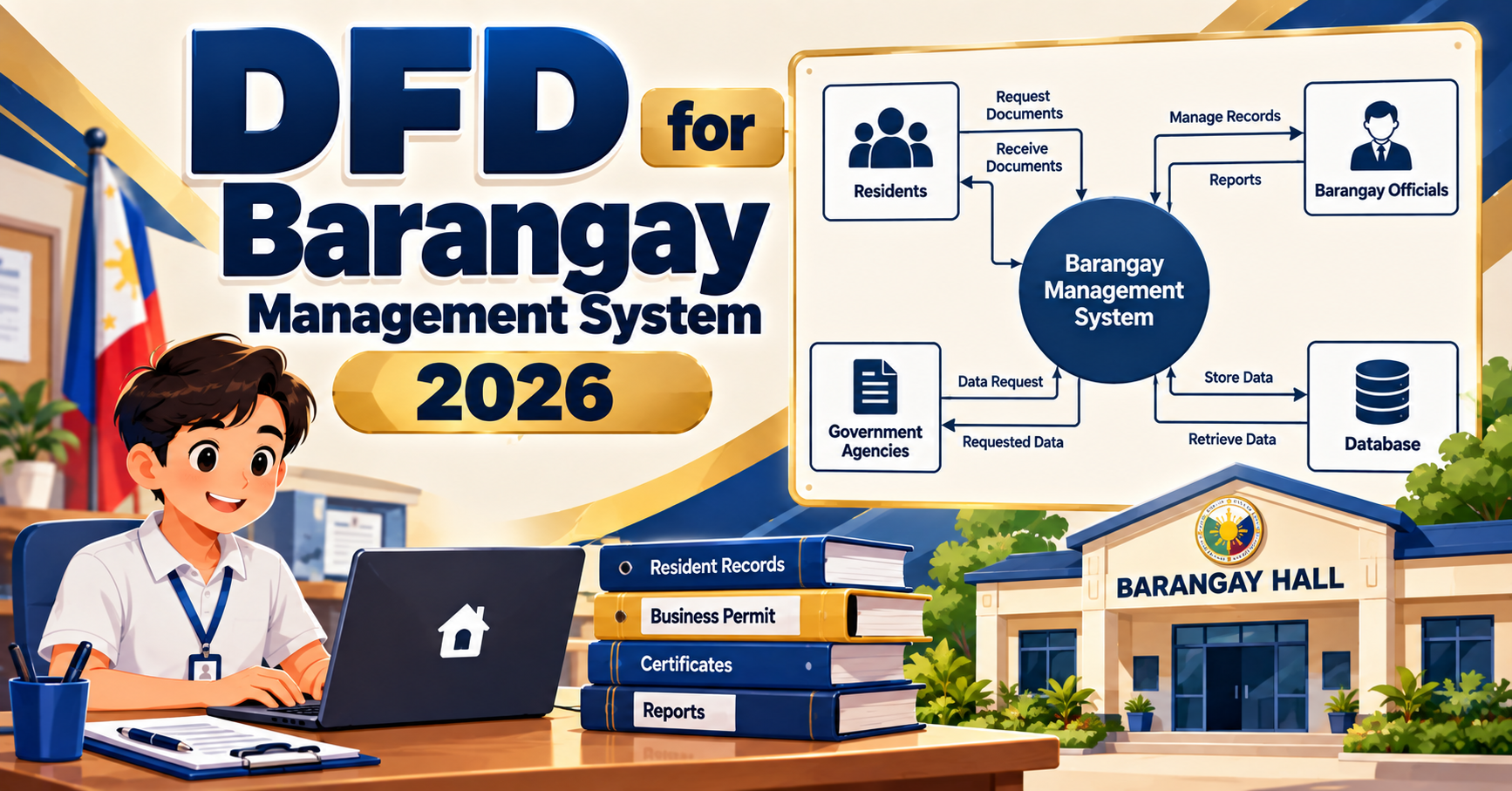
A data flow diagram (DFD) for a barangay management system maps how resident records, clearance requests, blotter entries, aid distributions, and reports flow between residents, barangay officials, and higher LGU levels. Barangay management remains one of the most-picked BSIT capstone topics because every student can visit their own barangay hall to gather requirements. Panels in 2026 expect current-year features (online clearance requests, digital signatures, DILG integration) and strict RA 10173 compliance on resident data. This guide walks through the three-level DFD with defense-ready detail.
Quick 2026 verdict
A defensible barangay DFD in 2026 has 5-7 external entities (Resident, Barangay Captain, Kagawad or Secretary, Treasurer, DILG, PNP, LGU Municipal Hall), 9-12 processes covering registration, clearance issuance, blotter, aid, report, and residency tracking, and 8-10 data stores. Add online request flow, digital signature, and RA 10173 notation to look 2026-current. Missing the online-request channel is the most common panel deduction.
Why barangay management DFDs matter for BSIT capstone
A barangay is the smallest LGU unit in the Philippines, and every Filipino resident interacts with theirs for clearances, IDs, blotter, and aid distribution. Building a system for a barangay hall is a natural BSIT capstone because the sponsor is accessible, the workflow is documented in DILG memoranda, and the project has measurable impact on real community service.
Panels in 2026 grade a barangay DFD on three unique dimensions: coverage (does it include the main barangay services or only one), data privacy (RA 10173 for sensitive resident data), and modernization (online requests, digital signatures, DILG-Bayanihan integration where applicable). A DFD that only covers clearance issuance loses points against one that covers clearance, blotter, aid, and residency together.
Level 0 (context diagram)
Level 1 expands the barangay system into 9-12 sub-processes covering the main service categories:
- 1.0 Register Resident / Update Household: input from Resident (name, address, birthdate, contact, household members); writes to
D1: ResidentsandD2: Households - 2.0 Issue Clearance: request from Resident (clearance type: barangay, indigency, business); reads from
D1; verifies eligibility; awaits Captain approval; writes toD3: Clearances - 3.0 Record Blotter: input from Kagawad or Secretary (incident type, involved parties, timestamp, narrative); writes to
D4: BlotterEntries; may refer to PNP - 4.0 Mediate Case: reads blotter from
D4; records mediation session, agreements; writes toD5: MediationRecords - 5.0 Distribute Aid: reads
D1and applies eligibility rules; Treasurer records distributions toD6: AidDistributions; releases funds fromD7: BudgetLedger - 6.0 Collect Fees: Resident payment for clearance or business permit; Treasurer records collection in
D7 - 7.0 Track Population: aggregates household data from
D1andD2; segments by age, gender, employment; used for DILG reports - 8.0 Manage Announcements: Barangay Captain posts notices; writes to
D8: Announcements; sends via SMS/email to Residents - 9.0 Generate Reports: Barangay Captain and LGU read consolidated reports (population, clearances, blotter, aid, budget) from
D1-D7 - 10.0 Digital Signature: Barangay Captain signs clearances electronically; writes signature timestamp and hash to
D3 - 11.0 Send to LGU / DILG: quarterly and annual data submission to external LGU and DILG entities
Data stores with security notation:
D1: Residents(resident ID, name, birthdate, sex, address, contact; governed under RA 10173, retention permanent-active + 10y-post-removal)D2: Households(household ID, address, head of family, member list linking to D1)D3: Clearances(clearance ID, resident ID, type, issue date, purpose, signature hash, fee)D4: BlotterEntries(blotter ID, complainant, respondent, incident type, narrative, status; access-restricted, retention 5y minimum per DILG)D5: MediationRecords(mediation ID, blotter ID, mediator, session date, agreements, outcome)D6: AidDistributions(distribution ID, resident ID, aid type, amount or goods, date, source)D7: BudgetLedger(transaction ID, category, amount in/out, source or destination, approver)D8: Announcements(announcement ID, category, content, publish date, target audience)
Level 1 (main process decomposition)
Level 1 breaks the single “Barangay Management System” bubble from Level 0 into the six core functions a barangay actually runs. Every process gets a number (1.0 through 6.0), every data store gets an ID (D1 through D6), and every flow shows which store is read or written. This is the diagram panels grade the hardest, because it is where students most often skip the parts they did not build.
The 2026 rubric expects: 1.0 Manage Residents (registration, updates, deactivation), 2.0 Issue Clearance (verify, collect fee, generate, sign), 3.0 Handle Blotter (log incident, notify PNP), 4.0 Distribute Aid (assess need, allocate, report), 5.0 Manage Treasury (record income and expenses, produce summary), and 6.0 Report to DILG (compile compliance reports, receive memoranda). Skip any and reviewers ask why.
Six data stores support the six processes and cross-reference each other: D1 Residents feeds Issue Clearance (identity verification) and Distribute Aid (household check), D2 Clearances holds the issued certificates with serial numbers, D3 Blotter stores incident records, D4 Aid Records logs who received what aid, D5 Treasury Ledger records every fee collected and every aid disbursement, and D6 Reports holds the DILG compliance packages. Every read and write must be shown as a directional arrow, which is what the diagram above renders using the same CapstoneUML notation your editor will produce.
Level 2 (focused sub-process zoom)
Level 2 is where you prove you understand one specific sub-process end to end, not just the top-level flow. Panels reviewing a barangay capstone in 2026 look for at least one Level 2 zoom, and they usually want it on the process that touches money or personally identifiable data: 2.0 Issue Clearance is the safest choice because it maps to a real Barangay Clearance workflow that every panel member has personally used.
The zoom breaks Level 1’s single “Issue Clearance” bubble into 4 internal steps: 2.1 Verify Resident (check the registry against a submitted valid ID), 2.2 Collect Payment (accept the clearance fee, generate a receipt), 2.3 Generate Certificate (fill the template with resident data + purpose + serial number), 2.4 Print & Sign (physical print for wet signature, or digital signature by the Barangay Captain for QR-verifiable clearances).
Three data stores appear in this zoom: D1 Residents (read-only for verification), D5 Treasury Ledger (write for the fee record), and D2 Clearances (write for the issued certificate with the serial number for later verification). This matches what the RA 10173 Data Privacy Act requires for barangay-level personal data handling: minimum necessary access per process, an audit trail for every write, and a signed authorization for external release.
Panels grade a Level 2 diagram on three things: does every sub-process fit inside the parent’s boundary (no new external entities that were not in Level 1), does each data store read/write flow show the direction correctly (a common mistake is showing a single line without an arrow), and does the numbering follow the parent (2.1, 2.2, 2.3, 2.4, not 1, 2, 3, 4). If any of those slip, you lose easy points.
Best Level 2 candidates for barangay defense:
- 2.0 Issue Clearance expands into 2.1 Receive Request (in-person or online), 2.2 Verify Resident Identity from D1, 2.3 Check Requirements Met (age, residency months, no derogatory record), 2.4 Compute Fee, 2.5 Await Captain Digital Signature, 2.6 Print or Email Clearance to Resident
- 3.0 Record Blotter expands into 3.1 Interview Complainant, 3.2 Record Narrative, 3.3 Notify Respondent, 3.4 Schedule Mediation, 3.5 Assign Blotter Number, 3.6 Escalate to PNP if beyond barangay jurisdiction
- 5.0 Distribute Aid expands into 5.1 Verify Eligibility from D1, 5.2 Check Budget Availability in D7, 5.3 Log Distribution Record, 5.4 Deduct from Budget, 5.5 Get Resident Signature (electronic or thumbprint), 5.6 Send SMS Confirmation
2026 features every barangay DFD should include
- Online clearance request channel. Residents can request via mobile app or web form; Kagawad receives queue; Captain signs digitally. This is the biggest 2026 differentiator vs 2018-era templates.
- Digital signature process. Include process 10.0 Digital Signature separately. Captain does not physically sign every clearance in 2026; the DFD should reflect that.
- SMS notification to Residents. Every clearance approval, aid distribution, and blotter update sends SMS. Use Semaphore or Twilio as the gateway.
- Indigent verification. For 4Ps or DSWD-linked aid, show a verification data flow to DSWD database (real or simulated). Panels appreciate real-agency integration.
- DILG reporting integration. Show the Send to LGU / DILG process, especially for SBM (Seal of Good Local Governance) criteria data submission.
- Data Privacy Act notation on D1, D4. Resident data is regulated personal information. Blotter data includes sensitive information (crimes, disputes). Both need explicit RA 10173 annotations on retention and access.
- Population dashboard. Track Population process outputs a real-time counter dashboard for the Captain (total residents, senior citizens, PWDs, children, unemployed).
Common Level 1 mistakes reviewers catch
- No Blotter or Mediation processes (many students only build clearance; DFD looks incomplete)
- Budget Ledger missing but Aid Distribution present (aid without budget tracking is not defensible)
- Digital Signature not shown at Level 1 (paper claims paperless but DFD shows manual signing)
- Announcements process missing (barangay is primarily a communication hub for the community)
- Kagawad and Secretary treated as one entity (they are separate roles with different data flows)
- DILG reporting missing (barangay does not exist in isolation)
- Data flow from Resident to D1 does not pass through Register process (a Resident cannot write directly to Residents store)
- Fee collection missing (barangay clearance costs ₱50-100 typically; the DFD should reflect it)
Comparison: scope options for a barangay capstone
| Scope | Processes Included | Panel Fit |
|---|---|---|
| Clearance only | Residents, Clearance, Signature, Fee | Weak (too narrow for full capstone) |
| Clearance + Blotter | Add Blotter, Mediation, PNP referral | Adequate |
| Full barangay hall | Clearance, Blotter, Aid, Population, Reports, DILG | Excellent (full scope) |
| Multi-barangay LGU | Above plus multi-tenancy and LGU consolidation | Overkill for BSIT (masteral level) |
Frequently Asked Questions
Should I include online clearance in the DFD if my barangay hall does not have internet?
Yes, show it as a future-capability data flow with a note. Panels in 2026 explicitly ask about online options. Even if the current barangay hall is offline, the DFD proves the system was designed to support the online channel when connectivity arrives.
How do I show digital signature versus manual signature?
Separate process 10.0 Digital Signature at Level 1. Captain signs by clicking an authenticated button; system attaches a hash and timestamp to the clearance record in D3. Manual signature is a fallback data flow (Captain physically signs, Kagawad scans and uploads). Show both if your system supports both.
What does the blotter data store need to include?
Blotter ID, date-time, complainant name, respondent name, incident type (theft, dispute, drunkenness), narrative summary, status (open, mediated, resolved, referred to PNP), and mediation reference. Do not include full transcripts; that goes in a separate secure store D5 MediationRecords.
Do I need real DILG integration for the capstone?
No, but show it as a planned integration point with an external DILG entity in Level 0 and a Send to LGU / DILG process at Level 1. Real API integration with DILG requires official coordination and is out of scope for BSIT capstone. Simulated integration (CSV or PDF export) is sufficient.
How do I handle Data Privacy Act for resident data?
Add explicit annotation on D1 Residents: “Governed under RA 10173. Retention: permanent while active; 10 years after removal. Access: Kagawad, Secretary, Captain only. Data-subject rights: view own records, request correction, withdraw consent.”
What if my barangay does not distribute aid?
Every barangay distributes some form of aid, at minimum 4Ps distributions or disaster relief. If you scope your capstone to skip aid, the DFD looks incomplete. It is worth adding at least a basic Distribute Aid process even if the current implementation is simple.
Related UML tutorials
- DFD for E-commerce Website (Levels 0, 1, 2)
- DFD for POS System (Complete 2026 Guide)
- DFD for Online Voting System
- 150 Best Capstone Project Ideas for IT Students (2026 Edition)
Official documentation
- UML-diagrams.org: data flow diagram notation reference
- National Privacy Commission: RA 10173 Data Privacy Act
- DILG official portal (barangay compliance references)
Official documentation

Mary Grace G. Patulada
Programmer & Technical Writer at PIES IT Solution
Mary Grace G. Patulada (pen name ‘Nym’) is a programmer and writer at PIES IT Solution with a BSIT background from Carlos Hilado Memorial State College, Binalbagan Campus. Authored 370+ UML diagram tutorials and capstone documentation guides at itsourcecode.com. Specializes in UML (class, use case, activity, sequence, component, deployment), DFD, and ER diagrams for BSIT capstone projects.
Expertise: UML Diagrams, DFD, ER Diagrams, Use Case Diagrams, Activity Diagrams, Capstone Documentation, PHP · View all posts by Mary Grace G. Patulada →
Skip the redraw: grab the Barangay template
All three diagrams (Level 0, Level 1, Level 2) are ready to drag, rename, and export as PNG, SVG, PowerPoint, or PDF for your Chapter 3 documentation. Free preview, no card required.