
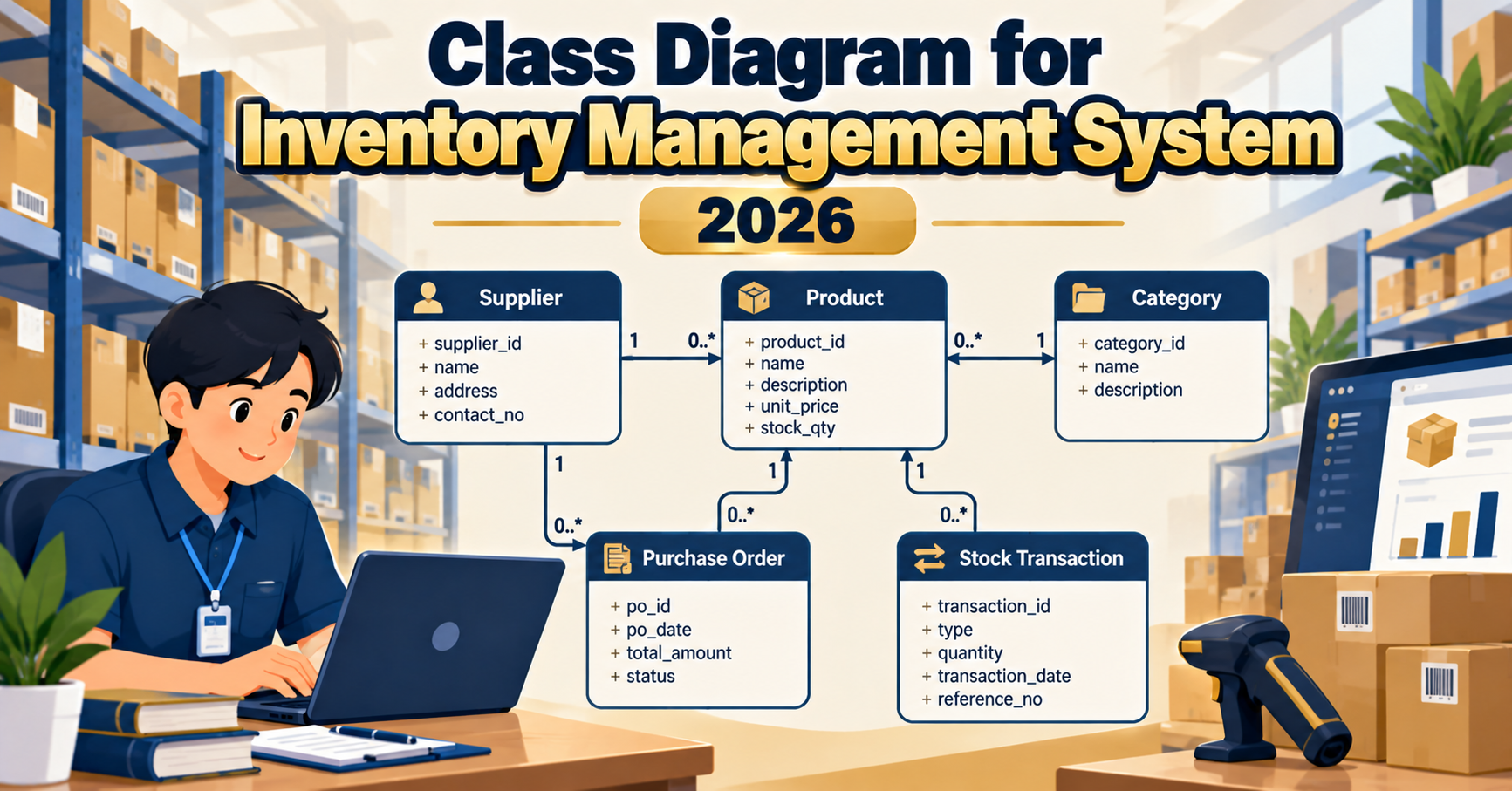
A class diagram for an inventory management system captures the static structure of the system: the classes, their attributes and methods, and the relationships between them. Where a DFD shows data flow and a sequence diagram shows time-ordered messages, the class diagram is the blueprint that maps directly to database tables and object-oriented code. Panels in 2026 expect at least 8-12 classes with complete attribute types, method signatures, and correct relationship notation. This guide walks through the diagram with defense-ready detail for BSIT capstone.
Quick 2026 verdict
A defensible inventory class diagram has 8-12 classes: Product, Category, Supplier, Warehouse, StockItem, StockMovement, PurchaseOrder, PurchaseOrderLine, User, Role, Audit. Each class needs attributes with typed declarations, methods with return types, and correct multiplicity on associations. Show composition where appropriate (PurchaseOrder composes PurchaseOrderLine, not aggregation). Add barcode + mobile scanner references to look current-year.
Class diagram notation reviewed
A UML 2.5 class diagram uses these elements:
Want to customize this class diagram for your capstone?
Open the Inventory Management System template in CapstoneUML. Drag, rename, add relationships, then export as PNG, SVG, PowerPoint, or PDF for your Chapter 3 documentation.
- Class box: rectangle with three sections (name, attributes, methods)
- Visibility markers: + public, – private, # protected, ~ package
- Attribute format:
visibility name : Type = defaultValue - Method format:
visibility name(parameter : Type) : ReturnType - Association: solid line between classes with optional label and multiplicity (1, 0..*, 1..*, 0..1)
- Aggregation: hollow diamond, “has-a” relationship where the part can exist independently
- Composition: filled diamond, strong ownership where the part cannot exist without the whole
- Generalization: hollow triangle arrow, “is-a” inheritance
- Realization: hollow triangle with dashed line, class implements an interface
- Dependency: dashed arrow, one class uses another briefly
Core classes for an inventory system
Product
------------
- productId : String
- sku : String
- name : String
- description : String
- category : Category
- unitPrice : Decimal
- barcode : String
- reorderThreshold : Integer
------------
+ getStockLevel() : Integer
+ isLowStock() : Boolean
+ updatePrice(newPrice : Decimal) : Void
Category
------------
- categoryId : String
- name : String
- parentCategory : Category (nullable)
------------
+ getSubcategories() : List<Category>
+ getAllProducts() : List<Product>
Warehouse
------------
- warehouseId : String
- name : String
- address : String
- manager : User
------------
+ getTotalStock() : Integer
+ getStockItems() : List<StockItem>
StockItem
------------
- stockItemId : String
- product : Product
- warehouse : Warehouse
- quantityOnHand : Integer
- lastUpdated : DateTime
------------
+ increment(amount : Integer) : Void
+ decrement(amount : Integer) : Boolean
+ isBelowReorder() : Boolean
StockMovement
------------
- movementId : String
- product : Product
- warehouse : Warehouse
- movementType : Enum(INBOUND, OUTBOUND, TRANSFER, ADJUSTMENT)
- quantity : Integer
- timestamp : DateTime
- performedBy : User
- referenceOrder : PurchaseOrder (nullable)
------------
+ apply() : Void
+ reverse() : Void
Supplier
------------
- supplierId : String
- name : String
- contactPerson : String
- email : String
- phone : String
- address : String
- leadTimeDays : Integer
------------
+ getProducts() : List<Product>
+ getPendingOrders() : List<PurchaseOrder>
PurchaseOrder
------------
- purchaseOrderId : String
- supplier : Supplier
- orderDate : Date
- expectedDelivery : Date
- status : Enum(DRAFT, SUBMITTED, RECEIVED, CANCELLED)
- lines : List<PurchaseOrderLine> [composition, filled diamond]
- totalAmount : Decimal
- createdBy : User
------------
+ addLine(product : Product, qty : Integer, unitCost : Decimal) : Void
+ submit() : Void
+ receive() : Void
+ computeTotal() : Decimal
PurchaseOrderLine
------------
- lineId : String
- product : Product
- quantity : Integer
- unitCost : Decimal
- receivedQuantity : Integer
------------
+ computeLineTotal() : Decimal
+ receive(qty : Integer) : Void
User
------------
- userId : String
- username : String
- fullName : String
- email : String
- passwordHash : String
- role : Role
------------
+ authenticate(password : String) : Boolean
+ hasPermission(action : String) : Boolean

Role
------------
- roleId : String
- name : String  // "Admin", "Manager", "StaffScanner"
- permissions : List<String>
Relationships with correct multiplicities
- Product 0..* to 1 Category (many products belong to one category; category can have zero-to-many products)
- Category 0..1 to 0..* Category (parent-subcategory, self-association)
- Warehouse 1 to 0..* StockItem (a warehouse holds zero-to-many stock items)
- Product 1 to 0..* StockItem (a product has zero-to-many stock item records, one per warehouse)
- Product 1 to 0..* StockMovement (many movements per product)
- Warehouse 1 to 0..* StockMovement
- Supplier 1 to 0..* PurchaseOrder
- PurchaseOrder 1 to 1..* PurchaseOrderLine (COMPOSITION, filled diamond). Critical: composition means lines cannot exist without their parent order
- PurchaseOrderLine 0..* to 1 Product
- User 1 to 0..* PurchaseOrder (creator)
- User 1 to 0..* StockMovement (performedBy)
- User 0..* to 1 Role
2026 features every inventory class diagram should include
- Barcode and QR support. Add barcode attribute to Product. Add BarcodeScanner interface or a ScannerClient class that returns a Product from a scan.
- Multi-warehouse. Even for capstone, panels expect Warehouse as a first-class entity. Single-warehouse designs limit real-world applicability.
- Audit trail. Add an Audit class with references to User, timestamp, action, and affected entity. All destructive operations create Audit entries.
- Low-stock notification. StockItem has isBelowReorder() method. When true, the system emits a NotificationService call. Show Notification as a separate class if you have space.
- Batch and expiry tracking (optional). Add BatchLot class with batchId, expiryDate, and quantity if your inventory is for pharmacy, food, or perishable items.
- Mobile scanner user. Role class has a “StaffScanner” role type. Panel will ask about mobile access; the class diagram should reflect it.
- Real-time sync. Add a syncStatus attribute to StockMovement (LOCAL, PENDING_SYNC, SYNCED) if your project supports offline scanning.
Common panel deductions on inventory class diagrams
- Missing multiplicity on associations (reviewers explicitly check for 1, 0..*, 1..*, 0..1 labels)
- PurchaseOrder-to-PurchaseOrderLine shown as aggregation (hollow diamond) instead of composition (filled diamond)
- All attributes shown without types (name should be name : String, not just name)
- Methods shown without return types or parameter types
- Warehouse or multi-location model missing (single-tenant inventory diagrams look 5 years old)
- No StockMovement class (system cannot audit how stock changed over time)
- User and Role merged into one class (violates single-responsibility, harder to extend)
- Product self-associates to a “related products” but no clear multiplicity or role name
- Barcode attribute absent even though the project uses barcode scanning
Aggregation vs Composition (the classic panel question)
| Aspect | Aggregation | Composition |
|---|---|---|
| Symbol | Hollow diamond | Filled diamond |
| Part lifecycle | Can exist without whole | Cannot exist without whole |
| Inventory example | Warehouse has StockItem (StockItem can be moved to another warehouse) | PurchaseOrder has PurchaseOrderLine (line cannot exist without its order) |
| Cascade delete? | No | Yes |
Frequently Asked Questions
How many classes should an inventory class diagram have?
8-12 for a complete BSIT capstone. Fewer than 8 looks underscoped; more than 15 gets cluttered. Core 10: Product, Category, Warehouse, StockItem, StockMovement, Supplier, PurchaseOrder, PurchaseOrderLine, User, Role.
Do I need to show method signatures with parameter types?
Yes, always. Reviewers in 2026 expect + decrement(amount : Integer) : Boolean, not just + decrement(). Language-agnostic types are fine (Integer, String, Decimal, DateTime, List<T>). Java, C#, or TypeScript panels all validate types.
When should I use inheritance in an inventory system?
Rarely. Product subclassed into ConsumableProduct and DurableProduct is possible if the domain has strong distinctions (batch tracking, warranty). Otherwise a single Product class with a type attribute is simpler. Reviewers appreciate simplicity when inheritance is not truly needed.
Should I include a separate Notification class?
Yes if your system sends low-stock alerts, order-received confirmations, or reorder reminders. Notification with type, recipient, message, and timestamp attributes is common. Attach it to StockItem or User via association.
How do I show the barcode scanner as part of the class diagram?
Add a ScannerClient class or interface with method scanCode(code : String) : Product. It has an association to Product for the lookup. Or model it as an external actor in a use-case diagram and skip in the class diagram. Both are defensible.
Does the class diagram directly map to database tables?
Mostly yes for object-relational mapping (ORM). Each class becomes a table, attributes become columns. Compositions typically map to foreign keys with cascade delete. Panels ask this explicitly; be ready to walk from class diagram to the ER diagram to prove consistency.
Related UML tutorials
- DFD for Inventory Management System Levels 0, 1, 2
- Sequence Diagram for Library Management System
- Activity Diagram for E-learning System
- Class Diagram for Online Ordering System
Official documentation
Official documentation

Mary Grace G. Patulada
Programmer & Technical Writer at PIES IT Solution
Mary Grace G. Patulada (pen name ‘Nym’) is a programmer and writer at PIES IT Solution with a BSIT background from Carlos Hilado Memorial State College, Binalbagan Campus. Authored 370+ UML diagram tutorials and capstone documentation guides at itsourcecode.com. Specializes in UML (class, use case, activity, sequence, component, deployment), DFD, and ER diagrams for BSIT capstone projects.
Expertise: UML Diagrams, DFD, ER Diagrams, Use Case Diagrams, Activity Diagrams, Capstone Documentation, PHP · View all posts by Mary Grace G. Patulada →
Skip the redraw: grab the Inventory Management System template
Class, Use Case, ER, DFD, Activity, and Sequence diagrams already filled in with capstone-ready entities and flows. Free preview, no card required.