
You’re running a Python script, everything looks fine, then suddenly: TypeError: 'X' object is not callable. Where X is list, str, int, NoneType, tuple, module, or the name of one of your own classes. The error is short. The cause is almost always one of six patterns.
This guide covers the general “object is not callable” pattern and shows you how to diagnose every variant in seconds. Each cause comes with a runnable code example and a clean fix.
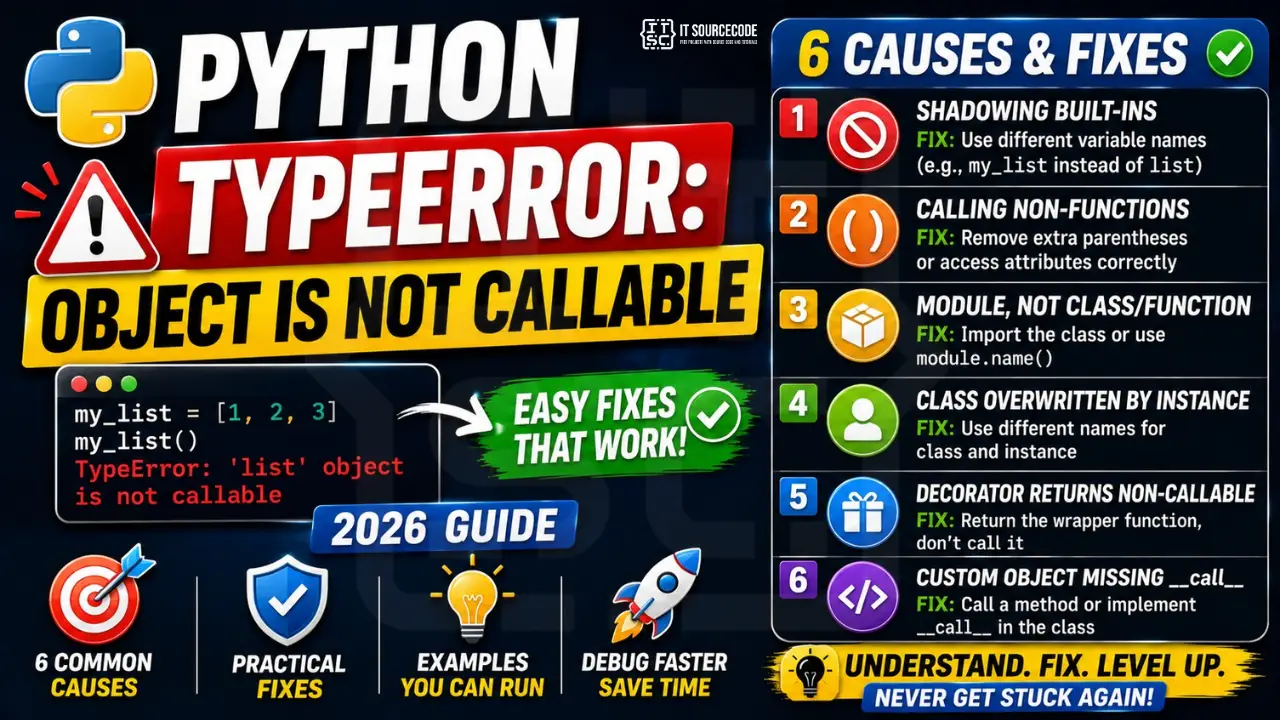
📌 Quick answer: TypeError: 'X' object is not callable means you used () after something that isn’t a function or class. By far the most common cause: you reassigned a built-in name to a regular value (e.g. list = [1, 2, 3] and then later wrote list()). The fix: rename your variable (my_list instead of list) and restart your Python session so the original built-in is restored.
What “Not Callable” Actually Means
In Python, only certain things can be “called” with parentheses: functions, methods, classes, and any object that defines a __call__ method. Everything else, integers, strings, lists, dicts, modules, None, is not callable.
When Python sees x(), it asks: “is x callable?” If no, it raises TypeError: 'X' object is not callable, where X is the type of whatever you tried to call.
x = 5
x()    # ❌ TypeError: 'int' object is not callable

s = "hello"
s()    # ❌ TypeError: 'str' object is not callable

lst = [1, 2, 3]
lst()  # ❌ TypeError: 'list' object is not callable
You can always check whether something is callable before calling it:
callable(print)      # True: built-in function
callable(len)        # True: built-in function
callable(int)        # True: class (calling it constructs an int)
callable(5)          # False: instance, not a class
callable("hello")    # False
Now let’s go through the 6 patterns that cause this error 99% of the time.
Cause #1: Variable Shadowing a Built-in Function
This is the #1 cause and the easiest to miss. You use a name like list, str, int, dict, tuple, sum, max, or type as a variable. From that point on, the original built-in is hidden, and any later call like list() tries to call your variable instead:
list = [1, 2, 3]        # ❌ shadows the built-in list
nums = list(range(5))   # TypeError: 'list' object is not callable
The same trap with other names:
sum = 0
for n in [1, 2, 3]:
    sum += n
print(sum([10, 20, 30]))   # ❌ TypeError: 'int' object is not callable

str = "username"
print(str(42))             # ❌ TypeError: 'str' object is not callable
The fix, never use built-in names as variables:
# ✅ Use descriptive names that don't collide with built-ins
my_list = [1, 2, 3]
nums = list(range(5))   # works: list() is the original built-in

total = 0
for n in [1, 2, 3]:
    total += n
print(sum([10, 20, 30]))   # works
If you’ve already done it in a notebook and the kernel is poisoned, run del list (or restart the kernel) to restore the built-in.
A linter like Pyflakes, Ruff, or Pylint catches this instantly, Ruff’s rule A001 flags every shadowed built-in. Enable it and you’ll never hit this error again.
Cause #2: Calling a Non-Function (Missing or Extra Parens)
You wrote () on something that looks like a function but isn’t. Two common variants:
2a, accessing a class attribute as if it were a method:
class Student:
    def __init__(self, name):
        self.name = name
        self.score = 0   # this is an attribute, not a method

s = Student("Ana")
print(s.score())   # ❌ TypeError: 'int' object is not callable
The fix:
print(s.score) # ✅ no parens: attribute access
2b, calling the result of a function instead of the function itself:
def get_count():
    return 42

result = get_count()      # result is now 42
print(result())           # ❌ TypeError: 'int' object is not callable: already called!
The fix: stop the second call. get_count() already returned the value.
Cause #3: Confusing a Module With a Class or Function
Python’s import system has a classic trap: when you write import datetime, you import the module named datetime, not the class named datetime inside it.
import datetime

now = datetime(2026, 6, 18)   # ❌ TypeError: 'module' object is not callable
The fix, either import the class explicitly, or qualify the call:
# ✅ Option A: import the class directly
from datetime import datetime
now = datetime(2026, 6, 18)

# ✅ Option B: qualify with module name
import datetime
now = datetime.datetime(2026, 6, 18)
The same pattern bites people with socket, random, email, and other stdlib modules whose primary class shares the module name.
Cause #4: Reassigning a Class Reference to an Instance
You bind a name to a class, use it to create instances, then accidentally rebind the name to an instance, and later code tries to construct another instance from it:
class Database:
    def __init__(self, url):
        self.url = url

Database = Database("postgres://localhost")   # ❌ now Database is an instance
db = Database("postgres://prod")              # TypeError: 'Database' object is not callable
The class Database got overwritten with one of its own instances on line 2. The next call fails because instances aren’t callable (unless they define __call__).
The fix, separate the class from the instance with distinct names:
class Database:
    def __init__(self, url):
        self.url = url

db = Database("postgres://localhost")   # ✅ instance has its own name
prod_db = Database("postgres://prod")   # ✅ Database class is still callable
Capitalize class names (PascalCase) and use snake_case for instances, PEP 8 conventions prevent this naturally.
Cause #5: Decorator Returns a Non-Callable
Decorators are supposed to wrap a function and return a callable. If your decorator forgets to return the wrapper, or returns the result of calling it, every subsequent call fails:
def my_decorator(fn):
    def wrapper(*args, **kwargs):
        print(f"Calling {fn.__name__}")
        return fn(*args, **kwargs)
    wrapper()   # ❌ called wrapper here, then returned None implicitly

@my_decorator
def greet(name):
    return f"Hi {name}"

greet("Ana")    # ❌ TypeError: 'NoneType' object is not callable
The decorator returned None (implicit), so greet is now None, and greet("Ana") tries to call None.
The fix, return the wrapper, don’t call it:
from functools import wraps

def my_decorator(fn):
    @wraps(fn)
    def wrapper(*args, **kwargs):
        print(f"Calling {fn.__name__}")
        return fn(*args, **kwargs)
    return wrapper   # ✅ return the function, don't call it

@my_decorator
def greet(name):
    return f"Hi {name}"

print(greet("Ana"))   # ✅ Calling greet \n Hi Ana
Same trap with parametrized decorators: the outer function returns the actual decorator, and the actual decorator returns the wrapper. Miss any return and you get 'NoneType' object is not callable.
Cause #6: Custom Object Missing __call__
You designed a class to be used like a function, but forgot to define __call__:
class Multiplier:
    def __init__(self, factor):
        self.factor = factor

    def multiply(self, x):
        return x * self.factor

double = Multiplier(2)
print(double(5))   # ❌ TypeError: 'Multiplier' object is not callable
Even though the class has a multiply method, the instance itself isn’t callable, Python looks for __call__, not multiply.
The fix, either call the method explicitly, or define __call__:
# ✅ Option A: call the method
print(double.multiply(5))   # 10

# ✅ Option B: make the instance callable
class Multiplier:
    def __init__(self, factor):
        self.factor = factor

    def __call__(self, x):
        return x * self.factor

double = Multiplier(2)
print(double(5))   # ✅ 10
This pattern is common in PyTorch, TensorFlow, scikit-learn, and other libraries where “models” act like functions thanks to __call__.
Quick Prevention Checklist
To stop hitting TypeError: object is not callable in future code, build these habits:
- Never use built-in names as variables: avoid
list,dict,str,int,tuple,set,sum,max,min,type,id,input,print - Run a linter: Ruff (rule
A001), Pyflakes, or Pylint flag shadowed built-ins instantly - Follow PEP 8: PascalCase for classes, snake_case for variables, prevents class/instance name collisions
- Always return from decorators: the inner
wrapperfunction must be returned, not called - Use
from module import Classwhen the class shares the module name (datetime,socket,random.Random) - Check before you call: when accepting callbacks from users, use
if callable(fn): fn()to fail fast with a clear message - Read the error type carefully:
'NoneType' object is not callabletells you a function returnedNone;'list' object is not callabletells you a built-in was shadowed
Variant Errors You Might See
This article covers the general “object is not callable” pattern. The exact wording of the error tells you which type was involved, and each variant has its own specific debugging tips:
'NoneType' object is not callable, a function returnedNone(often from a decorator, or you forgotreturn)'str' object is not callable, usually shadowedstrbuilt-in'list' object is not callable, usually shadowedlistbuilt-in'int' object is not callable, usually shadowedintbuilt-in, or treated an attribute as a method'dict' object is not callable, used()instead of[]on a dictionary'module' object is not callable, imported a module but tried to call it like a class'tuple' object is not callable, most often a missing comma between two tuples in a list, accidentally calling the first
For sibling error families, see our guides on IndexError: list index out of range and Python KeyError, they share the same “wrong access pattern” root cause as the not-callable family.
📌 Going further with Python
Once your TypeErrors are under control, see our best Python projects with source code for capstone-ready builds, the best Python IDE 2026 comparison for tooling that catches these errors before you run, or browse our free Python tutorial series.
Quick step-by-step summary (click to expand)
- Check if you shadowed a built-in function. Search your code for variable names like list, dict, str, tuple. Assigning to a builtin overwrites the function.
- Verify you are calling the right attribute. If you meant to call a method, add parentheses (my_obj.method()). If you meant a class instance, call the class name, not the instance.
- Check for missing parentheses on a method reference. my_list.append (with no parens) returns the method object. my_list.append(x) actually calls it.
- Print the object type before calling. Add print(type(target)) right before the failing call to see what Python sees. Nine times out of ten this reveals the shadowing.
Official documentation
Frequently Asked Questions
What does “TypeError: object is not callable” mean in Python?
() after something that isn’t a function, method, or class, so Python can’t “call” it. The most common cause is reassigning a built-in name like list, str, or sum to a variable, then trying to use the built-in again. Other causes: missing return in a decorator, accessing a class attribute as if it were a method, importing a module instead of the class inside it.Why does Python say “‘list’ object is not callable”?
list (e.g. list = [1, 2, 3]), which shadowed the built-in list() function. Any later call like list(range(5)) tries to call your list, not the built-in. Fix: rename the variable (my_list = [1, 2, 3]) and either run del list or restart your Python session to restore the original built-in.Why am I getting “‘NoneType’ object is not callable”?
None, and you called the result with (). The two most common cases: (1) a decorator forgot to return its wrapper function, so the decorated function became None; (2) you assigned a function call’s result to the same name as the function (greet = greet()), and a later call to greet() calls None. Trace back to where the value became None by printing it before the failing call.Why does “import datetime” then “datetime()” fail?
import datetime imports the module, not the class. Modules aren’t callable, only the datetime.datetime class inside the module is. Two fixes: use from datetime import datetime so the name refers to the class, or use the qualified form datetime.datetime(2026, 6, 18). The same pattern applies to socket, random, and other stdlib modules whose primary class shares the module name.How do I check if something is callable in Python?
callable(x) function. It returns True for functions, methods, classes, and any object with a __call__ method; False for everything else. Example: callable(len) → True, callable(5) → False, callable(int) → True (classes are callable because calling them constructs an instance). Use this at the boundary when accepting callbacks from user code.Why does my decorator cause “‘NoneType’ object is not callable”?
return the wrapper. A decorator must return a callable (usually the inner wrapper function). If you forget return wrapper at the end, the decorator returns None implicitly, and the decorated function becomes None. The next call to the decorated function then raises this error. Always end your decorator with return wrapper (or use functools.wraps for proper metadata).How do I make my own class callable?
__call__ method on the class. Python checks for __call__ whenever you write instance(). Example: class Adder: def __init__(self, n): self.n = n; def __call__(self, x): return x + self.n. Then add5 = Adder(5); add5(10) returns 15. This is how PyTorch and scikit-learn models work, calling a model is calling its __call__ method.How is “object is not callable” different from “object is not subscriptable”?
() on something that isn’t a function or class. “Not subscriptable” means you used square brackets [] on something that doesn’t support indexing (like a function or integer). Both are TypeError, both signal “wrong access syntax for this type,” but they apply to different access patterns. If you see “not subscriptable,” you wrote fn[0] when you meant fn(); if you see “not callable,” you wrote x() when you meant x or x[0].How do I prevent this error in the future?
return wrapper, never call the wrapper inside the decorator. Pair this with an IDE that highlights shadowed built-ins (PyCharm and VS Code with Pylance both do this), and you’ll stop hitting the error entirely.Final Recommendation
If you take one habit from this guide, make it this: never use a built-in name as a variable. That single rule eliminates the majority of “object is not callable” errors, including 'list', 'str', 'int', 'dict', 'sum', and 'type' variants. A linter enforces it for free.
For the remaining cases, decorators returning None, modules vs classes, custom callable objects, the error message tells you exactly which type was misused. Read the type name in the quotes, map it to the right cause from this list, and you’ll have a fix in under a minute.
🎯 Your next steps:
- Audit your current file for variables named
list,str,dict,sum,type,id, rename them now - Install Ruff (
pip install ruff) and enable ruleA001to catch shadowed built-ins automatically - If you hit
'NoneType' object is not callable, check everyreturnstatement in your decorators - Browse more TypeError fixes or Python tutorials
Still stuck on a specific TypeError variant? Drop the exact error message and code snippet in the comments, we’ll help you debug it.

Adrian Mercurio
Full-Stack Developer at PIES IT Solution
Specializes in building complete capstone projects with full documentation. Strong background in PHP/MySQL development and database design. Has personally built and tested over 30 capstone-ready projects with ER diagrams, DFDs, and chapter-by-chapter thesis documentation.
Expertise: PHP · Laravel · Database Design · Capstone Projects · C# · C · C++ · Python · AI Projects
· View all posts by Adrian Mercurio →