
Instructor patches LLM clients to return validated Pydantic models instead of raw JSON. If you see ModuleNotFoundError: No module named ‘instructor’, install with one pip command and pair with whichever LLM provider you use.
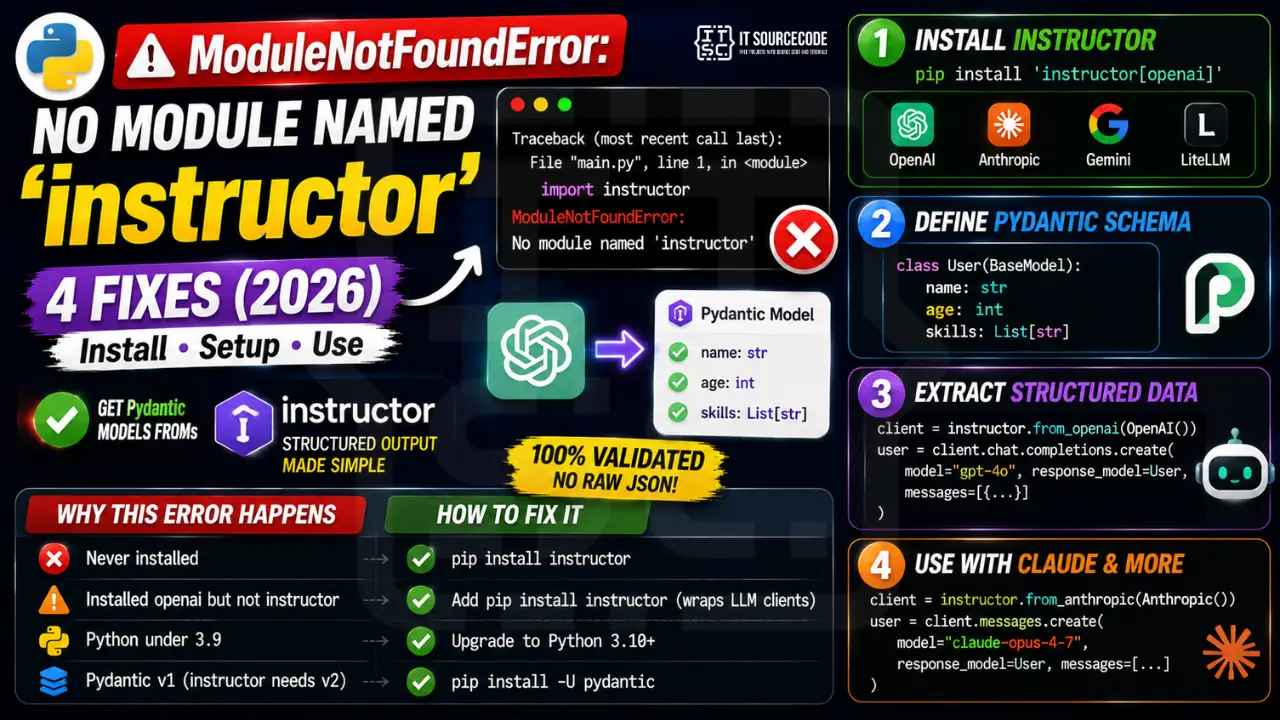
Step 1: Install instructor
# Base install:
pip install instructor

# With provider extras:
pip install 'instructor[openai]'       # OpenAI client patched
pip install 'instructor[anthropic]'    # Anthropic client patched
pip install 'instructor[google-generativeai]'   # Gemini
pip install 'instructor[litellm]'      # 100+ models via LiteLLM
Step 2: Define a Pydantic schema
from pydantic import BaseModel, Field
from typing import List

class User(BaseModel):
    name: str = Field(description="Full name")
    age: int = Field(description="Age in years")
    skills: List[str] = Field(description="List of skills")
Step 3: Extract structured data
import instructor
from openai import OpenAI

client = instructor.from_openai(OpenAI())

user = client.chat.completions.create(
    model="gpt-4o",
    response_model=User,
    messages=[{
        "role": "user",
        "content": "Extract: Alice is 30 and knows Python, SQL, Docker."
    }]
)
print(user.name, user.age, user.skills)
# Alice 30 ['Python', 'SQL', 'Docker']
Step 4: Use with Anthropic Claude
import instructor
from anthropic import Anthropic

client = instructor.from_anthropic(Anthropic())

user = client.messages.create(
    model="claude-opus-4-7",
    max_tokens=1024,
    response_model=User,
    messages=[{"role": "user", "content": "Alice is 30 and knows Python"}]
)
Why this error happens
| Cause | Fix |
|---|---|
| Never installed | pip install instructor |
| Installed openai but not instructor | Add pip install instructor (instructor wraps OpenAI client) |
| Python under 3.9 | Upgrade to Python 3.10+ |
| Pydantic v1 (instructor needs v2) | pip install -U pydantic |
Debugging checklist for MNFE: instructor
- Confirm the correct package name.
instructordepends onopenaiandpydantic. - Check Python version. instructor requires 3.9+.
- Verify install:
python -m pip show instructor. - If Jupyter, use
%pip install instructorto install into the running kernel.
Correct install for common setups
# Standard
python -m pip install instructor

# uv
uv add instructor

# With Anthropic provider
uv add "instructor[anthropic]"

# Poetry
poetry add instructor
Verify install + smoke test
import instructor
print(instructor.__version__)

from openai import OpenAI
from pydantic import BaseModel

class User(BaseModel):
    name: str
    age: int

client = instructor.from_openai(OpenAI())
user = client.chat.completions.create(
    model="gpt-4o-mini",
    response_model=User,
    messages=[{"role": "user", "content": "Ana is 30 years old"}]
)
print(user)   # User(name="Ana", age=30)
Real-world example: extracting structured data from LLMs
import instructor
from anthropic import Anthropic
from pydantic import BaseModel
from typing import List

class MenuItem(BaseModel):
    name: str
    price: float

class Menu(BaseModel):
    restaurant: str
    items: List[MenuItem]

client = instructor.from_anthropic(Anthropic())
menu = client.messages.create(
    model="claude-opus-4-8",
    max_tokens=1024,
    response_model=Menu,
    messages=[{"role": "user", "content": "Extract menu from: Cafe Aroma - Latte $4.50, Croissant $3.25"}],
)
print(menu.restaurant)   # "Cafe Aroma"
for item in menu.items:
    print(f"  {item.name}: ${item.price}")
Related patterns to know
- Pydantic model validators: use
field_validatorto add domain rules likeprice > 0. - Retries on validation failure: pass
max_retries=3to instructor client so it re-prompts on invalid response. - Provider-agnostic: same schema works with OpenAI, Anthropic, Groq, Ollama by swapping the underlying client.
Common install issues with instructor
- Missing provider dependencies. instructor is provider-agnostic. If you plan to use Anthropic, install
"instructor[anthropic]"for the extras. - Old pydantic version. instructor 1.x requires pydantic 2+. Upgrade pydantic first if you see cryptic import errors after install.
- Conflict with openai package. If you have both
openai0.x (legacy) and 1.x installed, uninstall the old one:pip uninstall openai; pip install openai. - Corporate proxy blocking PyPI. Set HTTPS_PROXY environment variable.
Quick reference summary
instructor extends any LLM SDK with structured output via Pydantic models. Install with uv add instructor for the base, or add provider extras like "instructor[anthropic]" for provider-specific helpers. Verify with python -c "import instructor; print(instructor.__version__)". If import works but the smoke test fails, the issue is your API key or network, not the module.
Instructor integration with FastAPI
Instructor pairs well with FastAPI for API endpoints that need structured LLM output. Define your Pydantic response model once and reuse it as both the LLM response schema and the FastAPI response schema. This gives you one source of truth from user prompt to HTTP response.
Rate limiting and retries
Every LLM provider has rate limits. Instructor works with the underlying SDK’s retry logic, but you can add your own layer on top. For production apps, wrap instructor calls with tenacity: retry on RateLimitError with exponential backoff, cap at 5 attempts, and log every retry. This turns transient provider issues into a slower response instead of a crash.
Instructor version compatibility notes
Instructor 1.x is the current stable line as of 2026. Version 1.0 shipped in early 2024 with the migration to Pydantic 2. If you find old tutorials using instructor 0.x with pydantic 1 syntax, treat them as legacy. The pattern of importing instructor, wrapping a client, and passing response_model is stable across the 1.x line. Feature additions (new provider support, streaming, retries) landed as minor version bumps and remain backwards compatible.
Common tutorials on YouTube that are outdated
Search YouTube for “instructor python” and half the top results date from 2023 using instructor 0.x. The old syntax uses instructor.patch(openai.ChatCompletion) which no longer works. Prefer written docs on python.useinstructor.com for current syntax. If a video is older than late 2024, cross-check every code snippet against the current docs.
Diagnostic checklist for “No module named ‘instructor'”
- Verify pip install target. Run
pip show instructor— if not installed, runpip install instructor. - Check the active Python interpreter.
which python(mac/Linux) orwhere python(Windows). Both pip and python must point to the same environment. - Check virtual environment activation. If you use venv/conda, activate before installing:
source .venv/bin/activate. - Rule out uppercase/lowercase. Python imports are case-sensitive:
import PyPDF2notimport pypdf2. - Rule out the pip-vs-package-name mismatch. Some packages install under a different name than you import (e.g.
pip install beautifulsoup4→import bs4).
Modern install for LLM frameworks
# 2026 recommended workflow — uv is fastest
pip install uv
uv pip install instructor

# Or classic pip
pip install instructor

# With extras for LLM providers
pip install "instructor[openai,anthropic]"
Common “No module named ‘instructor'” causes
- Version pinning conflict. LLM libraries update fast —
pip install --upgrade instructorif you saw the module before. - Multiple Python versions. LLM tutorials often use Python 3.11 or 3.12. Verify
python --versionmatches. - Notebook kernel. Jupyter picks a different kernel than pip installs to. Use
%pip install instructorinside the notebook. - WSL / Docker paths. Install in the same environment as your Python — not on the host if you run Python inside WSL.
Working code example
# Verify install
import instructor
print(instructor.__version__)

# Basic usage skeleton
# (adapt to your specific instructor version)
Best practices
- Use a virtual environment for every LLM project. Dependencies overlap and pin conflicts are common.
- Pin your versions in
requirements.txtorpyproject.toml. LLM libraries move fast. - Consider uv or Poetry. Modern package managers handle dep resolution far better than pip alone.
Official documentation
Quick step-by-step summary (click to expand)
- Activate your virtual environment. Ensure you are in the venv where you want instructor installed.
- Install instructor with provider extras. Run uv pip install “instructor[anthropic]” for Claude, or “instructor[openai]” for GPT models.
- Also install pydantic for structured outputs. instructor uses pydantic to validate structured responses: uv pip install pydantic if not already present.
- Verify with import test. Run python -c “import instructor” to confirm the module loads.
Frequently Asked Questions
Why use instructor instead of OpenAI’s built-in JSON mode?
Instructor gives you Pydantic validation, automatic retries on schema mismatch, streaming partial objects, and a consistent API across OpenAI, Anthropic, Gemini, Cohere, and Ollama. JSON mode alone just guarantees valid JSON, not your specific schema.
Does instructor work with local LLMs?
Yes. Use the OpenAI-compatible endpoint of Ollama, vLLM, or LM Studio: from openai import OpenAI; OpenAI(base_url=”http://localhost:11434/v1″) then wrap with instructor. Larger local models (70B+) handle structured output best.
Can instructor stream partial Pydantic objects?
Yes. Use create_partial() instead of create() to yield progressively-filled Pydantic models as tokens arrive. Useful for UIs that show fields appearing one by one.
How does instructor handle validation failures?
When the LLM returns data that does not match your Pydantic schema, instructor retries automatically with the validation error included in the prompt so the LLM can correct itself. Default max_retries=3. Configurable.
Is instructor free and open-source?
Yes, MIT licensed. The library is free; you only pay for LLM API calls. Works in commercial products with no restrictions.

Adrian Mercurio
Full-Stack Developer at PIES IT Solution
Specializes in building complete capstone projects with full documentation. Strong background in PHP/MySQL development and database design. Has personally built and tested over 30 capstone-ready projects with ER diagrams, DFDs, and chapter-by-chapter thesis documentation.
Expertise: PHP · Laravel · Database Design · Capstone Projects · C# · C · C++ · Python · AI Projects
· View all posts by Adrian Mercurio →