
You called df.pivot_table(values="amount", index="month", columns="category") and pandas threw a KeyError, usually pointing at one of the column names. The issue is almost always a column name typo or that the column doesn’t exist after a previous transformation.
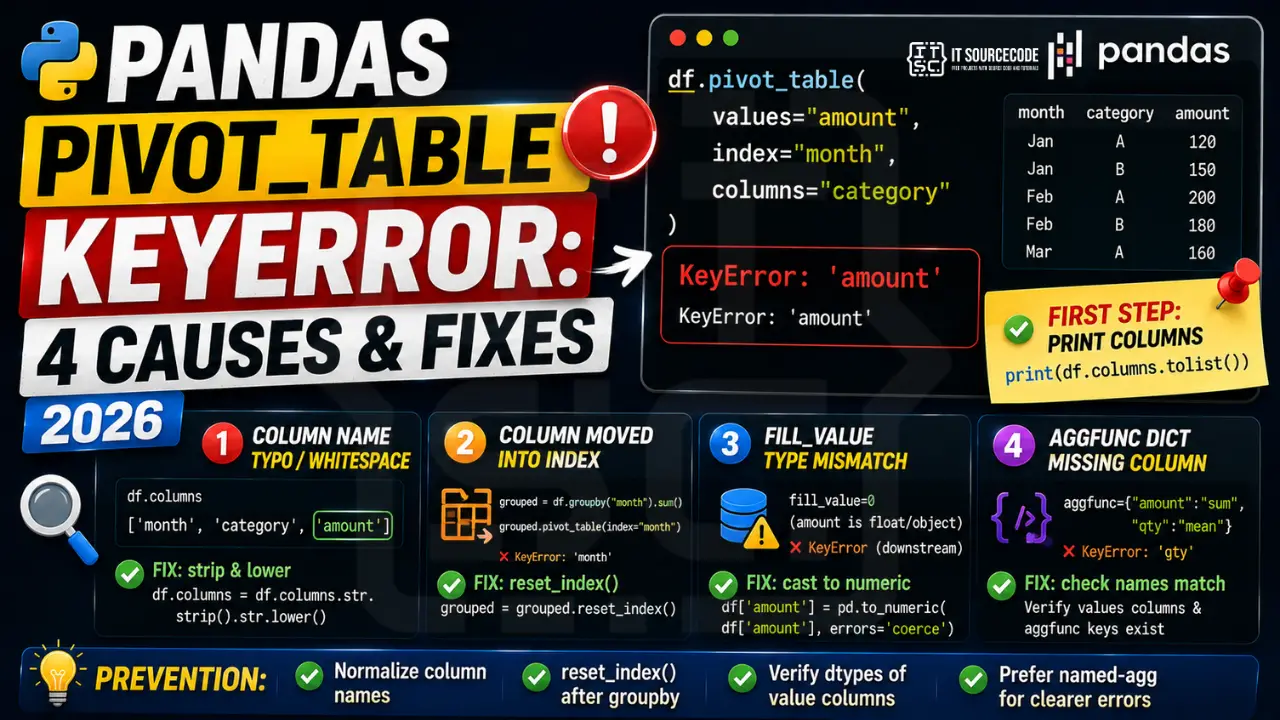
📌 Quick answer: Print df.columns.tolist() right before the pivot_table call. Verify the names of values, index, and columns arguments match exactly. If you got the DataFrame from a merge or groupby, the column may have been renamed (e.g. amount_x) or moved into the index.
Cause 1: Column name typo or whitespace
The most common cause. Pivot_table errors usually point to whichever column it tried first.
import pandas as pd
df = pd.read_csv("sales.csv")

df.pivot_table(values="Amount", index="month", columns="category")
# ❌ KeyError: 'Amount' if column is "amount" (lowercase)

# Diagnose
print(df.columns.tolist())

# Fix: normalize at load
df.columns = df.columns.str.strip().str.lower()
Cause 2: Column was moved into the index by groupby
If you did df.groupby("month").sum().pivot_table(...), “month” is now the index, not a column. pivot_table expects column names but gets index names.
grouped = df.groupby("month").sum()
grouped.pivot_table(index="month", ...)    # ❌ KeyError: 'month' (it's the index)

# Fix: reset_index first
grouped = df.groupby("month").sum().reset_index()
grouped.pivot_table(index="month", ...)    # ✓ works
Cause 3: fill_value type mismatch causes silent KeyError downstream
You passed fill_value=0 but the values column is float. Pandas may raise a downstream KeyError when applying the fill.
df.pivot_table(values="amount", index="month", columns="category", fill_value=0)
# Sometimes errors if dtype is object

# Fix: cast first
df["amount"] = pd.to_numeric(df["amount"], errors="coerce")
df.pivot_table(values="amount", index="month", columns="category", fill_value=0)
Cause 4: aggfunc dict references missing column
Passing aggfunc={"amount":"sum", "qty":"mean"} when “qty” doesn’t exist.
df.pivot_table(values=["amount","qty"], index="month", aggfunc={"amount":"sum","qty":"mean"})
# ❌ KeyError if 'qty' is actually 'quantity'

# Diagnose: check both values columns AND aggfunc keys match
print([c for c in df.columns if "qty" in c.lower() or "quantity" in c.lower()])
Prevention
- Normalize column names at load:
df.columns = df.columns.str.strip().str.lower() - reset_index() after groupby if you plan to pivot
- Verify dtype of value columns before pivot (numeric for sum/mean)
- Use named-agg pattern when possible for clearer errors
Related Guides
Debugging checklist for pivot_table KeyError
- Dump the columns right above the pivot call:
print(df.columns.tolist()). - Check every argument that expects a column name:
index,columns,values,aggfunc. - Confirm the values column is numeric if you use
aggfunc="mean"or"sum". Passing a string column raises KeyError inside pandas internals. - If the column exists but the pivot still errors, check for duplicate column names in the DataFrame.
Common pivot_table patterns that error out
- Passing the column name with a typo.
index="Date"vs actual"date". - Passing a MultiIndex level that does not exist. If you did
groupbyearlier, the columns are now inside a MultiIndex. - Case mismatch after CSV import. Pandas is case-sensitive. Normalize with
df.columns = df.columns.str.strip().str.lower(). - Empty DataFrame. pivot_table on
pd.DataFrame()raises immediately.
Safe pivot_table template
import pandas as pd

def safe_pivot(df, index_col, values_col, columns_col=None, aggfunc="mean"):
    cols_to_check = [index_col, values_col]
    if columns_col:
        cols_to_check.append(columns_col)
    for c in cols_to_check:
        if c not in df.columns:
            raise KeyError(f"Missing: {c}. Columns: {list(df.columns)}")
    return df.pivot_table(
        index=index_col,
        columns=columns_col,
        values=values_col,
        aggfunc=aggfunc,
    )

df = pd.read_csv("sales.csv")
df.columns = df.columns.str.strip().str.lower()
result = safe_pivot(df, "region", "sales", columns_col="quarter", aggfunc="sum")
print(result)
Real-world example: monthly sales pivot from CSV
Here is an end-to-end pattern that reads sales data, normalizes columns, and pivots without KeyError surprises.
import pandas as pd

def monthly_sales_pivot(csv_path):
    df = pd.read_csv(csv_path)
    df.columns = df.columns.str.strip().str.lower()

    required = {"date", "region", "amount"}
    missing = required - set(df.columns)
    if missing:
        raise KeyError(f"CSV missing required columns: {missing}. Got: {list(df.columns)}")

    df["date"] = pd.to_datetime(df["date"])
    df["month"] = df["date"].dt.to_period("M")

    return df.pivot_table(
        index="month",
        columns="region",
        values="amount",
        aggfunc="sum",
        fill_value=0,
    )

result = monthly_sales_pivot("sales_2026.csv")
print(result)
Three guardrails make this production-ready. Column normalization on read. Explicit required-columns check with a helpful error message. fill_value=0 so missing month-region pairs do not become NaN in downstream reports.
Related pandas KeyError patterns
- KeyError on .groupby: same fix, verify column names with
list(df.columns)first. - KeyError on .agg: passing a column name in the agg dict that does not exist. Check before calling.
- KeyError on .set_index: passing a column name that was already promoted to index earlier. Verify with
df.index.name.
Quick reference summary
Pivot table KeyError almost always comes down to one of four causes. Column name typos, column names that changed case during CSV import, columns that were promoted to an index earlier in the pipeline, or an empty DataFrame. The single most reliable fix is to normalize your column names on read with df.columns = df.columns.str.strip().str.lower() and then run an explicit required-columns check right before the pivot call. This costs three lines of code and eliminates the entire class of pivot KeyError bugs.
Pandas KeyError patterns
KeyError in pandas fires when you access a column, index label, or row that does not exist. Because pandas uses labels (not just positions), a KeyError on df["column_name"] means the column string literally is not in df.columns.
Common triggers
- Column not in DataFrame. Whitespace, case, or typo in the column name. Print df.columns.tolist() to see the actual names.
- Index label not present. df.loc[label] fails if label is not in df.index.
- Renamed on load. read_csv may rename columns if header parsing was wrong.
- MultiIndex access. df.loc[key] on MultiIndex needs a tuple, not a scalar.
- Merged column disappeared. After merge, only the join key remains as one column — the right-side extra columns get suffixed (_x, _y).
Diagnostic pattern
# BAD — whitespace in column name
import pandas as pd
df = pd.read_csv("data.csv")
print(df["price"])  # KeyError if actual name is " price" or "Price"

# GOOD — inspect columns first
print(df.columns.tolist())  # ['name', ' price', 'quantity']

# Normalize names on load
df.columns = df.columns.str.strip().str.lower()
print(df["price"])  # now works
Best practices
- Normalize column names on load. Strip, lower, replace spaces with underscores.
- Use df.get(“col”). Returns None instead of raising, similar to dict.get.
- Check with “col in df.columns” before accessing.
- Use assert on expected columns. Fails fast in data pipelines.
Official documentation
Quick step-by-step summary (click to expand)
- Verify the columns exist in the DataFrame. Print df.columns and confirm the index, columns, and values arguments all match existing column names exactly.
- Check for whitespace in column names. Use df.columns = df.columns.str.strip() to remove trailing spaces before pivoting.
- Use pd.pivot_table on a filtered DataFrame. If the target column has NaN values, filter first: df.dropna(subset=[“col”]).pivot_table(…).
- Test with a smaller sample first. df.head(20).pivot_table(…) confirms your arguments are valid before running on the full dataset.
Frequently Asked Questions
Why does pivot_table raise KeyError when the column is in df.columns?
Whitespace, case, or wrong stage. Print df.columns.tolist() right before the call to verify the exact name. If you did a groupby() before pivot_table(), the column may now be in df.index. Use .reset_index() to move it back.
Can I pivot on a column that’s currently the index?
No. pivot_table reads from columns, not the index. Call df.reset_index() first to move the index column back into the columns.
Why does fill_value cause KeyError?
Type mismatch between fill_value and the values column. If the values column is object dtype with mixed strings and numbers, fill_value=0 may fail. Cast first: df[‘col’] = pd.to_numeric(df[‘col’], errors=’coerce’).
What’s the difference between pivot and pivot_table?
pivot() requires unique index/columns combinations and raises if duplicates exist. pivot_table() handles duplicates by aggregating (sum by default) and never raises on duplicates. Use pivot_table for almost all real-world data.
How do I pivot with multiple values columns?
Pass a list: df.pivot_table(values=[‘amount’,’qty’], index=’month’, aggfunc=’sum’). Result has MultiIndex columns. Flatten with .columns.map(‘_’.join) or just use named-agg via .groupby() instead.

Angel Jude Suarez
Full-Stack Developer at PIES IT Solution
Focuses on Python development, machine learning, and AI integration. Has built production AI systems including OpenAI Whisper integration for medical transcription and GPT-4o-powered diagnosis assistance. Strong background in pandas, scikit-learn, and TensorFlow.
Expertise: Python · PHP · Java · VB.NET · ASP.NET · Machine Learning · AI Integration · OpenCV · Django · CodeIgniter
· View all posts by Angel Jude Suarez →