
You called orders.merge(customers, on="customer_id") and got KeyError. Both DataFrames have a “customer_id” column, you can see them, but pandas insists one is missing. This guide walks through the 4 most common causes.
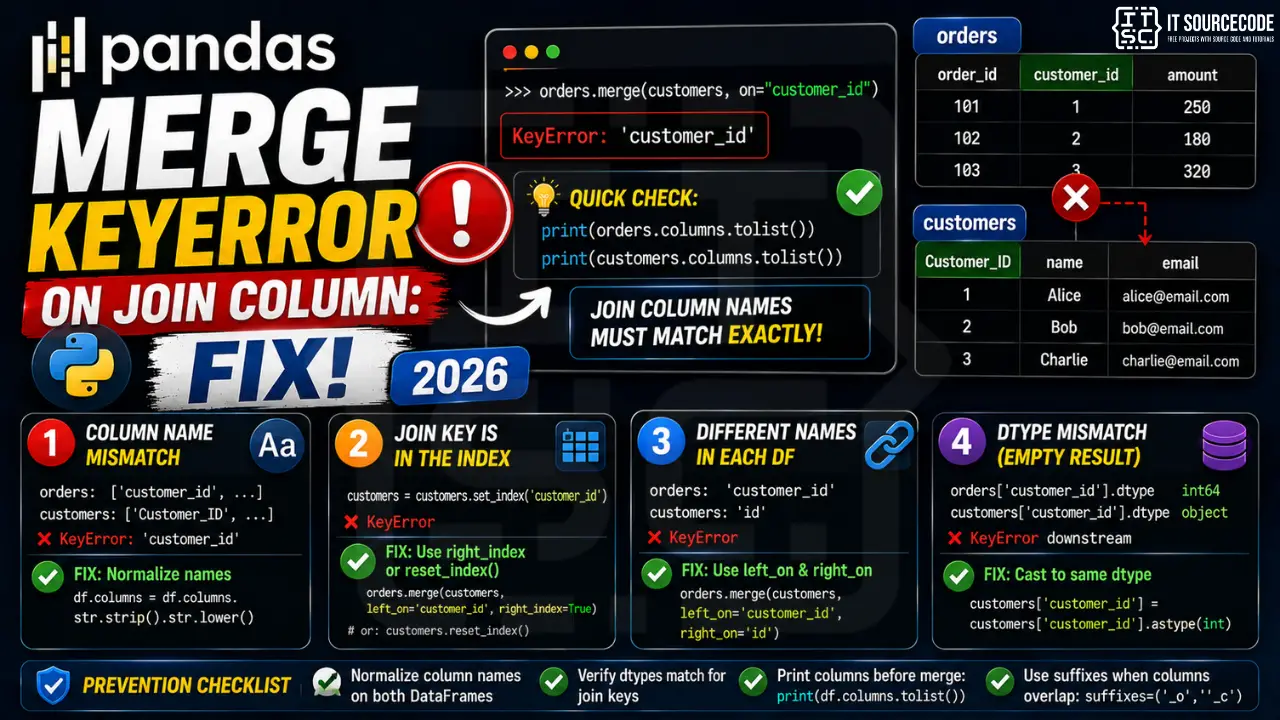
📌 Quick answer: Print orders.columns.tolist() and customers.columns.tolist(). The join column name must match exactly in both. If one side has it as the index, use left_on="customer_id", right_index=True instead of on=.
Cause 1: Column name mismatch (case or whitespace)
“customer_id” vs “Customer_ID” vs “customer_id ” (trailing space) are all different to pandas.
orders.columns.tolist()    # ['order_id', 'customer_id', 'amount']
customers.columns.tolist() # ['Customer_ID', 'name', 'email']

orders.merge(customers, on="customer_id")    # ❌ KeyError: 'customer_id' not in customers

# Fix: normalize both sides
orders.columns = orders.columns.str.strip().str.lower()
customers.columns = customers.columns.str.strip().str.lower()
orders.merge(customers, on="customer_id")    # ✓
Cause 2: Join key is in the index, not a column
If you did customers.set_index("customer_id") earlier, customer_id is no longer a column.
customers = customers.set_index("customer_id")
orders.merge(customers, on="customer_id")    # ❌ KeyError

# Fix 1: use right_index
orders.merge(customers, left_on="customer_id", right_index=True)

# Fix 2: reset the index
customers = customers.reset_index()
orders.merge(customers, on="customer_id")    # ✓
Cause 3: Column has different names in each DataFrame
“customer_id” in orders, “id” in customers, the natural join key but different labels.
orders.merge(customers, on="customer_id")    # ❌ KeyError: 'customer_id' not in customers

# Fix: use left_on and right_on
orders.merge(customers, left_on="customer_id", right_on="id")
Cause 4: dtype mismatch causes empty result, looks like KeyError downstream
Both columns exist with matching names, but one is int and the other is string. Merge succeeds but produces empty rows, and downstream code (like result["amount"]) raises KeyError because the column is now empty.
print(orders["customer_id"].dtype)      # int64
print(customers["customer_id"].dtype)   # object (string)

# Fix: cast to matching dtype first
customers["customer_id"] = customers["customer_id"].astype(int)
result = orders.merge(customers, on="customer_id")    # ✓ rows now match
Prevention
- Normalize column names on both DataFrames immediately after load
- Verify dtypes match for join keys:
print(a["k"].dtype, b["k"].dtype) - Print columns before merge:
print(a.columns.tolist(), b.columns.tolist()) - Use suffixes parameter when both sides have overlapping non-key columns
Related Guides
Debugging checklist before the merge
Before you rewrite the merge call, confirm which side is missing the join column.
print(left.columns.tolist())andprint(right.columns.tolist())right above the merge.- Check for hidden spaces in column names with
[c for c in df.columns if c != c.strip()]. - Check case sensitivity.
Customer_idandcustomer_idare different columns to pandas. - If one side uses an index instead of a column, use
left_index=Trueorright_index=True.
Common merge KeyError patterns
- Column typo:
on="cutomer_id"instead ofon="customer_id". Fix with a fresh columns dump. - Different names left vs right: use
left_onandright_oninstead of a singleon. - Trailing whitespace in Excel imports: normalize with
df.columns = df.columns.str.strip(). - MultiIndex confusion: if you did
set_index()earlier, the column is no longer indf.columns.
Safe merge template
import pandas as pd

def safe_merge(left, right, join_col, how="inner"):
    left.columns = left.columns.str.strip()
    right.columns = right.columns.str.strip()
    if join_col not in left.columns:
        raise KeyError(f"Missing from LEFT: {join_col}. Columns: {list(left.columns)}")
    if join_col not in right.columns:
        raise KeyError(f"Missing from RIGHT: {join_col}. Columns: {list(right.columns)}")
    return left.merge(right, on=join_col, how=how)

orders = pd.read_csv("orders.csv")
customers = pd.read_csv("customers.csv")
combined = safe_merge(orders, customers, "customer_id", how="left")
When the fix is different
Not every KeyError on merge is a missing column. If both columns exist but the values do not overlap, merge succeeds but the result is empty (or full of NaN). That is a data problem, not a merge problem.
Real-world example: joining orders and customers
A typical retail pipeline pulls customer records from a CRM and orders from a fulfillment system. Column names drift between the two systems, which is where merge KeyError shows up.
import pandas as pd

# CRM export uses "CustomerID" (title case)
customers = pd.read_csv("crm_export.csv")
# Fulfillment export uses "customer_id" (snake case)
orders = pd.read_csv("orders_export.csv")

# Normalize both sides first
customers.columns = customers.columns.str.strip().str.lower()
orders.columns = orders.columns.str.strip().str.lower()

# Verify the join column exists on both sides
assert "customerid" in customers.columns or "customer_id" in customers.columns
assert "customer_id" in orders.columns

# Rename to align (CRM had CustomerID -> customerid after lower)
customers = customers.rename(columns={"customerid": "customer_id"})

combined = orders.merge(customers, on="customer_id", how="left")
print(combined.head())
Two rules keep this from breaking again. Normalize column names on read. Add an assert or explicit column check before any merge that touches production data.
Related KeyError patterns in pandas
- KeyError on .loc / .iloc: covered separately, same root cause of label vs position confusion.
- KeyError on .groupby: passing a column name that does not exist. Use
list(df.columns)to verify. - KeyError on rename mapping: passing a source name that is not in the DataFrame. Use
errors="ignore"if partial rename is acceptable.
Pandas KeyError patterns
KeyError in pandas fires when you access a column, index label, or row that does not exist. Because pandas uses labels (not just positions), a KeyError on df["column_name"] means the column string literally is not in df.columns.
Common triggers
- Column not in DataFrame. Whitespace, case, or typo in the column name. Print df.columns.tolist() to see the actual names.
- Index label not present. df.loc[label] fails if label is not in df.index.
- Renamed on load. read_csv may rename columns if header parsing was wrong.
- MultiIndex access. df.loc[key] on MultiIndex needs a tuple, not a scalar.
- Merged column disappeared. After merge, only the join key remains as one column — the right-side extra columns get suffixed (_x, _y).
Diagnostic pattern
# BAD — whitespace in column name
import pandas as pd
df = pd.read_csv("data.csv")
print(df["price"])  # KeyError if actual name is " price" or "Price"

# GOOD — inspect columns first
print(df.columns.tolist())  # ['name', ' price', 'quantity']

# Normalize names on load
df.columns = df.columns.str.strip().str.lower()
print(df["price"])  # now works
Best practices
- Normalize column names on load. Strip, lower, replace spaces with underscores.
- Use df.get(“col”). Returns None instead of raising, similar to dict.get.
- Check with “col in df.columns” before accessing.
- Use assert on expected columns. Fails fast in data pipelines.
Official documentation
Quick step-by-step summary (click to expand)
- Verify both DataFrames have the join column. Print df1.columns and df2.columns before merging. KeyError means the column name does not exist on one side.
- Use left_on and right_on for renamed columns. If the column has different names in each DataFrame, use pd.merge(df1, df2, left_on=”user_id”, right_on=”uid”).
- Strip whitespace from column names. Use df.columns = df.columns.str.strip() to remove trailing spaces from CSV imports.
- Check for case sensitivity issues. DataFrame column names are case-sensitive. “user_ID” and “user_id” are different columns.
Frequently Asked Questions
Why does merge raise KeyError when both DataFrames have the same column?
Case or whitespace mismatch. ‘customer_id’ in one and ‘Customer_ID’ or ‘customer_id ‘ in the other are different to pandas. Print both .columns.tolist() and normalize.
How do I merge when the key is in the index of one DataFrame?
Use left_index=True / right_index=True instead of on=. Example: orders.merge(customers, left_on=’customer_id’, right_index=True).
How do I merge when the join column has different names?
Use left_on and right_on: orders.merge(customers, left_on=’customer_id’, right_on=’id’). The result has both columns; drop one with .drop(columns=[‘id’]) afterward.
Why does my merge return an empty DataFrame?
dtype mismatch on the join key. orders[‘customer_id’] as int64 won’t match customers[‘customer_id’] as object (string). Cast both to the same dtype before merging.
What’s the difference between merge, join, and concat?
merge() is SQL-like, matches on key columns. join() defaults to joining on index. concat() stacks DataFrames vertically or horizontally without key matching. For column-key joins use merge; for index-key joins use join; for stacking use concat.

Angel Jude Suarez
Full-Stack Developer at PIES IT Solution
Focuses on Python development, machine learning, and AI integration. Has built production AI systems including OpenAI Whisper integration for medical transcription and GPT-4o-powered diagnosis assistance. Strong background in pandas, scikit-learn, and TensorFlow.
Expertise: Python · PHP · Java · VB.NET · ASP.NET · Machine Learning · AI Integration · OpenCV · Django · CodeIgniter
· View all posts by Angel Jude Suarez →