
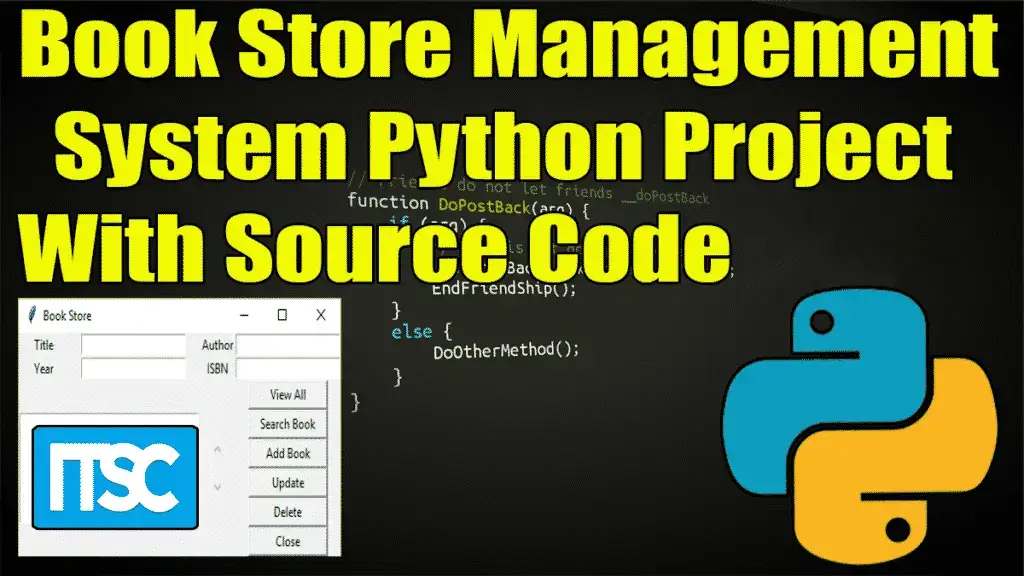
The Book Store Management System Python Project is written in Python Programming Language, this Book Store Management System Using Python is an interesting project.
The user can add the number of book details and you can see the details stored in the list form.
Book Store Management System Project in Python – Project Information
| Project Name: | Book Store Management System Project in Python |
| Language/s Used: | Python (GUI) Based |
| Python version (Recommended): | 2.x or 3.x |
| Database: | None |
| Type: | Python App |
| Developer: | IT SOURCECODE |
| Updates: | 0 |
A Book Shop Management System Project Report about the features of this system, the user can make a list of books with their authors, and year, and keep them as records.
You just have to type the book information in the text fields and click on the add button to add the information to the record.
This Book Store Management System In Python also includes a downloadable Source Code for FREE, just find the downloadable source code below and click to start downloading.
To start creating a Book Store Management System Python Project, make sure that you have PyCharm IDE installed on your computer.
By the way, if you are new to Python programming and don’t know what Python IDE is, I have here a list of the Best Python IDE for Windows, Linux, and Mac OS that will suit you. I also have here How to Download and Install the Latest Version of Python on Windows.
Steps on how to create a Book Store Management System Python Project
Book Store Management System Python Project With Source Code
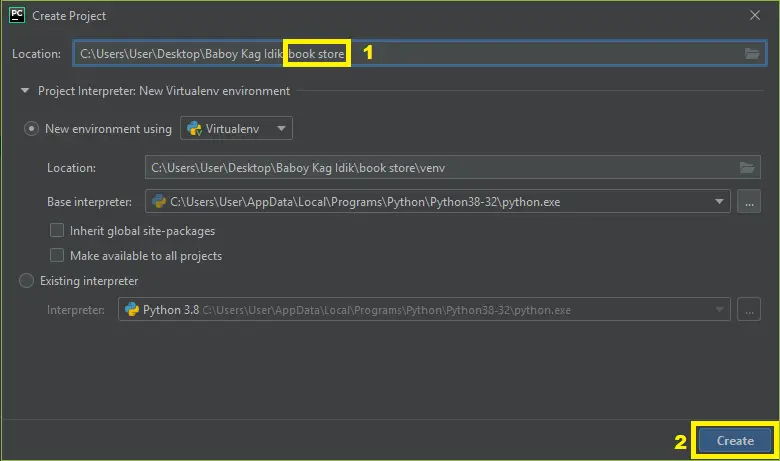
- Step 1: Create a project Name.
First, open Pycharm IDE and then create a “project name.” After creating a project name click the “create” button.

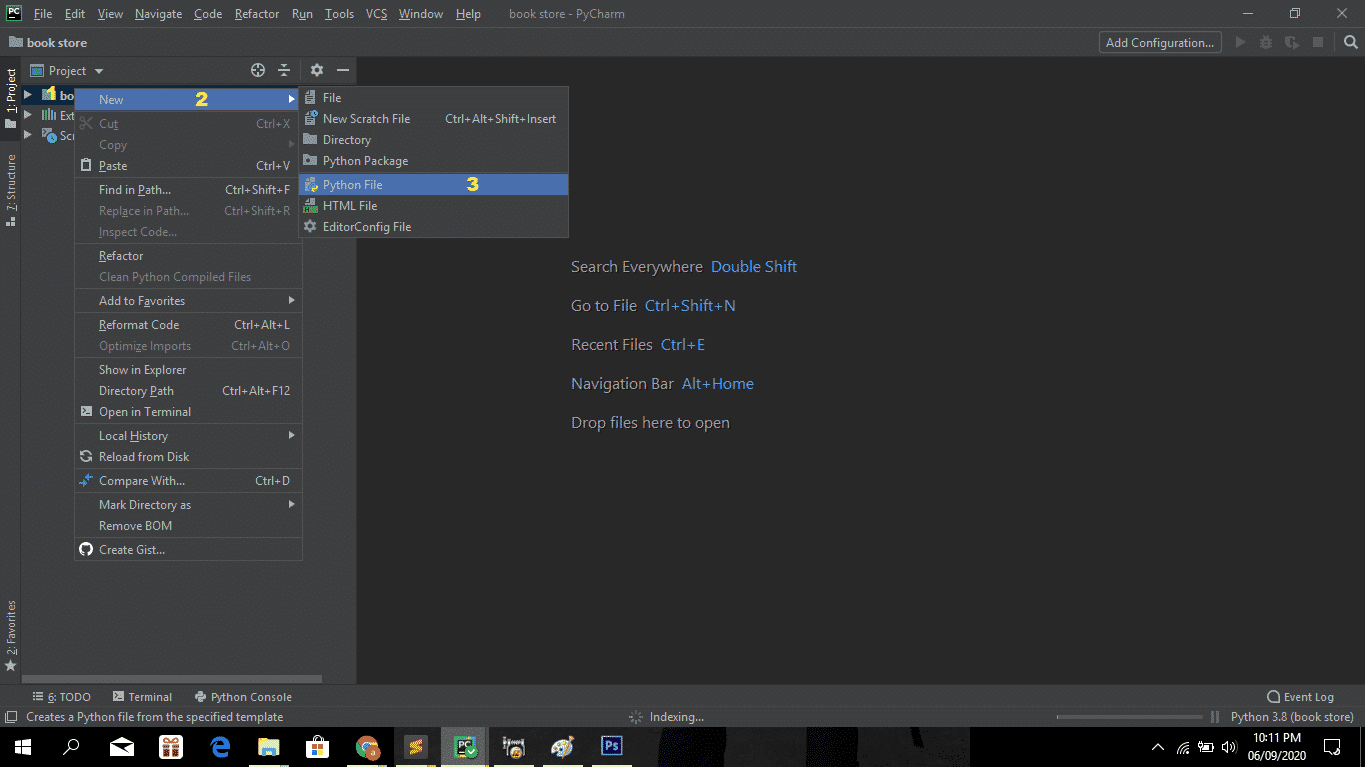
- Step 2: Create a python file.
Second, after creating a project name, “right click” your project name and then click “new” After that click the “python file“.

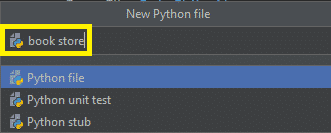
- Step 3: Name your python file.
Third, after creating a Python file, Name your Python file after that click “enter“.

- Step 4: The actual code.
You are free to copy the code given below and download the full source code below.
The Code Given Below Is For Importing Libraries
from tkinter import *
import backend
The code given is importing the given libraries.
The Code Given Below Is For The View Command Module
def view_command():
list1.delete(0,END)
    for row in backend.view():
        list1.insert(END, row)
In this module which is the module for view command.
The Code Given Below Is for the Get Selected Row Module
def get_selected_row(event):
    try:
        global select_tup
        index=list1.curselection()[0]
        select_tup = list1.get(index)
        e1.delete(0,END)
        e1.insert(END, select_tup[1])
        e2.delete(0,END)
        e2.insert(END, select_tup[2])
        e3.delete(0,END)
        e3.insert(END, select_tup[3])
        e4.delete(0,END)
        e4.insert(END, select_tup[4])
    except IndexError:
        pass
This module is the module for getting the data in the database.
The Code Given Below Is For The Search Module
def search_command():
    list1.delete(0,END)
    for row in backend.search(title_text.get(),author_text.get(),year_text.get(), isbn_text.get()):
        list1.insert(END,row)
This module is the module for searching the data.
The Code Given Below Is For The Add Book Module
def add_book():
    backend.insert(title_text.get(),author_text.get(),year_text.get(), isbn_text.get())
    list1.delete(0,END)
    list1.insert(END,(title_text.get(),author_text.get(),year_text.get(), isbn_text.get()))
This module is the module for adding the book to the database.
The Code Given Below Is For The Delete Module
def delete_book():
    backend.delete(select_tup[0])
This module is the module for deleting the data from the database.
The Code Given Below Is For The Modify Module
def update_book():
    backend.update(select_tup[0], title_text.get(),author_text.get(),year_text.get(), isbn_text.get())
This module which is the module for editing or modifying the data from the database.
Complete Source Code
from tkinter import *
import backend
window = Tk()

def get_selected_row(event):
    try:
        global select_tup
        index=list1.curselection()[0]
        select_tup = list1.get(index)
        e1.delete(0,END)
        e1.insert(END, select_tup[1])
        e2.delete(0,END)
        e2.insert(END, select_tup[2])
        e3.delete(0,END)
        e3.insert(END, select_tup[3])
        e4.delete(0,END)
        e4.insert(END, select_tup[4])
    except IndexError:
        pass


def view_command():
    list1.delete(0,END)
    for row in backend.view():
        list1.insert(END, row)

def search_command():
    list1.delete(0,END)
    for row in backend.search(title_text.get(),author_text.get(),year_text.get(), isbn_text.get()):
        list1.insert(END,row)

def add_book():
    backend.insert(title_text.get(),author_text.get(),year_text.get(), isbn_text.get())
    list1.delete(0,END)
    list1.insert(END,(title_text.get(),author_text.get(),year_text.get(), isbn_text.get()))

def delete_book():
    backend.delete(select_tup[0])

def update_book():
    backend.update(select_tup[0], title_text.get(),author_text.get(),year_text.get(), isbn_text.get())

window.wm_title("Book Store")

l1 = Label(window, text="Title")
l1.grid(row=0,column=0)

l2 = Label(window, text="Auther")
l2.grid(row=0,column=2)

l3 = Label(window, text="Year")
l3.grid(row=1,column=0)

l4 = Label(window, text="ISBN")
l4.grid(row=1,column=2)

title_text = StringVar()
e1 = Entry(window, textvariable= title_text)
e1.grid(row=0, column=1)

author_text = StringVar()
e2 = Entry(window, textvariable= author_text)
e2.grid(row=0, column=3)

year_text = StringVar()
e3 = Entry(window, textvariable= year_text)
e3.grid(row=1, column=1)

isbn_text = StringVar()
e4 = Entry(window, textvariable= isbn_text)
e4.grid(row=1, column=3)

list1 = Listbox(window, height=6, width=35)
list1.grid(row=2, column =0, rowspan=6, columnspan=2)

list1.bind("<<ListboxSelect>>", get_selected_row)

sb1 =Scrollbar(window)
sb1.grid(row=2, column=2 ,rowspan = 6)

list1.configure(yscrollcommand=sb1.set)
sb1.configure(command=list1.yview)

b1 =Button(window, text= "View All", width=12, command=view_command)
b1.grid(row=2, column=3)

b2 =Button(window, text= "Search Book", width=12, command=search_command)
b2.grid(row=3, column=3)

b3 =Button(window, text= "Add Book", width=12, command=add_book)
b3.grid(row=4, column=3)

b4 =Button(window, text= "Update", width=12, command=update_book)
b4.grid(row=5, column=3)

b5 =Button(window, text= "Delete", width=12, command=delete_book)
b5.grid(row=6, column=3)

b6 =Button(window, text= "Close", width=12, command=window.destroy)
b6.grid(row=7, column=3)


window.mainloop()
Downloadable Source Code
I have here the list of Best Python Project with Source code free to download for free, I hope this can help you a lot.
Summary
The Book Store Management System Python Project is written in Python programming language, Python is very easy to research the syntax emphasizes readability and it is able to reduce time ingesting in developing.
Also, this tutorial is the simplest way for beginners or students to enhance their logical skills in programming. and also in this System project is the way for the students or beginners to design and develop the systems.
Related Articles
- Loan Calculator in Python with Source Code
- Python Code For Food Ordering System
- College Management System in Python with Source Code
- Ticket Booking System In Python With Source Code
- Snakes and Ladders Game in Python with Source Code
Inquiries
If you have any questions or suggestions about the Book Store Management System Python Project, please feel free to leave a comment below.
Official documentation
Frequently Asked Questions
How does this Python management system work?
Standard Tkinter architecture: Frame with Treeview for listings, Entry/Combobox/DateEntry for input, sqlite3/MySQL via parametrized queries, reportlab for PDF reports.
What Python version and libraries does this project require?
Most projects in this batch use Python 3.10, 3.11, or 3.12. Standard libs: tkinter (built-in), sqlite3 (built-in). External: pip install pillow opencv-python pygame mysql-connector-python reportlab requests beautifulsoup4.
How do I set up the database for this Python project?
For SQLite (most common, no setup): the .db file auto-creates on first run. For MySQL: install MySQL Server, create an empty database, import the included .sql file, edit connection in db.py with your credentials.
Can I use this Python project for a BSIT capstone or thesis?
Yes. Python is rising fast in Philippine BSIT panels. Extend it: add user roles, dashboards (matplotlib), PDF reports (reportlab), email notifications (smtplib), real domain extension. Pair with Chapter 1-5 documentation.
Why am I getting ‘ModuleNotFoundError’?
Three common Python issues: (1) Module not installed, pip install
Where can I find more Python projects with source code?
Browse the Python Projects hub for the full library. For computer vision see OpenCV Projects. For ML capstones see Machine Learning Projects. For BSIT capstone ideas see 150 Best Capstone Project Ideas.

Angel Jude Suarez
Full-Stack Developer at PIES IT Solution
Focuses on Python development, machine learning, and AI integration. Has built production AI systems including OpenAI Whisper integration for medical transcription and GPT-4o-powered diagnosis assistance. Strong background in pandas, scikit-learn, and TensorFlow.
Expertise: Python · PHP · Java · VB.NET · ASP.NET · Machine Learning · AI Integration · OpenCV · Django · CodeIgniter · View all posts by Angel Jude Suarez →
i need to run it o google colab pls help