
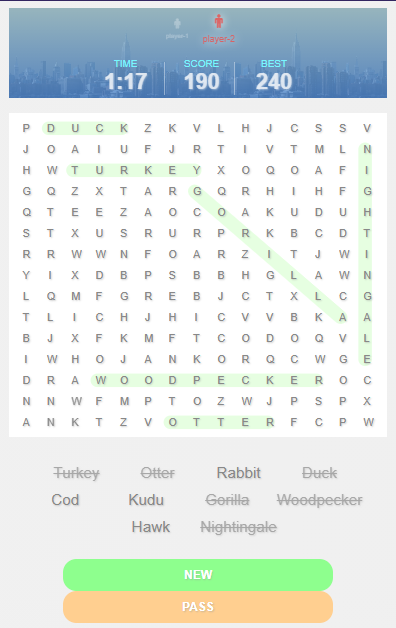
Vue JS Wordswipe Game is a fun way to enrich your vocabulary. In this game, you search for words in a word box. You select the words vertically, horizontally, or diagonally. You gain points as you find words.
This game is developed using VueJS – a JavaScript framework made for front end development. VueJS is a powerful framework that lets you create progressive web applications with interactive front end development.
You can run this Vuejs game on your computer with or without internet connection. Also, you can take new ideas from this wordswipe game to incorporate with other systems.
What is a Web Application (Web App)
A web application is a program that run on a web server. In comparison to desktop apps where they run inside an operating system, Web apps run using web browsers and other web technologies to perform tasks.
What is Vue.JS
Vue.js or Vue is a JavaScript framework for front-end developers. It is used to create single-page applications with stunning UI. Many companies use Vue on their websites. Some of them are Xiaomi, Alibaba, and GitLab.
Wordswipe Game in VueJS: How to Install the Project
Installing Wordswipe web app is easy! Just follow the guide and you will get it done in a breeze!.
Time needed: 5 minutes
- Install and Run XAMPP
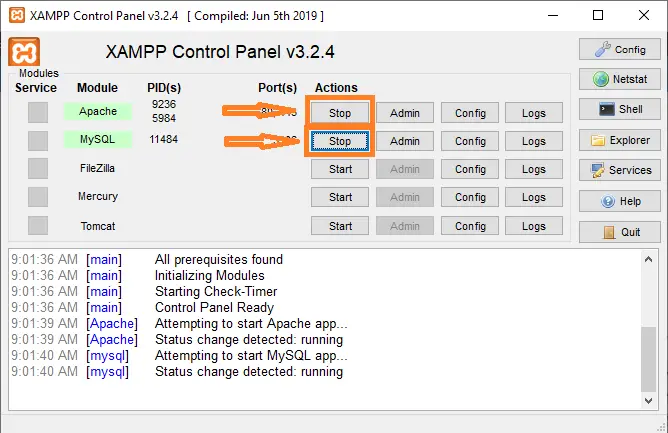
First step is to install XAMPP. This will allow you to run a local web server on your computer. After installation, run XAMPP and start Apache and MySQL

- Open the project and locate “project.json” file
Next step is to locate the JSON file where you can find the instructions to start the web app. Open this file using your selected code or text editor. Now, find the “script” block. This will give you the correct command to start it.

- Open the Command Prompt
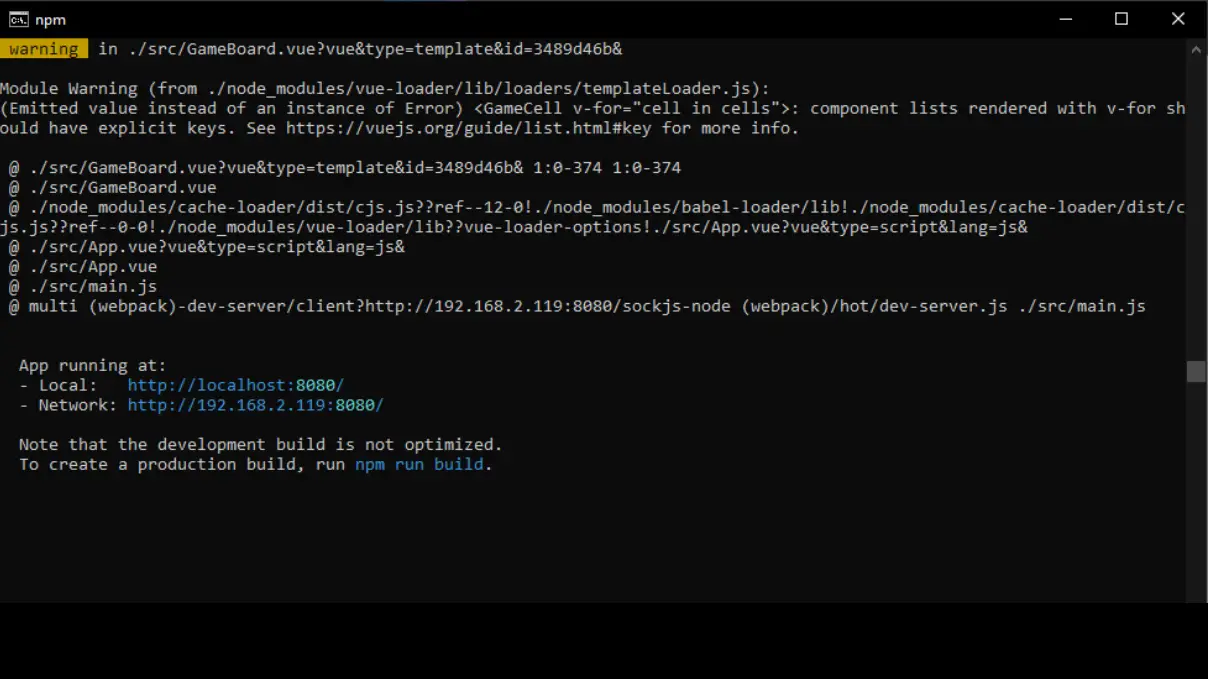
After that you identified the “start” command, Open your CMD terminal and change the directory to the project folder. You can do this by entering “cd “ and the project address.
Press enter. Then, type in the “start” command. In this case, the command represents “npm run serve”. You will know that it is successful when you are instructed to open the localhost.

- Wordswipe Game in VueJS in your browser.
Now you are ready to run the Vuejs game! Enter the link to the web browser. The output looks like this:


Conclusion
So there you have it! Wordswipe Game in VueJS. Vue.JS is versatile and can be used with other frameworks. These projects are good in developing your skills in programming web applications
Comments and Suggestions
We would love to hear from you! Please feel free to ask us in the comment section below.
| ABOUT PROJECT | PROJECT DETAILS |
|---|---|
| Project Name : | Wordswipe Game in Vue.JS |
| Project Platform : | Vue.JS |
| Programming Language Used: | php,javascript,html,css |
| Developer Name : | itsourcecode.com |
| IDE Tool (Recommended): | Visual Studio 2019 |
| Project Type : | Web Application |
| Database: | MySQL |
Source Code Download
Click the button below to download the project.
How the Wordswipe Game in Vue JS with Free Source Code game logic works
Most browser-based JavaScript games follow the same architecture: a game state kept in memory, a render function that redraws the screen every animation frame, and an input handler that mutates state in response to user actions.
- Game loop. requestAnimationFrame(update) creates a smooth 60 FPS loop that calls your update-and-render function every frame.
- State object. A single JavaScript object holds all mutable data (score, positions, level, game-over flag). Every frame reads from and writes to this object.
- Input handling. addEventListener(‘keydown’) for keyboard, or ‘mousedown’ / ‘touchstart’ for pointer input. Store the key state in a lookup so multiple keys can be pressed at once.
- Rendering. Either canvas 2D drawing (game object positions to draw() calls) or direct DOM manipulation (updating .style.left on absolutely-positioned elements).
- Sound and music. HTMLAudioElement with .play() for one-shot effects, or the Web Audio API for lower-latency mixing.
Extending the Wordswipe Game in Vue JS with Free Source Code for a capstone project
- Add difficulty levels. Provide easy / medium / hard modes that change speed, spawn rate, or scoring.
- Persist high scores. Save top scores in localStorage or send them to a Node.js backend for a global leaderboard.
- Add sound effects. Include background music and event-triggered sounds (jump, collect, game over) for polish.
- Mobile touch controls. Add touch-and-swipe input alongside keyboard to make the game playable on phones.
- Multiplayer via WebSocket. Connect two browsers through a Node.js WebSocket server for real-time two-player play.
Working code snippet
// Standard JS game loop pattern
const state = { score: 0, playerX: 100, gameOver: false };

function update() {
  if (state.gameOver) return;
  // ...update positions, check collisions, increment score...
  render();
  requestAnimationFrame(update);
}

function render() {
  const ctx = document.getElementById("canvas").getContext("2d");
  ctx.clearRect(0, 0, 800, 600);
  ctx.fillRect(state.playerX, 400, 40, 40);
}

document.addEventListener("keydown", (e) => {
  if (e.key === "ArrowLeft")  state.playerX -= 10;
  if (e.key === "ArrowRight") state.playerX += 10;
});

requestAnimationFrame(update);
Deployment checklist for this JavaScript project
Before showing the project to a client, panel member, or user, run through this checklist:
- Minify the JavaScript. Use esbuild or terser to shrink the file for faster page load.
- Add a .gitignore. Exclude node_modules, .env, and IDE folders before committing to GitHub.
- Set up a README. Explain what the project does, how to install, and how to contribute.
- Add screenshots. A picture beats a paragraph when someone lands on your repo.
- Enable HTTPS. GitHub Pages and Netlify give free HTTPS by default; use it.
- Test in real browsers. Chrome, Firefox, Safari, Edge — not just the one you develop in.
- Check mobile layout. Chrome DevTools device mode simulates common phones and tablets.
Official documentation
Frequently Asked Questions
How does this JavaScript game work?
Built with vanilla JS + HTML5 Canvas API. Game loop via requestAnimationFrame. Input via document.addEventListener(‘keydown’). Common: Snake, Tic-Tac-Toe, Tetris, Pong, Hangman, Flappy Bird. Drop-in browser play, no install needed. Foundation BSIT 1st-2nd year mini-project.
What JavaScript runtime or browser does this project need?
Pure frontend projects (vanilla JS, Vue, jQuery) run in any modern browser (Chrome 90+, Firefox 88+, Safari 14+, Edge 90+) – no install needed. Node.js projects need Node.js 18 LTS or 20 LTS (download from nodejs.org). Run: npm install in project folder, then npm start or node app.js.
How do I run this JavaScript project locally?
For pure HTML/CSS/JS: open index.html in your browser, or use VS Code Live Server extension for auto-reload. For Vue projects: npm install then npm run dev (Vite) or npm run serve (Vue CLI). For Node.js: npm install then npm start. For projects with backend (PHP+MySQL): place in XAMPP htdocs, start Apache + MySQL, browse to localhost/project.
Can I use this JavaScript project for a BSIT capstone or thesis?
Yes. Extend it: add user authentication (JWT for SPA, sessions for traditional), role-based access, real backend (Node.js+Express+MongoDB or PHP+MySQL), responsive design (Bootstrap/Tailwind), PDF exports (jsPDF), real-time features (Socket.IO). Pair with Chapter 1-5 documentation matching your panel’s rubric.
Why am I getting ‘Uncaught ReferenceError’ or ‘Cannot read property of undefined’?
Three common JavaScript issues: (1) Script tag placement wrong, put
Related Articles
Looking for similar projects or tutorials?
Search for more source code, capstone projects, or programming tutorials