
This Market Billing System in JavaScript is a simple project designed in JavaScript language using HTML and CSS platform.
A project that can make a bill for your item purchase is the Market Billing System with Source Code.
This project will measure the total products that the client has ordered.
The system’s aim is to fasten the billing and automate the transaction calculation.
Market Billing System in JavaScript with Source Code
A Market Billing System can be accessed without the user’s login information being provided. Only the item name, item price, and the quantity of the item may be added by the customer.
The total sum of the entered object will automatically be determined by the system.
By pressing the two keys, you can see the total price and the item list. You are also permitted to delete an item from the list.
This simple mini project for Market Billing System in JavaScript is complete and totally error free and also includes a downloadable Source Code for free, just find the downloadable source code below and click to start downloading. Before you start to click the download now first you must click the Run Quick Scan for secure Download.
Anyway if you want level up your knowledge in programming especially C/C++ Programming Language, try this new article I’ve made for you Best C Projects with Source Code for Beginners Free Download.
I have here a suggested list of Best JavaScript Projects with Source Code Free to download and I’m sure this can help you to improve your skills in JavaScript programming and web development as a whole.
To start creating a Market Billing System in JavaScript, make sure that you have any platform in creating a JavaScript, bootstrap, and HTML installed in your computer, in my case I will use Sublime Text.
Market Billing System in JavaScript
Time needed: 5 minutes
Here’s the Steps on How to Create a Market Billing System in JavaScript with Source Code
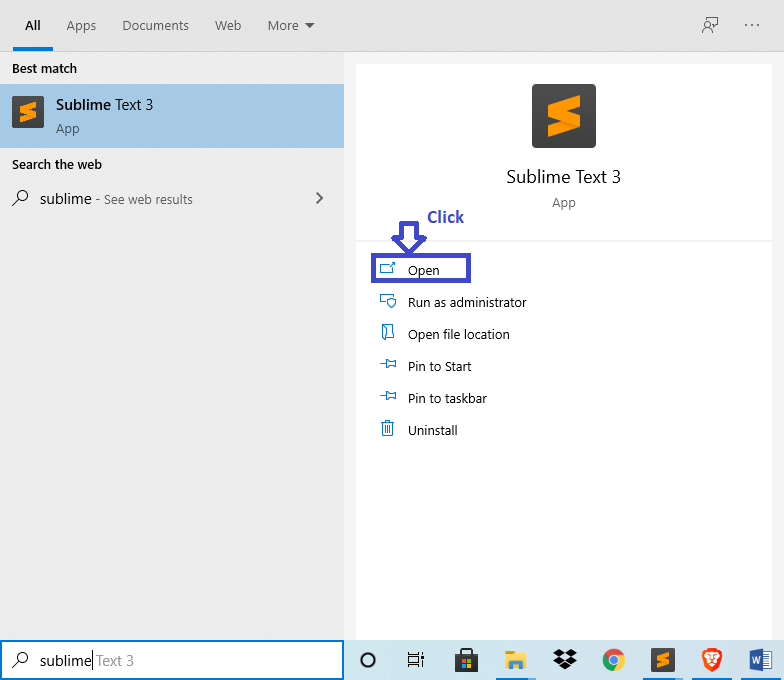
- Step 1: Open Sublime Text.
First, after installing sublime text IDE, click “open” to start.

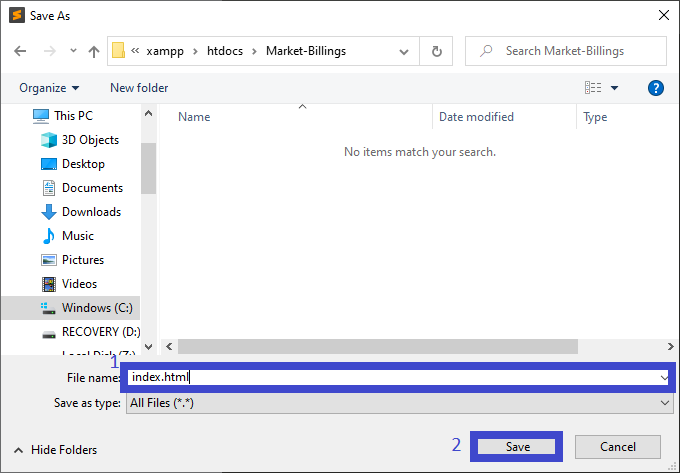
- Step 2: Create a HTML file.
Next, click “file” and select “save as” and named it “index.html“.

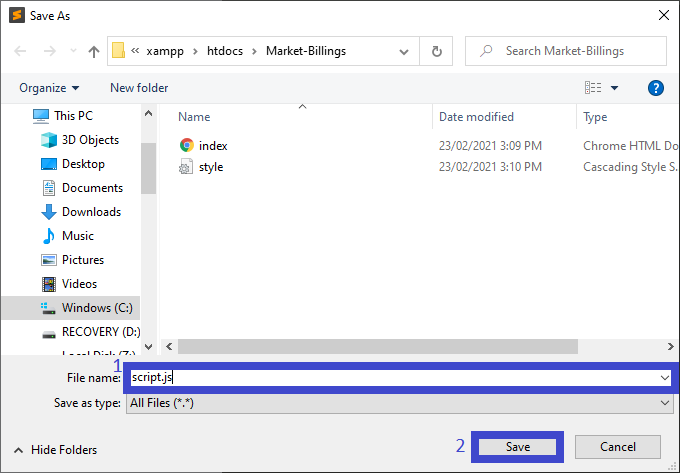
- Step 3: Create a JavaScript file.
Then, click “file” and select “save as” and named it “script.js“.
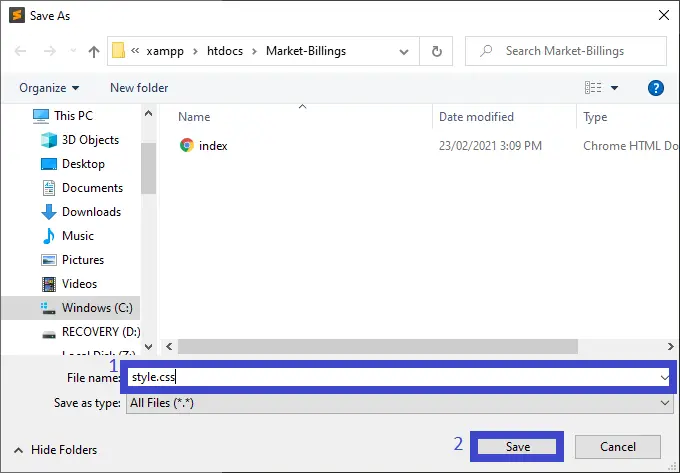
- Step 4: Create a CSS file.
Last, click “file” and select “save as” and named it “style.css“.
- Step 5: The actual code.
Finally, You are free to copy the code given below and paste to your different file created.
Code for the index.html in Market Billing System in JavaScript with Source Code
In the code given below, which is the code contains the interface of the application. This code will show the form that will be use in html.
<!DOCTYPE html>
<html>
    <head>
        <title>Market Billing System</title>
        <link rel="stylesheet" href="style.css">
        <link rel="stylesheet" href="https://stackpath.bootstrapcdn.com/bootstrap/4.5.2/css/bootstrap.min.css" integrity="sha384-JcKb8q3iqJ61gNV9KGb8thSsNjpSL0n8PARn9HuZOnIxN0hoP+VmmDGMN5t9UJ0Z" crossorigin="anonymous">
    </head>

    <body>

        <div class=" bg-dark text-white p-2">
            <h1 class="display-4 text-center">Market Billing System</h1>
        </div>

        <div class="container-fluid">
            <div class="row content bg-danger">
                <div class="col-sm-4 bg-success text-center text-white p-sm-0">
                    <form class="was-validation pl-sm-2 bg-primary">
                        <div class="form-row pr-2">
                            <label for="fruit-name" class="col-sm-4 text-left fruit-input">Item Name : </label>
                            <input type="text" class='col-sm-7 mb-sm-2 form-control' id="fruit-name" name="fruit-name" placeholder="Item name" required>
                        </div>

                        <div class="form-row pr-2">
                            <label for="fruit-price" class="col-sm-4 text-left fruit-input">Item Price : </label>
                            <input type="number" class="col-sm-7 mb-sm-2 form-control" id="fruit-price" name="fruit-price" required>
                        </div>

                        <div class="form-row pr-2 form-group">
                            <label for="fruit-quantity" class="col-sm-4 text-left fruit-input">Quantity : </label>
                            <input type="number" class="col-sm-7 mb-sm-2 form-control" id="fruit-quantity" name="fruit-quantity" required>
                        </div>

                        <div class="container">
                            <button type="submit" class="btn btn-success" id="add-btn">Add</button> <br><br>
                            <button type="button" class="btn btn-danger mb-sm-2" id="fruit-basket">View Item Basket</button>
                            <button type="button" class="btn btn-warning mb-sm-2" id="total-price">View Total Price</button>
                        </div>
                    </form>

                    <div class="total bg-info hidden" id="total-div">

                    </div>
                </div>

                <div class="col-sm-8 container-fluid hidden" id="list">

                </div>
            </div>

        </div>

        <script src="script.js"></script>
        <script src="https://code.jquery.com/jquery-3.5.1.slim.min.js" integrity="sha384-DfXdz2htPH0lsSSs5nCTpuj/zy4C+OGpamoFVy38MVBnE+IbbVYUew+OrCXaRkfj" crossorigin="anonymous"></script>
        <script src="https://cdn.jsdelivr.net/npm/popper.js@1.16.1/dist/umd/popper.min.js" integrity="sha384-9/reFTGAW83EW2RDu2S0VKaIzap3H66lZH81PoYlFhbGU+6BZp6G7niu735Sk7lN" crossorigin="anonymous"></script>
        <script src="https://stackpath.bootstrapcdn.com/bootstrap/4.5.2/js/bootstrap.min.js" integrity="sha384-B4gt1jrGC7Jh4AgTPSdUtOBvfO8shuf57BaghqFfPlYxofvL8/KUEfYiJOMMV+rV" crossorigin="anonymous"></script>
    </body>
</html>
Code for the style.css in Market Billing System in JavaScript with Source Code
In the code given below, which is the code contains the interface design of the application. This code will show the form that will be use for designing.
body, html {
    height: 100%;
}

.flexview {
    display: flex;
}

.flexview p {
    flex: 1;
    margin-top: 0.5rem;
    margin-bottom: 0.5rem;
    padding-left: 10px;
}

.content {
    height: 85vh;
}

.fruit-input {
    margin: 0.5rem 0 0.5rem 0;
}

.remove-btn {
    border: none;
    background: rgb(255, 68, 68);
    color: white;
}

.remove-btn:hover {
    background: rgb(194, 50, 50);
    color: white;
}

.large {
    font-size: 1.2rem;
}

form {
    height: 60vh;
    padding-top: 70px;
}

.total {
    height: 25vh;
    justify-content: center;
    padding-top: 10%;
}

.hidden {
    display: none;
}
Code for the script.js in Market Billing System in JavaScript with Source Code
In the code given below, which is the code contains the interface function of the application. This code will show the function of the form that will be use in html.
const addButton = document.getElementById('add-btn');
const list = document.getElementById('list');
const fruitInput = document.getElementById('fruit-name');
const priceInput = document.getElementById('fruit-price');
const quantityInput = document.getElementById('fruit-quantity');
const totalPrice = document.getElementById('total-price');
const fruitBasket = document.getElementById('fruit-basket');
const totalDiv = document.getElementById('total-div');

const fruitList = [];
let total = 0;

const state = {};

addButton.addEventListener('click', (e)=> {
    e.preventDefault();
    const fruitName = capitalize(fruitInput.value);
    const fruitPrice = priceInput.value;
    const fruitQuantity = quantityInput.value;
    if(fruitName !== '' && !fruitList.includes(fruitName)) {

        state[`${fruitName}`] = {
            price: `${fruitPrice}`,
            quantity: `${fruitQuantity}`
        };

        fruitList.push(fruitName);

        renderList();

        total += parseFloat(fruitPrice) * parseInt(fruitQuantity);
        fruitInput.value = '';
        quantityInput.value = '1';
        priceInput.value = '';
        renderTotal();
    }
});

list.addEventListener('click', (e)=>{
    const element = e.target;
    if(element.classList[0] === 'button') {
        const elementNode = element.parentElement;
        const elementDataName = element.dataset.name;
        let elementDataPrice = parseFloat(element.dataset.price);
        let elementDataQuantity = parseInt(element.dataset.quantity);
        total = total - (parseFloat(elementDataPrice) * parseInt(elementDataQuantity));
        elementNode.remove();
        if(fruitList.includes(elementDataName))
        {
            const index = fruitList.indexOf(elementDataName);
            fruitList.splice(index,1);
            delete state[`${elementDataName}`];
        }

        renderList();
        renderTotal();
    }
});

totalPrice.addEventListener('click', () => {

    totalDiv.classList.toggle('hidden');
    renderTotal();

})

fruitBasket.addEventListener('click', () => {
    list.classList.toggle('hidden');
})

const renderList = () => {
    list.innerHTML = '';

    //console.log(quantityInput.value);
    // Setting the items in alphabetical order
    fruitList.sort();
    fruitList.forEach((fruit) => {

        itemHtml = `
            <div class="mt-sm-3 bg-light alert flexview">
                <p class="large">${fruit}</p>
                <button type="button" class="button col-sm-2 remove-btn" data-name="${fruit}" data-price="${state[`${fruit}`].price}" data-quantity="${state[`${fruit}`].quantity}">Remove</button>
            </div>`;
        list.insertAdjacentHTML('beforeend', itemHtml);
    })
}

const renderTotal = () => {
    totalDiv.innerHTML = '';
    //const html = `Total : <span>${total}</span>`;
    const html = `<p class="display-4">Total: <span>${total}</span></p>`;
    totalDiv.insertAdjacentHTML('afterbegin', html);
}

const capitalize = (string) => {
    return string.charAt(0).toUpperCase() + string.slice(1);
}
| ABOUT PROJECT | PROJECT DETAILS |
|---|---|
| Project Name : | Market Billing System in JavaScript |
| Project Platform : | JavaScript |
| Programming Language Used: | php,javascript,html,css |
| Developer Name : | itsourcecode.com |
| IDE Tool (Recommended): | Sublime |
| Project Type : | Web Application |
| Database: | None |
| Upload Date: | February 25, 2021 |
Downloadable Source Code
Summary
In summary, this Market Billing System in JavaScript with Source Code can be useful to students or professional who wants to learn web development using JavaScript programming language and it is used html and css platform.
This project can also be modified to fit your personal requirements. Hope this project will help you to improve your skills. Happy coding!
Related Articles
- To Do List Project in Python with Source Code
- Currency Converter In Python With Source Code
- Music Player In JavaScript With Source Code
- CRUD Operation In JavaScript With Source Code
- Fibonacci Series In JavaScript With Source Code
- Calculator In JavaScript Source Code
- Library System in JavaScript with Source Code
- Random Password Generator in JavaScript with Source Code
- Ecommerce in JavaScript Framework with Source Code
- JavaScript Snake Game with Source Code
Inquiries
If you have any questions or suggestions about Market Billing System in JavaScript with Source Code, please feel free to leave a comment below.
Official documentation
Frequently Asked Questions
How does this JavaScript billing or invoice system work?
Customer master, invoice generation, payment recording, statement printing via window.print() or jsPDF.
What JavaScript runtime or browser does this project need?
Pure frontend projects (vanilla JS, Vue, jQuery) run in any modern browser (Chrome 90+, Firefox 88+, Safari 14+, Edge 90+) – no install needed. Node.js projects need Node.js 18 LTS or 20 LTS (download from nodejs.org). Run: npm install in project folder, then npm start or node app.js.
How do I run this JavaScript project locally?
For pure HTML/CSS/JS: open index.html in your browser, or use VS Code Live Server extension for auto-reload. For Vue projects: npm install then npm run dev (Vite) or npm run serve (Vue CLI). For Node.js: npm install then npm start. For projects with backend (PHP+MySQL): place in XAMPP htdocs, start Apache + MySQL, browse to localhost/project.
Can I use this JavaScript project for a BSIT capstone or thesis?
Yes. Extend it: add user authentication (JWT for SPA, sessions for traditional), role-based access, real backend (Node.js+Express+MongoDB or PHP+MySQL), responsive design (Bootstrap/Tailwind), PDF exports (jsPDF), real-time features (Socket.IO). Pair with Chapter 1-5 documentation matching your panel’s rubric.
Why am I getting ‘Uncaught ReferenceError’ or ‘Cannot read property of undefined’?
Three common JavaScript issues: (1) Script tag placement wrong, put

Adones Evangelista
Programmer & Technical Writer at PIES IT Solution
Adones Evangelista is a programmer and writer at PIES IT Solution, author of over 900 tutorials and error-fix guides at itsourcecode.com. Specializes in JavaScript, Django, Laravel, and Python error debugging covering ValueError, TypeError, AttributeError, ModuleNotFoundError, and RuntimeError, plus C/C++ and PHP capstone projects for BSIT students.
Expertise: JavaScript · Python · Django · Laravel · Error Debugging · C/C++ · View all posts by Adones Evangelista →
Looking for similar projects or tutorials?
Search for more source code, capstone projects, or programming tutorials