
Fibonacci Series In JavaScript With Source Code
The Fibonacci Series In JavaScript is developed using JavaScript, CSS, bootstrap, and HTML.
This Project With Source Code is a small and interesting project to generate the Fibonacci series of the required length.
The user has to enter the number for generating the series and you will see the entered length of Fibonacci series.
A Fibonacci In JavaScript is a micro framework for generating different series in different length.
The user has to enter the number for the series length, then click ‘Generate’ button to generate the series.
Also, this Project you can learn on how to Write A Program To Fibonacci Series In JavaScript.
This Program For Fibonacci Series In JavaScript project with source code, also includes a downloadable Fibonacci In JavaScript Code for free, just find the downloadable source code below and click to start downloading.
I have here a suggested list of Best JavaScript Projects with Source Code Free to download and I’m sure this can help you to improve your skills in JavaScript programming and web development as a whole.
To start creating a Fibonacci Series In JavaScript, makes sure that you have any platform in creating a JavaScript, CSS, bootstrap, and HTML installed in your computer, in my case I will use Sublime Text.
Steps on how to create a Fibonacci Series In JavaScript
Fibonacci Series In JavaScript With Source Code
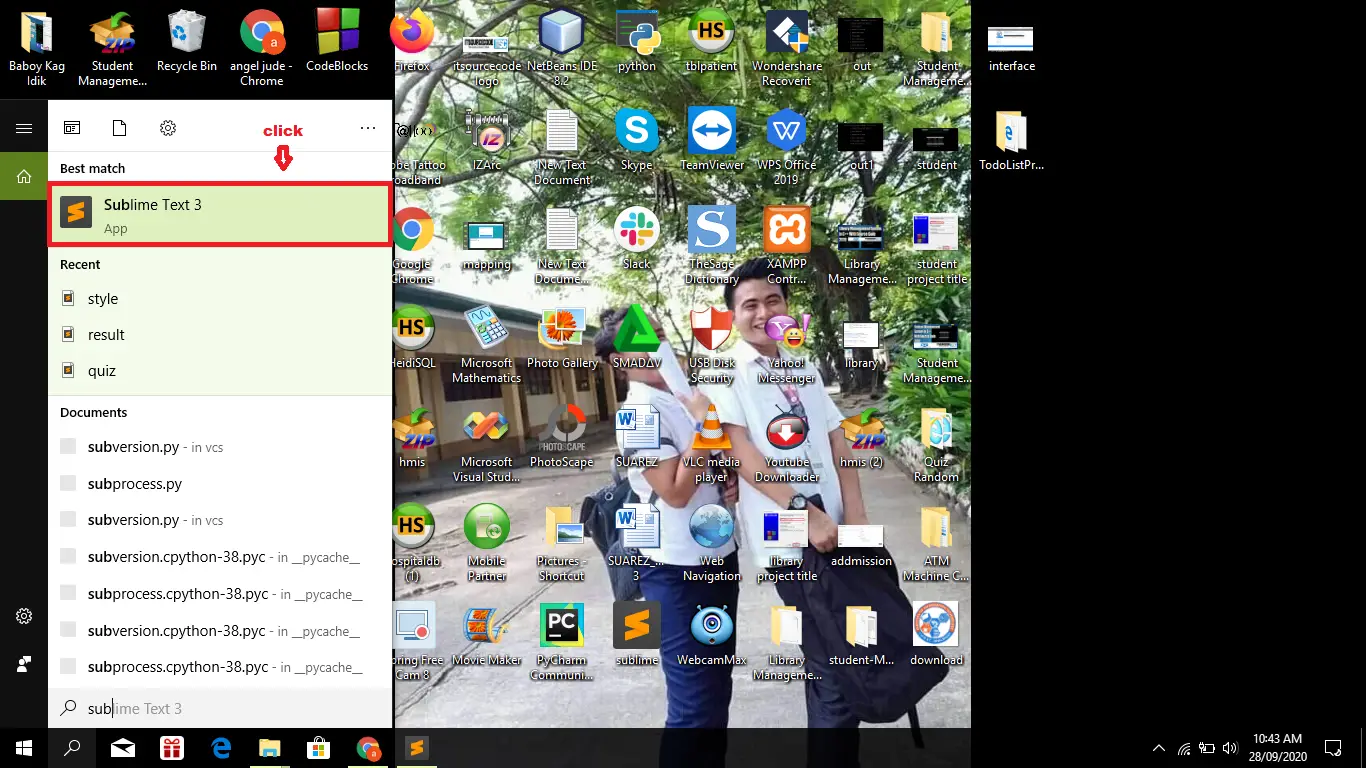
- Step 1: Open Sublime Text.
First after installing sublime text IDE, click “open” to start.

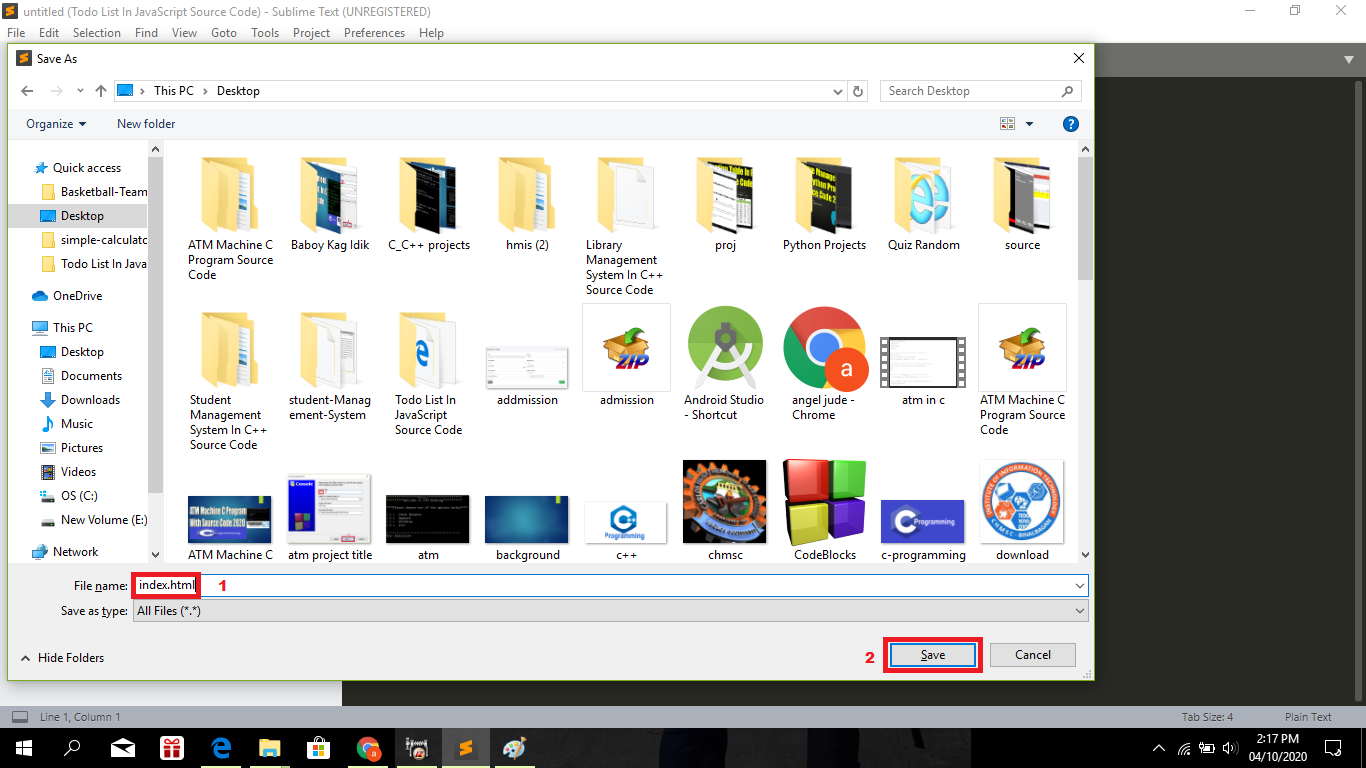
- Step 2: Create a HTML file.
Second click “file” and select “save as” and named it “index.html“
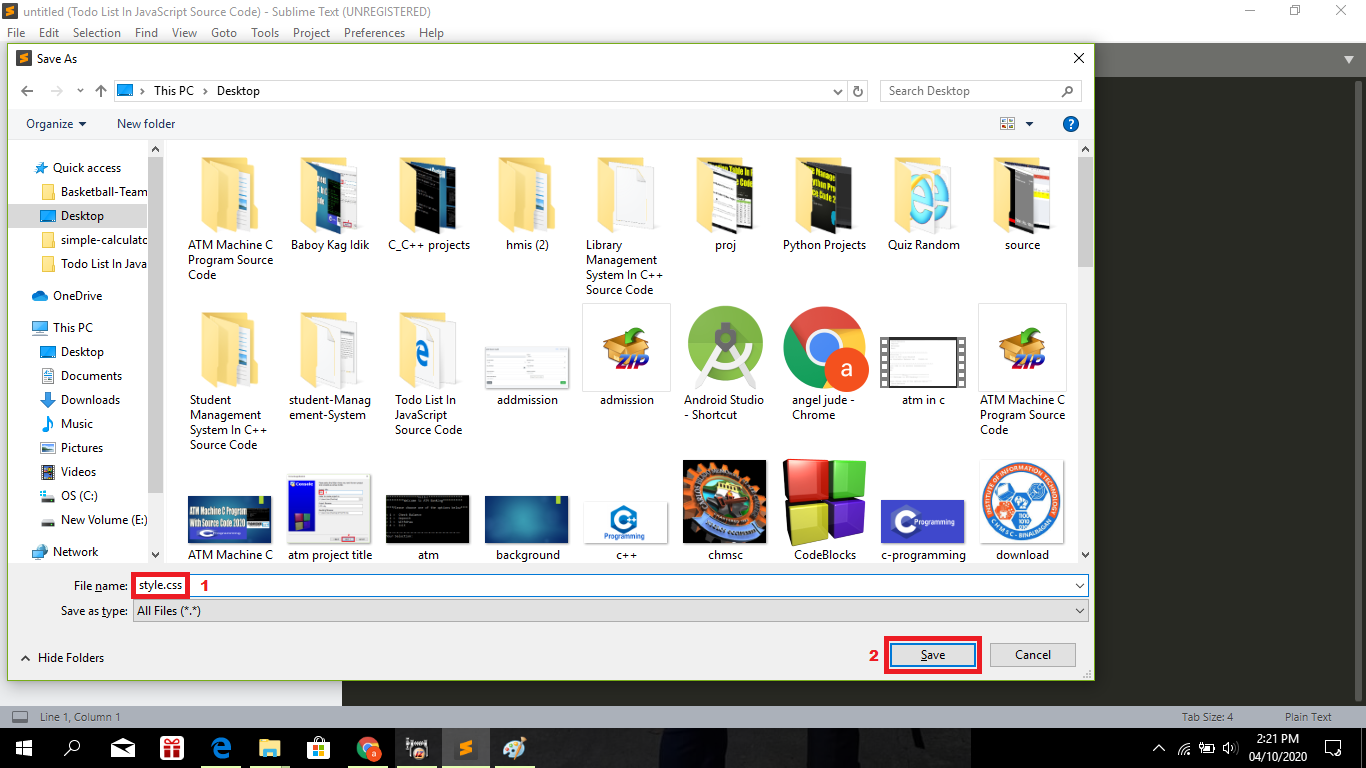
- Step 3: Create a CSS file.
Third click “file” and select “save as” and named it “style.css“
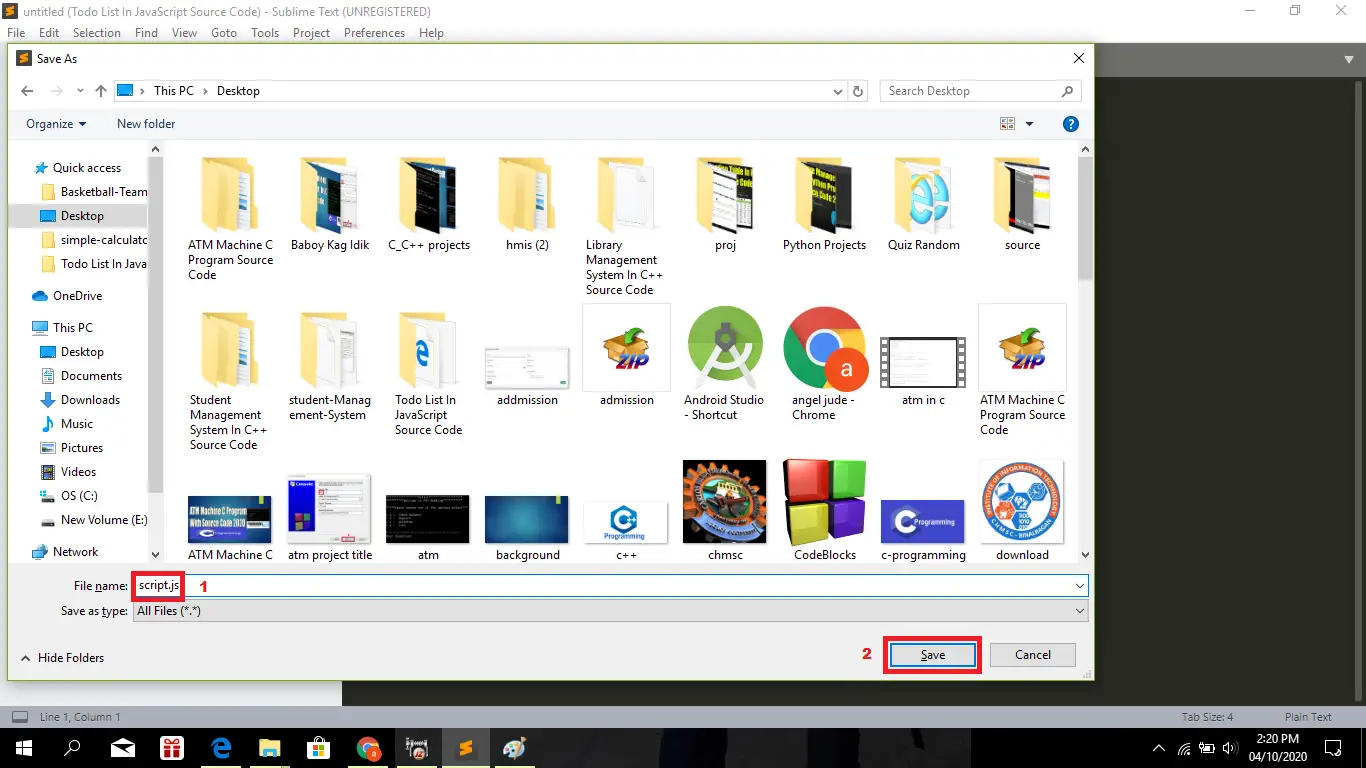
- Step 4: Create a JavaScript file.
Fourth click “file” and select “save as” and named it “script.js“
- Step 5: The actual code.
You are free to copy the code given below and paste to your different file created.
The Code Given Below Is For The Index.html Module
<!DOCTYPE html>
<html lang="en">
<head>
    <title>Fibonacci</title>
    <link rel="stylesheet" href="style.css">
    <script src="script.js"></script>
</head>
<body>
    <div class="container">
        <div class="gameDiv">
            <h1>Lets get a Fibonacci sequence: </h1>
            <form action="myForm">
                <input type="number" name="txtNumber" id="txtNumber" id="txtNumber" placeholder="Enter the number...">
            </form>
                <br>
                <button class="button" onclick="Alert.render()">Generate</button>
        </div>
    </div>
    <div id="dialogoverlay"></div>
    <div id="dialogbox">
        <div>
            <div id="dialogboxhead"></div>
            <div id="dialogboxbody"></div>
            <div id="dialogboxfoot"></div>
        </div>
    </div>
</body>
</html>
In this module which is the html file of the system.
The Code Given Below Is For The Style.css Module
body{background-color: #f4f4f4;color: #555555;font: normal 16px Arial, Helvetica, sans-serif;line-height: 1.6em;margin: 0;}

.button{background-color: #333;color:#fff;padding: 10px 15px;border:none;font: bold 16px Arial, Helvetica, sans-serif;}

.button:hover{background-color: red;color: #fff;}

.container{width: 80%;margin: auto;text-align: center;}

.gameDiv{margin: 20px 0;border: 2px dotted #ccc;padding: 20px;border-radius: 20px;}

#dialogoverlay{display: none;opacity: .8;position: fixed;top: 0px;left: 0px;background: #fff;width: 100%;z-index: 10;}

#dialogbox{display: none;position: fixed;background: #000;border-radius: 7px;width: 550px;z-index: 10; }

#dialogbox > div{background: #fff; margin: 8px;}

#dialogbox > div > #dialogboxhead{background: #666;font-size: 19px;padding: 10px;color: #ccc;}

#dialogbox > div > #dialogboxbody{background: #333;padding: 20px;color: #fff;overflow: scroll;}

#dialogbox > div > #dialogboxfoot{background: #666;padding: 10px;text-align: right;}
In this module which is the css file of the system.
The Code Given Below Is For The Script.js Module
function CustomAlert() {

    this.render = function() {
        var winW = window.innerWidth;
        var winH = window.innerHeight;
        var dialogoverlay = document.getElementById('dialogoverlay');
        var dialogbox = document.getElementById('dialogbox');


        var numberEntered = document.getElementById('txtNumber').value;
        var counter = 1;
        var fib = [];

        if (numberEntered == 0) {
            fib = [0];
            document.getElementById('dialogboxbody').innerHTML = fib;
        } else if(numberEntered == 1){
            fib = [1];
            document.getElementById('dialogboxbody').innerHTML = fib;
        } else if(numberEntered == 2){
            fib = [1, 1];
            document.getElementById('dialogboxbody').innerHTML = fib;
        } else if(numberEntered > 2){
            fib = [1, 1];
            while (counter < (numberEntered - 1)) {
                fib.push(fib[counter] + fib[counter - 1]);
                counter++;
            }
            document.getElementById('dialogboxbody').innerHTML = fib;
        }


        dialogoverlay.style.display = "block";
        dialogoverlay.style.height = winH+"px";

        dialogbox.style.left = (winW/2) - (550 * .5) + "px";
        dialogbox.style.top = "100px";
        dialogbox.style.display = "block";

        document.getElementById('dialogboxhead').innerHTML = "Your Fibonacci Sequence is: ";
        // document.getElementById('dialogboxbody').innerHTML = dialog;
        document.getElementById('dialogboxfoot').innerHTML = '<button class="button" onclick="Alert.ok()">OK</button>';
    }

    this.ok = function() {
        document.getElementById('dialogbox').style.display = "none";
        document.getElementById('dialogoverlay').style.display = "none";
    }
}

var Alert = new CustomAlert();
In this module which is the JavaScript file of the system.
| ABOUT PROJECT | PROJECT DETAILS |
|---|---|
| Project Name : | Fibonacci Series In JavaScript |
| Project Platform : | JavaScript |
| Programming Language Used: | php,javascript,html,css |
| Developer Name : | itsourcecode.com |
| IDE Tool (Recommended): | Sublime |
| Project Type : | Web Application |
| Database: | None |
| Upload Date: | October 5, 2020 |
Downloadable Source Code
Summary
This JavaScript Project With Source Code is simply in HTML, CSS, and JavaScript.
Taking about the features of this system, the user has to enter the number for the series length, then click ‘Generate’ button to generate the series.
This project includes a lot of JavaScript for making the functioning of the project.
Related Articles
- Todo List In JavaScript With Source Code
- Currency Converter Project in JavaScript with Source Code
- Calculator In JavaScript Source Code
Inquiries
If you have any questions or suggestions about Fibonacci Series In JavaScript, please feel free to leave a comment below.
How Fibonacci Series works
This JavaScript project demonstrates common patterns used across web applications. The code is intentionally small so it can be understood in a few reading sessions and extended for a real project.
Extending Fibonacci Series for a capstone project
- Persist data. Add localStorage or a Node.js backend so state survives page reloads.
- Style it. Add Bootstrap, Tailwind, or a custom design so the project looks polished for defense.
- Add authentication. Login and role-based access control for multi-user scenarios.
- Deploy live. Push to GitHub Pages, Netlify, or Vercel so panel members can access it from any device.
- Test on mobile. Use Chrome DevTools device mode to confirm the layout works on phones.
Working code snippet
// A minimal JavaScript pattern for Fibonacci Series
(function () {
  const state = { items: [] };

  function add(item) {
    state.items.push(item);
    render();
  }

  function render() {
    const container = document.getElementById("output");
    container.innerHTML = state.items.map(x => `<li>${x}</li>`).join("");
  }

  document.getElementById("addBtn").addEventListener("click", () => {
    const input = document.getElementById("input");
    if (input.value) {
      add(input.value);
      input.value = "";
    }
  });
})();
Best practices for this JavaScript pattern
- Use const and let. Never var. It has function-scope surprises that trip up beginners.
- Wrap in an IIFE or module. Prevents polluting the global namespace.
- Attach one event listener per action. Not multiple listeners on the same button.
- Separate state from rendering. Update state first, then call render(). Do not mutate DOM directly from event handlers.
Official documentation
Featured guides worth reading next
Frequently Asked Questions
How does this JavaScript project work?
Built with vanilla JavaScript (no framework) or Vue/Node. HTML structure, CSS styling, JS logic via DOM manipulation + event listeners. Backend optional (Node.js or PHP). Ready to extend for BSIT capstone scope.
What JavaScript runtime or browser does this project need?
Pure frontend projects (vanilla JS, Vue, jQuery) run in any modern browser (Chrome 90+, Firefox 88+, Safari 14+, Edge 90+) – no install needed. Node.js projects need Node.js 18 LTS or 20 LTS (download from nodejs.org). Run: npm install in project folder, then npm start or node app.js.
How do I run this JavaScript project locally?
For pure HTML/CSS/JS: open index.html in your browser, or use VS Code Live Server extension for auto-reload. For Vue projects: npm install then npm run dev (Vite) or npm run serve (Vue CLI). For Node.js: npm install then npm start. For projects with backend (PHP+MySQL): place in XAMPP htdocs, start Apache + MySQL, browse to localhost/project.
Can I use this JavaScript project for a BSIT capstone or thesis?
Yes. Extend it: add user authentication (JWT for SPA, sessions for traditional), role-based access, real backend (Node.js+Express+MongoDB or PHP+MySQL), responsive design (Bootstrap/Tailwind), PDF exports (jsPDF), real-time features (Socket.IO). Pair with Chapter 1-5 documentation matching your panel’s rubric.
Why am I getting ‘Uncaught ReferenceError’ or ‘Cannot read property of undefined’?
Three common JavaScript issues: (1) Script tag placement wrong, put

Angel Jude Suarez
Full-Stack Developer at PIES IT Solution
Focuses on Python development, machine learning, and AI integration. Has built production AI systems including OpenAI Whisper integration for medical transcription and GPT-4o-powered diagnosis assistance. Strong background in pandas, scikit-learn, and TensorFlow.
Expertise: Python · PHP · Java · VB.NET · ASP.NET · Machine Learning · AI Integration · OpenCV · Django · CodeIgniter
· View all posts by Angel Jude Suarez →
Looking for similar projects or tutorials?
Search for more source code, capstone projects, or programming tutorials