
The Currency Converter Source Code in JavaScript is a web-based project which is created using HTML, CSS, and JavaScript.
In Addition, JavaScript is a scripting language that enables you to create dynamically updating content, control multimedia, animate images, and pretty much everything else, can update and change both HTML and CSS you can access it this project via fetch https.
This JavaScript Currency Converter changes currency starting with one unit then onto the next. You can have various choices for the cash units all alone. Here, the client needs to type themselves for the cash unit while change.
What is Currency Converter?
In JavaScript, Currency Converter is a simple web project which provides a quick currency conversion of present day value of foreign money to local.
This Currency Converter JavaScript is a basic program to provide a reliable exchange rate of every money all over the world.
In addition this Currency Converter is developed in HTML tags such as body HTML, doctype HTML, form input, input type text, type button, head body into one div class.
In this application, the client can type the unit of const amount for changing over and enter the sum to change over the money, you can select an ID amount to access the (GBP Option).
The JavaScript Code Currency Converter additionally incorporates selected currency which show a record permitting the application to work.
Why Currency Converter is needed?
The Currency Converter in JavaScript (JS) is needed to our daily living because it will help foreign travelers to monitor the exchange rate of there money into other country.
To start creating a Currency Converter Project in JavaScript, make sure that you have any platform in creating a JavaScript, bootstrap, and HTML installed in your computer, in my case I will use Sublime Text.
Project details and technology:
| ABOUT PROJECT | PROJECT DETAILS |
|---|---|
| Project Name : | Currency Converter Project in JavaScript |
| Project Platform : | JavaScript |
| Programming Language Used: | JavaScript, HTML, and CSS |
| Developer Name : | itsourcecode.com |
| IDE Tool (Recommended): | Sublime |
| Project Type : | Web Application |
| Database: | None |
| Upload Date: | 9/ 23 / 2022 |
Currency Converter Source Code in JavaScript Free Download Steps To Run The Project:
Time needed: 3 minutes
Currency Converter Source Code in JavaScript
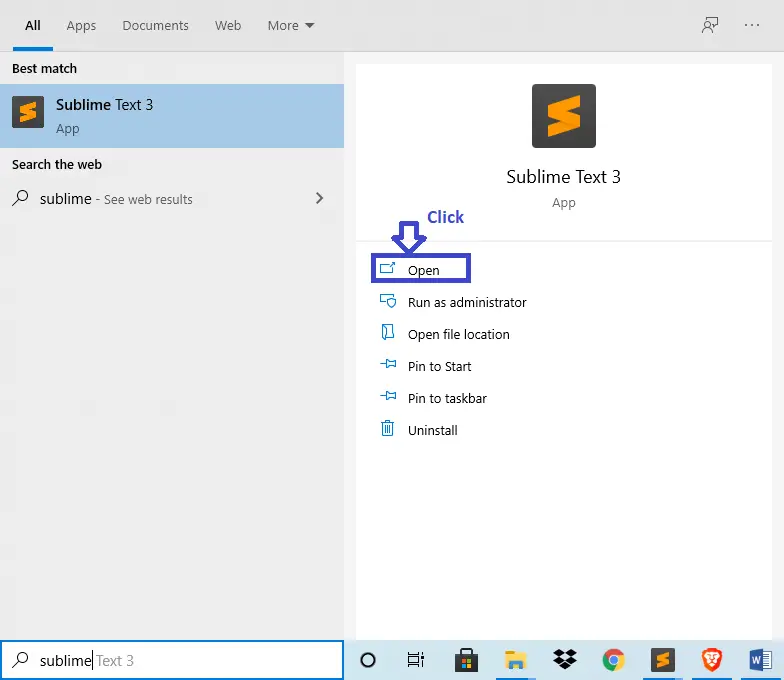
- Step 1: Open Sublime Text.
First after installing sublime text IDE, click “OPEN” to start.

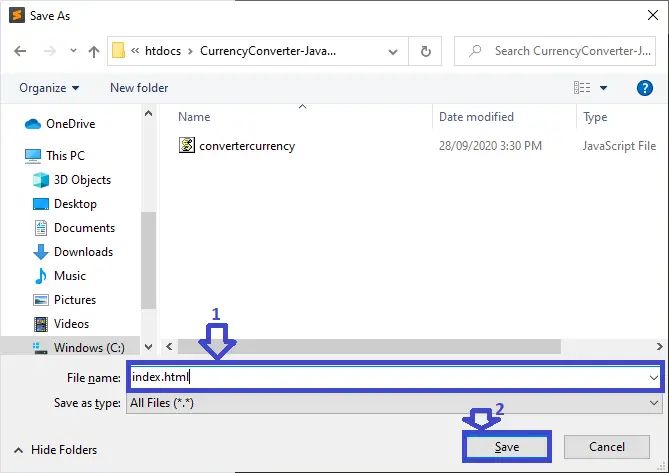
- Step 2: Create a HTML file.
Second click “file” and select “save as” and named it “index.html“

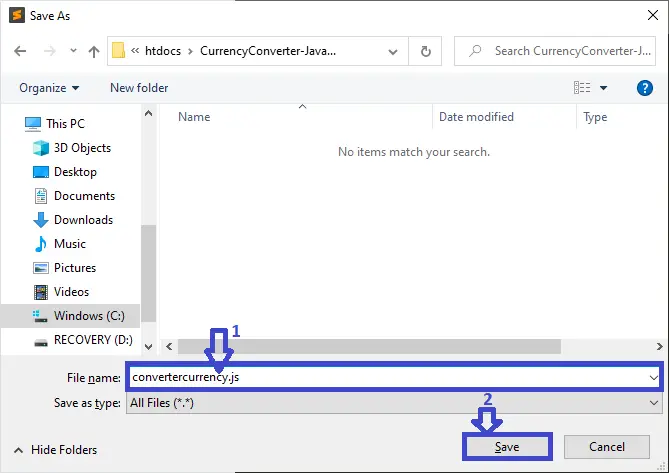
- Step 3: Create a JavaScript file.
Third click “file” and select “save as” and named it “convertercurrency.js“
- Step 4: The actual code.
You are free to copy the code given below and paste to your different file created.
Downloadable Source Code
Summary
In summary, this Currency Converter Source Code in JavaScript can be useful to students or professional who wants to learn web development using technologies like HTML, CSS and JavaScript.
This project can also be modified to fit your personal requirements. Hope this project will help you to improve your skills. Happy coding!
Related Articles
- To Do List Project in Python with Source Code | Video | 2020
- Currency Converter In Python With Source Code
Inquiries
If you have any questions or suggestions about Currency Converter Source Code in JavaScript, please feel free to leave a comment below.
How Currency Converter Source Code works
This JavaScript project demonstrates common patterns used across web applications. The code is intentionally small so it can be understood in a few reading sessions and extended for a real project.
Extending Currency Converter Source Code for a capstone project
- Persist data. Add localStorage or a Node.js backend so state survives page reloads.
- Style it. Add Bootstrap, Tailwind, or a custom design so the project looks polished for defense.
- Add authentication. Login and role-based access control for multi-user scenarios.
- Deploy live. Push to GitHub Pages, Netlify, or Vercel so panel members can access it from any device.
- Test on mobile. Use Chrome DevTools device mode to confirm the layout works on phones.
Working code snippet
// A minimal JavaScript pattern for Currency Converter Source Code
(function () {
  const state = { items: [] };

  function add(item) {
    state.items.push(item);
    render();
  }

  function render() {
    const container = document.getElementById("output");
    container.innerHTML = state.items.map(x => `<li>${x}</li>`).join("");
  }

  document.getElementById("addBtn").addEventListener("click", () => {
    const input = document.getElementById("input");
    if (input.value) {
      add(input.value);
      input.value = "";
    }
  });
})();
Best practices for this JavaScript pattern
- Use const and let. Never var. It has function-scope surprises that trip up beginners.
- Wrap in an IIFE or module. Prevents polluting the global namespace.
- Attach one event listener per action. Not multiple listeners on the same button.
- Separate state from rendering. Update state first, then call render(). Do not mutate DOM directly from event handlers.
Deployment checklist for this JavaScript project
Before showing the project to a client, panel member, or user, run through this checklist:
- Minify the JavaScript. Use esbuild or terser to shrink the file for faster page load.
- Add a .gitignore. Exclude node_modules, .env, and IDE folders before committing to GitHub.
- Set up a README. Explain what the project does, how to install, and how to contribute.
- Add screenshots. A picture beats a paragraph when someone lands on your repo.
- Enable HTTPS. GitHub Pages and Netlify give free HTTPS by default; use it.
- Test in real browsers. Chrome, Firefox, Safari, Edge — not just the one you develop in.
- Check mobile layout. Chrome DevTools device mode simulates common phones and tablets.
Official documentation
Frequently Asked Questions
How does this JavaScript project work?
Built with vanilla JavaScript (no framework) or Vue/Node. HTML structure, CSS styling, JS logic via DOM manipulation + event listeners. Backend optional (Node.js or PHP). Ready to extend for BSIT capstone scope.
What JavaScript runtime or browser does this project need?
Pure frontend projects (vanilla JS, Vue, jQuery) run in any modern browser (Chrome 90+, Firefox 88+, Safari 14+, Edge 90+) – no install needed. Node.js projects need Node.js 18 LTS or 20 LTS (download from nodejs.org). Run: npm install in project folder, then npm start or node app.js.
How do I run this JavaScript project locally?
For pure HTML/CSS/JS: open index.html in your browser, or use VS Code Live Server extension for auto-reload. For Vue projects: npm install then npm run dev (Vite) or npm run serve (Vue CLI). For Node.js: npm install then npm start. For projects with backend (PHP+MySQL): place in XAMPP htdocs, start Apache + MySQL, browse to localhost/project.
Can I use this JavaScript project for a BSIT capstone or thesis?
Yes. Extend it: add user authentication (JWT for SPA, sessions for traditional), role-based access, real backend (Node.js+Express+MongoDB or PHP+MySQL), responsive design (Bootstrap/Tailwind), PDF exports (jsPDF), real-time features (Socket.IO). Pair with Chapter 1-5 documentation matching your panel’s rubric.
Why am I getting ‘Uncaught ReferenceError’ or ‘Cannot read property of undefined’?
Three common JavaScript issues: (1) Script tag placement wrong, put

Adones Evangelista
Programmer & Technical Writer at PIES IT Solution
Adones Evangelista is a programmer and writer at PIES IT Solution, author of over 900 tutorials and error-fix guides at itsourcecode.com. Specializes in JavaScript, Django, Laravel, and Python error debugging covering ValueError, TypeError, AttributeError, ModuleNotFoundError, and RuntimeError, plus C/C++ and PHP capstone projects for BSIT students.
Expertise: JavaScript · Python · Django · Laravel · Error Debugging · C/C++
· View all posts by Adones Evangelista →
Looking for similar projects or tutorials?
Search for more source code, capstone projects, or programming tutorials
Please I need a paper work on this project work