
Student Grading System In C# With Source Code
The Student Grading System in C# with Source Code is developed using C# language, this is a basic grading system that produces and stores new student data and their semester and school year grades.
A Grading System compute student grades and decide whether they have failed or passed.
This display student records and their particular grades in datagridview.
A navigation panel allows the user to access the student records
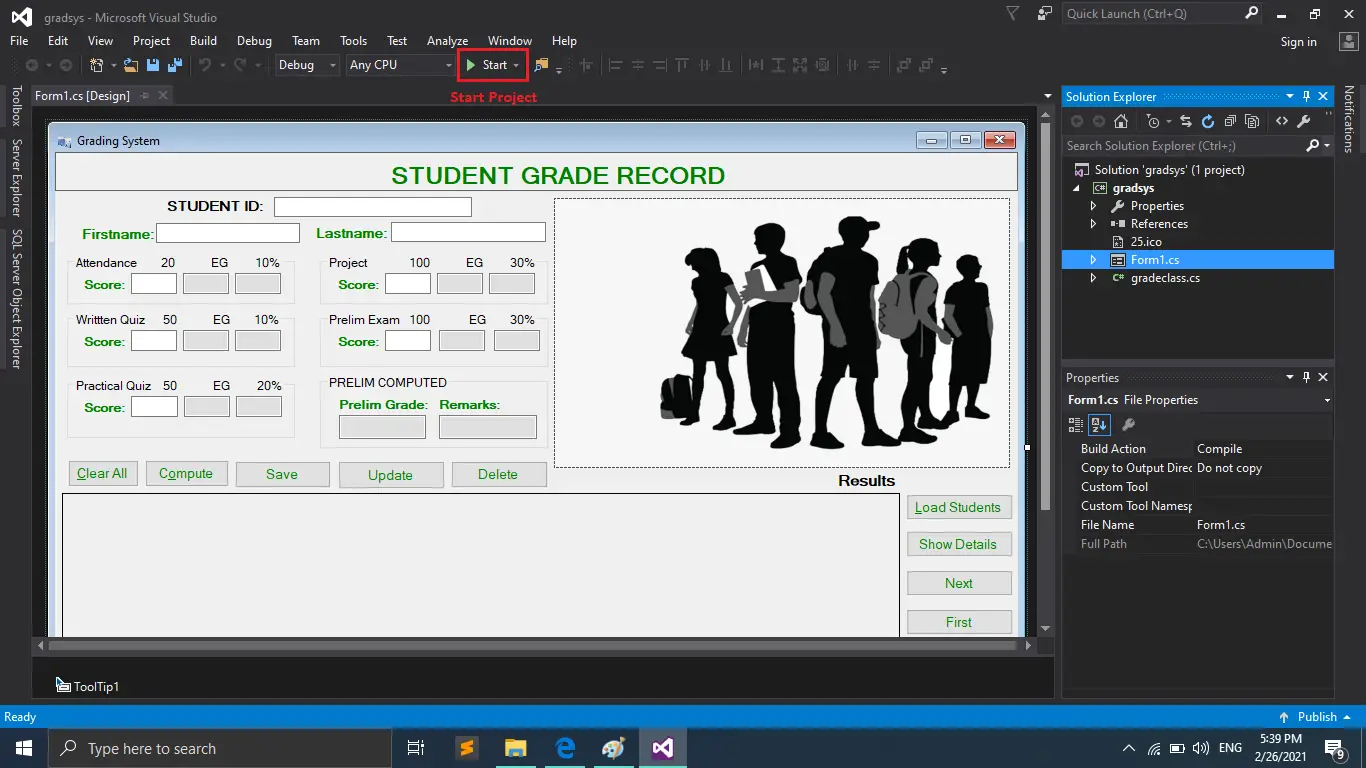
A Student Grading System in C# user must enter the student details such as: student ID, name, attendance score, project score, written quiz score, preliminary examination score and practical quiz score to measure the student report to show Prelim Grade, Remarks and can also save, alter, list, delete grade reports after computing user.
This device is easy for users to operate and understand.
These are the following features of the system
- Compute Grades
- Add Student Grades
- Update Student Grades
- Delete Student Grades
- Load Students
To run this project make sure that you have Visual Studio IDE installed in your PC(for Windows) to run this project. Student Grading System in C#.net free download with source code.
Student Grading System in C# with Source Code: Steps On How To Run The Project
Time needed: 5 minutes
These are the steps on how to run Student Grading System In C# With Source Code
- Step 1: Download
First, download the source code given below.

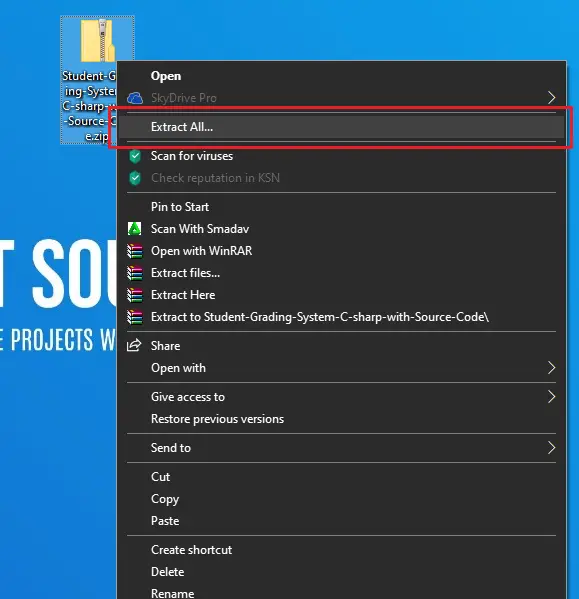
- Step 2: Extract file
Second, after you finished download the source code, extract the zip file.

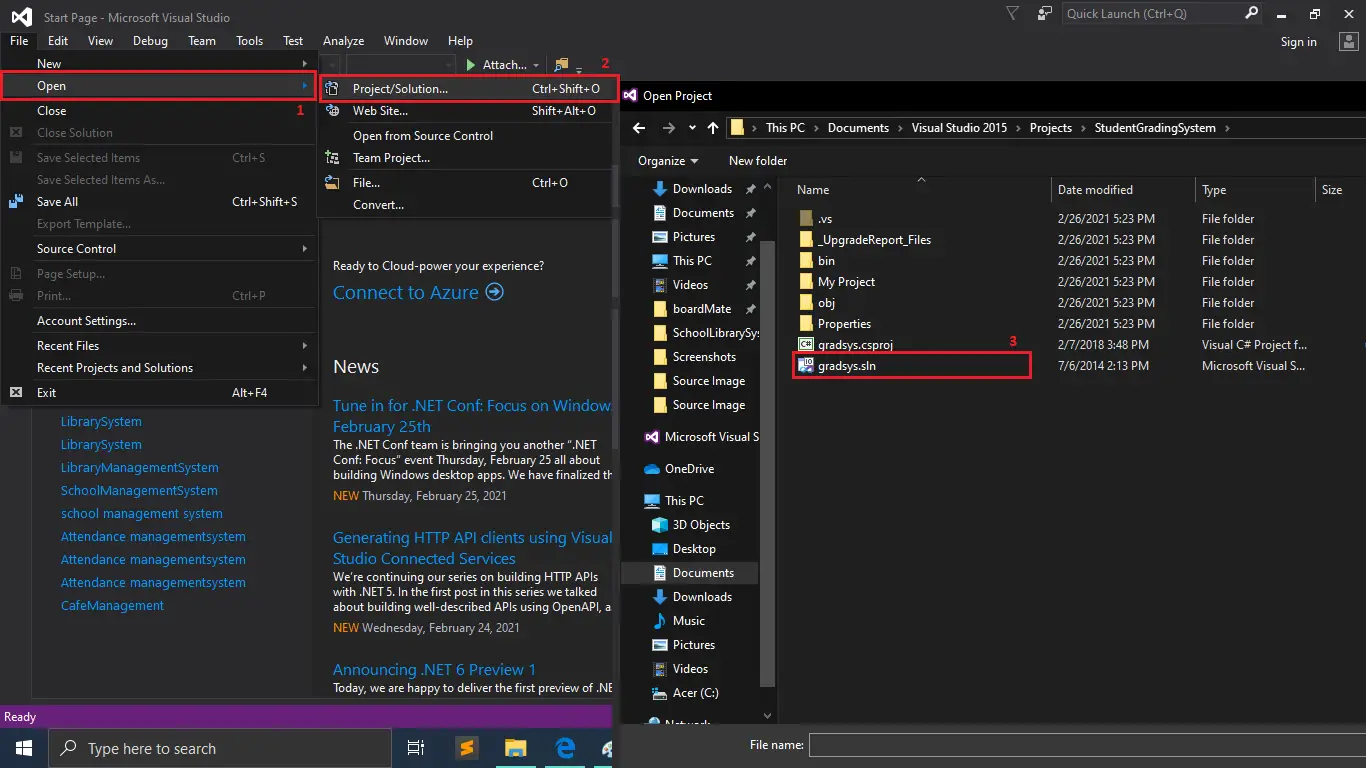
- Step 3: Open Project
Third, Open a Visual Studio and open project folder StudentGradingSystem then open the “gradsys.sln“.

- Step 4: Start Project
Fourth, Start the project.
| ABOUT PROJECT | PROJECT DETAILS |
|---|---|
| Project Name : | Student Grading System |
| Project Platform : | C# |
| Programming Language Used: | C# Programming Language |
| Developer Name : | itsourcecode.com |
| IDE Tool (Recommended): | Visual Studio 2019 |
| Project Type : | Desktop Application |
| Database: | MYSQL DATABASE |
| Upload Date and Time: | February 26, 2021- 10:08 am |
Downloadable Source Code
Conclusion
This Student Grading System in C#.net is only a project made for school requirement purposes only.
You can download this source code and modify it to suit your client requirements, since this is a student project it means you cannot really expect 100% functionality from this.
Related Articles
- Simple Calculator Source Code in C#
- How to Connect MySQL Database to C#.net
- How to Populate Datagridview With MySQL Database using C#
- Multi-Columns AutoComplete in a TextBox Using C# and SQL Server
- How to Retrieve and Update the Data Using C# and MySQL Database
- Saving and Retrieving Data in the Database Using C# and MySQL Database
- Payroll Management System Project in C# with Source Code
- Inventory Management System in C# Source Code
- Cafe Billing System in C# with Source Code
- Student Grading System VB.net Full Source Code
- School Library Management System in C# with Source Code
Other Articles you might read also:
- Library Management System Project in Django with Source Code
- Online Library Management System in PHP Source Code
- ICHS Library Management System
- College Management System Project in Django with Source Code
- Search Filter In Django With Source Code
- Best Python Course Online | Python Course Free
- CRANE Thesis Documentation Chapter 1
- CRANE Thesis Documentation Chapter 2 – Related Literature
- ECOMMERCE IN JAVASCRIPT FRAMEWORK WITH SOURCE CODE
- Cafe Reservation System Source Code Using PHP
- Hotel Reservation System SourceCode in PHP
- Online Frozen Foods Ordering System Source Code
- Online Hotel Management System Source Code
- To Do List Project in Python with Source Code
- Currency Converter In Python With Source Code
- Music Player In JavaScript With Source Code
- CRUD Operation In JavaScript With Source Code
Inquiries
If you have any questions or suggestions about Student Grading System in C# with Source Code, please feel free to leave a comment below.
Frequently Asked Questions
How does this C# school management system work?
Modules: student enrollment, teacher/staff management, class scheduling, attendance, grade entry, report card generation, fee collection, library. Role-based access via login form. Built with C# WinForms + SQL Server. Foundation BSIT capstone.
What .NET and SQL Server versions does this project require?
Most projects in this batch use C# WinForms on .NET Framework 4.5+ (the dominant stack for tutorial sites) with SQL Server 2012 Express or higher. A few newer projects use .NET 6/7/8. To run: install Visual Studio 2019 / 2022 (Community edition is free), install SQL Server Express + SSMS, open the .sln file, build, run.
How do I set up the database for this C# project?
Open SQL Server Management Studio (SSMS) and connect to your SQL Server instance (e.g. localhost\SQLEXPRESS). Right-click Databases > Restore Database OR > New Database then import the included .sql script. Update the connection string in App.config (or in code-behind) with your server name + credentials. Rebuild and run.
Can I use this C# project for a BSIT capstone or thesis?
Yes, but extend it. A bare CRUD form is too narrow for full capstone scope. Add: role-based access (admin/staff/customer login redirect), Crystal Reports or RDLC reports, dashboard with Chart controls, audit log, multi-branch support. Pair with Chapter 1-5 documentation matching your panel’s rubric.
Why am I getting ‘connection error’ or ‘object reference not set’?
Three common C# issues: (1) Connection error: SQL Server isn’t running OR connection string in App.config has wrong server name. Open SQL Server Configuration Manager + verify SQL Server (SQLEXPRESS) service is running. (2) NullReferenceException: a control reference or DB column returned NULL, add a check or use ?? operator. (3) Build error ‘The type or namespace could not be found’: missing assembly reference, add via Project > Add Reference.
Where can I find more C# projects with source code?
Browse the C# Projects hub for the full library. For other .NET stacks see VB.NET Projects (300+ Windows Forms systems). For ASP.NET WebForms see ASP.NET Projects. For BSIT capstone idea lists see 150 Best Capstone Project Ideas.

Adrian Mercurio
Full-Stack Developer at PIES IT Solution
Specializes in building complete capstone projects with full documentation. Strong background in PHP/MySQL development and database design. Has personally built and tested over 30 capstone-ready projects with ER diagrams, DFDs, and chapter-by-chapter thesis documentation.
Expertise: PHP · Laravel · Database Design · Capstone Projects · C# · C · C++ · Python · AI Projects · View all posts by Adrian Mercurio →
can you give us step on how to connect the application to our own local database, so that we can save and update records