
This article is made for Hospital Management System in C# with Source Code to give you ideas about best and free source code C# projects for capstone and thesis.
A simple desktop application built using hospital management system project in C#.
The idea of handling hospital patients, personnel records and more is the basis of the Hospital Management System.
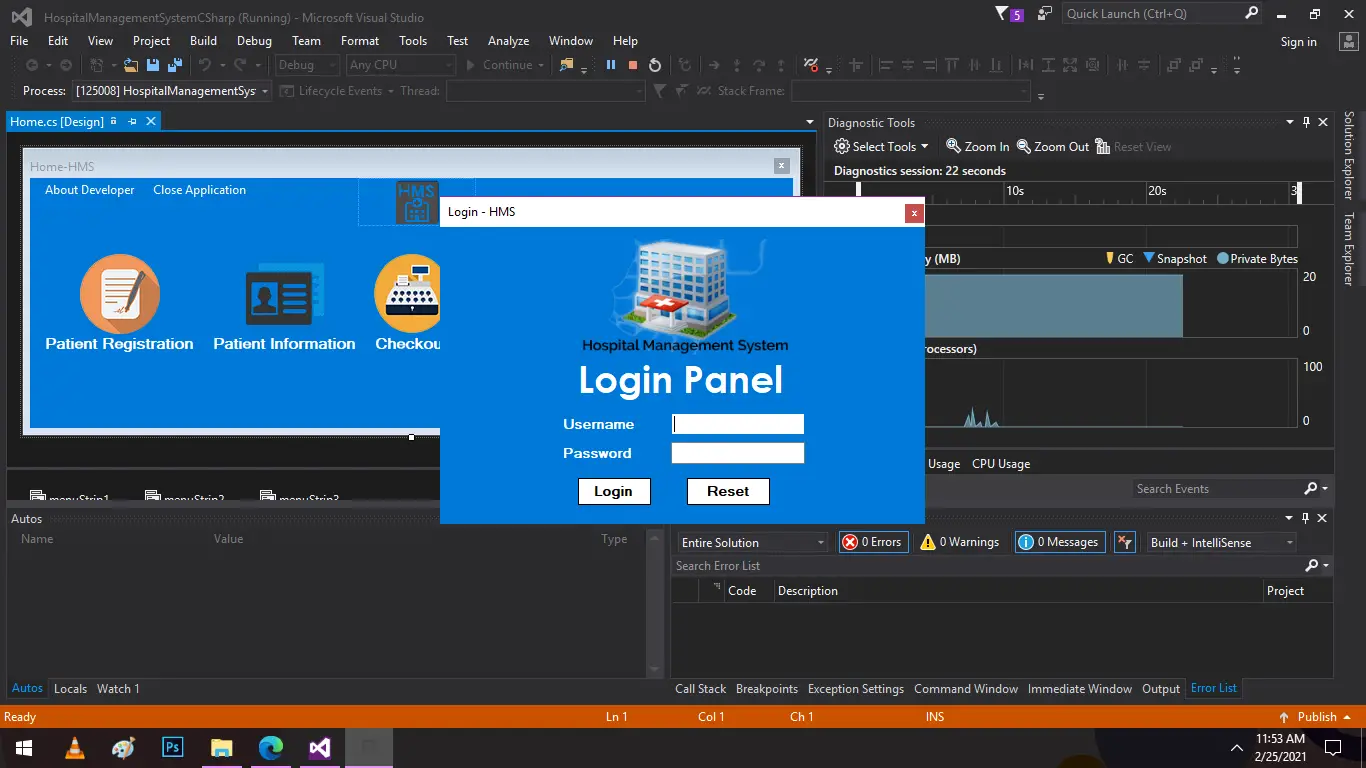
Speaking of the Hospital Management System, before the user could use its functions the user has to move through a login system.
By entering his or her details such as name, gender, age, contact details, illness, condition, room number, and price, a user may register a patient.
The user may also continue with the patient’s checkout and access it. Patient ID, patient personal information, contact details, date of arrival, address or location, room number, his/her status, price of medication, and total cost are included in this Hospital Management System.
Checkout could also be viewed by the admin simply by entering the patient id. Other attributes provide information about the space and staff specifics.
The user can easily add room information by providing the building number, type of room, room number, bed number, price and room status.
The user is required to enter his/her information, salary, and contact details in order to handle staff details.
It is very easy to build the project so that the user would not find any difficulties when working on it. As a database, this project uses an external register. The Hospital Management System project aims to handle patient records.
You must have Visual Studio IDE installed on your PC to run this project.
The Hospital Management Framework with source code is free to download in C#. Take a look at the video below for the project demo.
This project in C# assists the user in managing hospital information and transactions. SQLite is used as a database for handling the data. This free source code C# project is user friendly to run and understand.
To run the Hospital Management System C# project, first change the database directory. After downloading the file, open “READ ME.txt” for more information.
Features:
- Login system
- Patient registration and information
- Recording checkout transactions
- Manage room information
- Manage staffs
Username: admin | Password: pass
Steps on how to run the Hospital Management System in C#
To start running an Hospital Management System in C# project, make sure that you have Visual Studio IDE 2015 or latest version and XAMPP installed in your PC(for Windows) to run this project.
Time needed: 5 minutes
Hospital Management System in C# with Source Code
- Step 1: Download
First, download the source code given below.

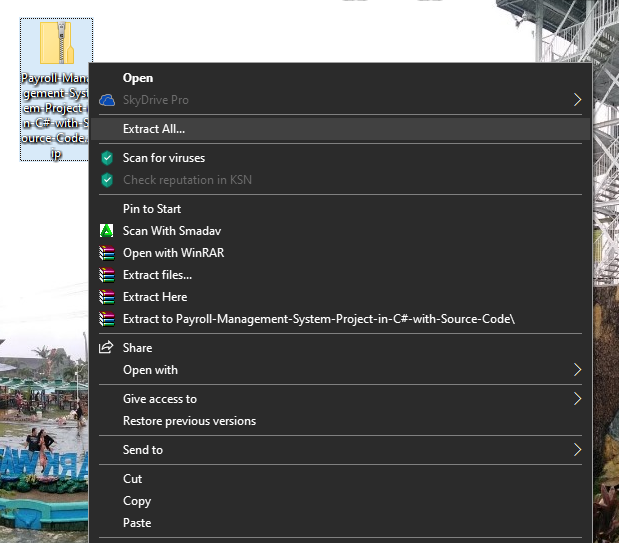
- Step 2: Extract file
Second, after you finished download the source code, extract the zip file.

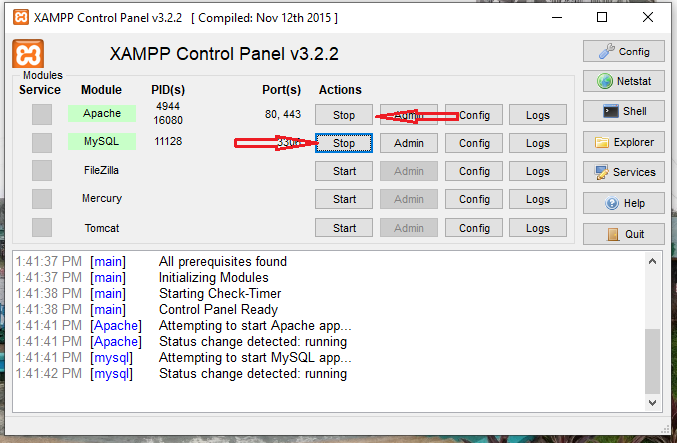
- Step 3: Open Xampp
Third, open xampp and start the Apache and SQLite.

- Step 4: Start Project
Start the project.

| ABOUT PROJECT | PROJECT DETAILS |
|---|---|
| Project Name : | Hospital Management System |
| Project Platform : | C# |
| Programming Language Used: | C# Programming Language |
| Developer Name : | itsourcecode.com |
| IDE Tool (Recommended): | Visual Studio 2019 |
| Project Type : | Desktop Application |
| Database: | MYSQL DATABASE |
Download Source Code
Conclusion
This Hospital Management System in C# with Source Code is only a student project made for school requirement purposes only.
You can download this source code and modify it to suit your client requirements.
This project is a student project so it means you cannot really expect 100% functionality from it.
Frequently Asked Questions
How does this C# hospital management system work?
Standard modules: patient registration, doctor schedule, appointment booking, billing, lab results, pharmacy, ward assignment. Role-based access via login form separating admin/doctor/nurse/receptionist. Built with C# WinForms + SQL Server. Foundation BSIT capstone.
What .NET and SQL Server versions does this project require?
Most projects in this batch use C# WinForms on .NET Framework 4.5+ (the dominant stack for tutorial sites) with SQL Server 2012 Express or higher. A few newer projects use .NET 6/7/8. To run: install Visual Studio 2019 / 2022 (Community edition is free), install SQL Server Express + SSMS, open the .sln file, build, run.
How do I set up the database for this C# project?
Open SQL Server Management Studio (SSMS) and connect to your SQL Server instance (e.g. localhost\SQLEXPRESS). Right-click Databases > Restore Database OR > New Database then import the included .sql script. Update the connection string in App.config (or in code-behind) with your server name + credentials. Rebuild and run.
Can I use this C# project for a BSIT capstone or thesis?
Yes, but extend it. A bare CRUD form is too narrow for full capstone scope. Add: role-based access (admin/staff/customer login redirect), Crystal Reports or RDLC reports, dashboard with Chart controls, audit log, multi-branch support. Pair with Chapter 1-5 documentation matching your panel’s rubric.
Why am I getting ‘connection error’ or ‘object reference not set’?
Three common C# issues: (1) Connection error: SQL Server isn’t running OR connection string in App.config has wrong server name. Open SQL Server Configuration Manager + verify SQL Server (SQLEXPRESS) service is running. (2) NullReferenceException: a control reference or DB column returned NULL, add a check or use ?? operator. (3) Build error ‘The type or namespace could not be found’: missing assembly reference, add via Project > Add Reference.
Where can I find more C# projects with source code?
Browse the C# Projects hub for the full library. For other .NET stacks see VB.NET Projects (300+ Windows Forms systems). For ASP.NET WebForms see ASP.NET Projects. For BSIT capstone idea lists see 150 Best Capstone Project Ideas.
Related Articles
- Hospital Management System Project in C with Source Code
- Hospital Management System Project In Python Source Code
- Hospital Management System Project In C++ With Source Code
- Hospital Management System in PHP with Source Code
- Django Hospital Management System With Source Code
- Hospital Management System Project In PHP With Source Code
- DFD for Hospital Management System – Data Flow Diagram
- Hospital Management System Project In PHP With Source Code
Hi