
The Bookshop Management System In C is developed in C Programming language, and this Bookstore Program In C++ doesn’t contain any login system but a bookshop maintains the inventory program in C++.
The user can easily manage and view all the book records.
This Simple Bookstore Program In C++ contains limited features, but the essential ones.
A C++ Bookstore Program Features is the user can add book details by providing the Book Number, Book Name, Author Name, Publication, Cost, and Accession Number, and a bookshop maintains the inventory program in C++.
This Bookshop Management Project In C++ also includes a downloadable Bookstore C++ Source Code for free, just find the downloadable source code below and click to start downloading.
To start creating a Bookshop Management System In C With Source Code, make sure that you have code blocks or any platform of C/C++ language installed on your computer.
| ABOUT PROJECT | PROJECT DETAILS |
|---|---|
| Project Name : | Bookshop Management System |
| Project Platform : | C/C++ |
| Programming Language Used: | C Programming Language |
| Developer Name : | itsourcecode.com |
| IDE Tool (Recommended): | Dev-C++/Codeblocks |
| Project Type : | Desktop Application |
| Database: | Stores data in .DAT file |
Steps on how to create a Bookshop Management System In C With Source Code
Time needed: 5 minutes
Bookshop Management System project In C With Source Code
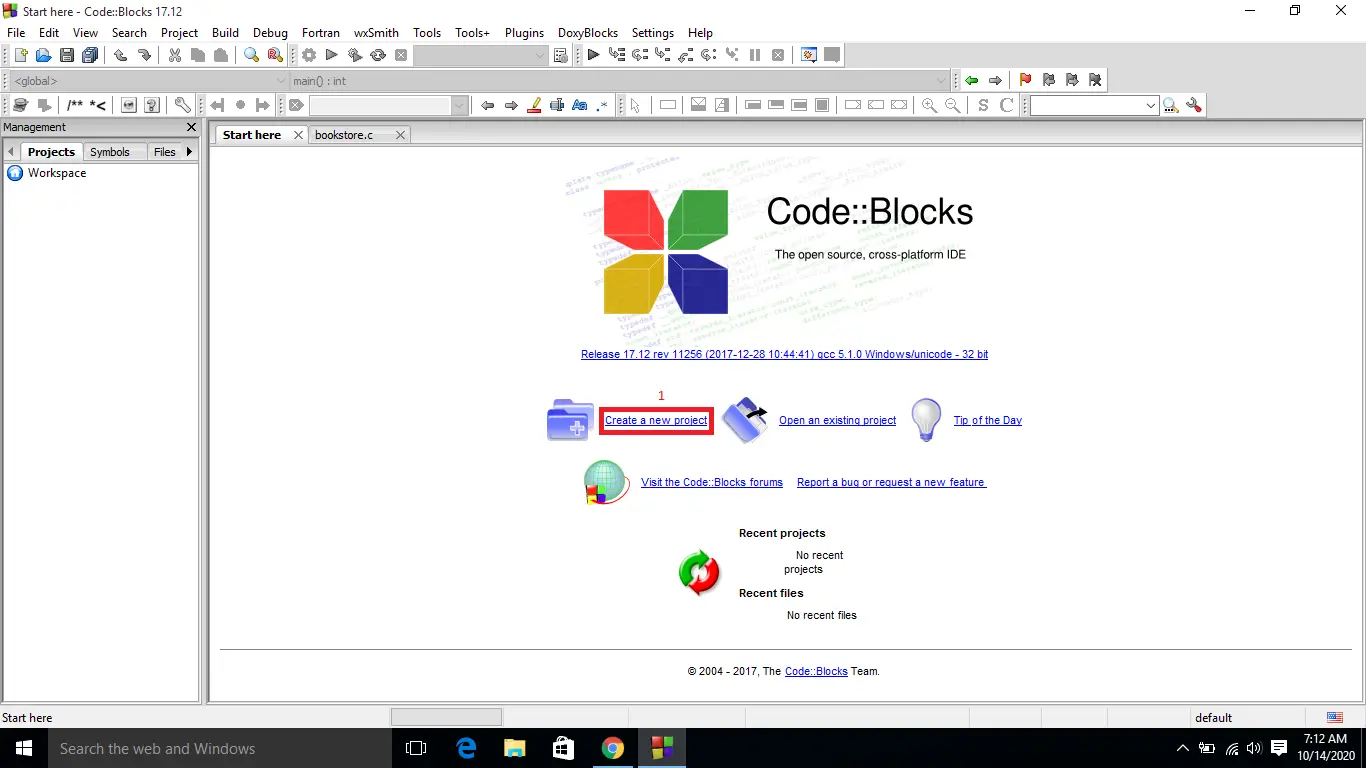
- Step 1: Create a new project.
First open the code blocks IDE and click “create a new project“.

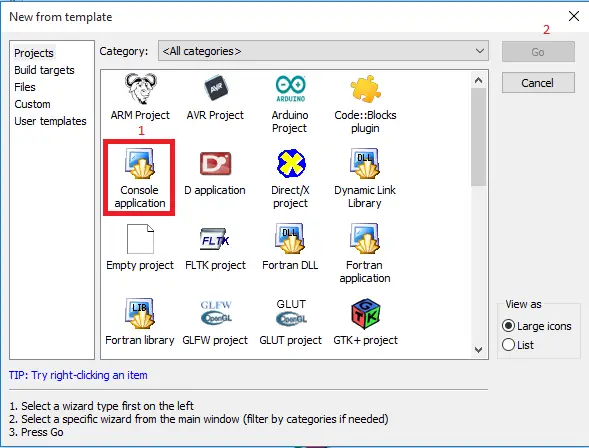
- Step 2: Choose console application.
Second click the “console application” and after that click “next“.

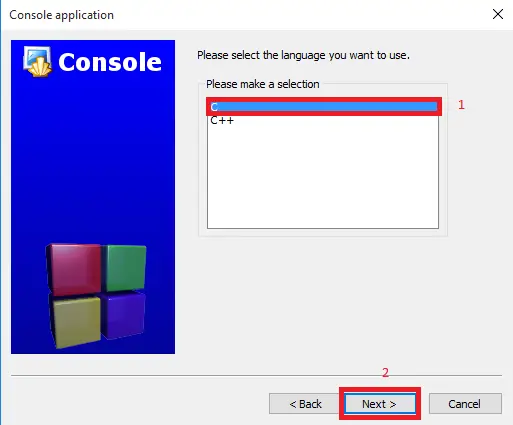
- Step 3: Choose C language.
Third choose “C language” and click “next“.

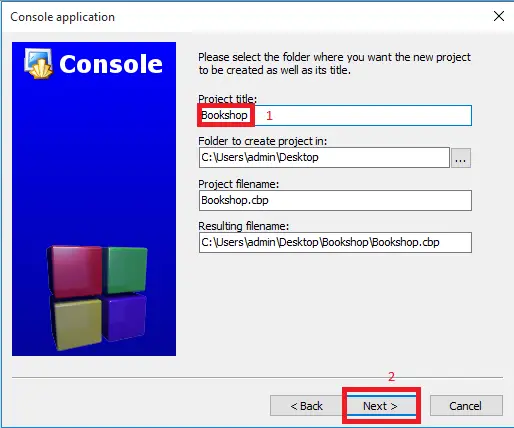
- Step 4: Name Your Project.
Fourth name the project you’ve created and click “next” after that click “finish“.

- Step 5: The actual code.
You are free to copy the given source code below or download the downloadable source code given.
Complete Source Code
#include<stdio.h>
#include<string.h>
#include<stdlib.h>
struct book
{
     int bno,bcost,baccno;
     char bname[20],bpub[20],bauthor[20];
}p[10];
int main()
{
     int n,i,ch;
     char pubname[20],authorname[20];
     printf("/*How Many Records of Books You Want to Add*/\n\nEnter Limit : ");
     scanf("%d",&n);
     printf("------------------------------------------\n");
     for(i=0;i<n;i++)
     {
          printf("\tEnter Details of Book-%d",i+1);
          printf("\n------------------------------------------\n");
          printf("Book Number      : ");
          scanf("%d",&p[i].bno);
          printf("Book Name        : ");
          scanf("%s",p[i].bname);
          printf("Author Name     : ");
          scanf("%s",p[i].bauthor);
          printf("Publication : ");
          scanf("%s",p[i].bpub);
          printf("Cost             : ");
          scanf("%d",&p[i].bcost);
          printf("Accession Number : ");
          scanf("%d",&p[i].baccno);
          printf("------------------------------------------\n");
     }
     while(1)
     {
          printf("\n\t\tMENU\n");
          printf("------------------------------------------\n");
          printf("\n1.Books of Specific Author");
          printf("\n2.Books of Specific Publisher");
          printf("\n3.All Books Costing Rs. 500 & Above");
          printf("\n4.All Books");
          printf("\n5.Exit");
          printf("\n------------------------------------------\n");
          printf("\nEnter Your Choice : ");
          scanf("%d",&ch);
          printf("\n");
          switch(ch)
          {
               case 1:
                    printf("Enter Author Name : ");
                    scanf("%s",authorname);
                    for(i=0;i<n;i++)
                    {
                         if(strcmp(p[i].bauthor,authorname)==0)
                         printf("\nBook Number      : %d\nBook Name        : %s\nAccession Number : %d\n",p[i].bno,p[i].bname,p[i].baccno);
                    }


                    exit(0);
          }
     }
     return 0;
}
Downloadable Source Code
Summary
The whole project is designed in ‘C’ language and different variables and strings have been used for the development of this project.
This mini project is easy to operate and understand by the users.
This simple project can enhance the knowledge of the beginners or the students to develop their skills in programming, also this project is easy to understand the module and its variables.
Related Articles
- Online Bookshop Management System in Laravel with Source Code
- Bookshop Management System in VB.Net With MS Access Database
- Online Bookstore Management System in Django
- Bookstore Management System Project In CodeIgniter With Source Code
- Book Store Management System Python Project With Source Code
Inquiries
If you have any questions or suggestions about the Bookshop Management System In C With Source Code, please feel free to leave a comment below.
Frequently Asked Questions
How does this C / C++ management system work?
Console application using struct arrays OR file-handling (fopen/fread/fwrite) for persistence. CRUD operations via numbered menu. Compile via gcc (C) or g++ (C++). Foundation BSIT 1st-2nd year mini-project.
What compiler do I need to run this C or C++ project?
For C: gcc (GNU Compiler Collection) or MinGW (Windows). For C++: g++. IDE options: Code::Blocks (lightweight, built-in compiler), Dev-C++ (classic Philippine BSIT favorite), Visual Studio Code with C/C++ extension, CLion (paid). To compile from terminal: gcc program.c -o program (for C) or g++ program.cpp -o program (for C++), then run with ./program (Linux/macOS) or program.exe (Windows).
How do I run this C / C++ project?
Open the .c or .cpp file in your IDE (Code::Blocks, Dev-C++, VS Code). Click Build (or press F9), then Run (or press F5). From terminal: navigate to project folder, run gcc/g++ command above, then ./program. If using file storage, make sure the data file (e.g. records.txt) is in the same folder as the executable.
Can I use this C / C++ project for a BSIT capstone or thesis?
C/C++ projects are usually accepted for 1st-2nd year mini-projects or as building blocks. For a full capstone you would typically pair them with a more interactive frontend (e.g. wrap C++ logic with a Java/Python/PHP frontend, or extend to GTK/Qt for a real GUI). Standalone console C++ capstones are accepted by some panels but rare in 2026.
Why am I getting ‘undeclared identifier’ or ‘cannot find header’ errors?
Three common C/C++ issues: (1) Missing #include directive, e.g. #include
Where can I find more C or C++ projects with source code?
Browse the C and C++ Projects hub for the full library. For Java desktop alternatives see Java Projects. For higher-level languages see Python Projects. For BSIT capstone idea lists see 150 Best Capstone Project Ideas.

Angel Jude Suarez
Full-Stack Developer at PIES IT Solution
Focuses on Python development, machine learning, and AI integration. Has built production AI systems including OpenAI Whisper integration for medical transcription and GPT-4o-powered diagnosis assistance. Strong background in pandas, scikit-learn, and TensorFlow.
Expertise: Python · PHP · Java · VB.NET · ASP.NET · Machine Learning · AI Integration · OpenCV · Django · CodeIgniter · View all posts by Angel Jude Suarez →