
Supabase is Firebase’s open-source alternative that BSIT capstones should default to in 2026: real PostgreSQL (not NoSQL), built-in Auth, file Storage, and Row Level Security (RLS) for access control, all free at student scale. This tutorial gets you from zero to a working capstone backend in ~2 hours of focused work.
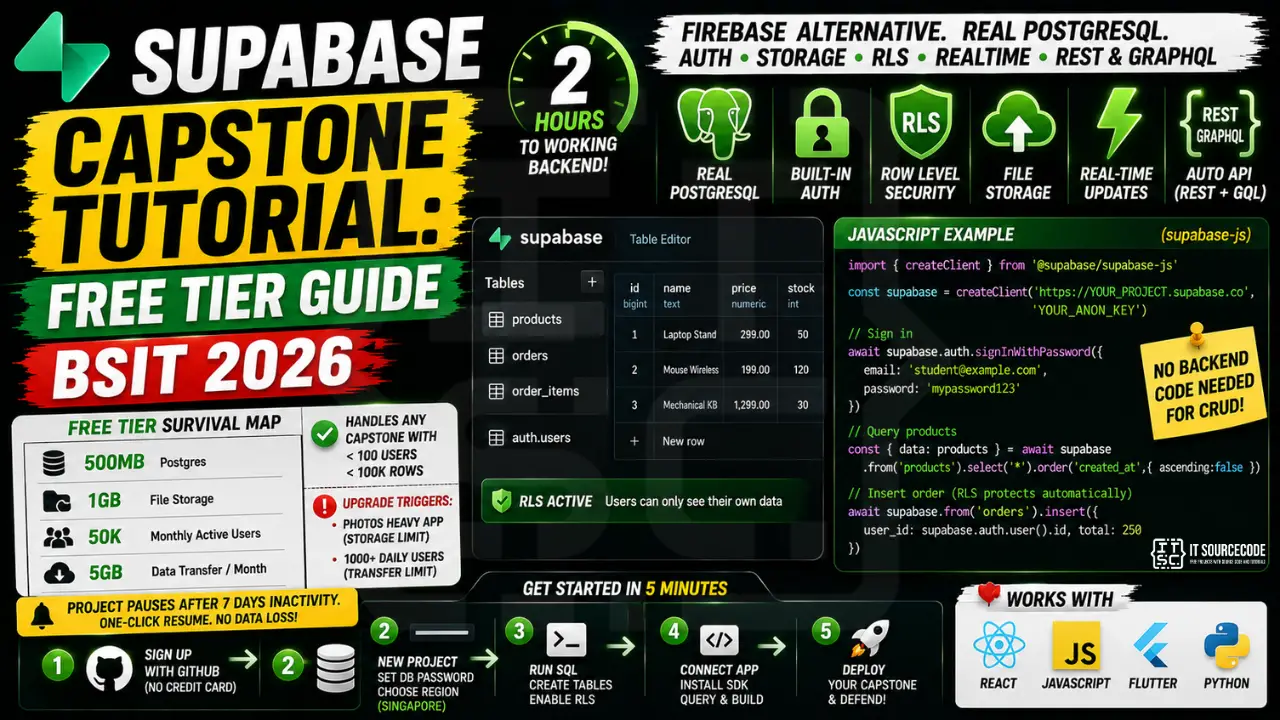
📌 Free tier survival map: 500MB Postgres, 1GB file storage, 50K monthly active users, 2GB data transfer/month. Handles any capstone with <100 active users + <100K rows. Upgrade triggers: photos heavy app (storage limit), 1000+ daily users (transfer limit). Project pauses after 7 days inactivity (resume free with one click).
Why Supabase for BSIT Capstones
- Real PostgreSQL, panels recognize SQL; familiar from your DBMS course
- Built-in Auth, email/password, Google, Facebook, all configured in dashboard
- Row Level Security (RLS), declarative access control (“user can only see their own orders”)
- Auto-generated REST + GraphQL API, no backend code needed for CRUD
- Real-time subscriptions, push updates to clients without polling
- Free tier sufficient for capstone scale, no credit card needed
Setup: Create Project (5 min)
- Go to supabase.com, sign up with GitHub (no credit card)
- Click “New Project”, give it a name, set a strong DB password
- Choose region: Singapore (closest to PH)
- Wait 2 minutes for provisioning
- Copy your Project URL and anon public key from Settings, API
Schema: Create Tables (10 min)
In the Supabase dashboard, open SQL Editor and run:
-- Products table
CREATE TABLE products (
  id BIGSERIAL PRIMARY KEY,
  name TEXT NOT NULL,
  price NUMERIC(10,2) NOT NULL,
  stock INTEGER DEFAULT 0,
  created_at TIMESTAMPTZ DEFAULT NOW()
);

-- Orders table
CREATE TABLE orders (
  id BIGSERIAL PRIMARY KEY,
  user_id UUID REFERENCES auth.users NOT NULL,
  total NUMERIC(10,2),
  status TEXT DEFAULT 'pending',
  created_at TIMESTAMPTZ DEFAULT NOW()
);

-- Order items
CREATE TABLE order_items (
  id BIGSERIAL PRIMARY KEY,
  order_id BIGINT REFERENCES orders ON DELETE CASCADE,
  product_id BIGINT REFERENCES products,
  qty INTEGER NOT NULL,
  price NUMERIC(10,2) NOT NULL
);

-- Enable Row Level Security
ALTER TABLE orders ENABLE ROW LEVEL SECURITY;
ALTER TABLE order_items ENABLE ROW LEVEL SECURITY;

-- Users can only see their own orders
CREATE POLICY "Users see own orders" ON orders
  FOR SELECT USING (auth.uid() = user_id);

-- Users can insert their own orders
CREATE POLICY "Users create own orders" ON orders
  FOR INSERT WITH CHECK (auth.uid() = user_id);
Frontend: Query from JavaScript / React / Flutter
Install the client:
# JavaScript / React / Next.js
npm install @supabase/supabase-js

# Flutter
flutter pub add supabase_flutter

# Python (for Django / Flask backend)
pip install supabase
JavaScript example, list products + sign in:
import { createClient } from '@supabase/supabase-js'

const supabase = createClient(
  'https://YOUR_PROJECT.supabase.co',
  'YOUR_ANON_KEY'
)

// Sign up
const { data, error } = await supabase.auth.signUp({
  email: 'student@example.com',
  password: 'mypassword123'
})

// Sign in
const { data, error } = await supabase.auth.signInWithPassword({
  email: 'student@example.com',
  password: 'mypassword123'
})

// Query products
const { data: products } = await supabase
  .from('products')
  .select('*')
  .order('created_at', { ascending: false })

// Insert order (RLS auto-checks user_id matches)
const { error } = await supabase
  .from('orders')
  .insert({ user_id: supabase.auth.user().id, total: 250 })
File Storage: Upload Images
// Create a bucket in Supabase dashboard first: Storage > New Bucket > "product-images"

// Upload
const { data, error } = await supabase.storage
  .from('product-images')
  .upload('product-1.jpg', fileBlob)

// Get public URL
const { data } = supabase.storage
  .from('product-images')
  .getPublicUrl('product-1.jpg')
console.log(data.publicUrl)  // https://YOUR_PROJECT.supabase.co/storage/v1/object/public/product-images/product-1.jpg
Free Tier Limits and When You Hit Them
| Resource | Free limit | When you hit it |
|---|---|---|
| Database storage | 500MB | ~500K rows of typical capstone data |
| File storage | 1GB | ~2000 photos at 500KB each |
| Monthly active users | 50,000 | Never for capstone scale |
| Data transfer | 5GB/month | 1000+ daily users hitting your API |
| Edge function invocations | 500K/month | Rarely (most capstones skip Edge Functions) |
Project auto-pause: if no activity for 7 days, Supabase pauses your project. One-click resume from dashboard, no data loss. Plan around defense day with a “wake-up” query 1 hour before.
Related Guides
- Best Free Hosting for Capstone
- Docker for BSIT Capstone in 30 Minutes
- Django Projects
- DevOps Engineer Salary + Roadmap PH
Frequently Asked Questions
Is Supabase really free, or are there hidden costs?
Genuinely free at capstone scale. No credit card required for signup. The free tier covers small-to-medium apps (under 500MB DB, under 1GB files, under 50K monthly users). You only pay if you exceed limits, in which case Pro tier is $25/month.
Supabase vs Firebase: which is better for BSIT capstones?
Supabase if you want SQL (familiar from DBMS class, panels recognize it). Firebase if you want maximum tutorial availability and don’t mind NoSQL. Both have similar free tiers. For 2026 capstones, Supabase is slightly better because PostgreSQL is more defensible (“we used a relational DB with proper schema” vs “we used a document store”).
What is Row Level Security (RLS) and do I need it?
RLS is Supabase’s access control feature: declarative SQL policies that auto-filter rows based on the logged-in user. Example: ‘User can only see orders WHERE user_id = auth.uid()’. Critical for any multi-user capstone, otherwise your app accidentally leaks data. Always enable RLS before going live.
Can I use Supabase with Flutter / React Native / Django?
Yes. Official client libraries exist for JavaScript, Flutter, Python (Django/Flask), Go, Rust, and more. The auth + database + storage APIs are identical across clients.
What happens when my Supabase project pauses?
After 7 days of zero activity, projects on free tier pause to save resources. Your data is preserved. To resume: open the Supabase dashboard, click ‘Resume’, wait 30 seconds. For defense day: log in 1 hour before and run any query to wake it up.
Should I switch from Firebase to Supabase mid-capstone?
Only if you have time. Migration takes 1-2 weeks (rewrite auth, rewrite queries, migrate data). If your Firebase capstone is working, finish it. For NEXT project: start with Supabase. For new capstone now: start with Supabase.