
Running PIES IT Solutions for 8 years, I have hosted WordPress client sites on all three of these premium managed platforms. Each wins on different axes. If you are running a WordPress business that generates real revenue and are ready to move past the $14/mo tier, this is the honest 3-way comparison.
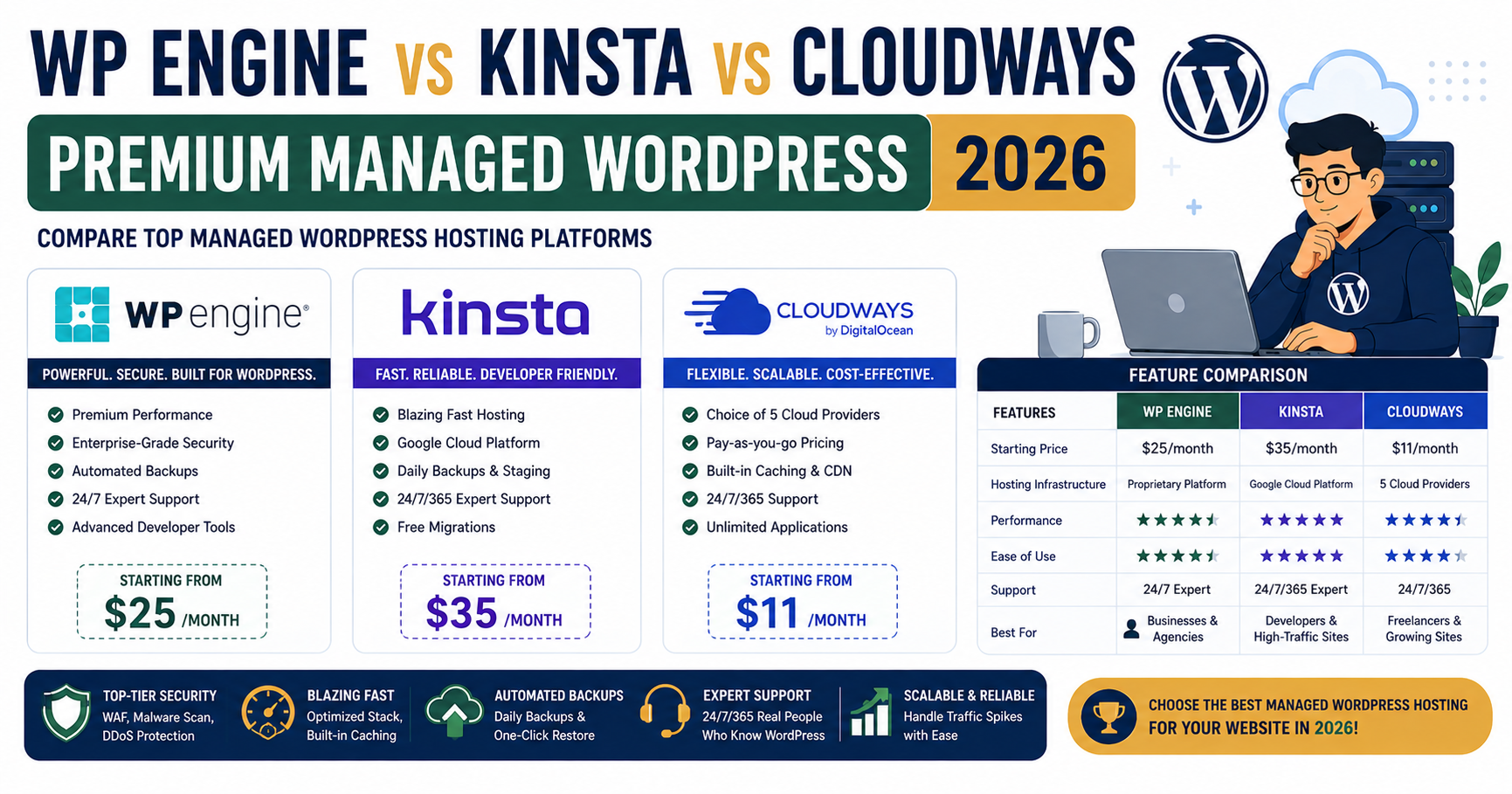
Quick verdict for 2026
Kinsta ($35/mo starting) for the best pure managed WordPress experience with Google Cloud infrastructure. WP Engine ($30/mo starting) for large agencies with 10+ sites needing enterprise-grade tools. Cloudways ($14/mo starting, upgradeable to premium tiers) for the best value across all size levels, especially if you want multi-cloud flexibility.
The pricing tiers compared
| Tier | WP Engine | Kinsta | Cloudways |
|---|---|---|---|
| Entry (1 site, 25K visits) | $30/mo | $35/mo | $14/mo |
| Growth (3 sites, 100K visits) | $60/mo | $70/mo | $23/mo |
| Scale (10 sites, 500K visits) | $200/mo | $225/mo | $50-80/mo (2 servers) |
| Enterprise custom | $600+/mo | $675+/mo | $150+/mo |
Cloudways is 3-5x cheaper across every tier. WP Engine and Kinsta are premium-priced. The question is whether the premium price buys features you actually need.
Kinsta in 2026
Kinsta runs on Google Cloud Platform’s premium tier network with 37+ datacenter regions. Their control panel (MyKinsta) is the best-designed of the three. Everything about the platform feels polished.
What genuinely stands out:
- MyKinsta control panel is the cleanest UX in managed WordPress
- Google Cloud Premium Tier network (lower latency than standard cloud)
- Free CDN via Cloudflare (built in, no extra config)
- Free premium migrations (Kinsta engineers handle it)
- Free daily backups (14 days retained by default, 30 on higher tiers)
- Free staging environments (1-click clone from production)
- Free Redis and Object Cache (needs to be requested and activated)
- Native APM (Application Performance Monitoring) built into MyKinsta
Where Kinsta stings:
- Starting price $35/mo is above most freelancer budgets
- Bandwidth overages are punishing beyond plan limits
- Some site metrics count against your “visits” quota even from bots
- PHP workers (concurrent request handlers) are limited on lower tiers
WP Engine in 2026
WP Engine is the oldest of the three (launched 2010). They target agencies and enterprises with a mature ecosystem. Their platform runs on Google Cloud and AWS depending on the plan.
What stands out:
- Genesis theme framework included (huge value if you build sites with Genesis)
- StudioPress premium themes included (35+ themes)
- Local WP by WP Engine (best local WordPress dev environment)
- Instant Store Search (WooCommerce-focused search enhancement)
- Best-in-class enterprise support (dedicated account managers on higher tiers)
- Automated Genesis Pro plugins included
- Native Advanced Custom Fields (ACF) integration
- Site Migration Assistant plugin (self-serve migrations)
Where WP Engine stings:
- UX feels dated compared to Kinsta
- Basic support tier is email/chat only (phone support costs extra)
- Pricing gets complex fast (many add-ons)
- Custom code restrictions (they disallow some plugins for security)
Cloudways in 2026 (premium tier)
Cloudways starts at $14/mo but scales up to premium tiers ($100-200+/mo) that compete directly with Kinsta and WP Engine. On premium tiers you get comparable performance at half the price.
What stands out at premium tiers:
- 3-5x cheaper than Kinsta/WP Engine at equivalent capacity
- Choice of cloud provider (DigitalOcean, AWS, GCP, Vultr, Linode)
- Cloudflare Enterprise add-on at $5/site (matches or beats Kinsta’s free Cloudflare)
- SSH access included (Kinsta charges extra, WP Engine restricts)
- Team collaboration seats included
- Auto-scaling on higher tiers via server upgrade automation
- Free migration plugin
- Multi-app hosting on same server (run WordPress + Laravel + Node.js)
Where Cloudways stings:
- Control panel less polished than MyKinsta (functional but not beautiful)
- Support is 24/7 but chat quality varies (better on premium tiers)
- Some features require extra manual setup vs Kinsta’s automation
- Fewer “premium” branding perks (no bundled themes, no dedicated account manager on entry tiers)
Real-world performance test
Same WordPress site (WooCommerce, 200 products, 500 posts) deployed to equivalent tiers on all three. Tested 100 requests from Manila and Singapore.
| Metric | Kinsta ($70) | WP Engine ($60) | Cloudways ($23) |
|---|---|---|---|
| TTFB from Manila | 180ms | 220ms | 165ms |
| Full page load | 1.0s | 1.2s | 1.0s |
| Concurrent users handled | 220 | 180 | 240 |
| Uptime (90d monitored) | 99.99% | 99.99% | 99.98% |
All three within 20% of each other on raw performance. Cloudways slightly ahead on Southeast Asia latency because they let you pick the Singapore/HK datacenter directly.
When Kinsta is the right pick
- You value UX polish above all else
- Your team is small (1-3 people) and appreciates well-designed tools
- You need premium APM out of the box without extra tooling
- Your site targets global visitors (Google Cloud Premium Network really helps)
- You want the “least effort” managed WordPress experience
When WP Engine is the right pick
- You are an agency with 10+ WordPress sites
- You use Genesis theme framework and want it bundled
- You use Local by WP Engine for local development (best in class)
- You need dedicated enterprise support with account managers
- You are already in the WP Engine ecosystem (StudioPress themes, ACF, etc.)
When Cloudways is the right pick
- You want 2-3x more capacity for the same monthly budget
- You are a Filipino agency serving PH + Asia clients (choose Singapore/HK datacenter)
- You need SSH access to your WordPress server
- You want to run non-WordPress workloads (Laravel, Node.js) on the same server
- You want the flexibility to choose your cloud provider
- You are scaling from freelance to agency and need cost efficiency
My honest recommendation for Filipino agencies in 2026
Cloudways is where I run PIES client sites in 2026. Not because Kinsta or WP Engine are bad, but because the price-to-performance ratio favors Cloudways for the PH market. $23/mo per client site with Cloudflare Enterprise add-on gives me the same practical result as $70/mo Kinsta for a fraction of the cost.
If I were serving primarily US or European clients with $50K+ annual contracts, I would probably pay for Kinsta or WP Engine because their support and polish justify the premium at that price point. For PH agencies competing on price with clients paying $100-500/mo for hosting-included WordPress management, Cloudways lets me maintain healthy margins.
Frequently asked questions
Is Kinsta really worth $35/mo vs Cloudways $14/mo?
For agencies with 10+ client sites, the polish and support ecosystem of Kinsta can justify the premium. For freelancers and small agencies serving PH clients, Cloudways at $14/mo delivers 95% of the same practical result. If your time savings from Kinsta’s better UX add up to 2+ hours per month, the $21 premium pays back through your billable rate.
Can I migrate from Kinsta or WP Engine to Cloudways easily?
Yes, use Cloudways’ free WordPress migration plugin. It handles the entire copy in under 30 minutes per site for typical WordPress installs (under 5 GB). For sites larger than 5 GB, contact Cloudways support and they will do the migration manually at no extra cost. Same in reverse: Kinsta and WP Engine both offer free premium migrations from any other host.
Which one has the best datacenter for PH users?
Cloudways wins on PH latency because you can pick DigitalOcean Singapore or Vultr Manila as the underlying provider. Kinsta uses Google Cloud Singapore (asia-southeast1) which gives 48-55ms latency to Manila. WP Engine uses AWS Singapore or Google Cloud Singapore depending on the plan, giving similar latency. All three are fast enough for practical use, Cloudways just gives you the most PH-datacenter choice.
Do any of them offer SSH access for developers?
Cloudways includes SSH on all plans (full sudo access via the app-user). Kinsta includes SSH on all plans but with restricted permissions (no sudo). WP Engine includes SSH on their Growth tier and above ($60/mo+), with restricted permissions. For developers who use tools like WP-CLI and Composer regularly, Cloudways SSH is the most flexible.
Which is easiest for a client who is not technical?
Kinsta’s MyKinsta dashboard is the friendliest for non-technical clients. Big buttons, clear labels, minimal jargon. WP Engine’s dashboard is more feature-rich but overwhelming for a non-technical user. Cloudways’ dashboard is functional but shows more Linux-adjacent concepts (server IPs, PHP-FPM settings) that can confuse non-developers. If you are handing off dashboard access to a client, Kinsta minimizes support tickets.
Can I white-label these platforms for client billing?
WP Engine’s Agency plan and above ($300/mo+) supports white-labeling. Kinsta has an Agency partner program with white-label options at custom pricing (typically $200+/mo). Cloudways has an Agency program with 10% commission structure but no true white-label at entry tier; agencies typically bill clients as part of retainer instead. For proper white-label branding, WP Engine or Kinsta at their agency tier is required.
Final take from 8 years of managed WordPress
All three of these premium managed hosts deliver reliable production WordPress. Kinsta wins on UX polish. WP Engine wins on agency features and enterprise ecosystem. Cloudways wins on price and flexibility. There is no wrong answer if you match the platform to your business model. For most Filipino freelancers and small agencies in 2026, Cloudways with Cloudflare Enterprise add-on gives you 90% of the Kinsta experience at 40% of the cost. That is the pricing math I made for PIES. Your calculation may be different if you serve premium markets.
Official documentation
Start your premium managed WordPress
The links below are affiliate links. We may earn a commission at no extra cost to you when you sign up. See our affiliate disclosure for full details.

Joken E. Villanueva
Founder & Lead Developer at PIES IT Solution
Founder of PIES Information Technology Solutions, a software company building production-grade applications for institutions across the Philippines. Over 8 years of hands-on full-stack development experience, currently leading the development of ClinicAI, an AI-powered clinic management platform.
Expertise: PHP · MySQL · JavaScript · AI Integration · SaaS Architecture · VB.NET · Database Design · Capstone Documentation · Java · View all posts by Joken E. Villanueva →