
React Server Components (RSC) reshaped how React apps are built. In 2026, the model is production-stable in Next.js 14+ and adopted by other frameworks. This guide answers the questions every developer hits when moving to RSC: what runs where, when to use each, what "use client" and "use server" actually do, and the mistakes that cost teams the most time.
Quick 2026 verdict
Default to Server Components. Add "use client" only when a component needs state, effects, event handlers, or browser-only APIs. That mental default gets 90% of components right and produces the smallest client bundles. The other 10% is about knowing where the boundary belongs, which is what this guide covers.
What each one is
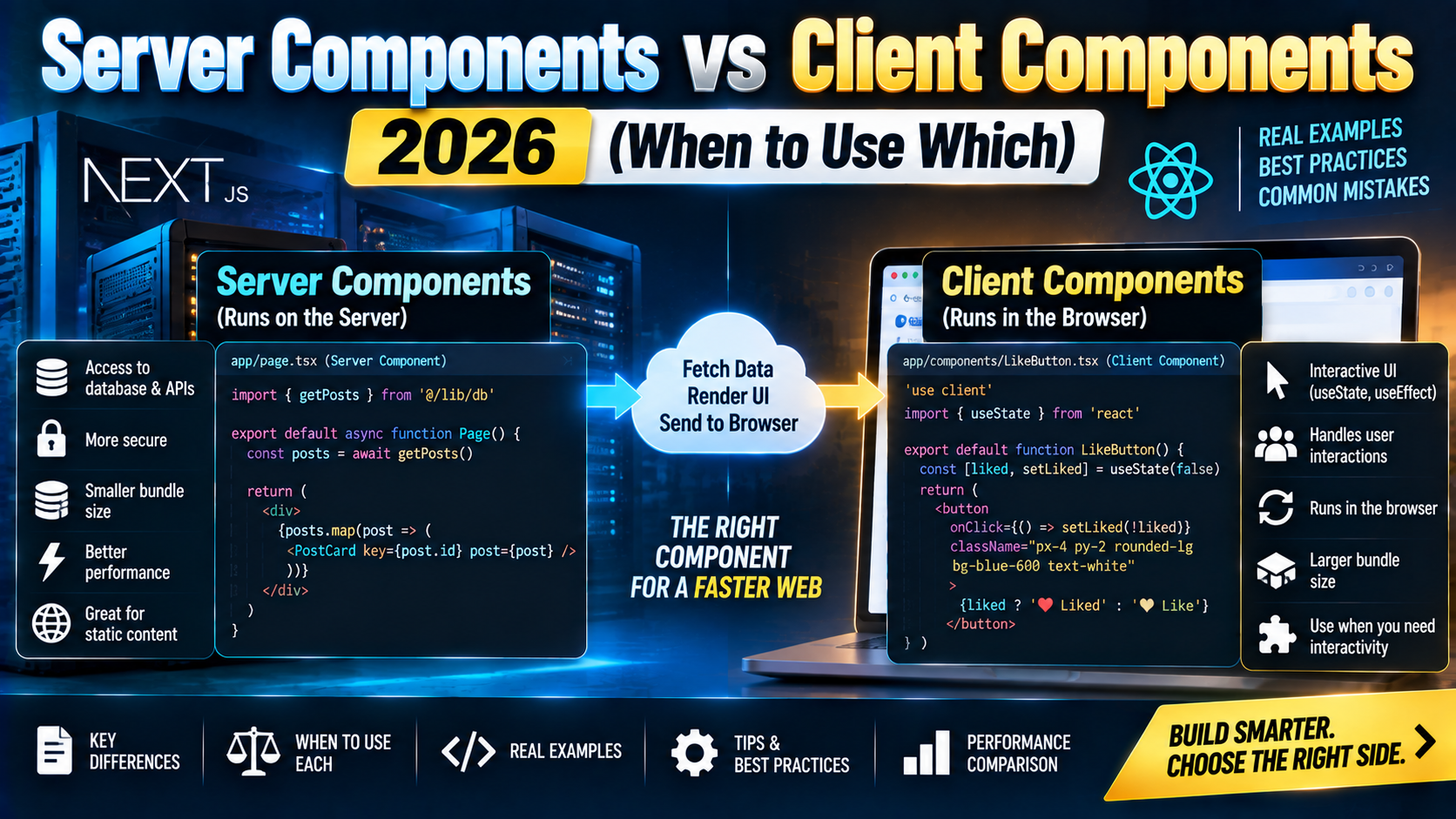
Server Components (default): render on the server, never ship JavaScript to the browser for their logic. Can be async, can hit databases directly, can read environment variables, can import server-only libraries (Prisma, Node fs, secret keys). They render to HTML + a small “RSC payload” that the browser stitches into the tree.
Client Components: the classic React model. Run on the server for the initial HTML (SSR), then hydrate and re-render on the client. Everything that requires interactivity (useState, useEffect, onClick, window) must live in a Client Component.
The mental model in one diagram
Request → Server Component (async)
             ↓ can render
         Server Component
             ↓ can render
         Client Component  ← "use client" boundary
             ↓ can render
         Client Component
             ↓ CAN render (via children/props)
         Server Component  ← passed as a prop, not imported

Rule: a Server Component can render both. A Client
Component can render another Client Component directly,
but can only render a Server Component if it was passed
in as a prop (children slot).
A Server Component example
// app/products/page.tsx  (Server Component, no directive)
import { db } from '@/lib/db';
import ProductCard from './ProductCard';       // can be Server or Client

export default async function ProductsPage() {
  const products = await db.products.findMany({
    orderBy: { createdAt: 'desc' },
  });

  return (
    <div>
      <h1>Products</h1>
      {products.map(p => <ProductCard key={p.id} product={p} />)}
    </div>
  );
}
Notice: async function, direct DB access, no useEffect, no client state, no "use client". Zero JavaScript ships to the browser for this component.
A Client Component example
// app/products/AddToCartButton.tsx
'use client';

import { useState } from 'react';

export default function AddToCartButton({ productId }: { productId: string }) {
  const [count, setCount] = useState(0);
  return (
    <button onClick={() => setCount(c => c + 1)}>
      Add to cart ({count})
    </button>
  );
}
The 'use client' directive at the top of the file marks EVERY component in that file (and every component it imports) as a Client Component. It is a boundary, not a per-component flag.
When to reach for “use client”
- State:
useState,useReducer,useContext - Effects:
useEffect,useLayoutEffect - Event handlers:
onClick,onSubmit,onChange - Browser APIs:
window,document,localStorage,navigator,IntersectionObserver - Third-party libraries that use any of the above (most animation libs, chart libs, form libs, etc.)
The rules to remember
- Server Components can import and render both Server and Client Components freely.
- Client Components CANNOT import a Server Component directly. You get a runtime error. Workaround: accept the Server Component as a prop (the
childrenslot pattern). - Everything inside a
"use client"file is a Client Component, including nested imports (transitively marked). - Data crossing the client boundary must be serializable: no functions, class instances, or symbols. Dates and Maps/Sets are OK in Next.js 15+.
- Server Components cannot use hooks (except
use()). NouseState, nouseEffect.
The children slot pattern (essential)
When a Client Component needs to contain a Server Component, pass the Server Component as a prop (usually children). The parent Server Component composes them:
// ClientTabs.tsx  (Client)
'use client';
import { useState } from 'react';

export function ClientTabs({ children }: { children: React.ReactNode }) {
  const [activeTab, setActiveTab] = useState(0);
  return <div className={activeTab === 0 ? 'active' : ''}>{children}</div>;
}

// page.tsx  (Server)
import { ClientTabs } from './ClientTabs';
import { ProductList } from './ProductList';   // Server Component

export default function Page() {
  return (
    <ClientTabs>
      <ProductList />   {/* server-rendered, passed through */}
    </ClientTabs>
  );
}
This pattern is how you keep interactive UI shells (tabs, modals, dropdowns) as Client Components while their content stays server-rendered.
“use server” (Server Actions)
The "use server" directive marks a function as a Server Action: callable from a Client Component but executed on the server. Great for form submissions and mutations.
// app/actions.ts
'use server';

import { db } from '@/lib/db';
import { revalidatePath } from 'next/cache';

export async function createProduct(formData: FormData) {
  const name = formData.get('name') as string;
  await db.products.create({ data: { name } });
  revalidatePath('/products');
}

// Use from a Client Component
'use client';
import { createProduct } from './actions';

export function ProductForm() {
  return (
    <form action={createProduct}>
      <input name="name" />
      <button type="submit">Create</button>
    </form>
  );
}
No API route needed. The action runs on the server, updates the database, and revalidates the cache automatically.
Common pitfalls
- Sprinkling
"use client"at the top of every file. Nullifies the whole point of RSC. Only mark leaf components that actually need interactivity. - Importing a Server Component into a Client Component. Runtime error. Pass it as a prop instead.
- Trying to
useStatein a Server Component. Server Components have no state. If you need state, either move it into a Client Component leaf or persist to the database. - Passing non-serializable props across the boundary. Functions cannot cross from Server to Client via props (except Server Actions themselves). Class instances cannot cross. Map/Set/Date work in Next.js 15+.
- Fetching data in a Client Component with
useEffect. Almost always the wrong shape now. Move the fetch into the parent Server Component and pass the data down as a prop. - Forgetting that
console.login a Server Component prints to the server terminal, not the browser DevTools. Wasted debugging time. - Assuming
useSearchParamsis a Server Component hook. It is Client only. To read search params on the server, accept thesearchParamsprop that Next.js passes to page components.
Framework support in 2026
- Next.js: full RSC + Server Actions since v14. Default rendering model in v15.
- Waku: minimal RSC-only framework built by React core team member, production-ready in 2025.
- React Router v7 (formerly Remix): RSC support landed in v7.4 (early 2025).
- Redwood: RSC support behind a flag since 2024, stable in 2026.
- Vite Plugin RSC: allows RSC in any Vite-based project without a full framework.
Frequently Asked Questions
Are Server Components the same as SSR?
No. SSR renders the initial HTML on the server and then hydrates the entire component tree on the client. Server Components render on the server and NEVER hydrate on the client. Their code never reaches the browser. SSR still happens for the Client Components in the tree, on top of the RSC layer.
Do I need to learn RSC if I just build small React apps?
Yes, if you use Next.js 14+ (the default framework for new React projects). No, if you build pure client-side SPAs with Vite + React Router. Even in the SPA case, RSC understanding helps because most React tutorials in 2026 assume it.
What about SEO?
Server Components emit HTML directly, which is what Google indexes. SEO is at least as good as classic SSR, often better because the initial HTML is richer and there is less JS to parse. Use the metadata export in page.tsx/layout.tsx for Next.js SEO tags.
Can I use React Context with Server Components?
Not directly in Server Components (no hooks). Context works within the Client Component subtree, and you provide values via a Client Component wrapper. The Server Component reads the underlying data source (DB, cookies, session) and passes serializable props down.
Do Server Components help with performance?
Often yes. Less JS ships to the browser (smaller bundle, faster parse), data-fetching happens next to the database (no round-trip through /api), and you can stream results. Real gains depend on the shape of the app. Content-heavy apps benefit more than dashboard apps where most components need interactivity anyway.
How do I test Server Components?
Testing tooling matured through 2025-2026. Vitest + @testing-library/react has RSC support. Playwright end-to-end tests are the safest bet for verifying the full render pipeline. Unit-testing an async Server Component still requires either mocking the data layer or using an integration-test-shaped setup.
Related Modern Web Dev tutorials
- Next.js 15 Complete Beginner Guide 2026 (First App)
- React 19 vs React 18 Migration Guide 2026
- Astro vs Next.js vs Nuxt 2026 Comparison
- tRPC Tutorial 2026 (End-to-End TypeScript API) (coming this week)
Official documentation
- React.dev: official Server Components reference
- Next.js: Server Components documentation
- Next.js: Server Actions documentation
Official documentation
Recommended hosting for React Server Components deployment
The links below are affiliate links. We may earn a commission at no extra cost to you. Full disclosure.
- Cloudways: managed cloud hosting with 1-click Node.js/Next.js/Vue deploys on DigitalOcean, Vultr, AWS, and Linode. Best for teams that want managed infrastructure without server admin.
- Kamatera: pay-per-hour cloud VPS starting at $4/month. Best for developers who want raw VPS control with quick provisioning.

Adones Evangelista
Programmer & Technical Writer at PIES IT Solution
Adones Evangelista is a programmer and writer at PIES IT Solution, author of over 900 tutorials and error-fix guides at itsourcecode.com. Specializes in JavaScript, Django, Laravel, and Python error debugging covering ValueError, TypeError, AttributeError, ModuleNotFoundError, and RuntimeError, plus C/C++ and PHP capstone projects for BSIT students.
Expertise: JavaScript · Python · Django · Laravel · Error Debugging · C/C++ · View all posts by Adones Evangelista →