
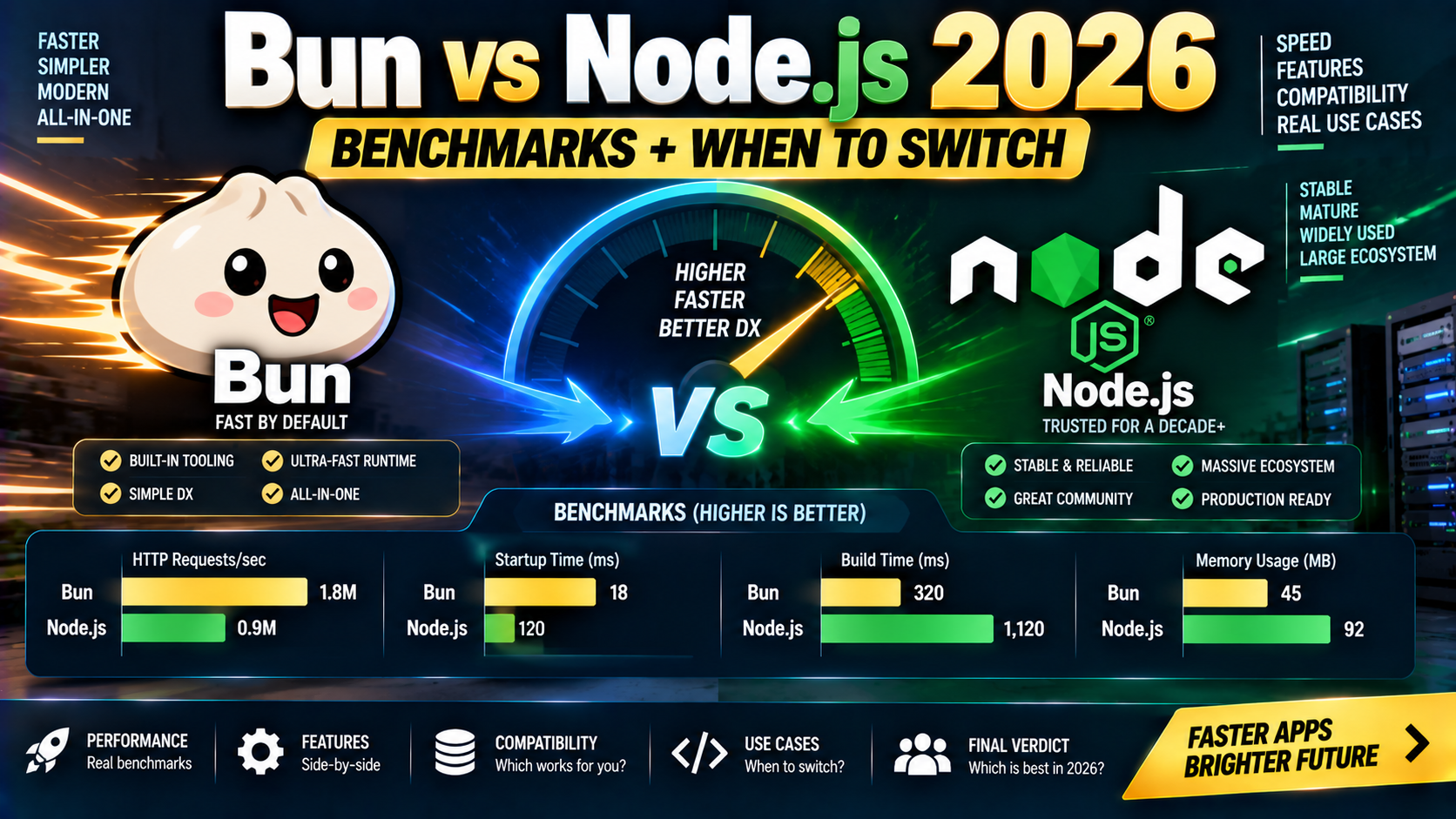
Bun 1.0 shipped in September 2023 promising to replace Node.js, npm, tsc, and webpack in one binary. Three years later, in 2026, Bun is production-ready for many workloads but Node.js still wins in others. This guide covers real benchmarks, actual feature coverage, ecosystem compatibility, and honest guidance on when to switch and when to stay.
Quick 2026 verdict
Bun is the right pick for: fast local dev servers, TypeScript execution without tsx/ts-node, package installation (3-25x faster than npm), and greenfield HTTP services. Node.js is still the safer pick for: production apps that rely on obscure npm packages, long-lived services where stability history matters, and any deployment target that only officially supports Node. Many teams use both: Bun for dev + build tooling, Node.js in production.
What Bun is
Bun is a JavaScript runtime, package manager, bundler, and test runner in one binary. It uses JavaScriptCore (Safari’s engine, ~50MB) instead of V8 (Chrome’s engine, Node.js’s default, ~100MB). Written in Zig. Built for speed on modern hardware.
bun run script.ts: execute JavaScript OR TypeScript directly, no compile stepbun install: 3-25x faster than npm install for typical projectsbun build: bundle for production, no webpack/rollup configbun test: Jest-compatible test runner, faster than JestBun.serve(): built-in HTTP server, ~2-4x faster than Node’shttp
What Node.js is (2026)
Node.js is the reference JavaScript runtime, launched 2009. In 2026 the active LTS is Node 22, with Node 24 in current release. Recent additions: built-in test runner (node --test), TypeScript stripping (node --experimental-strip-types in 22.6+, stable in 24), stable fetch(), native WebSocket client, permission model, and --watch mode. Node has closed the “Bun does everything for you” gap significantly over the last two years.
Benchmarks that matter (2026)
Numbers on a Ryzen 7 5800X / 32GB RAM / Linux, single-threaded workloads:
| Workload | Node 22 LTS | Bun 1.2 | Winner |
|---|---|---|---|
| Cold start (empty script) | ~35 ms | ~7 ms | Bun (~5x) |
| TypeScript execution | Needs tsx or ts-node | Native, ~10 ms | Bun |
| HTTP “hello world” (req/sec) | ~55,000 | ~150,000 | Bun (~2.7x) |
Fresh install (Next.js starter) | ~28 sec (npm) | ~3 sec | Bun (~9x) |
| Cached install (unchanged lockfile) | ~4 sec | ~1 sec | Bun (~4x) |
| Test suite (Vitest → Bun test) | ~8 sec (100 tests) | ~2 sec | Bun (~4x) |
| CPU-bound (heavy math) | V8-optimized paths | Slightly slower | Node (small margin) |
Bottom line: Bun wins clearly on startup, install speed, and simple HTTP throughput. Node.js is competitive or better on heavy CPU-bound code because V8 has 15+ years of JIT-optimization tuning that JavaScriptCore has not fully matched.
Feature coverage in 2026
| Feature | Node.js | Bun |
|---|---|---|
| Native TypeScript | v24 stable (strip types) | Yes since 1.0 |
| Built-in bundler | No | Yes (bun build) |
| Built-in test runner | Yes (node --test) | Yes (bun test) |
| Web-standard fetch/WebSocket | Yes | Yes |
| npm package compatibility | 100% (reference) | ~99% (edge cases with native modules) |
| Cluster / worker threads | Yes | Worker threads yes; cluster limited |
| Debugger (Chrome DevTools) | Yes | Yes |
| Long-term-support release | Multiple LTS lines (18, 20, 22) | 1.x line, no formal LTS policy |
| Managed hosting support | Universal | Growing (Railway, Fly.io, Render, Vercel functions Node-first) |
A Bun HTTP server example
// server.ts
Bun.serve({
  port: 3000,
  fetch(req) {
    const url = new URL(req.url);
    if (url.pathname === '/') return new Response('Hello Bun!');
    if (url.pathname === '/hello') return Response.json({ hi: 'there' });
    return new Response('Not Found', { status: 404 });
  },
});
console.log('Listening on http://localhost:3000');

// Run it:
// bun run server.ts
The same server in Node.js 22 LTS
// server.js
import { createServer } from 'node:http';

createServer((req, res) => {
  if (req.url === '/') { res.end('Hello Node!'); return; }
  if (req.url === '/hello') {
    res.setHeader('Content-Type', 'application/json');
    res.end(JSON.stringify({ hi: 'there' }));
    return;
  }
  res.statusCode = 404;
  res.end('Not Found');
}).listen(3000);

// Run it:
// node server.js
Bun’s Bun.serve() uses the standard Request/Response types from the Fetch API, which matches Cloudflare Workers, Deno, and modern frameworks (Hono, Elysia). Node’s http module still uses its own req/res types from 2009. Express/Fastify wrap this to be nicer.
When to switch to Bun
- Development speed matters. Faster installs and hot reloads compound across every commit.
- You write a lot of TypeScript scripts. No tsx/ts-node/compile step is a real quality-of-life win.
- You are building a new HTTP service without heavy native module deps (no sharp, no bcrypt native binding requirements).
- Test suites run in Jest and feel slow.
bun testis drop-in compatible for most Jest tests and often 3-4x faster. - Your deploy target supports Bun. Railway, Fly.io, Render, Docker-based hosts all support Bun. Cloudflare Workers and Deno Deploy do not run Bun (they have their own runtimes).
When to stay on Node.js
- Your production stack is Vercel / AWS Lambda / most managed hosts. Node is universally supported; Bun runs on many hosts now but not all.
- You depend on native modules with tricky bindings. Sharp, node-canvas, some crypto libraries, usually work in Bun but occasionally hit edge cases.
- You need enterprise LTS guarantees. Node LTS is supported for 30 months. Bun’s release cadence is faster; upgrade discipline is on you.
- You run heavy CPU-bound workloads (video/image processing in-process, scientific computation), V8’s mature JIT is still slightly ahead of JavaScriptCore.
- Team is unfamiliar with switching runtimes and has more pressing work. Node keeps improving too (native TypeScript, native test runner, native fetch). “Just use Node with modern flags” is a legitimate answer in 2026.
The hybrid pattern (very common in 2026)
Many teams have settled on: Bun for local dev + tests + build tooling, Node in production. The developer feedback loop is fast (Bun), the deploy target is battle-tested (Node). No hard requirement to be all-in on either runtime.
package.json:
{
  "scripts": {
    "dev": "bun run --watch src/index.ts",
    "test": "bun test",
    "build": "bun build src/index.ts --outdir dist --target node",
    "start": "node dist/index.js"
  }
}
Frequently Asked Questions
Can I use Bun for production?
Yes, many teams run Bun in production in 2026 for HTTP services, background workers, and CLI tools. Vet your critical dependencies for Bun compatibility first (bun-compat.dev tracks the top 1000 packages) and verify your hosting provider supports it. For risk-averse teams or fintech/healthcare workloads, Node LTS is still the safer default.
Does Bun work with Next.js?
Bun works with Next.js for install (bun install) and dev (bun run dev). Production builds and Vercel deploys still run through Node.js. For a full-stack framework where the framework itself controls the runtime, the meaningful Bun benefit is faster installs + faster local scripts, not a runtime swap in production.
Is Bun’s ecosystem mature enough?
Bun runs ~99% of npm packages unchanged. The remaining 1% is native modules with unusual build steps and some deep-Node internals like vm module or specific process behaviors. Popular frameworks (Hono, Elysia, tRPC, Prisma, Drizzle, Next.js, Astro) all work. Long-tail packages need a compatibility check.
Is Bun faster than Deno?
Bun’s HTTP throughput edges out Deno’s in most benchmarks. Both are much faster than Node.js at cold start and TypeScript execution. Deno has stronger security defaults (permission model), better standard library, and Deno Deploy for edge hosting. Bun has better npm compatibility and faster install. Different trade-offs, both valid choices.
Does Node.js still need tsx or ts-node?
Node.js 24 stripped-types support removed the need for many cases. node --experimental-strip-types script.ts works. Full type checking still requires tsc or tsx. For non-TS-checking dev runs, native Node is sufficient in 2026.
Should beginners learn Bun or Node.js?
Start with Node.js. It is the reference; most tutorials, jobs, and books assume it. Add Bun once you understand the core JavaScript runtime concepts. Learning Bun as a beginner works fine but you will still eventually run into Node-only concepts (npm, package.json layout, common gotchas) and need to know them.
Related Modern Web Dev tutorials
- Next.js 15 Complete Beginner Guide 2026 (First App)
- TypeScript Complete Beginner Tutorial 2026
- Server Components vs Client Components 2026
- tRPC Tutorial 2026 (End-to-End TypeScript API)
Official documentation
- Bun official documentation
- Node.js official API documentation
- Node.js release schedule (LTS timelines)
Official documentation
Recommended hosting for Bun and Node.js runtimes
The links below are affiliate links. We may earn a commission at no extra cost to you. Full disclosure.
- Cloudways: managed cloud hosting with 1-click Node.js/Next.js/Vue deploys on DigitalOcean, Vultr, AWS, and Linode. Best for teams that want managed infrastructure without server admin.
- Kamatera: pay-per-hour cloud VPS starting at $4/month. Best for developers who want raw VPS control with quick provisioning.

Caren Bautista
Technical Writer at PIES IT Solution
Responsible for crafting clear, well-structured, and beginner-friendly content across the platform. Handles the writing, proofreading, and editorial review of tutorials, guides, and documentation to ensure every article is accurate, readable, and easy to follow.
Expertise: Technical Writing · JavaScript · TypeScript · Python · Python Errors · HTTP Errors · MS Excel · View all posts by Caren Bautista →