
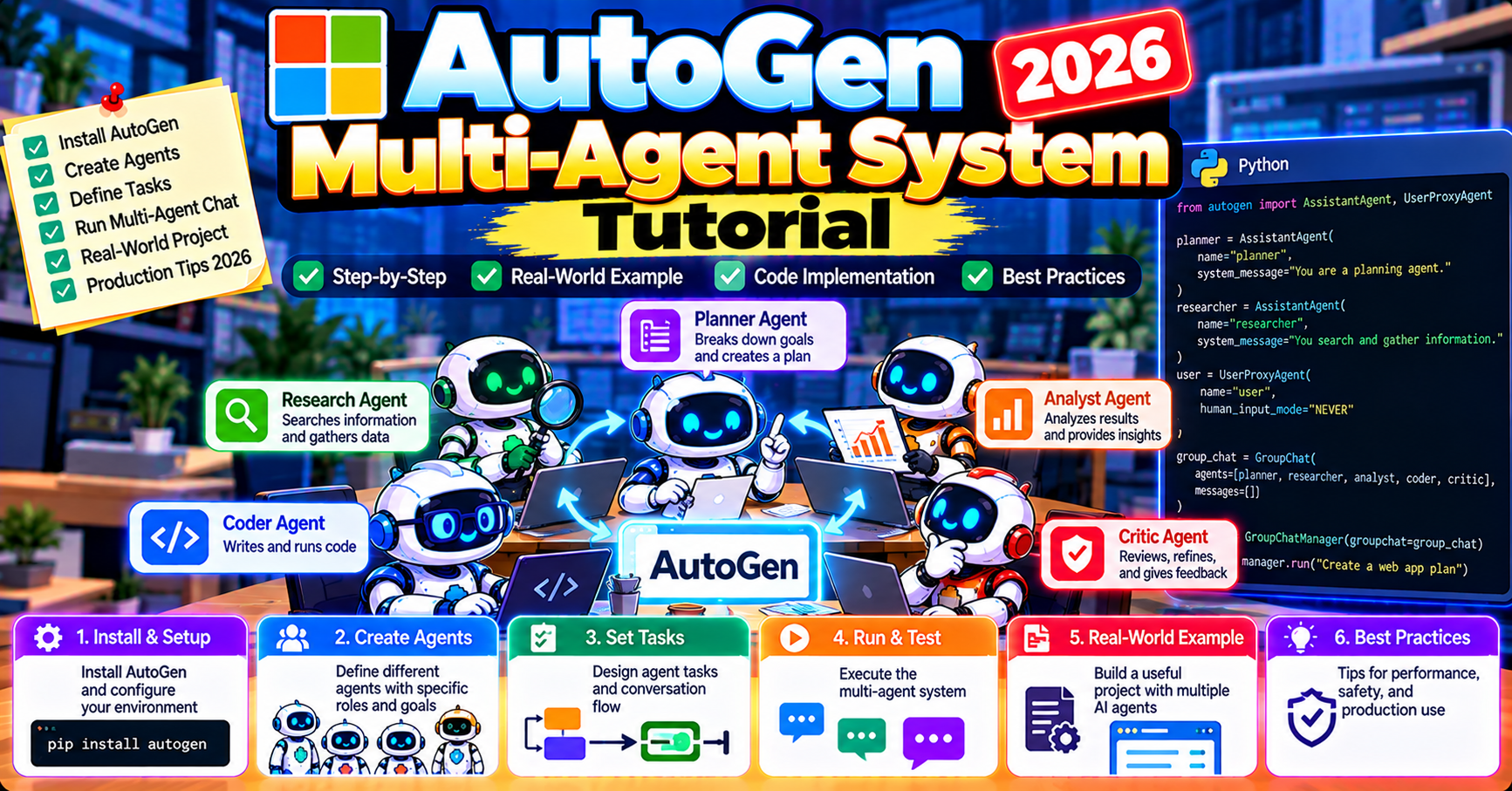
AutoGen is Microsoft Research’s framework for building multi-agent systems where AI agents coordinate through conversation. In 2026 it is one of the three dominant Python agent frameworks (alongside CrewAI and LangGraph). This tutorial walks through building a working multi-agent system end to end: a research-and-write workflow where three agents (researcher, writer, reviewer) collaborate on a report. By the end you will have a running system and understand the core concepts well enough to adapt it to your own use case.
What AutoGen is and when to use it
AutoGen abstracts multi-agent coordination as a conversation. You define agents, group them into a chat, and the framework handles turn-taking (who speaks next), tool invocation, and termination (when the conversation ends). Agents can be LLM-backed, human-in-the-loop, or deterministic Python functions.
Core use cases where AutoGen fits well:
- Workflows where agents genuinely need to debate, hand off ideas, and refine (research + writing, code generation + review, planning + execution)
- Systems where human input is sometimes needed mid-conversation
- Tool-using agents that invoke multiple external APIs and respond to results
- Microsoft Azure OpenAI shops (first-class integration)
Install and configure
pip install "autogen-agentchat" "autogen-ext[openai]"

# .env
OPENAI_API_KEY=sk-...
AutoGen split into two packages in the 0.4+ release line (2024 onwards): autogen-agentchat for the agent + conversation primitives, autogen-ext for provider integrations (OpenAI, Anthropic, Azure). Import what you need.
Build the three-agent research-and-write system
Our workflow: user asks “write a 300-word brief on quantum computing’s commercial state in 2026.” Three agents collaborate:
- Researcher uses web search to gather current facts
- Writer drafts the brief based on research
- Reviewer critiques and asks for revisions until acceptable
import asyncio
from autogen_agentchat.agents import AssistantAgent, UserProxyAgent
from autogen_agentchat.teams import RoundRobinGroupChat
from autogen_agentchat.conditions import TextMentionTermination
from autogen_ext.models.openai import OpenAIChatCompletionClient

async def main():
    model_client = OpenAIChatCompletionClient(model="gpt-4o")

    researcher = AssistantAgent(
        name="researcher",
        system_message="You are a research agent. Gather current facts on the topic. "
                       "Cite sources. When you have gathered 3-5 key facts, hand off to writer.",
        model_client=model_client,
        tools=[web_search_tool],  # defined elsewhere
    )

    writer = AssistantAgent(
        name="writer",
        system_message="You are a writer. Produce a 300-word brief based on researcher's facts. "
                       "Clear, concise, no filler. Hand off to reviewer when draft is ready.",
        model_client=model_client,
    )

    reviewer = AssistantAgent(
        name="reviewer",
        system_message="You are an editor. Review the brief for accuracy and clarity. "
                       "If it needs revision, give specific feedback and send back to writer. "
                       "If it is good, respond with APPROVED to end the conversation.",
        model_client=model_client,
    )

    team = RoundRobinGroupChat(
        [researcher, writer, reviewer],
        termination_condition=TextMentionTermination("APPROVED"),
    )

    stream = team.run_stream(task="Write a 300-word brief on quantum computing in 2026")
    async for event in stream:
        print(event)

asyncio.run(main())
Add a tool: web search
Researcher needs real-time info, so give it a web-search tool:
from tavily import TavilyClient
tavily = TavilyClient(api_key=os.environ["TAVILY_API_KEY"])

async def web_search_tool(query: str) -> str:
    """Search the web for current information on the query."""
    results = tavily.search(query, max_results=5)
    return "\n\n".join(f"{r['title']}: {r['content'][:200]}" for r in results["results"])

# Pass to researcher
researcher = AssistantAgent(
    name="researcher",
    system_message="...",
    model_client=model_client,
    tools=[web_search_tool],
)
AutoGen auto-wires the function signature. The researcher can call web_search_tool("quantum computing 2026 commercial") and gets back real search results, then uses them to inform its handoff to the writer.
Termination conditions: how to stop
Multi-agent conversations can loop indefinitely without a termination condition. Three common patterns:
- TextMentionTermination: ends when an agent says a specific keyword (like “APPROVED” above)
- MaxMessageTermination: ends after N total messages (safety cap, e.g., 20 messages)
- ExternalTermination: triggered by your code (e.g., user cancels)
Combine them with the pipe operator:
from autogen_agentchat.conditions import TextMentionTermination, MaxMessageTermination

termination = TextMentionTermination("APPROVED") | MaxMessageTermination(20)

team = RoundRobinGroupChat([researcher, writer, reviewer], termination_condition=termination)
Always set a MaxMessageTermination as a safety net. Even if your “APPROVED” condition should always fire, a model can misbehave and loop; the message cap catches it.
Picking who speaks next: group chat selector
RoundRobinGroupChat cycles agents in order (researcher to writer to reviewer to researcher…). For more intelligent routing, use SelectorGroupChat:
from autogen_agentchat.teams import SelectorGroupChat

team = SelectorGroupChat(
    [researcher, writer, reviewer],
    model_client=model_client,
    termination_condition=termination,
    selector_prompt="Select the agent that should speak next based on the conversation so far. "
                     "Choose from: researcher, writer, reviewer. Respond with just the agent name.",
)
The selector uses an LLM call to pick who speaks next based on the conversation context. More flexible than round-robin but each selection costs an extra LLM call. Use SelectorGroupChat when the natural flow is non-sequential (e.g., writer might need researcher to go back and find more info before another writing attempt).
Human in the loop
Add a UserProxyAgent to require human approval at specific points:
from autogen_agentchat.agents import UserProxyAgent

user = UserProxyAgent("user_approver", input_func=input)

team = RoundRobinGroupChat(
    [researcher, writer, reviewer, user],
    termination_condition=termination,
)
Now after each cycle the human user is prompted for input. Great for high-stakes agent systems (financial transactions, destructive operations) where you want a human to green-light before the next step.
Observability: trace what happened
Agent systems fail in subtle ways. Enable tracing from day one. AutoGen integrates with AgentOps:
import agentops
agentops.init(os.environ["AGENTOPS_API_KEY"])

# ... rest of code unchanged, AgentOps auto-traces every message
Dashboard shows full conversation, cost per message, latency, tool calls. For deeper OpenTelemetry integration, use OpenLLMetry alongside AutoGen (both emit standard OTel spans).
Common pitfalls
- Conversation loops: agents go back and forth without converging. Fix: tighter system messages, explicit “hand off to X when Y” instructions, lower MaxMessageTermination.
- Agent impersonation: writer agent sometimes replies as if it is the reviewer. Fix: make system prompts explicit about role boundaries.
- Cost blow-up: group chats stack message history. 10 agents times 20 messages = 200 LLM calls at minimum. Monitor with AgentOps; cap with MaxMessageTermination.
- Tool-call failures: tools fail silently if the error handling is loose. Wrap tool functions in try/except and return error strings to the agent so it can react.
State persistence patterns in production
AutoGen does not persist team state by default; a new team.run() starts fresh. For production workflows that need to survive crashes or user sessions that span multiple requests, three patterns work:
Pattern 1: Persist conversation history to your database. After each team.run_stream iteration, serialize the conversation (team.state() returns a JSON-friendly dict) and write to Postgres or Redis keyed by session ID. On resume, reconstruct the team and set its state before continuing.
Pattern 2: Use external memory tools. Give agents a remember_fact(key, value) and recall_fact(key) tool backed by Mem0 or Zep. State lives in the memory service; AutoGen stays stateless. Cleaner separation of concerns and the memory service handles expiry + search.
Pattern 3: Wrap AutoGen in a stateful orchestrator. For complex workflows, run AutoGen teams inside a LangGraph node and let LangGraph’s checkpointer handle persistence. AutoGen provides the group-chat primitive; LangGraph provides the state machine around it.
Cost control in production
Multi-agent teams multiply LLM costs. Three protective patterns:
- Per-team cost caps: track input + output tokens per agent, abort the team run if cost exceeds a budget. AutoGen’s response.usage dict reports this per request; sum across the run.
- Model routing per agent: use Claude Sonnet 5.5 for most agents, Opus 5.5 only for the critical reasoning agent. Mixing cuts cost 60-80% vs all-Opus with no quality loss on the simpler agents.
- Conversation summarization at long thresholds: if message count exceeds 15, insert a summarizer agent that compresses older messages into one summary message. Prevents context blow-up on long debates.
Frequently Asked Questions
Official documentation
What is the difference between AutoGen 0.2 and 0.4+?
AutoGen 0.4 (released late 2024, matured through 2026) is a complete rewrite with a cleaner API, async-first design, and the two-package split (agentchat + ext). Code from 0.2 does not run on 0.4 without rewrites. For new projects always start on 0.4+; AutoGen 0.2 is in maintenance mode only.
Can I use Claude or local models with AutoGen?
Yes. Install the right extension: autogen-ext[anthropic] for Claude, autogen-ext[ollama] for local Ollama models. Import the matching client (AnthropicChatCompletionClient, OllamaChatCompletionClient) and pass it to agents instead of OpenAIChatCompletionClient.
How does Magentic-One fit in?
Magentic-One is a prebuilt multi-agent system Microsoft shipped in 2024 for web-browsing tasks. It composes 5 specialized agents (orchestrator, web surfer, file surfer, coder, computer terminal) using AutoGen primitives. Use it as a starting point for browser-automation agents; see our dedicated Magentic-One tutorial for the setup.
Can I nest group chats?
Yes. A group chat is itself an agent from AutoGen’s perspective. You can have an outer team containing an inner team as one of its “agents.” Useful for hierarchical agent systems (manager delegates to a sub-team, waits for their result, continues orchestrating).
How do I handle state that outlives a single conversation?
AutoGen does not persist state by default; each run starts fresh. For memory across runs, use a tool that reads/writes a database on the agent’s behalf (e.g., Mem0, Postgres key-value store) and have the agent call it at conversation start and end.
Is AutoGen production-ready?
Yes for most use cases, with 0.4+ release. Microsoft uses it internally and the enterprise support channel is reliable. For strict uptime SLAs or human-in-the-loop requirements, LangGraph has stronger primitives; for conversational workflows AutoGen is production-grade.

Joken E. Villanueva
Founder & Lead Developer at PIES IT Solution
Founder of PIES Information Technology Solutions, a software company building production-grade applications for institutions across the Philippines. Over 8 years of hands-on full-stack development experience, currently leading the development of ClinicAI, an AI-powered clinic management platform.
Expertise: PHP · MySQL · JavaScript · AI Integration · SaaS Architecture · VB.NET · Database Design · Capstone Documentation · Java · View all posts by Joken E. Villanueva →