
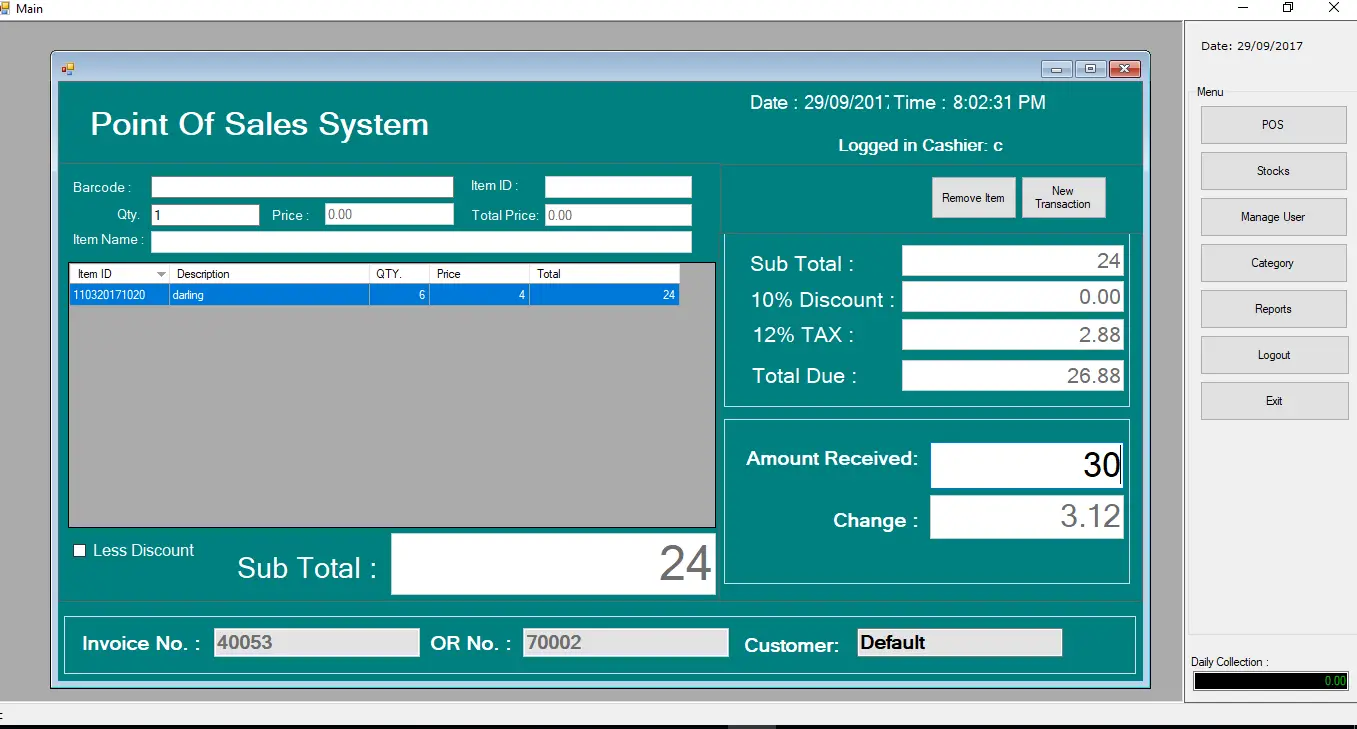
Good Day ItsourceCoders! Today I will be sharing a Point of Sale and Inventory System Using Visual Basic 2008 with MySQL Database for the back end.
Point of Sale and Inventory System using VB.NET Features:
- Barcode support
- Inventory system
- Point of Sales
- Stock Master (Stock in and Stock Out of Items)
- Item Category master
- Different types of Reports (Daily Sales, Monthly Sales, and Remaining Sales, etc… )
- Product inventory according to unit of measures
In order to appreciate the project run the source code.
Account Information:
Username: c1
Password: c1
Note: To successfully run the project, you need to create a MySQL Database.
How to set up the Point of Sales and Inventory System in VB.Net?
Time needed: 3 days
Here’s the step-by-step guide on how to set up the Point of Sales and Inventory System
- Open http://localhost/phpmyadmin in your browser
- Create a new Database and name it as “posdb”
- and Import the “posdb” database that can be downloaded in Step 4.
- Download the database here.o—>posdb (1)
- Download the installer here. o—>Point of Sale Installer
- Run the Installer
Another Note: You need crystal reports 8.5 to run the source code. If you don’t have crystal reports you can still open the source code but are unable to run the reports.
If you have any questions or suggestions please feel free to contact me at our contact page or you can add me on Facebook to receive a fast response.
The related article you may like:
- Payroll System in VB.Net Projects with Source Code
- Barangay Information System Source Code in VB.Net Projects
- Barangay Information System Source Code in VB.Net Projects
But if you are looking for a list of vb.net projects with source code free to download, you can follow it here. List of VB.Net Projects with source and free to download
Technology stack and requirements
To run this VB.NET project, you need the following on your development machine:
- Visual Studio 2019 or later. The free Community Edition is enough for building, debugging, and running the project.
- .NET Framework 4.7.2 or higher. Most Windows 10 and 11 systems have it preinstalled through Windows Update.
- MySQL Server 8.0 or MSSQL Express 2019. Choose whichever your capstone panel prefers; both work with VB.NET data adapters.
- MySQL Connector/NET or SqlClient library. Add via NuGet Package Manager inside Visual Studio.
- Crystal Reports (optional). Required only if the project generates printable reports; install the runtime redistributable.
Installing the source code
The download link contains a ZIP archive with the full solution. Extract and set up in five steps:
- Extract the archive to a folder outside Program Files (avoids permission issues).
- Open the .sln file in Visual Studio. It loads the full solution with all forms and modules.
- Restore NuGet packages. Right-click the solution then Restore NuGet Packages if prompted.
- Import the database. Locate the .sql file in the archive and import via phpMyAdmin (MySQL) or SQL Server Management Studio.
- Update the connection string in App.config or module code to match your local database name, user, and password.
How to use this project for your BSIT capstone
This VB.NET project maps cleanly to standard BSIT capstone documentation. Suggested chapter alignment:
- Chapter 1 (Introduction). Discuss the problem the system solves in real-world context. Cite Philippine business or academic use cases where a manual process could be replaced.
- Chapter 2 (Review of Related Literature). Compare this system’s features against 5-10 similar published projects. Cite journals like IJERT or IEEE Access for academic-standard sources.
- Chapter 3 (Methodology). Include Use Case Diagram, Data Flow Diagram, Entity Relationship Diagram, and Activity Diagram covering all major workflows in the system.
- Chapter 4 (Results and Discussion). Screenshot each module of the running system with a caption explaining what data it processes and which user role interacts with it.
- Chapter 5 (Conclusion and Recommendations). Identify features that could be added in a Version 2, such as web dashboard, mobile app, or REST API export.
Modules typical of Point of Sale and Inventory System
Inventory-management-style systems in VB.NET usually include these modules:
- Product master data. CRUD forms for adding, editing, and archiving products with SKU, price, and category.
- Stock receiving. Record incoming inventory batches from suppliers with quantity, cost, and expiry date if applicable.
- Sales / Point of Sale. Cashier interface with barcode scanning, quantity, subtotal, discount, and change calculation.
- Stock adjustment. Manual correction entries for damage, expiry, or shrinkage with reason codes.
- Reports. Sales-by-day, stock-on-hand, top-selling products, and low-stock alerts.
- User management. Role-based login (Admin, Cashier, Manager) with password hashing and audit trail.
Common enhancements for capstone review
- Barcode integration. Add a USB barcode-scanner input field on the POS form for faster checkout.
- Multi-branch support. Add a Branch table so a single database serves multiple store locations.
- Auto reorder alerts. Send email notification when stock falls below a defined threshold.
- Data export to Excel. Use ClosedXML or Microsoft.Office.Interop to export reports for offline analysis.
Official documentation
Featured guides worth reading next
Frequently Asked Questions
How does this VB.NET inventory management system work?
Tracks stock levels per item per warehouse, handles stock-in/out, stock-take, reorder alerts. Reports: inventory valuation, slow-moving stock, top-selling items.
What Visual Studio and SQL Server versions does this VB.NET project require?
Most projects use VB.NET WinForms on .NET Framework 4.5+ with SQL Server 2012 Express or higher. To run: install Visual Studio 2019 / 2022 (Community is free) with the ‘Desktop development with .NET’ workload, install SQL Server Express + SSMS, open the .sln file, build, run.
How do I set up the database for this VB.NET project?
Open SQL Server Management Studio (SSMS) and connect to your SQL Server (e.g. localhost\SQLEXPRESS). Right-click Databases, choose Restore Database OR New Database then import the included .sql script. Update the connection string in App.config (or in code-behind Module) with your server name + credentials. Rebuild and run.
Can I use this VB.NET project for a BSIT capstone or thesis?
Yes, VB.NET is one of the most accepted languages by Philippine BSIT panels. Extend it: add role-based access (admin/staff/customer login redirect), Crystal Reports or RDLC reports, dashboards with Chart control, audit log, multi-branch support. Pair with Chapter 1-5 documentation matching your panel’s rubric.
Why am I getting ‘connection error’ or ‘cannot find SQL Server’?
Three common VB.NET issues: (1) Connection error: SQL Server isn’t running. Open SQL Server Configuration Manager and verify SQL Server (SQLEXPRESS) service is started. (2) Wrong server name in connection string. Try .\SQLEXPRESS, (local)\SQLEXPRESS, or your machine name. (3) Login failed: SQL Server is set to ‘Windows-only’ authentication. Switch to Mixed Mode in SSMS Server Properties, Security.
Where can I find more VB.NET projects with source code?
Browse the VB.NET Projects hub for the full library. For C# WinForms alternatives see C# Projects. For ASP.NET web alternatives see ASP.NET Projects. For BSIT capstone idea lists see 150 Best Capstone Project Ideas.

Joken E. Villanueva
Founder & Lead Developer at PIES IT Solution
Founder of PIES Information Technology Solutions, a software company building production-grade applications for institutions across the Philippines. Over 8 years of hands-on full-stack development experience, currently leading the development of ClinicAI, an AI-powered clinic management platform.
Expertise: PHP · MySQL · JavaScript · AI Integration · SaaS Architecture · VB.NET · Database Design · Capstone Documentation · Java
· View all posts by Joken E. Villanueva →
Paano po makuha yung source code nito?
hello sir can you send the source code for my email : subhialjzazy@gmail.com
1. Download the database here.o—>posdb (1)
https://itsourcecode.com/wp-content/uploads/2017/09/posdb-1.zip
2. Download the installer here. o—>Point of Sale Installer
https://itsourcecode.com/wp-content/uploads/2017/09/Point-of-Sale-Installer.zip
CAN U SEND A SOURCE CODE TO phate.rethabile@gmail.com
Hi sir can you send the source code for my email chaselleg@gmail.com. Thanks
Hi kindly send me the source codes for the POS
Hi kindly send me the source codes for the POS rveniegas30@gmail.com
sourcode po please….simpledarwin25@yahoo.com
Thank you so much for the Mr. Joken Villanueva. Please send me the source code – johnwilliams0644@gmail.com
source code po neto please. manxhur21@gmail.com
can i use code i want to translate with my country
bgsplv50@gmail.com
source code po manxhur21@gmail.com
Send the source of this Program..
zoren141@gmail.com ppasa master source code.
Can i have a copy of your source code for study purposes “lin.coraline1@gmail.com”
source code please… khrisusman@gmail.com thank you
source code please .. islut.ding@gmail.com .. thank you
source code please .. jecoviovicente@gmail.com .. thank you so much
pasuyo papasa po source code sir. (iskiribap8888@gmail.com)
Thanks in Advance.
Hi. Can you send me the source code
Teekaym16@gmail.com
Source code plsss kusinmamalinta95@gmail.com
SOURCE CODE TO trajano75@hotmail.com
Source Code please … thank you
chbustercy@gmail.com
Source Code please …
manusherpa511@gmail.com
source code please bargs.rodney@gmail.com
Pls send me the source code boyroberto2009@gmail.com
Pls send source code to boyroberto2009@gmail.com
pilz can u send me the source to ronaldmwansaceo@gmail.com
Kind Foward me the code augustankhali@gmail.com
paps source code salamat
alainsim77@gmail.com
can i get source code please
hazimp@gmail.com
Can I get Source Code Please : solyda12345@gmail.com
Can I get Source Code Please : gadhpriyantha@gmail.com
can i get the source code please: lekofk@gmail.com
can i get the source code please: felipecoronacaceres@gmail.com
can you please send me the source code ? Thanks…
please can you send me source code
Hi,
could you please share with me the source code?
victorarturomeza@gmail.com
sOURCE COAD SIR PLZ plz sir really need it plzz
Can i have the source code sir? Please send me joieshy23@gmail.com
Can you please share source code to me mtshubhamt4@gmail.com
Hello Sir, Please can you send me the source code. would be much grateful. gizobae@gmail.com
Hi. Can you send me the source code(thanks in advance)
at(hai1fai2bhi@gmail.com
Hello, Wonderful POS. kindly share source code with me at benoni.williams@gmail.com
Hello Sir!, Can I get the Source Code Please. Thank You. jeralddesigner123@gmail.com
Hello Sir, Can i get the source code for this please @exirzen007@gmail.com
Hi sir,can you please send me the source code here millionshades3@gmail.com
hello sir… kindly pls send the source code here….. azukiyutha1412@gmail.com
hello sir, please send me the source code in nikhilchoudhary1607@gmail.com
hello sir, Can you share source code to me cvcjohnny@gmail.com
source code please to mark.bosch68@gmail.com
good day sir, baka naman po. pang thesis lang. 🙁
Well Done Sir Kindly Send Me Source Code at sohaiba49@gmail.com
hello sir can you send the source code for my email :
ahmadmazhar607@gmail.com
The source code is inside in the article.
hello sir can you send the source code for my email :
Usmansh5@gmail.com
YOu can download the source code inside the articles
what do you mean by “the source code inside the articles” where can i find it????
1. Download the database here.o—>posdb (1)
https://itsourcecode.com/wp-content/uploads/2017/09/posdb-1.zip
2. Download the installer here. o—>Point of Sale Installer
https://itsourcecode.com/wp-content/uploads/2017/09/Point-of-Sale-Installer.zip
Good work.. Please send me the Source at piyushtrivedicg@gmail.com