

In this article, we will show you the solutions for modulenotfounderror no module named ‘xgboost’ jupyter notebook.
This is a common error usually experienced when you are a developer or a programmer when you are running your program in Python.
The xgboost is a popular machine learning library that is used for gradient boosting.
This error no module named ‘xgboost’ jupyter is happen when the xgboost package is not installed properly in your system.
Luckily, we have simple and easy steps to go through to fix the error.
Continue to read on to discover the common causes and the solutions to resolve the issue in no time.
What is the modulenotfounderror no module named ‘xgboost’ jupyter notebook error?
Your error, whether in a Jupyter Notebook or in the terminal, probably looks like one of the following:
ModuleNotFoundError: No module named 'xgboost' Jupyter NotebookThe modulenotfounderror: no module named ‘xgboost‘ indicates that the “xgboost” module is not installed on your system.
Or it is not available to the current environment in the Jupyter Notebook you are using.
In addition to that, the error message no module named ‘xgboost’ in jupyter notebook usually arises when Jupyter Notebook is not able to access the module that you are trying to import.
And, Python interpreter is unable to find the xgboost module, resulting in an error.
In order to resolve this error, you’ll have to install the xgboost module either using pip or conda, depending on your Python environment.
What are the causes of modulenotfounderror no module named ‘xgboost’ jupyter notebook error?
1. XGBoost not installed
It is one of the most common causes of the modulenotfounderror no module named ‘xgboost’ Jupyter notebook error message, tells you that XGBoost is not installed in your system.
2. Incorrect xgboost installation
If the xgboost module is installed in your Python environment but not correctly, you will definitely receive this error message.
3. Jupyter Notebook kernel
When you are using a Jupyter Notebook kernel that is unable to access xgboost, you may encounter the error.
It only happens when you are using a virtual environment or a conda environment that does not have XGBoost installed.
How to fix modulenotfounderror no module named ‘xgboost’ jupyter notebook error?
These are the effective solutions to the modulenotfounderror no module named ‘xgboost’ jupyter notebook error message.
Time needed: 2 minutes
Just follow the following command until you have successfully fixed the error:
- Install xgboost
Installing xgboost in your system is the best solution for resolving the “module not found” error in a Jupyter notebook.
You can do this using the following command in your terminal or command prompt:

or
When you are using a conda environment, you may use the following command:

When installing xgboost is finally done, you have to restart your Jupyter Notebook kernel in order for the changes to take effect.
- Check xgboost installation
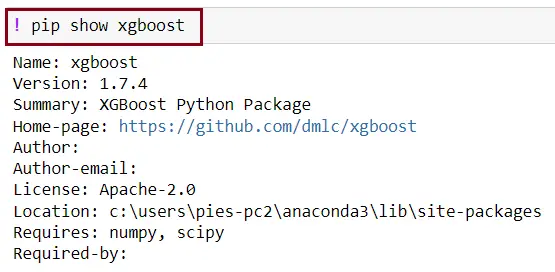
When you have already installed the module but are still encountering the error, you should check if xgboost is correctly installed.
You can simply do this using the following command in your Jupyter Notebook:

or you can use this command:

When you don’t encounter any errors after running the above command, then the module is installed correctly.
- Check Jupyter Notebook kernel
When you are still encountering the error after installing the module, you should check your Jupyter Notebook kernel.
You have to ensure that you are using a kernel that had access to XGBoost.
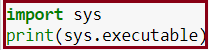
Use the following command in your Jupyter Notebook:
By executing this command it will display the path to the Python interpreter that is being used by your Jupyter Notebook.




Additional solutions for “modulenotfounderror no module named ‘xgboost’ jupyter notebook”
You can use the following command base on the platform you are using.
1. If you are using py alias (Windows)
✅ py -m pip install xgboost 2. If you are using python 3
✅ pip3 install xgboost
✅ python3 -m pip install xgboost
3. Use this command if you get permissions error
✅ sudo pip3 install xgboost
✅ pip install xgboost --user
4. Virtual environment or Python 2
✅pip install xgboost5. If you don’t have pip in your PATH environment variable
✅ python -m pip install xgboostDiagnostic checklist for “No module named ‘xgboost'”
- Verify pip install target. Run
pip show xgboost— if not installed, runpip install xgboost. - Check the active Python interpreter.
which python(mac/Linux) orwhere python(Windows). Both pip and python must point to the same environment. - Check virtual environment activation. If you use venv/conda, activate before installing:
source .venv/bin/activate. - Rule out uppercase/lowercase. Python imports are case-sensitive:
import PyPDF2notimport pypdf2. - Rule out the pip-vs-package-name mismatch. Some packages install under a different name than you import (e.g.
pip install beautifulsoup4→import bs4).
Installing xgboost — classical ML library
# Standard install
pip install xgboost

# For scikit-learn with all extras
pip install "scikit-learn[all]"

# For XGBoost / LightGBM
pip install xgboost lightgbm
Common causes for missing ML modules
- scikit-learn vs sklearn. Install as
pip install scikit-learn, import asimport sklearn. - Numpy/scipy version conflict. Older sklearn versions require specific numpy versions. Upgrade both.
- Build dependencies missing. LightGBM on Mac needs libomp (
brew install libomp). - Windows Visual C++ redistributables. XGBoost needs the runtime installed.
Working code example
import xgboost
print(xgboost.__version__)

# scikit-learn quick check
# from sklearn.ensemble import RandomForestClassifier
# clf = RandomForestClassifier()
Best practices
- Install with conda for scipy stack. conda-forge handles numpy + scipy + sklearn together.
- Pin all ML library versions. Reproducibility matters — models depend on exact library versions.
- Use pipeline objects. sklearn’s Pipeline avoids many install-vs-import mistakes.
Official documentation
Frequently Asked Questions
What is Python ModuleNotFoundError and what causes it?
ModuleNotFoundError (a subclass of ImportError) is raised when Python cannot find the module you tried to import. Common causes: the package isn’t installed (pip install missing), wrong virtual environment activated, typo in module name, or Python can’t find your local module on the import path. The error message names exactly which module is missing.
How do I fix ‘ModuleNotFoundError: No module named X’?
Run pip install X first. If that succeeds but you still get the error, check which Python you’re using (which python OR python –version) vs which pip (which pip OR pip –version), they must match. Common gotcha: pip points to system Python 3.9 but you’re running python3.11 in a venv. Inside the venv, use python -m pip install X to be sure pip matches the active Python.
Why does my code work in one environment but not another?
Different Python versions or different installed packages. To diagnose: pip freeze > requirements.txt on the working environment, then pip install -r requirements.txt on the broken one. Use virtualenv (python -m venv venv) or conda for every project to avoid system-wide package collisions.
Is ModuleNotFoundError the same as ImportError?
ModuleNotFoundError is a subclass of ImportError added in Python 3.6. It specifically means ‘no such module exists.’ Plain ImportError covers a wider set: module exists but a name inside it can’t be imported (e.g. ‘cannot import name X from Y’). except ImportError catches both; except ModuleNotFoundError catches only the missing-module case.
Where can I find more ModuleNotFoundError fixes?
Browse the ModuleNotFoundError reference hub for 198+ specific module fixes (TensorFlow, Flask, Django, pandas, numpy, etc.). For related issues see ImportError. For broader Python setup see Python Tutorial hub.
Conclusion
This article already gives you an effective solution that will help to resolve the error modulenotfounderror no module named ‘xgboost’ jupyter notebook.
By executing the effective solutions above, you can fix the error and run your program smoothly without any errors in your Jupyter Notebook.
We also have solutions if you encounter an error like modulenotfounderror: no module named ‘tensorboardx’.
Thank you very much for reading until the end of this article.

Caren Bautista
Technical Writer at PIES IT Solution
Responsible for crafting clear, well-structured, and beginner-friendly content across the platform. Handles the writing, proofreading, and editorial review of tutorials, guides, and documentation to ensure every article is accurate, readable, and easy to follow.
Expertise: Technical Writing · Content Creation · Documentation · Editorial Writing · JavaScript · TypeScript · Python · Python Errors · HTTP Errors · MS Excel
· View all posts by Caren Bautista →