
The attributeerror: module ‘tensorflow’ has no attribute ‘session’ is an error message that occurs when you are using a TensorFlow library to create a session.
However, the module cannot find the attribute ‘session’ because tf.Session() is incompatible with version 2 of TensorFlow.
It happens when you are using a newer version of TensorFlow that has changed, deprecated, or removed the attribute ‘session. In this article, we will show you what this error means and provide solutions to help you fix it.
What is “attributeerror: module ‘tensorflow’” has no attribute ‘session’?
AttributeError: module 'tensorflow' has no attribute 'session'
The error message attributeerror: module tensorflow has no attribute session usually happens when you are trying to use the deprecated session in TensorFlow version 1. In version 2 of TensorFlow, the session is no longer explicitly useful.
Aside from that, eager execution mode has been enabled by default, and you don’t have to create a session object directly. Instead, you can use operations directly by calling them as functions.
In addition to that, this error is caused by the incompatibility of TensorFlow module 2.x. To fix this error, you can remove the session code and use the new TensorFlow 2.x APIs instead.
How to use ‘session’ in TensorFlow 2.0?
This is an example of running a program in version 1 of TensorFlow:
import tensorflow as tf

msg = tf.constant('This will result an error!')

sess = tf.Session()

print(sess.run(msg))
As a result of the code above, it will throw an : AttributeError: module 'tensorflow' has no attribute 'Session'
Solution:
The TensorFlow 2.0 offers the option to disable eager execution by default when running older code for compatibility and to execute TensorFlow 1.x code. However, updating your code to TensorFlow 2.0 is advised.
This example shows a simple running session in version 2 of tensorflow:
import tensorflow as tf

tf.compat.v1.disable_eager_execution()

msg = tf.constant('Hi, Thank you')

sess = tf.compat.v1.Session()

print(sess.run(msg ))
How run Tensorflow in Pycharm?
Time needed: 2 minutes
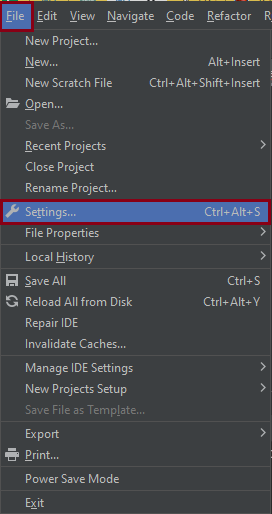
- Open your Pycharm application.
- Go to File tab and select “settings.”

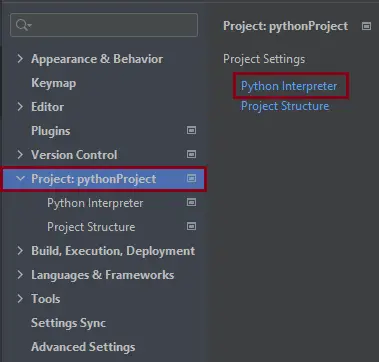
- Click “Project:pythonProject” and select “Python Interpreter.”

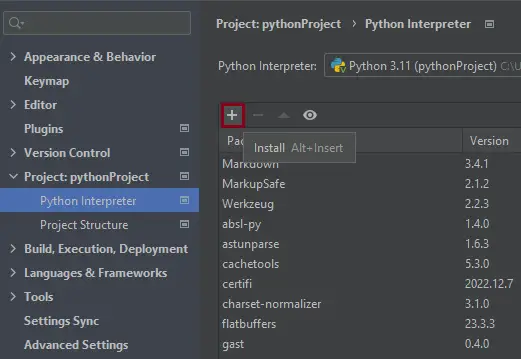
- Click the (+) sign.

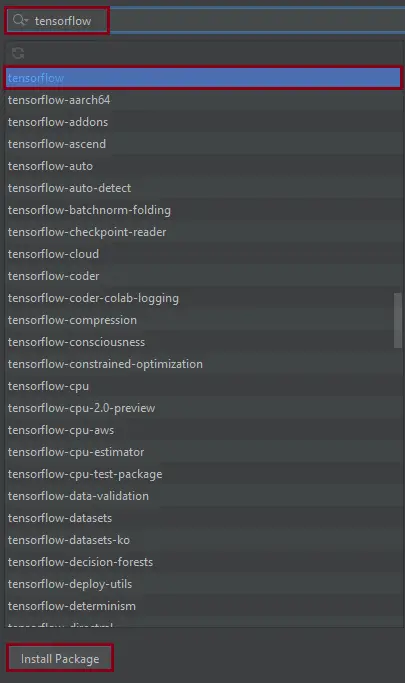
- Input “tensorflow” in the search box.
After “inputing tensorflow” click install package if you haven’t installed it yet.

After the installation, you can use and run the code without encountering any errors.
Solutions to fix the error “attributeerror: module ‘tensorflow’” has no attribute ‘session’
Here are the solutions that you may use to resolve the error attribute error module tensorflow has no attribute session that you currently facing. Open your command prompt or terminal.
1. Upgrade your code
To fix this error, you have to upgrade your code to the latest version of TensorFlow. You have to change every occurrence of sess.Session.run by calling the Python function.
In newer versions of TensorFlow, you can create a session using the tf.compat.v1.Session() method instead of tf.Session().
Alternatively, you can use the tf.compat.v1.disable_v2_behavior() method to enable compatibility with older versions of TensorFlow that use the tf.Session() method.
2. Use Tensorflow version 1 syntax
You can use this syntax to import, since it is not compatible with TensorFlow 2.x. Luckily, if you use this command, it supports TensorFlow 1.x syntax.
import tensorflow.compat.v1 as tf

 tf.disable_v2_behavior()
3. Downgrade Tensorflow version
You can easily downgrade the tensorflow version to 1. x using the following command:
pip install tensorflow==1.15.5
However, using the given command above is not a recommended solution because it might introduce incompatibilities with your code. Hence, if you are sure that you are just using the 1.x code base and only the installation version, you can use that command to downgrade the tensorflow.
4. Complete the program code conversion from 1. x to 2. x
If you already installed the TensorFlow 2.0 x in your system and wanted to use TensorFlow version 1.x as well as the supporting code. Therefore, use the following syntax if you encounter this attribute problem.
tf_upgrade_v2 \
  --intree code/ \
  --outtree code_v2/ \
  --reportfile text.txt
TensorFlow AttributeError patterns
TensorFlow AttributeErrors most often come from API changes between TF 1.x and 2.x, Keras deprecations, or the tf.compat module.
Common triggers
- TF 1.x code in TF 2.x.
tf.Session(),tf.placeholder()are TF 1.x — moved under tf.compat.v1 in TF 2.x. - Keras standalone vs tf.keras.
from keras.models import ...is standalone Keras;from tensorflow.keras.models import ...is bundled. Do not mix. - Removed features. Many TF 2.x releases dropped experimental APIs. Check the release notes.
- Tensor vs eager tensor. Some methods only work on eager tensors (default in TF 2.x).
Diagnostic pattern
# BAD — TF 1.x pattern in TF 2.x
import tensorflow as tf
sess = tf.Session()  # AttributeError: module 'tensorflow' has no attribute 'Session'

# GOOD — TF 2.x uses eager execution by default
import tensorflow as tf
result = tf.constant([1, 2, 3]) * 2  # runs immediately

# Or explicitly use TF 1.x compat
tf.compat.v1.disable_eager_execution()
sess = tf.compat.v1.Session()
Best practices
- Use TF 2.x eager execution for new code. TF 1.x graph mode is legacy.
- Use tf.keras, not standalone Keras. Bundled with TensorFlow — better integration.
- Check version.
tf.__version__before debugging any API issue. - Consider PyTorch for new projects. Cleaner API, better debugging.
Official documentation
Frequently Asked Questions
What is Python AttributeError and what causes it?
AttributeError is raised when you access an attribute or method that doesn’t exist on the object. Most common cause: calling a method on None (NoneType has no attribute X). Other causes: typo in method name, wrong object type (str when you expected list), or using a feature removed in a newer library version. The error names exactly which type and which missing attribute.
How do I fix ‘NoneType object has no attribute’?
The variable you’re accessing is None, but you expected an object. Trace back to where it was assigned: a function returning None instead of an object (forgot to return), a database query returning no rows (Model.objects.first() returns None when empty), or an API call that failed silently. Safe pattern: if obj is not None: obj.method() OR use the walrus operator: if (obj := get_obj()): obj.method().
How do I check if an attribute exists before accessing it?
Use hasattr(obj, ‘attr_name’) for runtime check, or getattr(obj, ‘attr_name’, default) to get-with-default. For frequent attribute checks, consider type hints + mypy/pyright which catch most AttributeErrors at static-analysis time before runtime.
How do I prevent AttributeError from None values?
Three patterns: (1) Always validate function returns (if result is None: raise). (2) Use type hints with Optional[X] to make None-ability explicit. (3) Use the walrus operator + early return: if (val := get_val()) is None: return default; use val. Defensive coding around None-able returns prevents 90% of AttributeError in production.
Where can I find more AttributeError fixes?
Browse the AttributeError reference hub for 170+ specific fixes (NoneType, pandas, NumPy, sklearn, Selenium). For related errors see TypeError. For Python debugging fundamentals see Python Tutorial hub.
Related Articles for Python Errors
- Modulenotfounderror: no module named prettytable
- Modulenotfounderror: no module named simple_salesforce
- Modulenotfounderror: no module named ‘numpy.testing.nosetester’
Conclusion
This article provides solutions for the “attributeerror: module ‘tensorflow’ has no attribute ‘session’,” which is a big help in solving the problem you are currently facing.
Thank you very much for reading until the end of this article. Just in case you have more questions or inquiries, feel free to comment.

Caren Bautista
Technical Writer at PIES IT Solution
Responsible for crafting clear, well-structured, and beginner-friendly content across the platform. Handles the writing, proofreading, and editorial review of tutorials, guides, and documentation to ensure every article is accurate, readable, and easy to follow.
Expertise: Technical Writing · Content Creation · Documentation · Editorial Writing · JavaScript · TypeScript · Python · Python Errors · HTTP Errors · MS Excel
· View all posts by Caren Bautista →