
uv is Astral’s Rust-built Python package and project manager that replaces pip, pip-tools, pipx, poetry, pyenv, and virtualenv in one tool. It is 10-100x faster than pip. If you see ModuleNotFoundError: No module named ‘uv’, you actually want to install uv as a standalone CLI tool, not as a Python module.
Important: uv is mostly used as a CLI command (uv pip install ..., uv run script.py), not as import uv in Python code. Install via curl or pipx, not regular pip install.
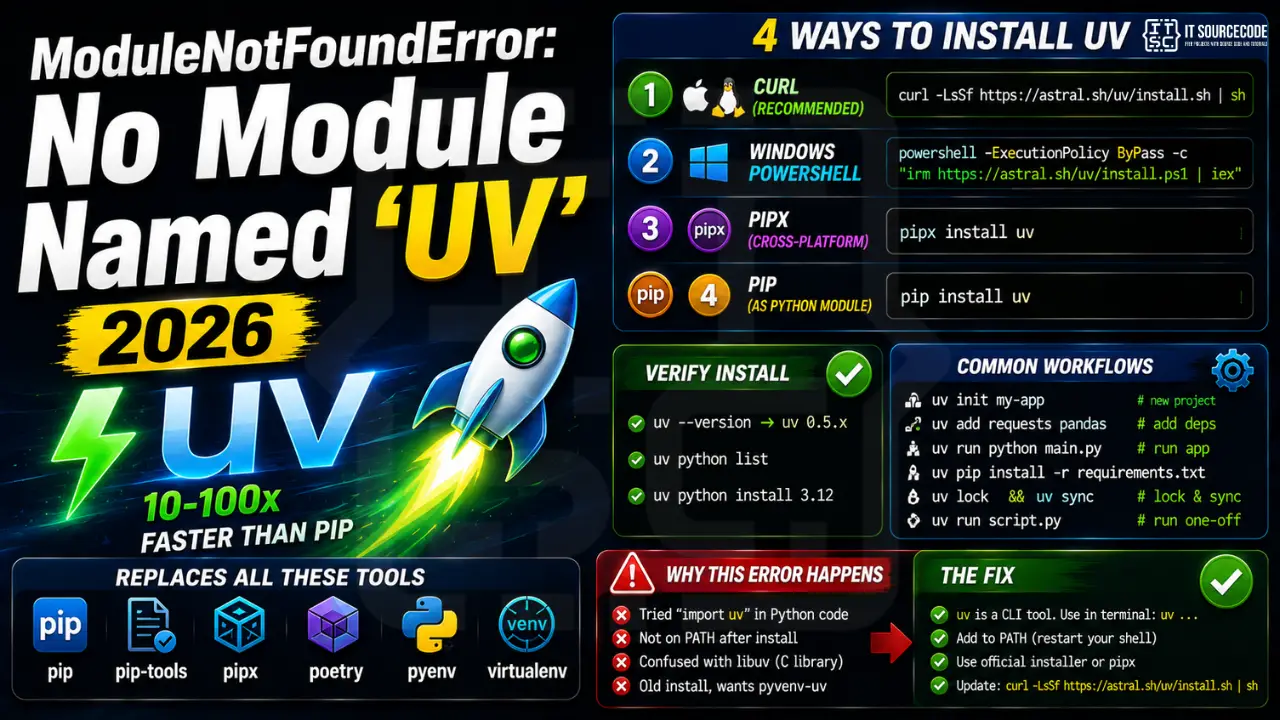
Step 1: Install uv (recommended methods)
# Linux / macOS (recommended, isolated install):
curl -LsSf https://astral.sh/uv/install.sh | sh

# Windows PowerShell:
powershell -ExecutionPolicy ByPass -c "irm https://astral.sh/uv/install.ps1 | iex"

# Or via pipx (cross-platform):
pipx install uv

# Or via pip (if you really want it as a Python module):
pip install uv
Step 2: Verify install
uv --version
# uv 0.5.x

uv python list   # show available Python versions
uv python install 3.12   # install a specific Python
Step 3: Common uv workflows
# Create a new project (pyproject.toml + .venv):
uv init my-app
cd my-app
uv add requests pandas
uv run python main.py

# Add packages to existing project:
uv add fastapi 'uvicorn[standard]'

# Install from requirements.txt (replaces pip):
uv pip install -r requirements.txt

# Sync exact versions (replaces pip-tools):
uv lock
uv sync

# Run a one-off script with deps inline (PEP 723):
uv run script.py
Why this error happens
| Cause | Fix |
|---|---|
| Tried “import uv” expecting a library | uv is a CLI tool, run as “uv …” in terminal |
| Installed but not on PATH | Restart shell, or add ~/.cargo/bin (Linux) / %USERPROFILE%\.local\bin (Win) |
| Confused with libuv (C async library) | Different project; Astral uv is what you want |
| Old install, wants pyvenv-uv | Update with: curl -LsSf https://astral.sh/uv/install.sh | sh |
Diagnostic checklist for “No module named ‘uv'”
- Verify pip install target. Run
pip show uv— if not installed, runpip install uv. - Check the active Python interpreter.
which python(mac/Linux) orwhere python(Windows). Both pip and python must point to the same environment. - Check virtual environment activation. If you use venv/conda, activate before installing:
source .venv/bin/activate. - Rule out uppercase/lowercase. Python imports are case-sensitive:
import PyPDF2notimport pypdf2. - Rule out the pip-vs-package-name mismatch. Some packages install under a different name than you import (e.g.
pip install beautifulsoup4→import bs4).
Installing uv — modern Python tooling
# Standard pip install
pip install uv

# uv (modern package manager) — install standalone
curl -LsSf https://astral.sh/uv/install.sh | sh

# Or via pip
pip install uv
uv pip install uv
Common causes for missing tooling modules
- Different install channel. uv, ruff, black often ship both as pip packages and standalone binaries.
- PATH not updated after standalone install. Rerun your shell or add
~/.local/binto PATH. - Global vs project install. Tools like ruff and mypy often run globally; pip installs to the current environment.
- pipx for CLI tools. Use
pipx install uvfor tools you want globally without polluting environments.
Working code example
# CLI check
# $ uv --version

# Module import check
import uv
print(uv.__version__)
Best practices
- Use pipx for developer tools. Keeps ruff, black, mypy out of project environments.
- Adopt uv. Massively faster than pip for dep resolution and installs.
- Configure in pyproject.toml. Modern tooling reads configuration from pyproject.toml.
Official documentation
Common uv installation issues by operating system
The ModuleNotFoundError: No module named uv message shows up differently depending on your OS. Here are the fixes I recommend by platform.
On macOS or Linux
Install uv via the official installer script: curl -LsSf https://astral.sh/uv/install.sh | sh. Then run source ~/.bashrc or restart your terminal so uv gets added to your PATH. Confirm with uv --version. If pip installed uv but your terminal cannot find it, your Python scripts directory is not on PATH.
On Windows
Use PowerShell: powershell -c "irm https://astral.sh/uv/install.ps1 | iex". If you installed via pip, make sure Python Scripts folder is in your PATH environment variable. Standard location is C:\Users\YOUR_NAME\AppData\Local\Programs\Python\Python312\Scripts.
On virtual environments
If you installed uv globally but you are inside a virtual environment (venv or conda), the venv may hide the global uv binary. Either install uv inside the venv (pip install uv) or exit the venv to use it. uv itself is fine to install globally since it manages other tools.
uv vs pip: when to use which
Both uv and pip install Python packages, but they serve different needs. Understanding the difference helps you pick the right tool for each project.
- Use uv when speed matters. uv is 10 to 100 times faster than pip at installing large dependency trees. For CI pipelines, Docker builds, and repeated fresh environments, uv wins.
- Use uv for reproducible builds. uv generates lockfiles that pin exact versions across platforms. This is the modern equivalent of pip-tools and Poetry, with better performance.
- Use pip when compatibility matters most. pip is universal. Every Python setup has it. If your team has not adopted uv yet, or you are working on a legacy project, pip is the safe choice.
- Use uv when you want a single tool. uv also handles Python version management (like pyenv) and virtual environments (like venv). One binary replaces three separate tools.
My recommendation for new projects in 2026: use uv. It has become the default in the Python community for good reason. For projects that already use pip and Poetry, stick with what works unless you have a specific speed problem.
Quick summary
The ModuleNotFoundError: No module named uv error means Python cannot find the uv binary in your current environment. Install it using the official installer script for your operating system. On macOS or Linux, use the curl command. On Windows, use PowerShell. After installation, restart your terminal and confirm with uv --version. For most projects, uv is faster and cleaner than pip. If you are new to Python packaging in 2026, uv is the modern default worth learning first.
Quick step-by-step summary (click to expand)
- Install uv via official installer. On macOS or Linux run the curl installer script from astral.sh. On Windows run the PowerShell installer.
- Restart your terminal. Close and reopen your terminal so the PATH updates with the new uv binary location.
- Verify with uv –version. Run uv –version to confirm uv is on your PATH and executable.
- Install per-project if needed. If working inside a venv that hides global uv, run pip install uv inside the venv.
Frequently Asked Questions
Why use uv instead of pip in 2026?
Speed: uv installs packages 10-100x faster than pip thanks to parallel downloads and a Rust-based resolver. It also bundles Python version management (replacing pyenv) and project management (replacing poetry). One tool, much less waiting.
Should I switch from poetry to uv?
For new projects in 2026, yes. uv has a near-identical pyproject.toml workflow, supports lockfiles, manages virtualenvs, and is dramatically faster. Existing poetry projects can usually be converted with: uv init –no-readme then uv add for each dep.
Does uv work with requirements.txt?
Yes. uv pip install -r requirements.txt is a drop-in replacement for pip install -r. You do not need to migrate to pyproject.toml just to use uv for speed.
Can uv install Python itself?
Yes. uv python install 3.12 downloads a portable Python build. uv automatically uses the right Python for each project based on pyproject.toml requires-python. Replaces pyenv for most users.
Is uv production-ready in 2026?
Yes. Reached 1.0-stable in late 2025. Used in major companies, including FastAPI, LangChain, and Polars CI pipelines. Backed by Astral (the team behind ruff). Open-source, MIT/Apache dual license.

Adrian Mercurio
Full-Stack Developer at PIES IT Solution
Adrian Mercurio is a full-stack developer at PIES IT Solution. Specializes in building complete capstone projects with full documentation. Strong background in PHP/MySQL development and database design. Has personally built and tested over 30 capstone-ready projects with ER diagrams, DFDs, and chapter-by-chapter thesis documentation.
Expertise: PHP, Laravel, Database Design, Capstone Projects, C#, C, C++, Python, AI Projects
· View all posts by Adrian Mercurio →