
TypedDict tells your type checker what keys to expect, but it does NOT enforce those keys at runtime. A TypedDict that should have name can still be missing it, and accessing user['name'] raises KeyError exactly like a regular dict.
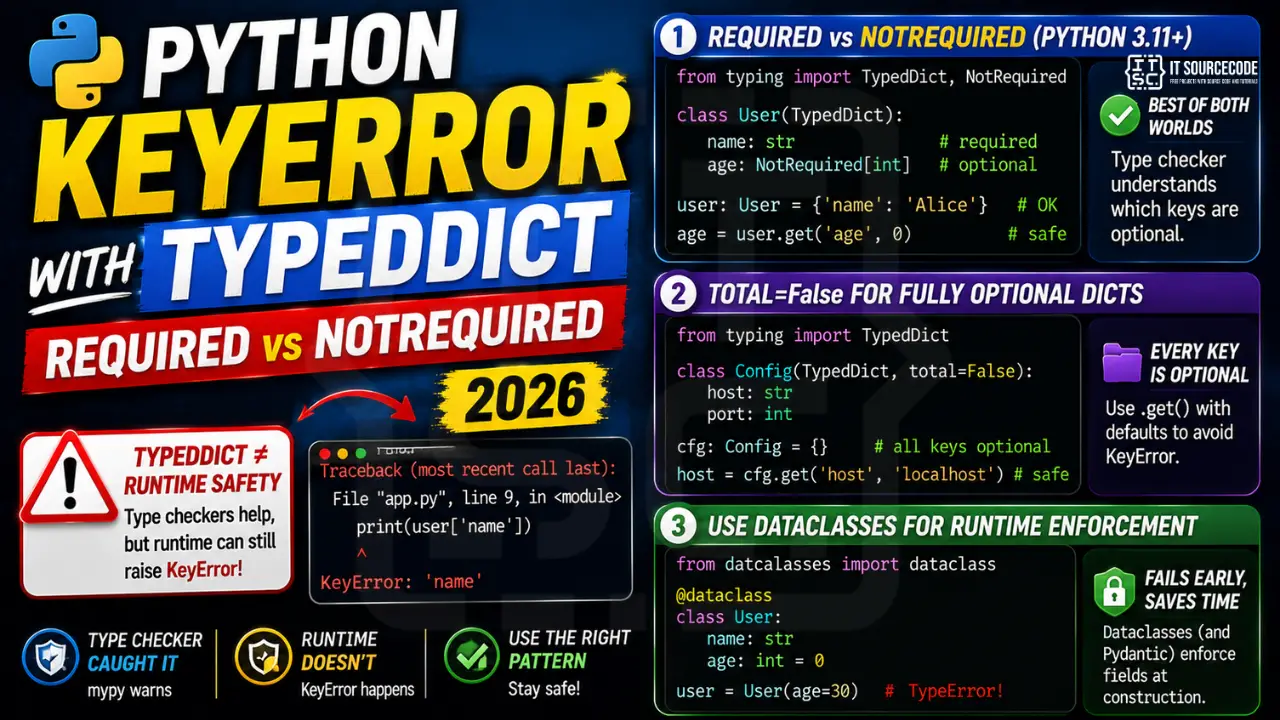
The minimal reproducer
from typing import TypedDict

class User(TypedDict):
    name: str
    age: int

user: User = {'age': 30}  # mypy warns but runtime is fine
print(user['name'])  # KeyError: 'name'
Pattern 1: Required vs NotRequired (Python 3.11+)
from typing import TypedDict, NotRequired

class User(TypedDict):
    name: str                    # required by default
    age: NotRequired[int]        # optional, mypy understands

user: User = {'name': 'Alice'}   # OK, age can be missing
age = user.get('age', 0)         # safe, KeyError-free
Pattern 2: total=False for fully optional dicts
class Config(TypedDict, total=False):
    host: str
    port: int

cfg: Config = {}  # all keys optional
host = cfg.get('host', 'localhost')
Pattern 3: Switch to dataclasses for runtime enforcement
from dataclasses import dataclass

@dataclass
class User:
    name: str
    age: int = 0

# This raises TypeError at construction if name is missing
user = User(age=30)  # TypeError: missing 1 required argument: 'name'
Dataclasses (and Pydantic models) check field presence at construction time, so missing required fields fail early instead of deep inside your code.
Debugging KeyError systematically
Before jumping to fixes, run through this diagnostic checklist. Nine times out of ten the answer surfaces here.
- Read the FULL traceback. The stack trace shows exactly which line and call chain triggered the error. Match the actual value to the expected value.
- Check Python version compatibility. APIs change between versions. Confirm your interpreter or runtime version supports the feature.
- Isolate in a minimal reproducer. Strip your code to the smallest snippet that triggers the error. This narrows the search space.
- Print state before the failing line. A single log statement often reveals the mismatch faster than reading the traceback.
- Search the exact error message. Someone else likely hit the same issue. Stack Overflow and GitHub Issues are your friends.
Common causes for KeyError
- Missing or uninitialized input. A variable was never set, or an API response did not contain the expected key.
- Type mismatch. Code expected one type but got another. Python’s dynamic nature means this surfaces at runtime.
- Version drift. A library API changed and your code assumes the old signature. Read the changelog.
- Environment differences. Works locally, fails in production. Compare environment variables, dependency versions, and platform.
- Race condition or ordering issue. Async code sometimes tries to access data before it is ready. Add awaits or locks.
Prevention practices
- Write tests that trigger the error path. A test that reproduces the error becomes a regression guard for the future.
- Validate inputs at API boundaries. Data entering from HTTP, files, or databases should be validated immediately.
- Use type hints and static analysis. Tools like mypy for Python or TypeScript for JavaScript catch type mismatches before runtime.
- Add structured logging. Log the operation context so post-mortem debugging is fast.
- Set up error monitoring. Sentry or similar captures production errors with stack traces automatically.
Production hardening for KeyError
- Wrap critical calls in try/except. Handle errors gracefully rather than letting them crash the process.
- Return meaningful error responses. A 400 with a clear message beats a 500 stack trace for API consumers.
- Log with context. Include user ID, request ID, and operation name in every error log.
- Alert on error rate spikes. A sudden increase in KeyError in production usually signals a deploy issue.
- Retry transient errors with backoff. Network errors and rate limits deserve automatic retries.
Real-world scenarios where this error surfaces
Understanding the context helps you spot the pattern faster in future projects. The same class of error tends to appear in similar situations.
- API endpoint receiving unexpected payload. A downstream service changed its response format. Your parser hit the missing field, and the error propagated.
- Environment variable not loaded. Local development had all variables set, but production is missing one. Runtime fails on the first access.
- Third-party library version bump. Semver-breaking changes in a dependency renamed a method or changed a parameter. Your unchanged code no longer compiles or runs.
- Race condition in async initialization. Code tried to use a resource before initialization completed. Often works on fast machines, fails on slow ones.
- Serialization mismatch. Data written in one format (JSON) is being read as another (Pickle or YAML). Deserialization discovers the mismatch.
Testing strategies for this error class
Preventing recurrence is more valuable than fixing a single instance. Build these into your test suite:
- Unit tests that trigger the error deliberately. Assert the correct error message and status code. Failing tests protect against regressions.
- Property-based testing. Tools like Hypothesis (Python) or fast-check (JavaScript) generate random inputs to find edge cases you would not think of.
- Integration tests with a mocked upstream service. Simulate the failure scenarios (500 errors, timeouts, malformed responses) to verify your code handles them gracefully.
- Load tests before deploying to production. Race conditions often only appear under load. Locust or k6 simulate realistic traffic.
- Chaos engineering. Tools like Gremlin inject faults (network partition, disk fill, high CPU) so you discover fragile assumptions before production does.
When to escalate vs solve yourself
Some errors are worth debugging for the learning. Others cost your team more than they teach. Escalate when:
- Blocking a customer-facing feature. Time to resolution matters more than teaching moments.
- You have spent an hour without progress. Fresh eyes see what you have missed. Post a question with a minimal reproducer.
- The error involves security or data integrity. Wrong fix here creates worse problems. Involve senior engineers early.
- You are unsure whether your fix introduces new bugs. Code review before merge is not optional for high-risk changes.
- The root cause seems to be in a dependency, not your code. File an issue on the dependency’s GitHub, and use a workaround in the meantime.
Documentation and further reading
When you finish fixing this error, invest a few minutes in the linked references. Understanding the underlying mechanism prevents you from hitting the same class of error next month with different symptoms. The official docs, MDN pages, and Node.js API reference all cover the runtime semantics that make this error preventable in future code. Bookmark them for the next debugging session and share with teammates who may hit similar issues.
Official documentation
Frequently Asked Questions
Does TypedDict raise an error at runtime if a required key is missing?
No. TypedDict is a type hint only. Missing required keys at runtime behave exactly like a regular dict and raise KeyError on bracket access. mypy and pyright catch this statically before runtime.
When was NotRequired added to TypedDict?
Python 3.11 (PEP 655). For earlier Python, use total=False to make every key optional, or split into two classes (RequiredFields and AllFields with inheritance).
Should I use TypedDict or Pydantic BaseModel?
TypedDict for zero-overhead type hints on existing dict data (no runtime cost). Pydantic for full runtime validation, JSON parsing, and serialization. TypedDict is faster, Pydantic is safer.
Can I check at runtime if a TypedDict has all required keys?
Use typing.get_type_hints(MyTypedDict).keys() then check membership: required = set(MyTypedDict.__required_keys__); if not required.issubset(data): raise ValueError. Available from Python 3.9+.
Does TypedDict work with JSON loading?
Yes, just annotate: data: MyType = json.loads(text). The annotation is for the type checker only; json.loads still returns a regular dict. For runtime validation of JSON, use Pydantic or msgspec.

Adrian Mercurio
Full-Stack Developer at PIES IT Solution
Specializes in building complete capstone projects with full documentation.
Expertise: PHP, Laravel, Database Design, Capstone Projects, C#, C, C++, Python, AI Projects · View all posts by Adrian Mercurio →