
You wrote [a[i] + b[i] for i in range(len(a))] and got IndexError because list b is shorter than a. Or you nested loops and the inner list had a different length than expected. List comprehensions don’t fail more often than regular loops, but the one-liner format hides the bug until runtime.
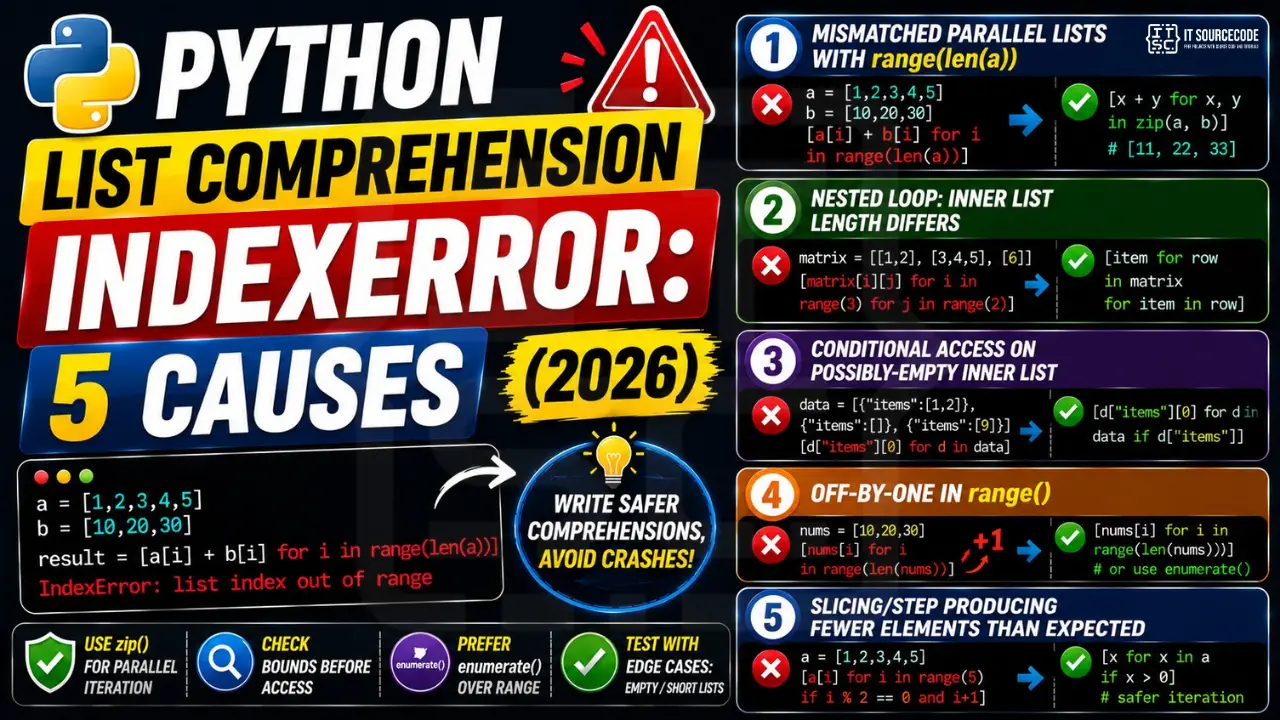
📌 Quick answer: Replace for i in range(len(a)) with zip(a, b) when iterating two lists in parallel. zip auto-stops at the shorter list. For positional access use enumerate. Both prevent the most common comprehension IndexError patterns.
Cause 1: Mismatched parallel lists with range(len(a))
The most common bug pattern.
a = [1, 2, 3, 4, 5]
b = [10, 20, 30]

# ❌ IndexError on b[3]
result = [a[i] + b[i] for i in range(len(a))]

# ✓ zip auto-stops at shorter list
result = [x + y for x, y in zip(a, b)]    # [11, 22, 33]
Cause 2: Nested loop accessing outer list by index
Common in 2D matrix code.
matrix = [[1, 2], [3, 4, 5], [6]]

# ❌ matrix[1] has 3 items, matrix[2] has 1
flat = [matrix[i][j] for i in range(3) for j in range(2)]

# ✓ iterate inner lists directly
flat = [item for row in matrix for item in row]
Cause 3: Conditional access on possibly-empty inner list
The conditional comes too late, after the index.
data = [{"items": [1, 2]}, {"items": []}, {"items": [9]}]

# ❌ data[1]["items"][0] doesn't exist
firsts = [d["items"][0] for d in data]

# ✓ guard inside the comprehension
firsts = [d["items"][0] for d in data if d["items"]]
Prevention
- Use zip() for parallel iteration, never
for i in range(len(a)) - Use enumerate(items) for “index + value” instead of range(len)
- Add an
ifclause inside comprehension to filter out empty/missing rows - Test with mismatched / empty inputs in unit tests
Related Guides
- List index out of range (full guide)
- String index out of range
- All IndexError fixes
- Python Tutorial hub
Quick step-by-step summary (click to expand)
- Add a length check inside the comprehension. Filter with an if clause: [items[i] for i in indices if i less than len(items)].
- Use itertools.compress for boolean-filtered access. For paired lists, list(compress(items, mask)) never raises IndexError on shorter mask.
- Use zip to bound iteration to shorter sequence. For paired access, zip(list_a, list_b) naturally stops at the shorter sequence.
- Break the comprehension into a for loop for debugging. Convert to a regular for loop temporarily to identify which iteration triggers IndexError. Then add the guard.
Why IndexError happens
List index out of range means you accessed my_list[i] beyond the list’s actual length. Python lists are indexed from 0 to len(list)-1.
Common triggers
- Off-by-one.
my_list[len(my_list)]fails — uselen(my_list) - 1. - Empty container.
my_list[0]fails when the list is empty. - Wrong data source. CSV had fewer columns than expected.
- Loop range wrong.
for i in range(len(my_list) + 1)— off-by-one. - API returned empty result. Unhandled empty response.
Diagnostic pattern
# BAD — accessing first element without check
def get_first(items):
    return items[0]     # IndexError if items is empty

# GOOD — guard for empty
def get_first(items):
    if not items:
        return None
    return items[0]

# BETTER — use Optional and let caller handle
from typing import Optional, Sequence, TypeVar
T = TypeVar("T")

def get_first(items: Sequence[T]) -> Optional[T]:
    return items[0] if items else None

# For pandas, use .iloc with .empty check
import pandas as pd
def first_row(df: pd.DataFrame) -> Optional[dict]:
    if df.empty:
        return None
    return df.iloc[0].to_dict()

# For enumerate-based loops, this is safe
for i, item in enumerate(items):
    print(i, item)      # never IndexError

# Never write: for i in range(len(items) + 1)
Best practices
- Prefer enumerate over range(len()). Never off-by-one.
- Guard empty containers. Return None or default before accessing.
- Use slicing.
items[:5]is safe even if items has fewer than 5 elements. - Use type hints with Optional. Communicates that the value may not exist.
- Use pytest with edge cases. Test empty lists, single-element lists, off-by-one boundaries.
Official documentation
Frequently Asked Questions
Why use zip() instead of range(len())?
zip auto-handles different-length inputs by stopping at the shorter one. range(len(a)) only knows about a’s length and will index out of b if b is shorter. zip is also more readable and Pythonic.
How do I iterate with index and value together?
Use enumerate(items): for i, v in enumerate(items). It’s cleaner than for i in range(len(items)) and avoids the IndexError trap when items length changes between iterations.
Can I add a try/except inside a list comprehension?
Not directly; comprehensions don’t support try/except. Refactor to a helper function: def safe(d, k): try: return d[k][0]; except (IndexError, KeyError): return None. Then [safe(d, ‘items’) for d in data].
How do I flatten a 2D list safely?
[item for row in matrix for item in row]. The two for clauses iterate the structure directly, no indexing required, never raises IndexError.
What’s the difference between zip and itertools.zip_longest?
zip stops at the shortest input. zip_longest continues to the longest, padding shorter inputs with a fillvalue (default None). Use zip when shorter is acceptable, zip_longest when you need every element from the longest.

Adrian Mercurio
Full-Stack Developer at PIES IT Solution
Specializes in building complete capstone projects with full documentation. Strong background in PHP/MySQL development and database design. Has personally built and tested over 30 capstone-ready projects with ER diagrams, DFDs, and chapter-by-chapter thesis documentation.
Expertise: PHP · Laravel · Database Design · Capstone Projects · C# · C · C++ · Python · AI Projects
· View all posts by Adrian Mercurio →