
You ran elements = soup.find_all("div", class_="price") and then elements[0].text, but the page returned no matching divs, so the list was empty and you got IndexError. Web scraping is full of this trap because HTML structure changes without warning.
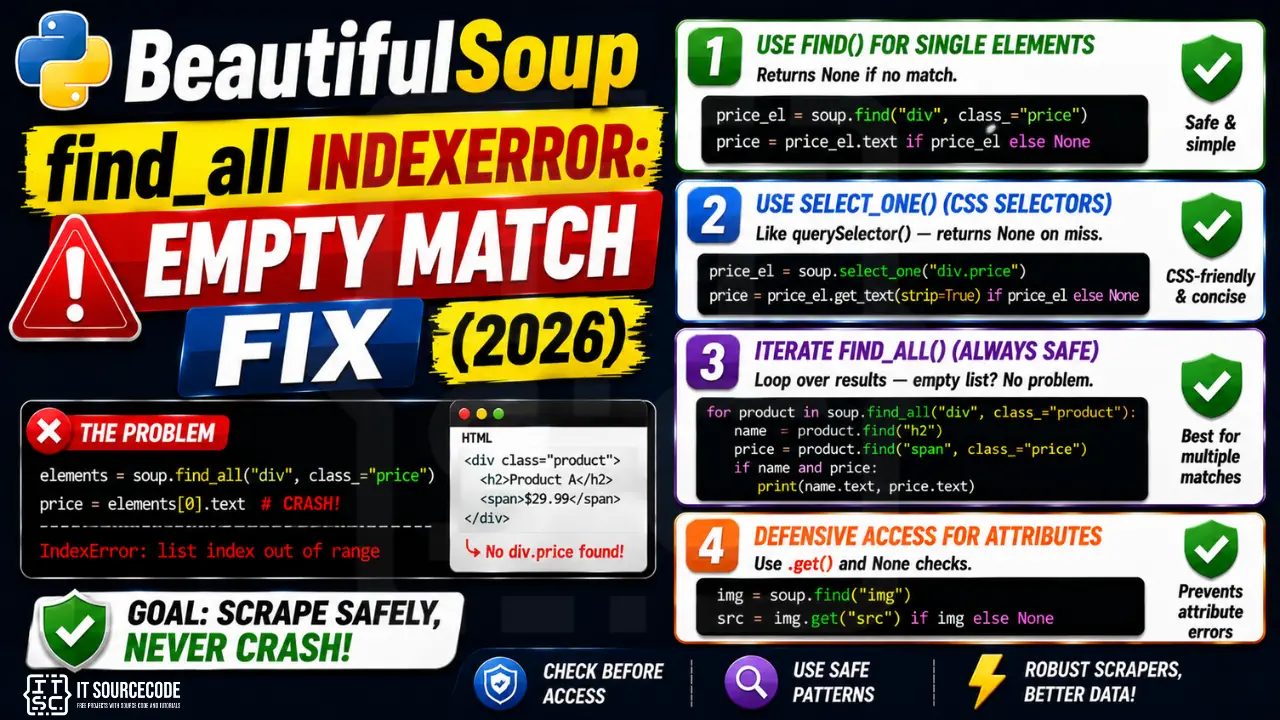
📌 Quick answer: Use soup.find(...) instead of soup.find_all(...)[0], find returns None on no match (instead of raising). Or use soup.select_one(...) for CSS-selector style. For multiple matches, iterate with for el in soup.find_all(...): which handles empty gracefully.
Pattern 1: Use find() for single elements
find() returns the first matching tag, or None if no match.
from bs4 import BeautifulSoup
soup = BeautifulSoup(html, "html.parser")

# ❌ Crashes if no .price element
price = soup.find_all("div", class_="price")[0].text

# ✓ find() returns None on no match
price_el = soup.find("div", class_="price")
price = price_el.text if price_el else None
Pattern 2: select_one for CSS selectors
Closer to JavaScript document.querySelector(). Same None-on-miss behavior as find().
price_el = soup.select_one("div.price")
if price_el:
    price = price_el.get_text(strip=True)
else:
    price = None
Pattern 3: iterate find_all (always safe)
The for loop over an empty list is a no-op, no IndexError possible.
for product in soup.find_all("div", class_="product"):
    name = product.find("h2")
    price = product.find("span", class_="price")
    if name and price:
        print(name.text, price.text)
Pattern 4: defensive helper for attribute access
Chained .find().attribute[“foo”] is fragile. Wrap with try/except or use .get() on attributes.
img = soup.find("img")
src = img.get("src") if img else None    # img.get("src") returns None on missing attr too
Prevention
- Default to find()/select_one() for single elements
- Iterate find_all() with for loop instead of indexing
- Always check element is not None before .text or attribute access
- Use .get(“attr”) on tags instead of tag[“attr”] (returns None on missing attr)
Related Guides
- List index out of range (full guide)
- String index out of range
- All IndexError fixes
- Python Tutorial hub
Quick step-by-step summary (click to expand)
- Check the find_all result length. Use results = soup.find_all(“div”) then if results: first = results[0] to guard access.
- Use find instead of find_all for single elements. soup.find(“div”) returns None on no match instead of an empty list. Check with if element is not None.
- Verify your selector matches the HTML. Print soup.prettify()[:2000] to see the actual HTML structure. Selectors that work in browser DevTools may not match the parsed HTML.
- Handle rate limiting and page redirects. Some sites return simplified HTML to bots. Check response.status_code and inspect the raw HTML before assuming your selector is wrong.
Why IndexError happens
List index out of range means you accessed my_list[i] beyond the list’s actual length. Python lists are indexed from 0 to len(list)-1.
Common triggers
- Off-by-one.
my_list[len(my_list)]fails — uselen(my_list) - 1. - Empty container.
my_list[0]fails when the list is empty. - Wrong data source. CSV had fewer columns than expected.
- Loop range wrong.
for i in range(len(my_list) + 1)— off-by-one. - API returned empty result. Unhandled empty response.
Diagnostic pattern
# BAD — accessing first element without check
def get_first(items):
    return items[0]     # IndexError if items is empty

# GOOD — guard for empty
def get_first(items):
    if not items:
        return None
    return items[0]

# BETTER — use Optional and let caller handle
from typing import Optional, Sequence, TypeVar
T = TypeVar("T")

def get_first(items: Sequence[T]) -> Optional[T]:
    return items[0] if items else None

# For pandas, use .iloc with .empty check
import pandas as pd
def first_row(df: pd.DataFrame) -> Optional[dict]:
    if df.empty:
        return None
    return df.iloc[0].to_dict()

# For enumerate-based loops, this is safe
for i, item in enumerate(items):
    print(i, item)      # never IndexError

# Never write: for i in range(len(items) + 1)
Best practices
- Prefer enumerate over range(len()). Never off-by-one.
- Guard empty containers. Return None or default before accessing.
- Use slicing.
items[:5]is safe even if items has fewer than 5 elements. - Use type hints with Optional. Communicates that the value may not exist.
- Use pytest with edge cases. Test empty lists, single-element lists, off-by-one boundaries.
Official documentation
Frequently Asked Questions
What’s the difference between find() and find_all() in BeautifulSoup?
find() returns the FIRST matching tag or None. find_all() returns a LIST of all matching tags (possibly empty). For single elements use find(); for multiple use find_all() with a for loop.
How do I check if a BeautifulSoup result is empty?
find() returns None on no match: ‘if el: el.text’. find_all() returns an empty list: ‘if elements: elements[0].text’ or just iterate. select_one() returns None like find().
Why does soup.find_all(‘div’)[0] sometimes fail?
When no div matches, find_all returns an empty list, and indexing [0] raises IndexError. Use soup.find(‘div’) which returns None instead, or iterate the result with for loop.
How do I safely get an attribute from a BeautifulSoup tag?
tag.get(‘attr’) returns None if missing (or your provided default). tag[‘attr’] raises KeyError on missing. Use tag.get() for safe access in web scraping where HTML structure varies.
Should I use bs4 find() or CSS selectors?
Personal preference + readability. CSS selectors (select, select_one) are concise for nested patterns: ‘div.product > h2’. find/find_all are more Pythonic for simple cases. Both have the same None-vs-empty-list semantics for missing matches.

Adrian Mercurio
Full-Stack Developer at PIES IT Solution
Specializes in building complete capstone projects with full documentation. Strong background in PHP/MySQL development and database design. Has personally built and tested over 30 capstone-ready projects with ER diagrams, DFDs, and chapter-by-chapter thesis documentation.
Expertise: PHP · Laravel · Database Design · Capstone Projects · C# · C · C++ · Python · AI Projects
· View all posts by Adrian Mercurio →