
Library Management System Project in VB.Net With Source Code
Library Management System Project in VB.Net is a student project. This project is created using Visual Basic 2008 with a LIBSOFT framework, and Microsoft Access as Database support.
A Libsoft is an integrated, multi-user, user-friendly Library Management Software Package.
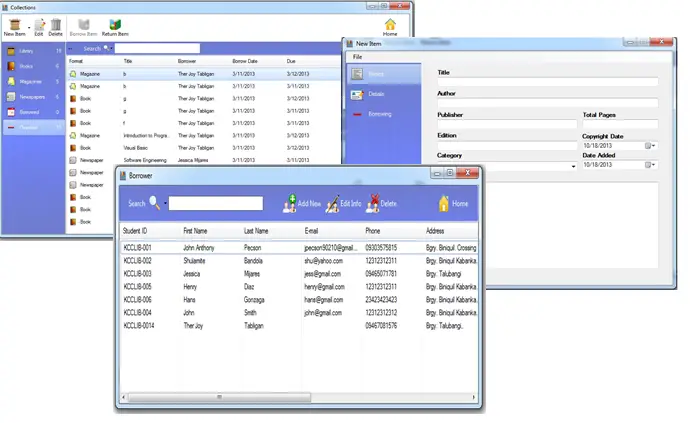
This library management system in vb.net helps to keep the records of whole transactions of the books available in the library.
You can find here the full details of what the library system is all about.
It has been an excellent performance in various schools, Colleges, universities, Special and Public Libraries.
Library Management System Project Features
Features of the Library Management System Project in VB.Net
- Book Management
This feature allows the librarian to manage the book such as adding, updating and, deleting book information.
- Magazines and Newspapers Management
The library has access to manage the information of Magazines and Newspapers.
- Library Borrowing System
By default, this System has the capability to manage the borrowing of Books.
- Transaction Monitoring Module
This feature of library management system can monitor the transaction especially the due dates and penalties of the borrower.
- User/Borrower Management Modules
With these features, the librarian of the library in charge can add and track borrower transactions to the system.
- Back-end user Management
This are the features where the administrator can register the user to use the system.
You can log in to this system using this account:
Username: admin
Password: admin123
Downloadable Source Code here.
Download the Library Management System Project in VB.Net Source code here.
Technology stack and requirements
To run this VB.NET project, you need the following on your development machine:
- Visual Studio 2019 or later. The free Community Edition is enough for building, debugging, and running the project.
- .NET Framework 4.7.2 or higher. Most Windows 10 and 11 systems have it preinstalled through Windows Update.
- MySQL Server 8.0 or MSSQL Express 2019. Choose whichever your capstone panel prefers; both work with VB.NET data adapters.
- MySQL Connector/NET or SqlClient library. Add via NuGet Package Manager inside Visual Studio.
- Crystal Reports (optional). Required only if the project generates printable reports; install the runtime redistributable.
Installing the source code
The download link contains a ZIP archive with the full solution. Extract and set up in five steps:
- Extract the archive to a folder outside Program Files (avoids permission issues).
- Open the .sln file in Visual Studio. It loads the full solution with all forms and modules.
- Restore NuGet packages. Right-click the solution then Restore NuGet Packages if prompted.
- Import the database. Locate the .sql file in the archive and import via phpMyAdmin (MySQL) or SQL Server Management Studio.
- Update the connection string in App.config or module code to match your local database name, user, and password.
How to use this project for your BSIT capstone
This VB.NET project maps cleanly to standard BSIT capstone documentation. Suggested chapter alignment:
- Chapter 1 (Introduction). Discuss the problem the system solves in real-world context. Cite Philippine business or academic use cases where a manual process could be replaced.
- Chapter 2 (Review of Related Literature). Compare this system’s features against 5-10 similar published projects. Cite journals like IJERT or IEEE Access for academic-standard sources.
- Chapter 3 (Methodology). Include Use Case Diagram, Data Flow Diagram, Entity Relationship Diagram, and Activity Diagram covering all major workflows in the system.
- Chapter 4 (Results and Discussion). Screenshot each module of the running system with a caption explaining what data it processes and which user role interacts with it.
- Chapter 5 (Conclusion and Recommendations). Identify features that could be added in a Version 2, such as web dashboard, mobile app, or REST API export.
Modules typical of Library Management System Project
- Student information. Personal info, guardian details, enrollment status, and program of study.
- Enrollment / registration. Term-by-term subject selection with prerequisite checking.
- Grading system. Teacher input for quiz, exam, and project scores with weighted average computation.
- Report card generation. Printable grade slip and transcript of records.
- Library / borrowing (optional). Track book borrowing, return date, and fine computation.
- Announcements and news. Post school-wide bulletins visible from the login screen.
Common enhancements for capstone review
- Online portal. Add ASP.NET web portal so parents and students see grades from home.
- SMS grade notification. Auto-send new-grade alerts to the parent’s registered mobile number.
- Digital ID card generation. Print student ID with photo, QR code, and academic year.
- Alumni tracking. Extend the database to include post-graduation contact info and current employer.
Official documentation
Frequently Asked Questions
How does this VB.NET library management system work?
Book catalog (ISBN, categories, copies), member registration, borrow/return workflow with due dates, fine calculation, reservations, reports.
What Visual Studio and SQL Server versions does this VB.NET project require?
Most projects use VB.NET WinForms on .NET Framework 4.5+ with SQL Server 2012 Express or higher. To run: install Visual Studio 2019 / 2022 (Community is free) with the ‘Desktop development with .NET’ workload, install SQL Server Express + SSMS, open the .sln file, build, run.
How do I set up the database for this VB.NET project?
Open SQL Server Management Studio (SSMS) and connect to your SQL Server (e.g. localhost\SQLEXPRESS). Right-click Databases, choose Restore Database OR New Database then import the included .sql script. Update the connection string in App.config (or in code-behind Module) with your server name + credentials. Rebuild and run.
Can I use this VB.NET project for a BSIT capstone or thesis?
Yes, VB.NET is one of the most accepted languages by Philippine BSIT panels. Extend it: add role-based access (admin/staff/customer login redirect), Crystal Reports or RDLC reports, dashboards with Chart control, audit log, multi-branch support. Pair with Chapter 1-5 documentation matching your panel’s rubric.
Why am I getting ‘connection error’ or ‘cannot find SQL Server’?
Three common VB.NET issues: (1) Connection error: SQL Server isn’t running. Open SQL Server Configuration Manager and verify SQL Server (SQLEXPRESS) service is started. (2) Wrong server name in connection string. Try .\SQLEXPRESS, (local)\SQLEXPRESS, or your machine name. (3) Login failed: SQL Server is set to ‘Windows-only’ authentication. Switch to Mixed Mode in SSMS Server Properties, Security.
Where can I find more VB.NET projects with source code?
Browse the VB.NET Projects hub for the full library. For C# WinForms alternatives see C# Projects. For ASP.NET web alternatives see ASP.NET Projects. For BSIT capstone idea lists see 150 Best Capstone Project Ideas.
Conclusion
This Library Project is created for student purposes only. You can download the full source code of this system and modify it to suit your client’s needs.
Freebies
If you are a student working for a thesis project for Information Technology or Computer Science and you want an idea on how to design a database for a Library Management System project in VB.net.
You can check it here: ER Diagram For Library Management System With Tables
*If you have any questions or suggestions about these projects, please leave a comment maybe we can help.

Joken E. Villanueva
Founder & Lead Developer at PIES IT Solution
Founder of PIES Information Technology Solutions, a software company building production-grade applications for institutions across the Philippines. Over 8 years of hands-on full-stack development experience, currently leading the development of ClinicAI, an AI-powered clinic management platform.
Expertise: PHP · MySQL · JavaScript · AI Integration · SaaS Architecture · VB.NET · Database Design · Capstone Documentation · Java
· View all posts by Joken E. Villanueva →
sir actually Im’n need of coding for library management system for visual studio-vb 2015.and say me how to connect the Backend in ms access and how to generate report…plzz reply me faster..
plz help me sir library management system project in vb.net full documentation send my email plz
email:
[email protected]
plz help me sir library management system project in vb.net full documentation send my email plz
email:[email protected]
Your program topics are good and i will like to join you to learn please bro.
sir pls i need the codes in library system for my final project hope you can help me..pls send to my email [email protected]
[email protected]
I’d like to join your circle
i need the code of library system plss help me
i need documentation of this project.library management system project in vb.net full documentation. my email
[email protected]
This project is amazing, introducing the paperless proccesses and making libraries smarter. please share this great project source code with me. Kind regards 🙂
This project is amazing, introducing the paperless proccesses and making libraries smarter. please share this great project source code with me. Kind regards ? my e-mail: rek1201 (AT) gmail.com
i need the design please
plese send me the dovumentation at [email protected]
please send me the documentation at [email protected]
please help me create a database in vb.net only without other program
please sent me the database of this project
Please help me.. i need the code..
Send me the the data base please..
[email protected]
Please help me.. i need the code..
Send me the the data base please..
[email protected]
Plz send me this project in vb 6.0
Plz
Send me this project sir….
[email protected]
sir i need this project, please send this to me. [email protected]
Please can i get Apartment Management project with vb.net documentation and source code with this email
plz help me sir library management system project in vb.net full documentation send my email plz
email:[email protected]
i need documentation of this project.library management system project full documentation. please help me
my email: [email protected] ty
plz i need the code will you snt it for me
[email protected]
Dear Sir Can you Send Me The Project Library
sir.its working fine sir.but i can’t add or edit users why???
GREAT! Please forward the code to my email [email protected]
Sir pls send library management project of VB.net with documentation and code
to this email [email protected] because there are interesting topics
i need of this project full documentation. my email
you’ll be a great help to me if you willing to share this project full documentation and code to my email [email protected] thankyou in advance sir.
Sir pls send library management project of VB.net with documentation and code
to this email [email protected]@gmail.com because there are interesting topics