
The File Management System using Django is designed and built a file management web application that allows users to add, edit, and remove files.
PDF, image, text, audio, and video files are all supported by the web application. Users should register themselves to upload static files, and stores files that have already been uploaded can be accessed without logging in.
The File Management System Project, user can add a title, definition, and upload the file in any of the compatible formats using the Add File feature.
The Edit File option helps you to make changes to the uploaded file.
The Delete File option allows users to remove types of files they’ve uploaded. The definition and descriptions of a user’s profile can be changed.
Any file and user on the application can be viewed, added, edited, and deleted using the Django Admin Interface.
This project, in my opinion, meets the capstone project’s requirements for uniqueness and complexity.
Read or visit also the other interesting programming language used in file management system.
- File Management System In PHP With Source Code
- File Management System In Java With Source Code
- File System Project In C++ With Source Code
To start creating a File System using Python Django, makes sure that you have PyCharm Professional IDE Installed apps in your computer.
This Project Django File Management System also includes a Download Source Code for free, just find the downloadable source code below and click download now.
| About Project | Project Details | Definition |
|---|---|---|
| Project Name | File Management System Project in Django | This File Management System Project in Django is created using Python Django programming language that can be used to build a file management system framework. The File Management System project is written in Python. We used Python Django and SQLITE to build the File Management System. |
| Python version (Recommended) | 3.8 Version | Python 3.8 introduces some new syntax to the language, as well as a few small modifications to existing behavior and, most importantly, a slew of performance improvements, following in the footsteps of the previous 3.7 version. |
| Programming Language Used | Python Django Language | Django is a high-level Python web framework for building safe and maintainable websites quickly. Django is a web framework built by experienced developers that takes care of a lot of the heavy lifting so you can focus on developing your app instead of reinventing the wheel. |
| Developer Name | itsourcecode.com | Free projects containing source code in Java, PHP, Python, Django, VB.Net, Visual Basic, C, C++, C#, Javascript, and other languages are available on this website. |
| IDE Tool (Recommended) | Sublime, Visual Studio, PyCharm | Sublime Text is a source code editor that is available for purchase. It comes with built-in support for a variety of programming and markup languages. Plugins, which are often community-built and maintained under free-software licenses, allow users to extend the functionality of the system. Sublime Text has a Python API to help with plugins. |
| Project Type | Web Application | A web application, unlike computer-based software programs that operate locally on the device’s operating system, is application software that runs on a web server. The user uses a web browser with an active network connection to access web apps. |
| Database | SQLite | SQLite is a programming language that is used to create embedded software for devices such as televisions, cell phones, and cameras. It can handle HTTP requests with low to medium traffic. SQLite has the ability to compress files into smaller bundles with less metadata. SQLite is a temporary dataset that is used within an application to process data. |
User Features of File Management System Project in Django
- User Registration – requires users to register to upload files, and files that have already been uploaded can be accessed without logging in.
- Add File – allows the user to add a title and description to the file, as well as upload it in any of the supported formats.
- Edit File – allows you to make adjustments to the file you’ve uploaded
- Delete File – enables the user to delete files they’ve uploaded. The definition and descriptions of a user’s profile can be edited.
File Management System Project in Django Steps on How to Create a Project
Time needed: 5 minutes
Here are the steps on how to create a Django File Management System
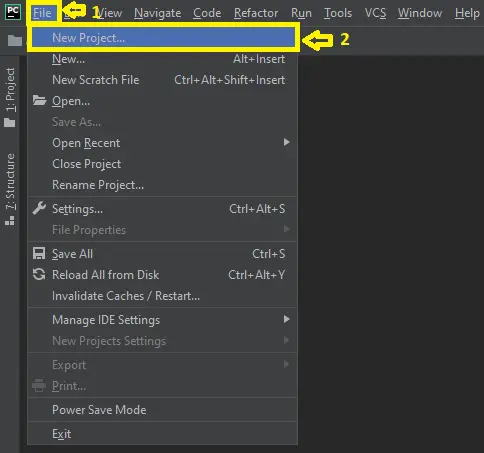
- Step 1: Open file.
First , open “pycharm professional” after that click “file” and click “new project”.

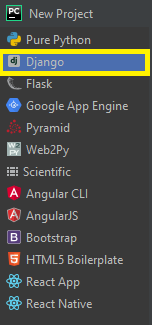
- Step 2: Choose Django.
Next, after click “new project“, choose “Django” and click.

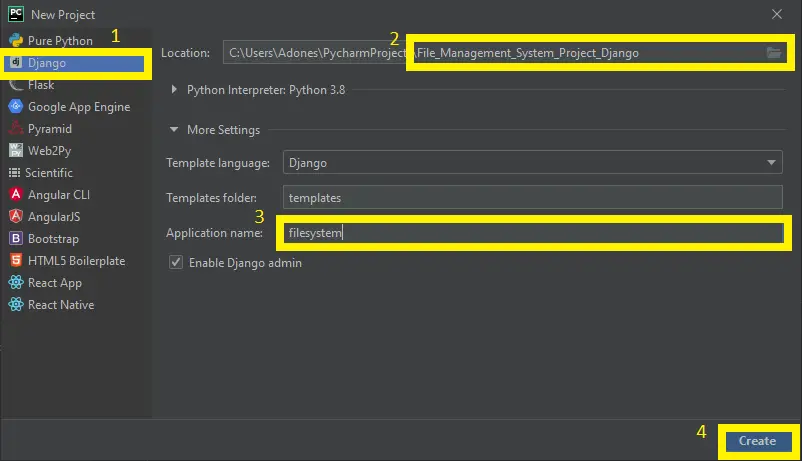
- Step 3: Select file location.
Then, select a file location wherever you want.

- Step 4: Create application name.
After that, name your application.

- Step 5: Click create.
Lastly, finish creating project by clicking “create” button.

- Step 6: Start Coding.
Finally, we will now start adding functionality to our Django Framework by adding some functional codes.


Downloadable Source Code Below.
Anyway, if you want to level up your programming knowledge, especially python, try this new article I’ve made for you Best Python Projects with source code for Beginners.
But If you’re going to focus on web development using Django, you can download here from our list of Best Django Projects with source code based on real-world projects.
How to run the File Management System Project in Django with Source Code?
Step 1: Extract/unzip the file
Step 2: Go inside the project folder, open cmd and type the following commands to install Django Framework and run the webserver:
• python manage.py runserver
Step 3: Finally, open the browser and go to http://127.0.0.1:8000/
Summary
In summary, this File Management System Project in Django with Source Code can be useful to students or professional who wants to learn python programming language.
This project can also be modified to fit your personal requirements. Hope this project will help you to improve your skills. Happy Coding!
Inquiries
If you have any questions or suggestions about File Management System Project in Django with Source Code, please feel free to leave a comment below.
Official documentation
Frequently Asked Questions
How does this Django management system work?
Standard Django MVT pattern: urls.py defines routes, views.py handles requests, models.py defines DB schema, templates render UI. CRUD on main entity, plus reports/dashboards. Django auth + groups for role-based access. Django admin available for back-office.
What Django and Python versions does this project require?
Most projects in this batch run on Django 4.x or 5.x with Python 3.8+. A few older projects need Django 3.2 with Python 3.7. Check the requirements.txt file for exact versions. To run any: install Python, create a virtualenv (python -m venv venv), activate it, pip install -r requirements.txt, run python manage.py migrate, then python manage.py runserver.
How do I set up the database for this Django project?
Most projects use SQLite (zero setup, auto-creates db.sqlite3 in project root on first migrate). For projects using MySQL or PostgreSQL: install the database server, create an empty database, edit settings.py DATABASES[‘default’] with your credentials, run python manage.py migrate. For sample data: python manage.py loaddata fixtures.json (if a fixture file is included) or create a superuser via python manage.py createsuperuser.
Can I use this Django project for a BSIT capstone or thesis?
Yes, but extend it. A bare CRUD app is too narrow for full capstone scope. Add: user roles via Django Groups, dashboards (Chart.js + AJAX endpoints), PDF exports (ReportLab or WeasyPrint), email notifications (Django send_mail), real domain extension (analytics, audit log, multi-branch). Pair with Chapter 1-5 documentation matching your panel’s rubric.
Why am I getting ModuleNotFoundError, OperationalError, or ‘No such table’ errors?
Three common Django startup issues: (1) ModuleNotFoundError: virtualenv not activated OR pip install -r requirements.txt skipped. (2) OperationalError: database credentials in settings.py don’t match your local MySQL/PostgreSQL. (3) ‘No such table’: you skipped python manage.py migrate. Also: if settings.py imports fail, check Python version compatibility (Django 5 needs Python 3.10+).
Where can I find more Django projects with source code?
Browse the Django Projects hub for the full library. For broader Python capstones see Python Projects (Tkinter desktop, Pygame games, OpenCV vision, ML). For PHP MVC alternatives see Laravel Projects. For BSIT capstone idea lists see 150 Best Capstone Project Ideas.

Adones Evangelista
Programmer & Technical Writer at PIES IT Solution
Adones Evangelista is a programmer and writer at PIES IT Solution, author of over 900 tutorials and error-fix guides at itsourcecode.com. Specializes in JavaScript, Django, Laravel, and Python error debugging covering ValueError, TypeError, AttributeError, ModuleNotFoundError, and RuntimeError, plus C/C++ and PHP capstone projects for BSIT students.
Expertise: JavaScript · Python · Django · Laravel · Error Debugging · C/C++ · View all posts by Adones Evangelista →