
The File Management System In Java is a document manager that helps you organize your files by keeping them all in one place.
This system allows you to conveniently manage and recover your files.
Any code editor, such as NetBeans or Eclipse, can be used to run this file.
The design is so simple that the person working on it will have no issue with it.
This File Management System Project In Java is beneficial for practicing Java development and gaining new skills.
This project is quite useful, and the concept and logic are simple to grasp.
The source code is open source and is free to use. Simply scroll down and click the download button.
Table of contents
- File Management System In Java : Project Output
- What Is File System Management In Java?
- Importance Of File Management System?
- Benefits Of File Management System
- About the Project : File Management System In Java With Source Code
- Project Details And Technology : File Management System In Java
- File Management System In Java : Steps On How To Run The Project
- Download Source Code below
- Summary
- Related Articles
- Inquiries
File Management System In Java : Project Output
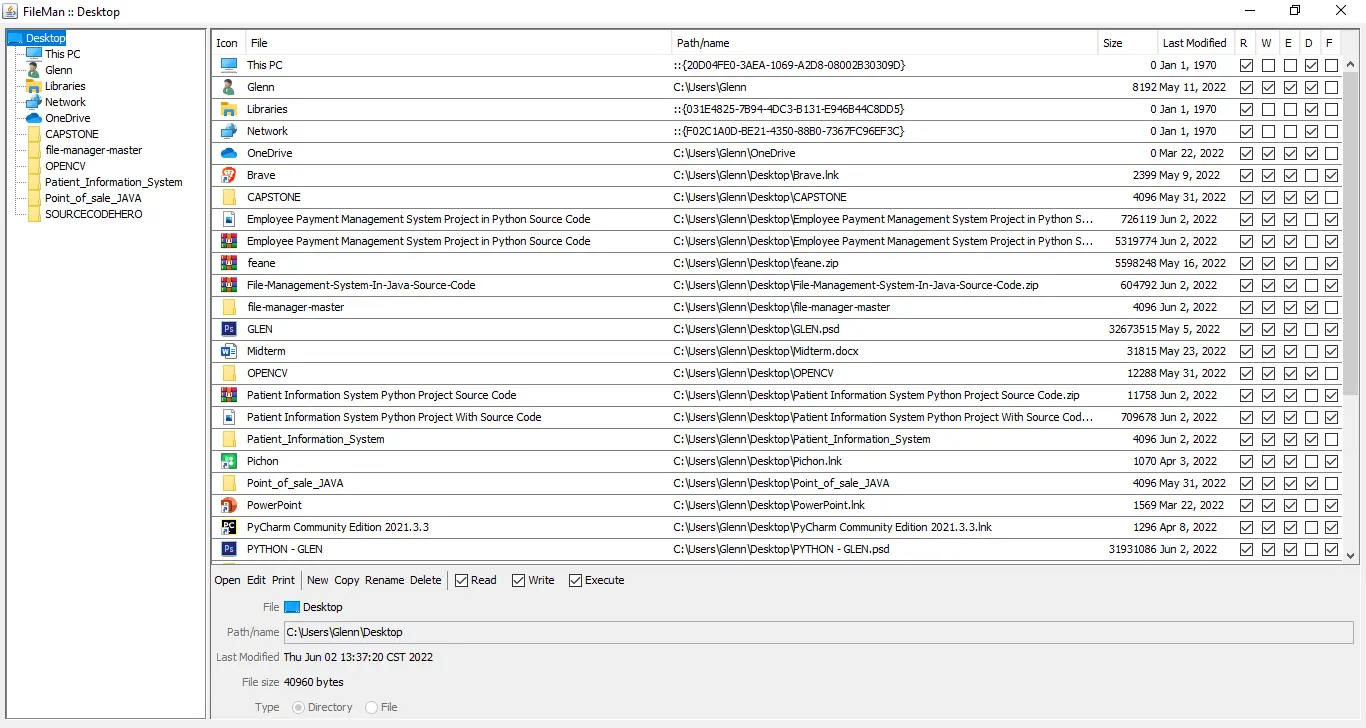
What Is File System Management In Java?
The File Management Java is used to keep files up to date, for example (or manage them).
It is a sort of computer software that aids in the management of computer data files.
This file management system is designed to assist individuals or groups of individuals in keeping track of their own or other files, such as special office documents and records.
It might display information such as who owns the report, when it was created, how far along it is, and other office-related information.
Importance Of File Management System?
This Java File Management is important because it lets you set limits, permissions, and roles for files.
This includes giving different levels of access to files and giving roles to specific users.
This increases efficiency because the right user gets the right file.
Benefits Of File Management System
- Budget friendly – File management system is very cost-effective because it is a digital filing system. Any kind of document that needs to be stored on paper can be stored digitally. So, there is no cost to building rents, buying cabinets, and buying physical papers.
- Security – The traditional way of storing files can’t match the level of security that the file management system offers. In fact, security is one of the reasons why many organizations like to use file management systems. Authentication methods, such as a username and password, are used to protect the documents that are stored in the file management system.
- Reliability – The information that is kept in a file management system is much more reliable than information that is kept on paper or in physical files. In contrast to traditional ways of storing data, files here are much less likely to be lost or damaged. With a file management system, you can completely avoid any damage caused by nature or human hands.
- Better method to protect your data and recover after a disaster – In the event of a disaster, any document management system should offer a backup and restoration feature. Paper documents are protected from fires, floods, and other disasters by using digital archiving as a backup. Documents may be found quickly and tracked using a variety of criteria with an FMS. Tracking capabilities make it less probable for a document to be misplaced or lost after it has been seen.
- Data Sharing – One of the most important parts of a file management system is the ability to share data. FMS makes it easy to share information with everyone in a very efficient way. Files can share the same information with more than one person at the same time.
About the Project : File Management System In Java With Source Code
The Document Management System In Java is a simple desktop application made with the Java programming language.
We can also make very interesting applications with the Java programming language. File Management System is one of these.
The project system file has both resource files and a Java code. The user interface of the system is smooth and easy to use.
This Document Management System Open Source Java includes a tutorial and a code development guide.
This is a simple and easy-to-understand little project to help you learn.
File Management System is open source, so you can download the zip file and change it to meet your needs.
You can also change this project to fit your needs and make a great project for an advanced level.
Project Details And Technology : File Management System In Java
| Project Name : | File Management System In Java |
| Abstract : | This File Management System In Java is a useful program that is meant to help IT students become better Java Developers. This system provides well organized data management. |
| Language Used : | Java |
| IDE Used : | NetBeans 11.2 |
| Type : | Desktop Application |
| Developer : | Glenn Magada Azuelo |
Anyway, if you want to level up your programming knowledge, especially Java, try this new article I’ve made for you Best Java Projects With Source Code For Beginners Free Download.
To start executing a File Management System In Java, makes sure that you have NetBeans IDE or any platform of Java installed in your computer.
File Management System In Java : Steps On How To Run The Project
Time needed: 5 minutes
These are the steps on how to run File Management System In Java
- Step 1: Download source code.
First, download the source code given below.

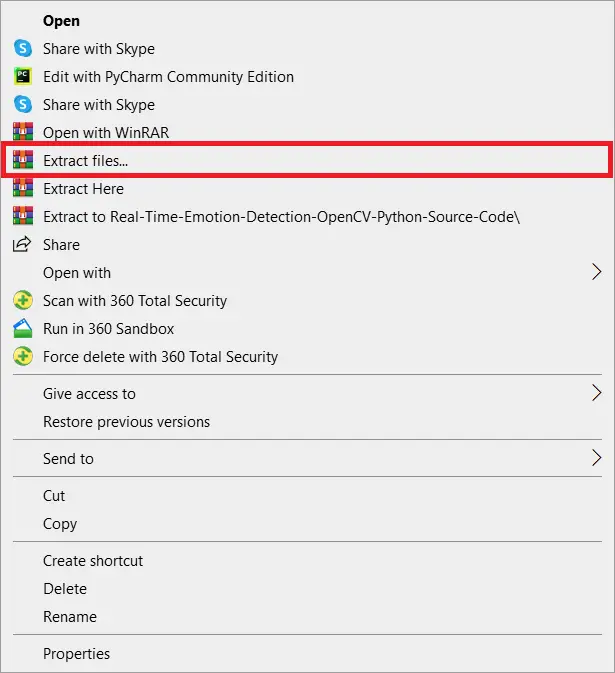
- Step 2: Extract file.
Second, after you finished download the source code, extract the zip file.

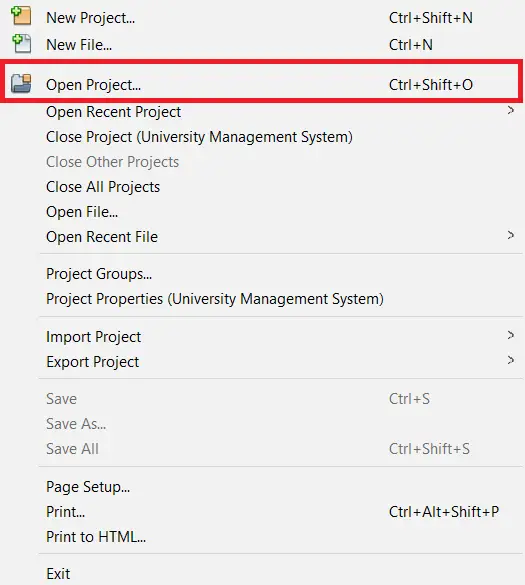
- Step 3: Click open project.
Third, open NetBeans IDE and click open project and choose your download source code.

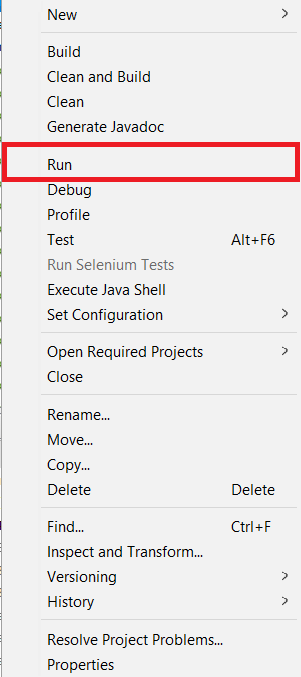
- Step 4: Run the project.
Last, right click the project folder and click run.


Download Source Code below
Summary
This System Project is a fully functional system that create using Graphical User Interface (GUI) in Java and connected to MySQL Database as the system’s back-end.
Related Articles
- Import CSV File In CodeIgniter With Source Code
- File Management System In C++ With Source Code
- CodeIgniter Download File From Database With Source Code
Inquiries
If you have any questions or suggestions about File Management System In Java With Source Code, please feel free to leave a comment below.
Official documentation
Frequently Asked Questions
How does this Java management system work?
Standard Java Swing architecture: JFrames with JTable for listings, JTextField / JComboBox / JDateChooser for input, JDBC parametrized SQL for data access, JasperReports for printable reports. MySQL backend. Foundation BSIT capstone scope.
What Java JDK and MySQL versions does this project require?
Most projects in this batch use Java JDK 8 or 11 with MySQL 5.7+ or MariaDB 10+. To run: install JDK (Adoptium / Oracle), install MySQL Server + MySQL Workbench, install NetBeans IDE (15+ supports modern JDK), open the project (.zip extracted folder), right-click + Open Project, add MySQL JDBC driver to Project Libraries, run.
How do I set up the database for this Java project?
Open MySQL Workbench (or phpMyAdmin if you have XAMPP), create a new empty database with the name specified in the project. Import the included .sql file via Server, Data Import in Workbench (or Import tab in phpMyAdmin). Update the connection class (usually DBConnection.java or DatabaseConnection.java) with your MySQL host, port, username, password, and database name.
Can I use this Java project for a BSIT capstone or thesis?
Yes, Java is one of the most accepted languages by Philippine BSIT panels. Extend it: add role-based access (admin/staff/customer login redirect), JasperReports printable reports, dashboards with JFreeChart, audit log, multi-branch support. Pair with Chapter 1-5 documentation matching your panel’s rubric.
Why am I getting ‘ClassNotFoundException: com.mysql.jdbc.Driver’ or ‘No suitable driver’?
Three common Java JDBC issues: (1) MySQL JDBC driver JAR not added to project Libraries. Right-click Project, Properties, Libraries, Add JAR/Folder, select mysql-connector-java-X.X.X.jar. (2) Wrong driver class name. Modern (8.0+) uses com.mysql.cj.jdbc.Driver, legacy (5.x) uses com.mysql.jdbc.Driver. (3) Connection URL missing serverTimezone parameter, add ?serverTimezone=UTC to the URL.
Where can I find more Java projects with source code?
Browse the Java Projects hub for the full library (120+ Java desktop systems). For modern Java web alternatives consider Spring Boot. For other desktop stacks see VB.NET Projects or C# Projects. For BSIT capstone idea lists see 150 Best Capstone Project Ideas.

Glenn Azuelo
Programmer & Technical Writer at PIES IT Solution
Glenn Azuelo is a programmer and writer at PIES IT Solution, author of 40+ PHP tutorials, Java capstone projects, and Python game guides at itsourcecode.com. Specializes in PHP built-in functions (string manipulation, arrays, filesystem, magic methods), Java Windows Forms projects for BSIT capstone (chat application, POS, faculty management, memory game), and Python game programming with Pygame (chess, blackjack, dice).
Expertise: PHP · PHP Tutorials · PHP Built-in Functions · PHP String Functions · PHP Array Functions · PHP Magic Methods · Java · Java Swing · Windows Forms · Python · Pygame · Capstone Projects · View all posts by Glenn Azuelo →