

This Courier Management System Project in Django is a Python-based project. Using Python, Django, and SQLite3 Database, we built a Courier Management System web application which can be used by an organization to track packages received.
A Courier Management System where the admin can enter receiver information such as name and id number.
After admin enters all the information, it will be stored in the database. The user can enter his/her above information and determine whether or not the package has arrived.
To start creating a Courier Management System Project in Python Django, makes sure that you have PyCharm Professional IDE Installed in your computer.
This Courier Management System in Django Framework, Also includes a Download Source Code for free, just find the downloadable source code below and click download now.
Checkout the related articles below.
- Courier Management System Project In PHP With Source Code
- Courier Management System Project In CodeIgniter With Source Code
- Courier Management System Project In Python With Source Code
- Database Design for Ordering and Delivery Management System
- Order Management System Project in Django with Source Code
| About Project | Project Details |
|---|---|
| Project Name | Courier Management System Project in Django |
| Python version (Recommended) | 3.8 Version |
| Programming Language Used | Python Django Language |
| Developer Name | itsourcecode.com |
| IDE Tool (Recommended) | Sublime, Visual Studio, PyCharm |
| Project Type | Web Application |
| Database | SQLite |
Admin Features of Courier Management System Project in Django
- Manage User– For the user, The admin admin can view, add, edit and delete user information
- Manage Courier– For the courier, The admin can add, edit and delete courier information.
- Login – By default the student need to login first to enable to access the system.
- Change Password– For the change password, The admin can change a password for better security.
Courier Management System Project in Django Steps on How to Create a Project
Time needed: 5 minutes
Here are the steps on how to create a Courier Management System Project in Django.
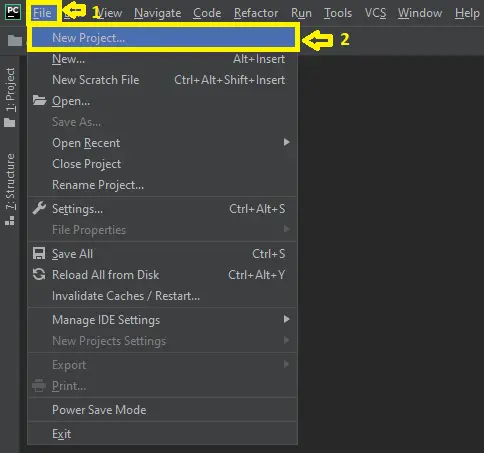
- Step 1: Open file.
First , open “pycharm professional” after that click “file” and click “new project”.

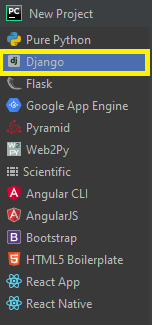
- Step 2: Choose Django.
Next, after click “new project“, choose “Django” and click.

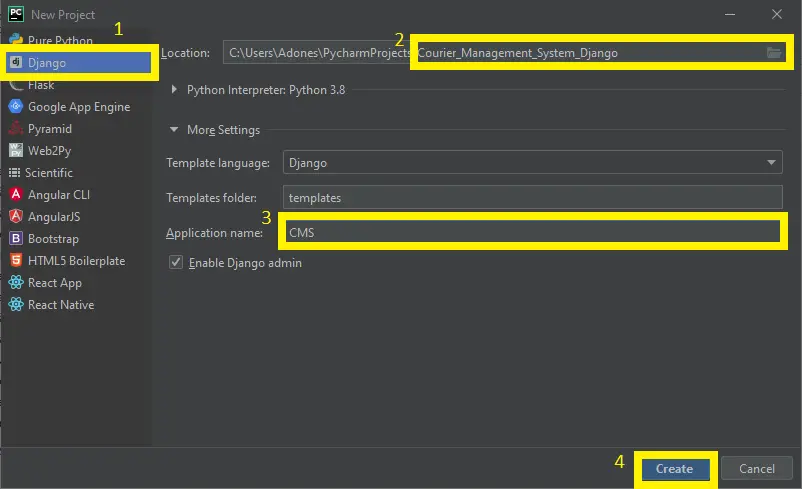
- Step 3: Select file location.
Then, select a file location wherever you want.

- Step 4: Create application name.
After that, name your application.

- Step 5: Click create.
Lastly, finish creating project by clicking “create” button.

- Step 6: Start Coding.
Finally, we will now start adding functionality to our Django Framework by adding some functional codes.


Functionality and Codes of the Courier Management System Project in Django
- Create template for the login in form
In this section, we will learn on how create a templates for the login form. To begin with, add the following code in your home.html under the folder of couriermanage/templates/.
<!DOCTYPE html>
<html>
<head>
	<meta name="viewport" content="width=device-width, initial-scale=1, shrink-to-fit=no">
	{% if title %}
		<title>ITSOURCECODE-CMS - {{ title }}</title>
	{% else %}
		<title>ITSOURCECODE-CMS</title>
	{% endif %}
</head>
<link rel="stylesheet" href="https://stackpath.bootstrapcdn.com/bootstrap/4.4.1/css/bootstrap.min.css" integrity="sha384-Vkoo8x4CGsO3+Hhxv8T/Q5PaXtkKtu6ug5TOeNV6gBiFeWPGFN9MuhOf23Q9Ifjh" crossorigin="anonymous">
<style type="text/css">
	fieldset {
		margin-right: 700px;
		margin-left: 700px;
	}
	h1	{
		font-family: "amrita";
	}
</style>
<body class="bg-info">
	{% if messages %}
		{% for message in messages %}
			<div>
				{{ message }}
			</div>
		{% endfor %}
	{% endif %}
	<h1 style="margin-top: 60px; background-color: darkblue;"><b class="text-white"><center>Itsourcecode Courier Management System</b><a href="{% url 'about' %}"></a></center></h1><br>
	<div style="margin-top: 110px";>
		<p><center>Login Using Your Id Number.</center></p><br>
		<div>
			<center>
			<div>
				<legend>
				<form method="POST">
					{% csrf_token %}
					<fieldset>
						{{ form.as_p }}
					</fieldset>
					<div>
						<button class="btn btn-success pull-left" type="submit">Login</button>
					</div>
				</form>
				</legend>
			</div><br><br>
			<p>Not yet Registered? <a href="{% url 'register' %}">Register now!</a></p>
			<p>Are you an admin? <a href="{% url 'admin:login' %}">click here</a></p><br>
			</center>
		</div>
	</div>
</body>
</html>- Create template for the registration form
In this section, we will learn on how create a templates for the registration form. To start with, add the following code in your register.html under the folder of /templates/couriermanage.
{% block content %}
<body style="background-color: skyblue">
	<div class="content-section" style="margin-left: 130px; background-color: darkblue; color: white;">
		<form method="POST">
			{% csrf_token %}
			<fieldset class="form-group">
				<legend>ICMS-REGISTRATION</legend>
				<p>*NOTE Username is your Id Number</p>
				{{ form.as_p }}
			</fieldset>
			<div class="form-group">
				<button class="btn btn-outline-info" type="submit">Sign up</button>
			</div>
		</form>
		<div class="border-top pt-3">
			<small class="text-muted">
			Already have an account? <a class="ml-2" href="{% url 'service-home' %}" style="color: white;">Sign in</a>
		</small>
		</div>
	</div>
	</body>
{% endblock content %}- Create template for the about us form
In this section, we will learn on how create a templates for the create about us. To start with, add the following code in your about.html under the folder of couriermanage/templates/.
{% extends "couriermanage/base.html" %}
{% block content %}
	<center><h3>Courier management is the process of planning and executing last-mile delivery for packages and goods. Courier managers are responsible for scheduling order deliveries, assigning them to couriers, overseeing operations while couriers are in the field, and suggesting strategic improvements for future planning.</h3></center>

{% endblock content %}- Create template for the user homepage
In this section, we will learn on how create a templates for the user homepage. To start with, add the following code in your main.html under the folder of couriermanage/templates/.
{% extends "couriermanage/base.html" %}
{% block content %}
<style type="text/css">
</style>
  <h1 style="padding-left: 20px;">Welcome :)</h1><br>
  <h5 style="padding-left: 20px;">Please visit room number s-004 to collect your package.</h5>
  <h5 style="padding-left: 20px;">Packages recieved as of now: </h5><br>
  {% if page_obj %}
    <ol>
      {% for courier in page_obj %}
      <div class="card" style="width: 25rem;">
        <div class="card-body" style="padding-left: 45px;">
          <li>
            <h5 class="card-title">{{ courier.name }}</h5>
            <h6 class="card-subtitle mb-2 text-muted">{{ courier.student_rollno }}</h6>
            <p class="card-text">date recieved: {{ courier.date_recieved }}</p>
            <p class="card-text">service: {{ courier.service }}</p>
          </li>
        </div>
      </div><br>
      {% endfor %}
    </ol>
    <nav aria-label="Page navigation example">
      <ul class="pagination justify-content-center">
        {% if page_obj.has_previous %}
        <li class="page-item"><a class="page-link" href="?page={{ page_obj.previous_page_number }}">Previous</a></li>
        {% endif %}
        <li class="page-item"><a class="page-link" href="?page={{ page_obj.number }}">Page {{ page_obj.number }} of {{ page_obj.paginator.num_pages }}</a></li>
        {% if page_obj.has_next %}
        <li class="page-item"><a class="page-link" href="?page={{ page_obj.next_page_number }}">Next</a></li>
        {% endif %}
      </ul>
    </nav>
  {% else %}
    <center>
    <div style="margin-top: 170px">
      <h4>Could'nt find any packages for you.<br>Make sure you typed your roll number correct.</h3>
    </div>
    </center>
  {% endif %}
{% endblock content %}
Downloadable Source Code Below.
Anyway, if you want to level up your programming knowledge, especially python, try this new article I’ve made for you Best Python Projects with source code for Beginners.
But If you’re going to focus on web development using Django, you can download here from our list of Best Django Projects with source code based on real-world projects.
How To Run The Courier Management System in Django?
- Step 1: Extract/unzip the file
- Step 2: Go inside the project folder, open cmd and type the following commands to install Django Framework and run the webserver:
- pip install -r requirements.txt
- python manage.py migrate
- python manage.py runserver
- Step 3: Finally, open the browser and go to http://127.0.0.1:8000/
Summary
In summary, this Courier Management System in Django with Source Code can be useful to students or professional who wants to learn python programming language.
This project can also be modified to fit your personal requirements. Hope this project will help you to improve your skills. Happy Coding!
Inquiries
If you have any questions or suggestions about Courier Management System in Django with Source Code, please feel free to leave a comment below.
Official documentation
Frequently Asked Questions
How does this Django management system work?
Standard Django MVT pattern: urls.py defines routes, views.py handles requests, models.py defines DB schema, templates render UI. CRUD on main entity, plus reports/dashboards. Django auth + groups for role-based access. Django admin available for back-office.
What Django and Python versions does this project require?
Most projects in this batch run on Django 4.x or 5.x with Python 3.8+. A few older projects need Django 3.2 with Python 3.7. Check the requirements.txt file for exact versions. To run any: install Python, create a virtualenv (python -m venv venv), activate it, pip install -r requirements.txt, run python manage.py migrate, then python manage.py runserver.
How do I set up the database for this Django project?
Most projects use SQLite (zero setup, auto-creates db.sqlite3 in project root on first migrate). For projects using MySQL or PostgreSQL: install the database server, create an empty database, edit settings.py DATABASES[‘default’] with your credentials, run python manage.py migrate. For sample data: python manage.py loaddata fixtures.json (if a fixture file is included) or create a superuser via python manage.py createsuperuser.
Can I use this Django project for a BSIT capstone or thesis?
Yes, but extend it. A bare CRUD app is too narrow for full capstone scope. Add: user roles via Django Groups, dashboards (Chart.js + AJAX endpoints), PDF exports (ReportLab or WeasyPrint), email notifications (Django send_mail), real domain extension (analytics, audit log, multi-branch). Pair with Chapter 1-5 documentation matching your panel’s rubric.
Why am I getting ModuleNotFoundError, OperationalError, or ‘No such table’ errors?
Three common Django startup issues: (1) ModuleNotFoundError: virtualenv not activated OR pip install -r requirements.txt skipped. (2) OperationalError: database credentials in settings.py don’t match your local MySQL/PostgreSQL. (3) ‘No such table’: you skipped python manage.py migrate. Also: if settings.py imports fail, check Python version compatibility (Django 5 needs Python 3.10+).
Where can I find more Django projects with source code?
Browse the Django Projects hub for the full library. For broader Python capstones see Python Projects (Tkinter desktop, Pygame games, OpenCV vision, ML). For PHP MVC alternatives see Laravel Projects. For BSIT capstone idea lists see 150 Best Capstone Project Ideas.

Adones Evangelista
Programmer & Technical Writer at PIES IT Solution
Adones Evangelista is a programmer and writer at PIES IT Solution, author of over 900 tutorials and error-fix guides at itsourcecode.com. Specializes in JavaScript, Django, Laravel, and Python error debugging covering ValueError, TypeError, AttributeError, ModuleNotFoundError, and RuntimeError, plus C/C++ and PHP capstone projects for BSIT students.
Expertise: JavaScript · Python · Django · Laravel · Error Debugging · C/C++ · View all posts by Adones Evangelista →
Thanks alot for these interestig projects here at it sourcecode but i have an issue with the courrier project i can not install the django packages with pip install -r in the folder directory.
Regards