

The Courier Management System Project In Python created using Graphical User Interface (GUI) Tkinter and connected into database using SQLlite3.
This project is good for the beginners or the students who wants to learn programming, specially Python Programming Language.
Project Information’s
| Project Name: | Courier Management System In Python |
| Language/s Used: | Python (GUI) Based |
| Python version (Recommended): | 2.x or 3.x |
| Database: | None |
| Type: | Python App |
| Developer: | IT SOURCECODE |
| Updates: | 0 |
About The Project
A Courier Management System In Python has a create account form and login page, under the creating account module includes such as username, password, reg. no, gender, mobile number and email id. and after the user create their account, the user can login now to the system and monitor their items.
This Courier Management System Project also includes a downloadable Project With Source Code for free, just find the downloadable source code below and click to start downloading.
By the way if you are new to python programming and you don’t know what would be the the Python IDE to use, I have here a list of Best Python IDE for Windows, Linux, Mac OS that will suit for you. I also have here How to Download and Install Latest Version of Python on Windows.
To start executing this project, make sure that you have installed Python 3.9 and PyCharm in your computer.
Steps on How To Run The Courier Management System Project
Time needed: 5 minutes
These are the steps on how to run Courier Management System Project In Python With Source Code
- Step 1: Download the given source code below.
First, download the given source code below and unzip the source code.

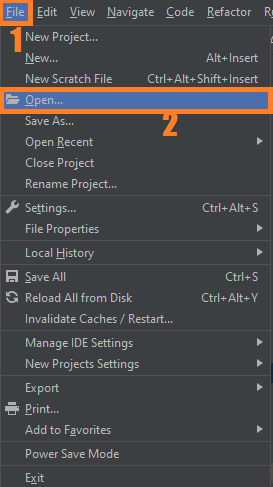
- Step 2: Import the project to your PyCharm IDE.
Next, import the source code you’ve download to your PyCharm IDE.

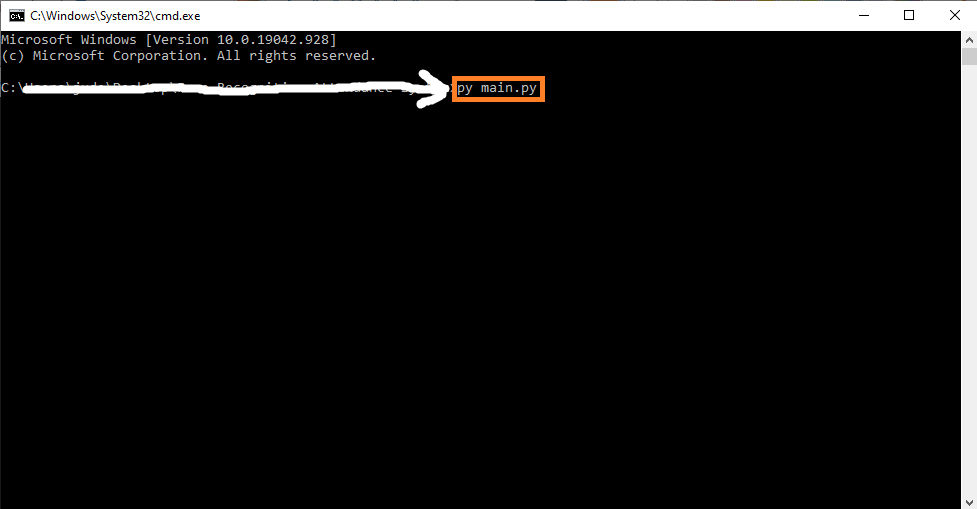
- Step 3: Run the project.
last, run the project with the command “py main.py”

Installed Libraries
from tkinter import *
from tkinter import messagebox as ms
from tkinter import ttk
import sqlite3
import random
from tkinter import Button
Complete Source Code
from tkinter import *
from tkinter import messagebox as ms
from tkinter import ttk
import sqlite3
import random
from tkinter import Button

# Database
import button as button

with sqlite3.connect('Akash5.db') as db:
    c = db.cursor()
try:
    c.execute('CREATE TABLE IF NOT EXISTS user (username TEXT NOT NULL ,password TEX  NOT NULL,mobile TEX NOT NULL);')
except:
    pass
db.commit()
db.close()


class main:
    def __init__(self,master):

        self.master = master

        self.username = StringVar()
        self.password = StringVar()
        self.n_username = StringVar()
        self.n_password = StringVar()
        self.n_reg=StringVar()
        self.n_mobile=StringVar()
        self.mobile11=StringVar()
        self.widgets()


    def login(self):

        with sqlite3.connect('Akash5.db') as db:
            c = db.cursor()


        #Find user If there is any take proper action
        find_user = ('SELECT * FROM user WHERE username = ? and password = ?')
        c.execute(find_user,[(self.username.get()),(self.password.get())])
        result = c.fetchall()

        if result:
            self.track()
        else:
            ms.showerror('Oops!','Username Not Found.')

    def new_user(self):


        with sqlite3.connect('Akash5.db') as db:
            c = db.cursor()
        if self.n_username.get()!=' ' and self.n_password.get()!=' ' and self.n_mobile.get()!=' ':
            find_user = ('SELECT * FROM user WHERE username = ?')
            c.execute(find_user,[(self.n_username.get())])

            if c.fetchall():
                    ms.showerror('Error!','Username Taken Try a Diffrent One.')
            else:
                    insert = 'INSERT INTO user(username,password,mobile) VALUES(?,?,?)'
                    c.execute(insert,[(self.n_username.get()),(self.n_password.get()),(self.n_mobile.get())])
                    db.commit()

                    ms.showinfo('Success!','Account Created!')
                    self.log()
        else:
             ms.showerror('Error!','Please Enter the details.')


    def consignment(self):


        try:
            with sqlite3.connect('Akash5.db') as db:
                c = db.cursor()


            #Find user If there is any take proper action
            find_user = ('SELECT * FROM user WHERE mobile= ?')
            c.execute(find_user,[(self.mobile11.get())])
            result = c.fetchall()

            if result:
                    self.track()
                    self.crff.pack_forget()
                    self.head['text'] = self.username.get() + '\n Your Product Details'
                    self.consi.pack()
            else:
                    ms.showerror('Oops!','Mobile Number Not Found.')
        except:
            ms.showerror('Oops!','Mobile Number Not Found.')


    def track1(self):
        self.consi.pack_forget()
        self.head['text'] = self.username.get() + '\n Track your Product'
        self.crff.pack()
    def log(self):
        self.username.set('')
        self.password.set('')
        self.crf.pack_forget()
        self.head['text'] = 'Login'
        self.logf.pack()

    def cr(self):
        self.n_username.set('')
        self.n_password.set('')
        self.logf.pack_forget()
        self.head['text'] = 'Create Account'
        self.crf.pack()

    def track(self):
             self.logf.pack_forget()
             self.head['text'] = self.username.get() + '\n Track your Product'

             self.crff.pack()


    def widgets(self):
        self.head = Label(self.master,text = 'LOGIN',font = ('',20),pady = 10)
        self.head.pack()


        self.logf = Frame(self.master,padx =10,pady = 10)

        self.logf.configure(background='lightblue')
        #PhotoImage(self.logf,file = 'lpu_logo.png')
        Label(self.logf,text = 'Username: ',font = ('',15),pady=5,padx=5).grid(sticky = W)
        Entry(self.logf,textvariable = self.username,bd = 3,font = ('',15)).grid(row=0,column=1)
        Label(self.logf,text = 'Password: ',font = ('',15),pady=5,padx=5).grid(sticky = W)
        Entry(self.logf,textvariable = self.password,bd = 3,font = ('',15),show = '*').grid(row=1,column=1)
        Button(self.logf,text = ' Login ',background='lightgrey',bd = 2 ,font = ('',13),padx=6,pady=6,command=self.login).grid(row=8,column=0)
        Button(self.logf,text = ' New user ',background='lightgrey',bd = 2 ,font = ('',13),padx=6,pady=6,command=self.cr).grid(row=8,column=1)

        self.logf.pack()

        self.crf = Frame(self.master,padx =10,pady = 10)
        Label(self.crf,text = 'Username: ',font = ('',15),pady=5,padx=5).grid(sticky = W)
        Entry(self.crf,textvariable = self.n_username,bd = 3,font = ('',15)).grid(row=0,column=1)

        Label(self.crf,text = 'Password: ',font = ('',15),pady=5,padx=5).grid(sticky = W)
        Entry(self.crf,textvariable = self.n_password,bd = 3,font = ('',15),show = '*').grid(row=1,column=1)

        Label(self.crf,text = 'Reg No.: ',font = ('',15),pady=5,padx=5).grid(sticky = W)
        Entry(self.crf,textvariable = self.n_reg,bd = 3,font = ('',15)).grid(row=2,column=1)
        Label(self.crf,text = 'Gender: ',font = ('',15),pady=5,padx=5).grid(sticky = W)
        var = IntVar()
        R1 = Radiobutton(self.crf, text="Male", variable=var, value=1).grid(sticky=W)

        R2 = Radiobutton(self.crf, text="Female", variable=var, value=2 ).grid(row=4,column=1)
        Label(self.crf,text = 'Mobile No.: ',font = ('',15),pady=5,padx=5).grid(sticky = W)
        Entry(self.crf,textvariable = self.n_mobile,bd = 3,font = ('',15)).grid(row=5,column=1)

        Label(self.crf,text = 'Email Id: ',font = ('',15),pady=5,padx=5).grid(sticky = W)
        Entry(self.crf,bd = 3,font = ('',15)).grid(row=6,column=1)


        Button(self.crf,text = 'Create Account',background='lightgrey',bd = 2,font = ('',13),padx=6,pady=6,command=self.new_user).grid(row=11,column=0)
        Button(self.crf,text = 'Go to Login',background='lightgrey',bd = 2,font = ('',13),padx=6,pady=6,command=self.log).grid(row=11,column=1)


        self.crff = Frame(self.master,padx =10,pady = 10)


        Label(self.crff,text = 'Consignment No: ',font = ('',15),pady=5,padx=5).grid(sticky = W)
        Entry(self.crff,bd = 3,font = ('',15)).grid(row=0,column=1)
        Label(self.crff,text = 'Mobile no:',font = ('',15),pady=5,padx=5).grid(sticky = W)
        Entry(self.crff,bd = 3,textvariable = self.mobile11,font = ('',15)).grid(row=1,column=1)
        Button(self.crff,text = 'Track',background='lightgrey',bd = 2,font = ('',13),padx=6,pady=6,command=self.consignment).grid(row=4,column=0)

        self.consi = Frame(self.master,padx =10,pady = 10)

        Label(self.consi,text = ' Product ID:',font = ('',15),pady=5,padx=5).grid(sticky = W)
        Label(self.consi,text =random.randint(565154,99994216) ,font = ('',13),pady=5,padx=5).grid(row=0,column=1)
        L = ['Bag','Colgate','shoe','Redme 2','Jeans','Parrot','Mac','Ipad','Pen','Book','shirt']
        f=random.randint(0,10)
        Label(self.consi,text = 'Product name: ',font = ('',15),pady=5,padx=5).grid(sticky = W)
        Label(self.consi,text =L[f] ,font = ('',13),pady=5,padx=5).grid(row=1,column=1)
        Label(self.consi,text = 'Product Status: ',font = ('',15),pady=5,padx=5).grid(sticky = W)
        Label(self.consi,text ='Pending' ,font = ('',13),pady=5,padx=5).grid(row=2,column=1)
        Label(self.consi,font = ('',13), text = 'Thanks for Exploring!').grid(row = 4, column = 0)

        Label(self.consi, text = 'Comments:',font = ('',13)).grid(row = 5, column = 0, padx = 5, sticky = 'sw')
        Entry(self.consi,bd = 3,font = ('',15)).grid(row=5,column=1)

        Button(self.consi,text = 'Back',background='lightgrey',bd = 2,font = ('',13),padx=6,pady=6,command=self.track1).grid(row=6,column=0)


if __name__ == '__main__':

    root = Tk()
    root.title('Track Consignment')
    root.geometry('800x450+300+300')
    main(root)

    root.mainloop()
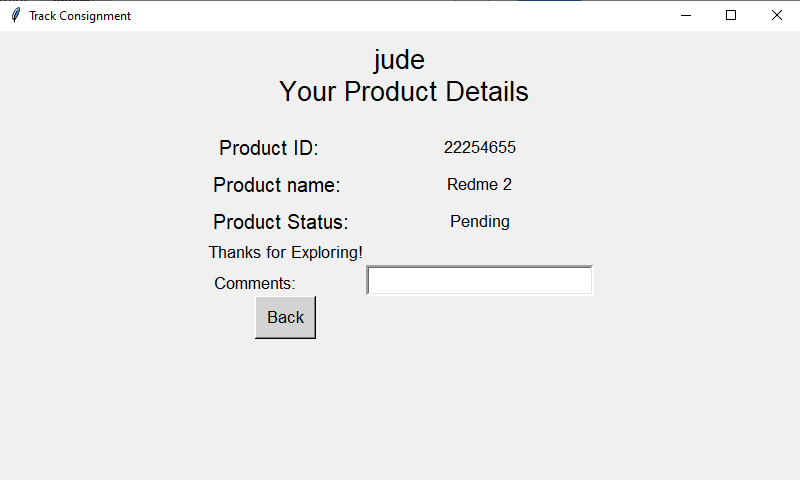
Output
Download Source Code below
Summary
This article about Courier Management System was created in Python Programming Language using PyCharm IDE, This project also includes a downloadable Source Code for free.
Inquiries
If you have any questions or suggestions about Courier Management System Project In Python With Source Code, please feel free to leave a comment below.
Official documentation
Frequently Asked Questions
How does this Python management system work?
Standard Tkinter architecture: Frame with Treeview for listings, Entry/Combobox/DateEntry for input, sqlite3/MySQL via parametrized queries, reportlab for PDF reports.
What Python version and libraries does this project require?
Most projects in this batch use Python 3.10, 3.11, or 3.12. Standard libs: tkinter (built-in), sqlite3 (built-in). External: pip install pillow opencv-python pygame mysql-connector-python reportlab requests beautifulsoup4.
How do I set up the database for this Python project?
For SQLite (most common, no setup): the .db file auto-creates on first run. For MySQL: install MySQL Server, create an empty database, import the included .sql file, edit connection in db.py with your credentials.
Can I use this Python project for a BSIT capstone or thesis?
Yes. Python is rising fast in Philippine BSIT panels. Extend it: add user roles, dashboards (matplotlib), PDF reports (reportlab), email notifications (smtplib), real domain extension. Pair with Chapter 1-5 documentation.
Why am I getting ‘ModuleNotFoundError’?
Three common Python issues: (1) Module not installed, pip install
Where can I find more Python projects with source code?
Browse the Python Projects hub for the full library. For computer vision see OpenCV Projects. For ML capstones see Machine Learning Projects. For BSIT capstone ideas see 150 Best Capstone Project Ideas.

Angel Jude Suarez
Full-Stack Developer at PIES IT Solution
Focuses on Python development, machine learning, and AI integration. Has built production AI systems including OpenAI Whisper integration for medical transcription and GPT-4o-powered diagnosis assistance. Strong background in pandas, scikit-learn, and TensorFlow.
Expertise: Python · PHP · Java · VB.NET · ASP.NET · Machine Learning · AI Integration · OpenCV · Django · CodeIgniter · View all posts by Angel Jude Suarez →
i am not able to execute my code above one
you can try to run in pycharm community